
1. Proizvod je gotovview
The LongPlus 4K PoE Security Camera System, Model LP8MC84B2, provides advanced surveillance capabilities for both home and business environments. This system includes 4K (8MP) cameras, a Network Video Recorder (NVR) with a pre-installed 2TB Hard Disk Drive (HDD), and utilizes H.265+ video compression for efficient storage. Key features include 24/7 recording, spotlight color night vision, and clear video streaming. The Power over Ethernet (PoE) design simplifies installation by providing both power and data through a single Ethernet cable.

Image: LongPlus 4K PoE Security Camera System with NVR and four bullet cameras.
2. Što je u kutiji
Molimo provjerite jesu li svi dolje navedeni artikli uključeni u vaš paket:
- 1 x 8CH NVR with 48/1.875V Adaptor
- 4 x 4K PoE Cameras
- 1 x USB miš
- 1 x 1M Cat5 kabel
- 1 x 1 M HDMI kabel
- 4 x 18M Cat5 kabela
- 2 x Extra Connectors
- 4 x paketa vijaka i ostalih dodataka
- 1 x Vodič za brzi početak
3. Upute za postavljanje
Follow these steps to set up your LongPlus 4K PoE Security Camera System:
- Spojite NVR na monitor: Use the provided HDMI or VGA cable to connect the NVR to a compatible monitor.
- Power On the NVR: Connect the NVR to a power source using the provided power adapter and turn on the NVR power switch.
- Povežite se na mrežu: Connect an Ethernet cable from the NVR's LAN port to your router's LAN port for internet access.
- Spojite kamere: Connect each PoE camera to any available PoE camera port on the NVR using the provided Ethernet cables. The cameras will receive both power and data through these cables.
- Spojite USB miš: Plug the USB mouse into a USB port on the NVR for system navigation.
- Početna konfiguracija: Follow the on-screen prompts on your monitor to complete the initial setup, including setting a password and configuring network settings.
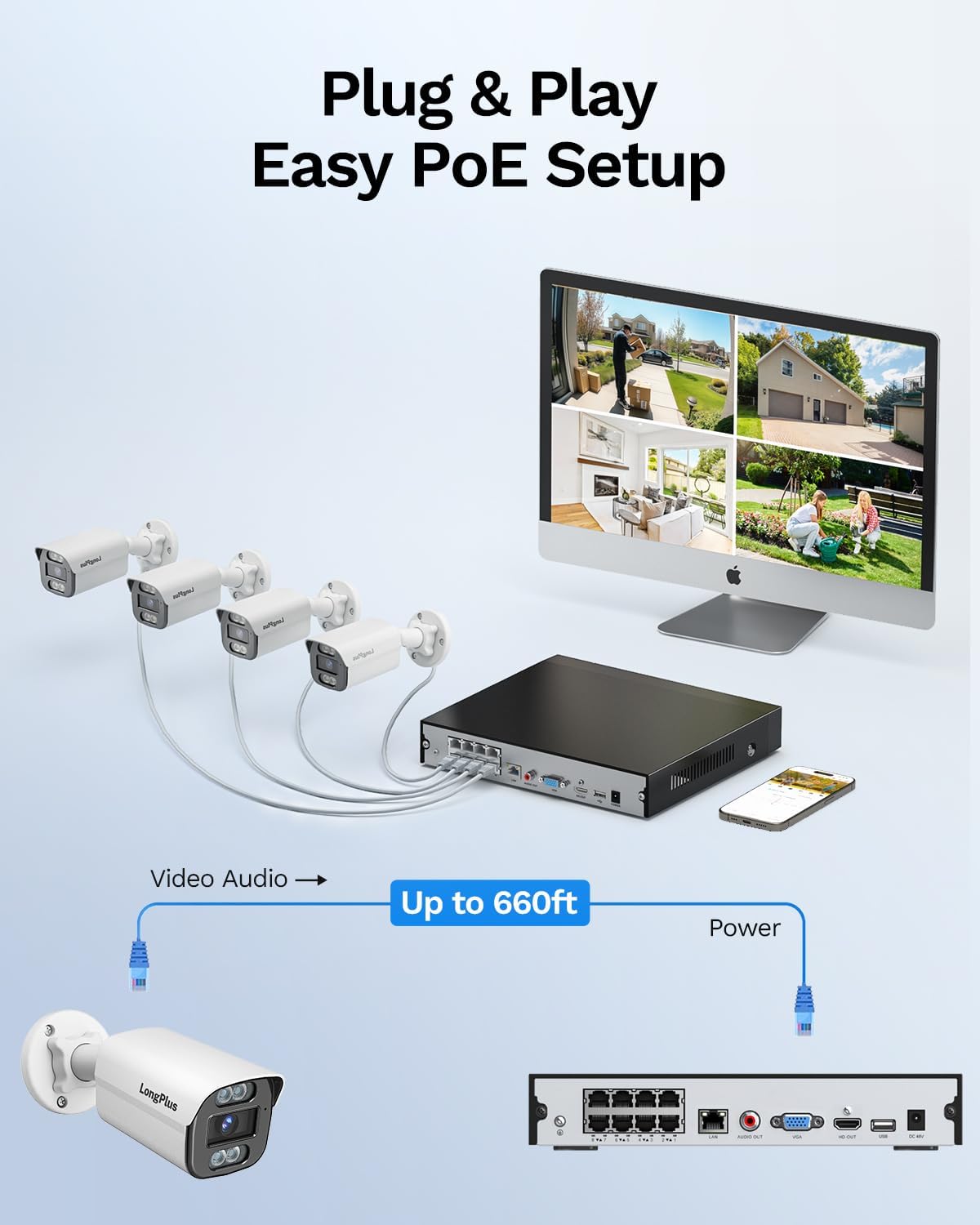
Image: Simplified PoE setup showing NVR, cameras, and monitor connections.
Video: LongPlus 8MP 16CH NVR Security System Unboxing & Setup Guide. This video demonstrates the unboxing process and step-by-step setup of the NVR and cameras.
4. Upute za rad
4.1. 4K UHD and Wide View Kut
The system captures video in crystal-clear 4K (3840x2160) resolution, providing enhanced detail and clarity. The cameras feature a 132° wide view angle, offering broader coverage and minimizing blind spots in your surveillance area.

Image: Demonstration of 4K UHD video quality, highlighting clear details day and night.

Image: Comparison illustrating the 132° wide view angle of LongPlus cameras.
4.2. AI Motion Detection and Activity Zones
The smart PoE cameras utilize AI object detection to accurately identify humans and vehicles, reducing false alarms. You can define specific activity zones within the camera's field of view to focus detection on critical areas and ignore motion in irrelevant regions. Privacy masks can also be set to exclude certain areas from recording.

Image: Smart AI detection identifying persons and vehicles, triggering alerts.
4.3. Triple Night Vision Modes
The system offers three night vision modes to suit various lighting conditions:
- IR noćni vid: Standard black and white infrared vision.
- Noćni vid u boji: Provides full-color footage in low-light conditions, allowing for better identification of details up to 100ft/30m.
- Pametni noćni vid: Automatically switches between IR and color modes based on detected activity.
4.4. Audio and Strobe Light Alarm / Two-way Audio
When motion is detected, the cameras can automatically trigger an audio alarm and red & blue strobe lights to deter intruders. The built-in two-way audio feature allows for real-time communication through the camera, enabling you to speak to visitors or warn off unwanted individuals.

Image: Two-way audio functionality with integrated strobe light alarm.
4.5. Flexible Storage and Playback
The NVR includes a 2TB HDD for 24/7 continuous recording, expandable up to 10TB. H.265+ compression technology significantly reduces file sizes, saving storage space without compromising video quality. Bank-level encrypted cloud storage is also available as an option. The Longvision APP/Client allows for easy playback of recorded footage, with events highlighted on the timeline for quick review.

Image: Interface demonstrating 24/7 recording and smart playback features.

Image: Explanation of H.265+ compression for efficient storage.
4.6. Remote Access and Sharing
Pristup uživo footage and recorded videos remotely via the Longvision app, compatible with iOS, Mac, Windows, and Android devices. The system supports up to 32 users, allowing you to share access with family members or colleagues.

Image: Remote access to live camera feeds via the Longvision app.
Video: LongPlus 4Channel PoE Security Camera System Overview. This video showcases the system's features including PoE setup, app monitoring, 4K UHD, night vision, motion detection, and alarm functions.
5. Održavanje
To ensure optimal performance and longevity of your security system, regular maintenance is recommended:
- Očistite objektive fotoaparata: Povremeno čistite leće fotoaparata mekom krpomamp krpom za uklanjanje prašine i mrlja koje mogu utjecati na jasnoću slike.
- Provjerite veze: Ensure all cable connections (power, Ethernet, video) are secure and free from damage.
- Ažuriranja firmvera: Regularly check for and install firmware updates for the NVR and cameras to benefit from new features and security enhancements.
- Review Snimke: Povremeno review snimljeno footage to ensure the system is capturing events as expected.
- Položaj NVR-a: Osigurajte da je NVR postavljen u dobro prozračenom prostoru kako biste spriječili pregrijavanje.
6. Rješavanje problema
If you encounter issues with your LongPlus security system, consider the following common troubleshooting steps:
- Nema prikaza videa:
- Verify all power and video cables are securely connected.
- Provjerite je li monitor postavljen na ispravan ulazni izvor (HDMI/VGA).
- Ponovno pokrenite NVR.
- Detekcija pokreta ne radi:
- Check motion detection settings in the NVR interface or app.
- Ensure activity zones are correctly configured and not excluding desired areas.
- Podesite postavke osjetljivosti.
- Problemi s daljinskim pristupom:
- Confirm the NVR is connected to the internet.
- Check network settings on the NVR and your router.
- Ensure the Longvision app is updated to the latest version.
- Loša kvaliteta slike:
- Očistite leću fotoaparata.
- Provjerite ima li prepreka u vidnom polju kamere view.
- Osigurajte dovoljno osvjetljenja za optimalne performanse noćnog vida.
7. Specifikacije
| Značajka | Detalj |
|---|---|
| Marka | LongPlus |
| Tehnologija povezivanja | Ožičeno |
| Rezolucija video snimanja | 3840x2160, 4K |
| Posebne značajke | High Efficiency Video Coding, Red & Blue Flashing Lights, Easy to Install, Waterproof, Vehicle Detection, Adjustable, Motion Sensor, Siren Alarm/Flexible Storage (Local Storage/Cloud Storage), Smart Playback, Vehicle/Person/Animal Detection |
| Broj kanala | 8 |
| Kapacitet pohrane memorije | 2 TB (proširivo do 10 TB) |
| Boja | Bijela |
| Izvor napajanja | Električni na kabel |
| Dimenzije artikla D x Š x V | 13.29 x 10.23 x 9.4 inča |
| Kompatibilnost operativnog sustava | Android, Mac OS, Windows, iOS |
| Preporučena upotreba | Indoor, Outdoor, Surveillance |
| Kompatibilni uređaji | Cameras, Laptops, Personal Computers, Smartphones |
| Ostale značajke kamere | Prednji, stražnji |
| Tehnologija slabog osvjetljenja | Noćni vid |
| Domet noćnog vida | 100 stopa |
| Frame Rate | 30 |
| Način snimanja | Snimanje pokrenuto pokretom (zadano); planirano snimanje, snimanje 24/7 |
| Ukupno USB priključaka | 2 |
| Hardversko sučelje | Ethernet, HDMI, USB, VGA |
| Vrsta objektiva | Široki kut |
| Video ulaz | VGA, USB, Ethernet, HDMI |
| Viewing kut | 132 stupnja |
| Proizvođač | LongPlus Direct |
| Težina artikla | 13.26 funti |
| Datum prve dostupnosti | 12. lipnja 2025 |
8. Jamstvo i podrška
LongPlus provides a Jamstvo 2 godine for this product, ensuring coverage against manufacturing defects. Additionally, lifetime technical support is available to assist with any inquiries or operational issues you may encounter. For support, please contact LongPlus customer service.