
1. Uvod
The FIREBAT X3 Wired RGB Gaming Mouse is designed for precision and comfort, suitable for various computing tasks including gaming, office work, and general use. This manual provides detailed instructions for setting up, operating, and maintaining your mouse.

Nadview of the FIREBAT X3 Wired RGB Gaming Mouse highlighting its main features.
2. Postavljanje
2.1 Spajanje miša
The FIREBAT X3 Gaming Mouse features a simple plug-and-play design for easy setup.
- Locate an available USB-A port on your computer or laptop.
- Insert the USB connector of the mouse into the USB-A port.
- Vaš operativni sustav će automatski prepoznati i instalirati potrebne upravljačke programe. Za osnovne funkcionalnosti nije potrebna instalacija dodatnog softvera.

The FIREBAT X3 mouse connects via a standard USB-A port for immediate use.
3. Operacija
3.1 Funkcije gumba
The FIREBAT X3 Gaming Mouse is equipped with 6 programmable buttons for enhanced control.
- Lijevi gumb: Standardna funkcija klika.
- Desni gumb: Standardna funkcija desnog klika.
- Kotačić za pomicanje: Scrolls up and down. Can also be pressed for a middle-click function.
- DPI Adjustment Key: Mijenja osjetljivost miša (DPI).
- Gumb naprijed: Navigira naprijed u web preglednici ili file istraživači.
- Gumb Natrag: Navigacija unatrag web preglednici ili file istraživači.

Illustration of the 6-button layout on the FIREBAT X3 Gaming Mouse.
3.2 Podešavanje DPI-ja (osjetljivosti)
The mouse features 4 adjustable DPI levels to suit different tasks and preferences.
- Pritisnite tipku DPI Adjustment Key (located behind the scroll wheel) to cycle through the preset DPI settings.
- The default DPI levels are 1200, 1800, 2400, and 3600.
- Each press will switch to the next DPI level, allowing you to find the optimal sensitivity for your current activity.

The DPI adjustment key allows for quick changes in mouse sensitivity.
3.3 RGB načina osvjetljenja
The FIREBAT X3 mouse features 7 dynamic RGB backlit modes to enhance your setup.
- The RGB lighting automatically cycles through its 7 distinct modes.
- There is no manual button to change the RGB mode; the mouse will continuously display various lighting effects.
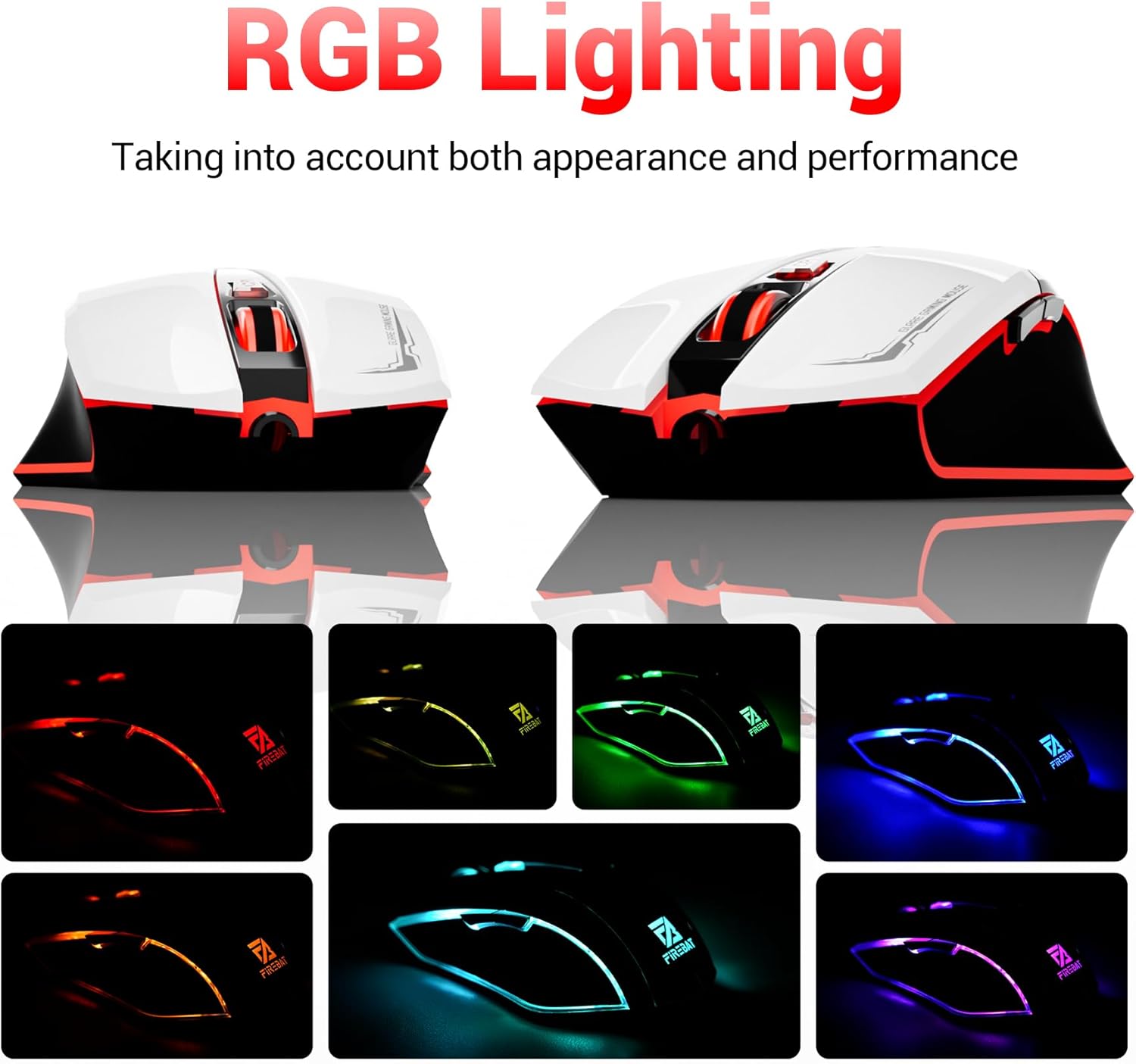
The mouse features vibrant RGB lighting with multiple dynamic modes.
3.4 Ergonomski dizajn i udobnost
The mouse is designed with an ergonomic shape to provide a comfortable grip and reduce hand fatigue during extended use, suitable for both right and left-hand users.

The ergonomic design ensures comfort during prolonged use.
3.5 Quiet Click Feature
The mouse incorporates a 'Heavy Bass Design' for its key sounds, ensuring soft clicks without excessive noise, which is beneficial in quiet environments.

The mouse features quiet clicks, minimizing noise during use.
4. Održavanje
4.1 Čišćenje
To ensure optimal performance and longevity, keep your mouse clean.
- Prije čišćenja isključite miš iz računala.
- Lagano koristite meku krpu koja ne ostavlja dlačice dampvodom ili blagom otopinom za čišćenje obrišite površinu miša.
- Izbjegavajte korištenje jakih kemikalija, abrazivnih sredstava za čišćenje ili prekomjerne vlage jer to može oštetiti miš.
- For the optical sensor, use a cotton swab to gently remove any dust or debris.
4.2 Skladištenje
Kada se ne koristi, miš čuvajte na čistom, suhom mjestu, dalje od ekstremnih temperatura i izravne sunčeve svjetlosti.
5. Rješavanje problema
5.1 Miš ne reagira
- Provjerite USB vezu: Provjerite je li USB kabel sigurno priključen u ispravan USB priključak na računalu. Pokušajte s drugim USB priključkom.
- Ponovno pokrenite računalo: Ponekad jednostavno ponovno pokretanje može riješiti probleme s povezivanjem.
- Testirajte na drugom računalu: If possible, test the mouse on another computer to determine if the issue is with the mouse or your computer's setup.
5.2 Kretanje kursora je nepravilno ili neravnomjerno
- Očistite optički senzor: Dust or debris on the optical sensor can cause erratic movement. Refer to the cleaning instructions in the Maintenance section.
- Use a Mouse Pad: Ensure you are using the mouse on a suitable surface. Reflective, transparent, or uneven surfaces can interfere with the optical sensor.
5.3 RGB osvjetljenje ne radi
- Provjerite USB napajanje: Ensure the mouse is receiving sufficient power through the USB connection.
- No Manual Control: Remember that the RGB lighting cycles automatically and does not have a manual control button. If the mouse is functioning otherwise, the lighting should be active.
6. Specifikacije
| Značajka | Detalj |
|---|---|
| Broj modela | X3 Gaming Mouse |
| Marka | VATREN BAT |
| Tehnologija povezivanja | USB ožičen |
| Otkrivanje pokreta | Optički |
| Razine DPI | 1200 / 1800 / 2400 / 3600 |
| Broj gumba | 6 (Programabilno) |
| Pozadinsko osvjetljenje | 7 RGB načina |
| Dimenzije proizvoda | 5 x 3 x 0.1 inča (12.7 x 7.6 x 0.25 cm) |
| Težina artikla | 5.1 unci (144.6 grama) |
| Ergonomija | Right or Left Hand Use |
| Proizvođač | VATREN BAT |
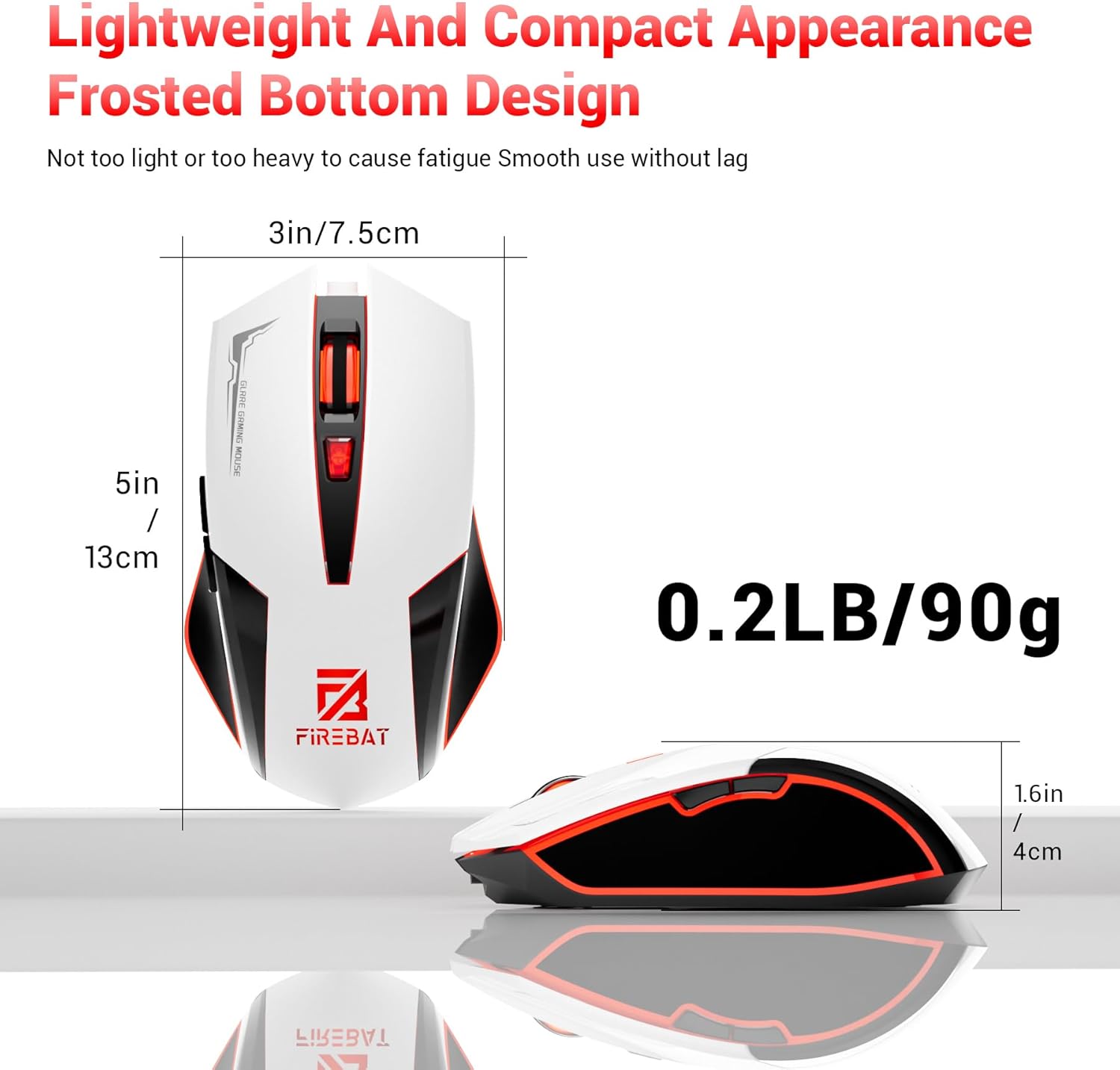
Physical dimensions and weight of the FIREBAT X3 Gaming Mouse.
7. Jamstvo i podrška
7.1 Informacije o jamstvu
FIREBAT products are manufactured to high-quality standards. For specific warranty details, please refer to the warranty card included with your product or visit the official FIREBAT webstranica. Proizvodi obično dolaze s ograničenim jamstvom koje pokriva nedostatke u proizvodnji.
7.2 Korisnička podrška
If you encounter any issues or have questions regarding your FIREBAT X3 Gaming Mouse, please contact our customer support team:
- Email: support@firebatpc.com
- Webstranica: www.firebatpc.com
Please provide your product model number (X3 Gaming Mouse) and a detailed description of your issue when contacting support for faster assistance.