
Uvod
This manual provides instructions for the proper setup, operation, and maintenance of your OMOTON GH03 Tablet Stand. Please read these instructions carefully before use to ensure optimal performance and longevity of the product.
Sadržaj paketa
Provjerite jesu li sve komponente prisutne u paketu:
- Aluminum tablet holder
- Plastic phone clamp
- Plastic tablet clamp
- C-klamp base with adjustable arm
Upute za postavljanje
Follow these steps to set up your OMOTON GH03 Tablet Stand:
1. Attaching the C-Clamp Baza
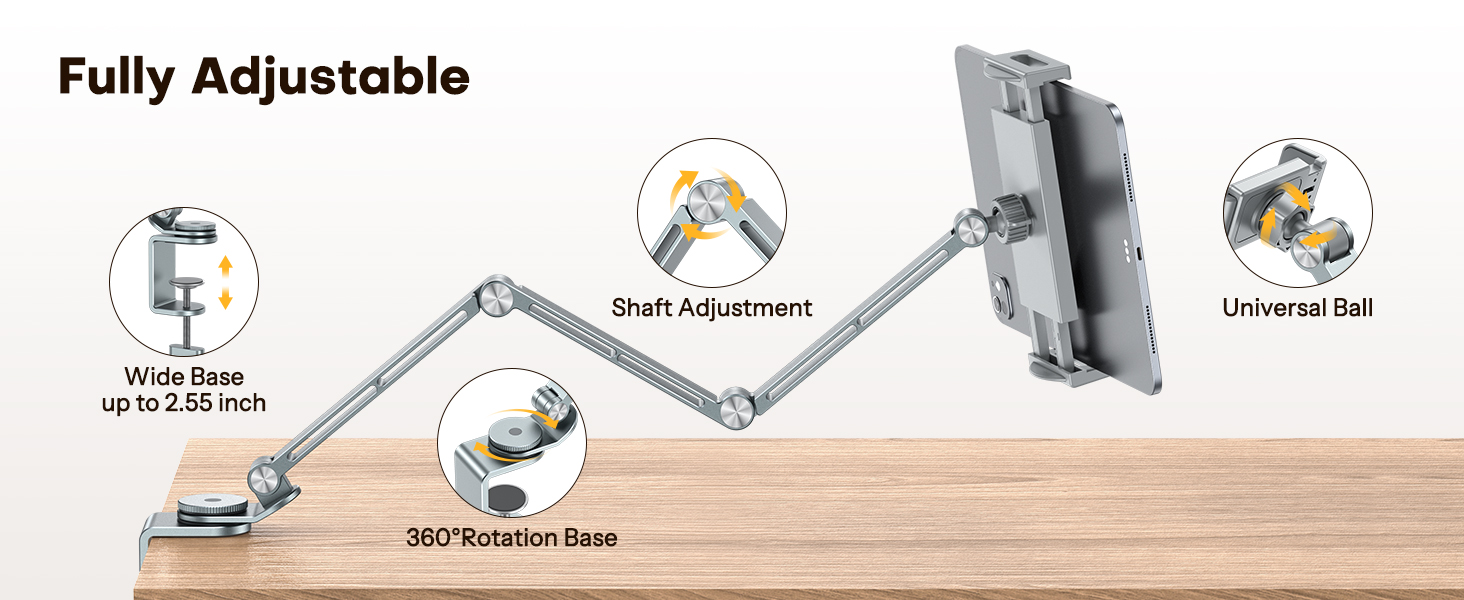
C-clamp base is designed to securely attach to surfaces up to 2.55 inches thick. Locate a stable surface such as a desk, headboard, or side cabinet.
- Unscrew the knob on the C-clamp base to open the clamp.
- Postavite clamp onto the edge of your desired surface.
- Zategnite gumb dok se ne pojavi clamp is firmly secured and does not wobble. Ensure the rubber padding on the base protects your surface from scratches.

2. Attaching the Device Clamp
The stand comes with two plastic clamps: one for phones and one for tablets. Choose the appropriate clamp za vaš uređaj.
- Identify the ball joint at the end of the adjustable arm.
- Align the chosen plastic clamp (phone or tablet) with the ball joint.
- Pritisnite clamp onto the ball joint until it snaps securely into place.
- Tighten the collar around the ball joint to secure the clamp's angle.

Upute za rad
The OMOTON GH03 stand offers flexible adjustment for optimal viewing.
1. Inserting Your Device
- Gently pull apart the jaws of the plastic clamp.
- Insert your phone or tablet into the clamp, ensuring it is centered and held securely. The plastic clamps are designed to protect your device from scratches.
2. Adjusting Angle and Height
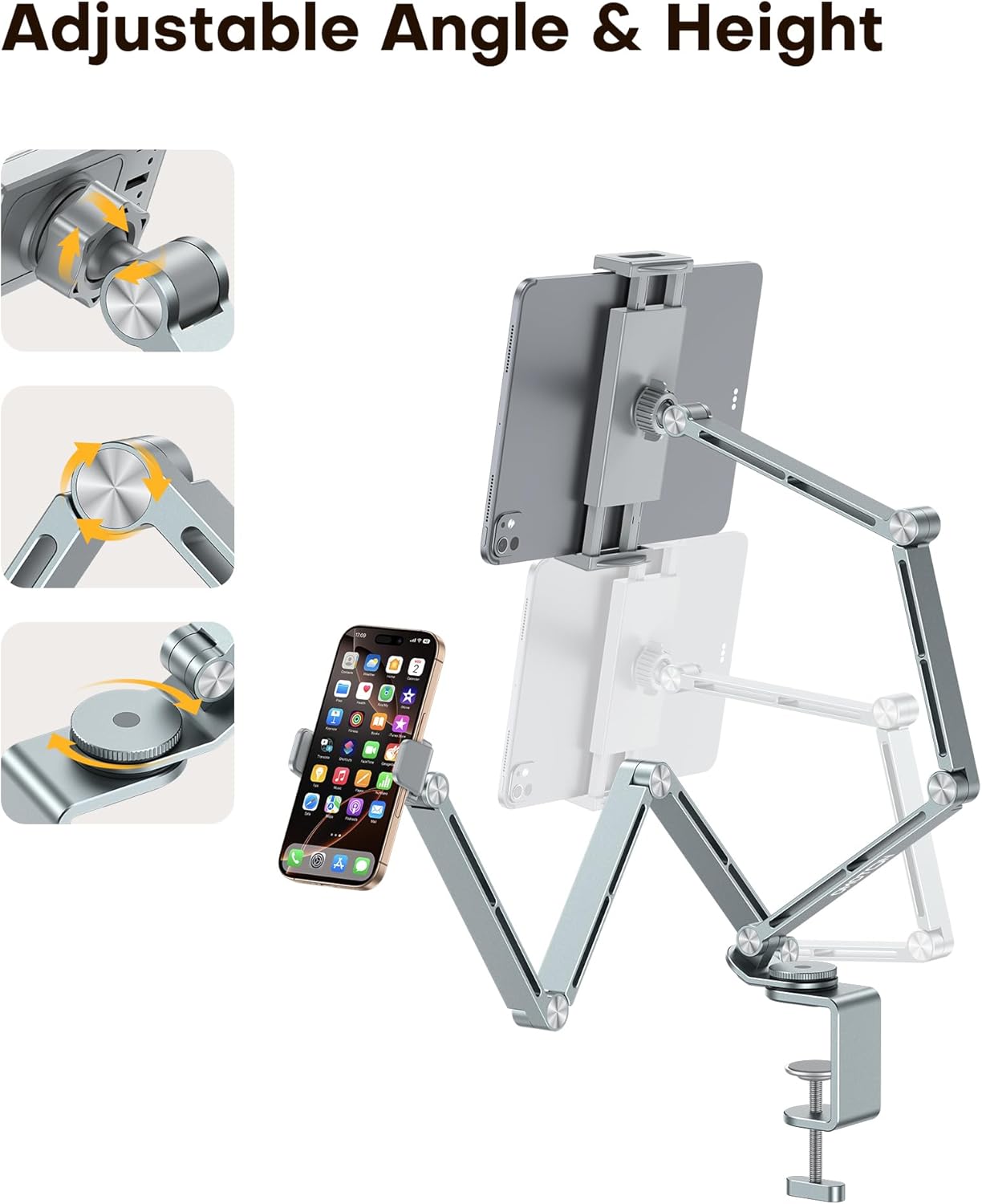
The stand features multiple rotating shafts and a 360° rotating base for comprehensive adjustment:
- Podešavanje ruke: The multi-joint aluminum alloy arm allows for various height and distance adjustments. Gently move the arm to your desired position. The joints are designed to hold their position once set.
- Osnovna rotacija: The base can rotate 360°. Use the tension control knob on the base to adjust the tightness, preventing unwanted side shaking.
- Uređaj Clamp Kut: The ball joint connection allows for 360° rotation and tilt of your device. Loosen the collar, adjust the device to your preferred viewing angle (portrait or landscape), and then tighten the collar to secure it.
Održavanje
To ensure the longevity and proper function of your OMOTON GH03 Tablet Stand, follow these maintenance guidelines:
- Čišćenje: Wipe the stand with a soft, dry cloth to remove dust. For stubborn marks, a slightly damp Može se koristiti krpa, nakon čega slijedi odmah sušenje. Izbjegavajte abrazivna sredstva za čišćenje ili otapala.
- Joints and Clamps: Periodically check all screws and knobs to ensure they are tight. Do not overtighten. Ensure the rubber padding on the clamps and base remains intact to protect your devices and surfaces.
- Skladištenje: When not in use for extended periods, store the stand in a clean, dry place.
Rješavanje problema
If you encounter any issues with your OMOTON GH03 Tablet Stand, refer to the following common solutions:
- Stalak je klimav:
- Osigurajte C-clamp is securely tightened to the surface.
- Check the tension control knob on the rotating base and tighten it if necessary.
- Device slips from clamp:
- Verify that you are using the correct clamp size for your device (phone clamp for phones, tablet clamp for tablets).
- Ensure the device is properly seated and centered within the clamp čeljusti.
- Ruka ne drži položaj:
- The joints are designed to be firm. If they feel loose, gently check for any visible loose screws and tighten them if possible. Avoid excessive force.
Tehnički podaci
| Marka | OMOTON |
| Broj modela | GH03 |
| Materijal | Aluminijska legura |
| Boja | Sivo |
| Vrsta montaže | Tabletop (C-clamp) |
| Kompatibilni uređaji | 4-13 inch tablets and phones (e.g., iPad Pro/Air/Mini, Samsung Galaxy Tabs, iPhone series, Kindle, Surface Pro, Switch) |
| C-Clamp Debljina | Do 2.55 inča |
| Posebne značajke | 360 Degree Rotation, Adjustable, Ergonomic, Dual Plastic Clamps |


Informacije o jamstvu
OMOTON provides a warranty for this product. For specific details regarding the warranty period and coverage, please refer to the documentation included with your purchase or contact OMOTON customer support.
Korisnička podrška
For any product-related issues, questions, or assistance, please contact the OMOTON support team. They are available to help ensure a satisfactory experience with your product.
Contact information can typically be found on the OMOTON official webweb-mjestu ili putem vaše platforme za kupnju.