
Uvod
This manual provides detailed instructions for the installation, operation, and maintenance of your Meiqils 4 Channel 2K Dash Cam. Please read this manual thoroughly before using the device to ensure proper functionality and safety. Keep this manual for future reference.
Što je u kutiji
Provjerite jesu li svi artikli prisutni u vašem paketu:
- 1x 4 Channel Dash Cam (Front, Rear, Left, Right Cameras integrated)
- 1x Type-C kabel za punjenje
- 1x SD kartica od 64 GB
- 1x GPS Module
- 1x Installation Tool

Image: Contents of the Meiqils 4 Channel 2K Dash Cam package.
Značajke proizvoda
The Meiqils 4 Channel 2K Dash Cam offers advanced features for comprehensive vehicle surveillance:
- Snimanje na 4 kanala: Simultaneously records from front (170° wide-angle), left, right (150° each), and a waterproof rear camera (150°).
- Visoka rezolucija: Captures 2K video from the front camera and 1080P from the rear, left, and right cameras in dual recording mode. The front camera can record up to 4K when used alone.
- Bešavno snimanje petlje: Automatski prepisuje najstariji videozapis files when the included 64GB Micro-SD card (supports up to 256GB) is full, ensuring continuous recording.
- Noćni vid: Equipped with sensors for clear recording in low-light conditions.
- Advanced 5GHz WiFi & App Control: Connects to a dedicated app for faster video downloads (up to 8MB/s) and convenient remote management.
- Ugrađeni G-senzor: Detektira iznenadne udare ili sudare i automatski zaključava trenutni videozapis file kako bi se spriječilo prepisivanje.
- Nadzor parkiranja 24/7: Activates time-lapse recording mode after the engine is turned off, providing continuous surveillance for up to 24 hours.
- GPS modul: Records vehicle position and speed, providing valuable data for incident reconstruction.
- 3-inčni IPS zaslon: Provides instant footage verification and clear display.
- WDR (široki dinamički raspon): Enhances video quality in varying light conditions.
- Detekcija pokreta: Records when motion is detected, conserving storage space.

Image: Illustration of the 4-channel recording capability.

Slika: Prekoview of additional powerful functions.
Proizvod gotovview
Familiarize yourself with the dash cam's components and dimensions:

Image: Product dimensions and screen size.
Postavljanje i instalacija
Follow these steps for proper installation of your dash cam:
- Montaža glavne jedinice: Attach the main dash cam unit to your vehicle's windshield using the provided suction cup mount. Ensure it is positioned to capture a clear view of the road ahead without obstructing your driving view.
- Spajanje stražnje kamere: Route the 20ft extension cable from the main unit to the rear of your vehicle. Mount the waterproof rear camera on the rear window or license plate area. The rear camera can be adjusted up to a full 360° angle.
- Connecting the GPS Module: Connect the GPS module to the designated port on the main unit. Position the GPS module in an area with a clear view neba za optimalan prijem signala.
- Priključak za napajanje: Use the Type-C charging cable to connect the dash cam to your vehicle's power outlet (e.g., cigarette lighter). For 24/7 parking monitoring, a hardwire kit (included) is required for continuous power.
- Umetnite SD karticu: Insert the 64GB Micro-SD card into the designated slot on the dash cam. Ensure it is inserted correctly.

Image: Easy installation guide.
Upute za rad
Osnovna operacija
- Uključivanje/isključivanje: The dash cam will automatically power on and begin recording when your vehicle starts. It will power off when the engine is turned off (unless 24/7 parking mode is active).
- Načini snimanja: The dash cam supports various recording modes including continuous loop recording, emergency recording (G-Sensor activated), and parking monitoring.
- Prikaz zaslona: The 3-inch IPS screen displays live views from the cameras. You can switch between camera views using the menu buttons.
Snimanje petlje
The dash cam records video in segments. When the memory card is full, the earliest recorded video will be automatically deleted to make space for new recordings. This ensures continuous operation without manual intervention.

Image: Loop Recording functionality.
G-senzor (snimanje u hitnim slučajevima)
The built-in G-Sensor detects sudden acceleration, braking, or collisions. When triggered, it automatically locks the current video segment, protecting it from being overwritten by loop recording. This ensures critical footage is saved for evidence.

Image: G-Sensor for emergency recording.
24/7 Parking Monitor
With the optional hardwire kit (included), the dash cam can monitor your vehicle continuously even when parked. It automatically switches to time-lapse recording mode after the engine is turned off, providing surveillance against bumps or vandalism.

Image: 24-hour parking monitoring setup.
Noćni vid
The dash cam is equipped with advanced night vision technology to ensure clear video capture in low-light and nighttime conditions, enhancing safety and visibility.
WiFi & App Control
The dash cam features 5GHz WiFi connectivity for seamless integration with its dedicated mobile application. This allows for:
- Živjeti View: Stream real-time video from the dash cam to your smartphone.
- Preuzimanje videa: Quickly download recorded footage to your phone at speeds up to 8MB/s.
- Podešavanje postavki: Configure dash cam settings directly from the app.
- Dijeljenje: Easily share videos and photos.
Za povezivanje:
- Power on the device and check WiFi information on the dash cam screen.
- Download the 'Vidure' app from your smartphone's app store (Google Play or App Store).
- Connect your smartphone to the dash cam's WiFi network.
- Open the app and add the dash cam as a device.
- Once connected, you can access all app features.
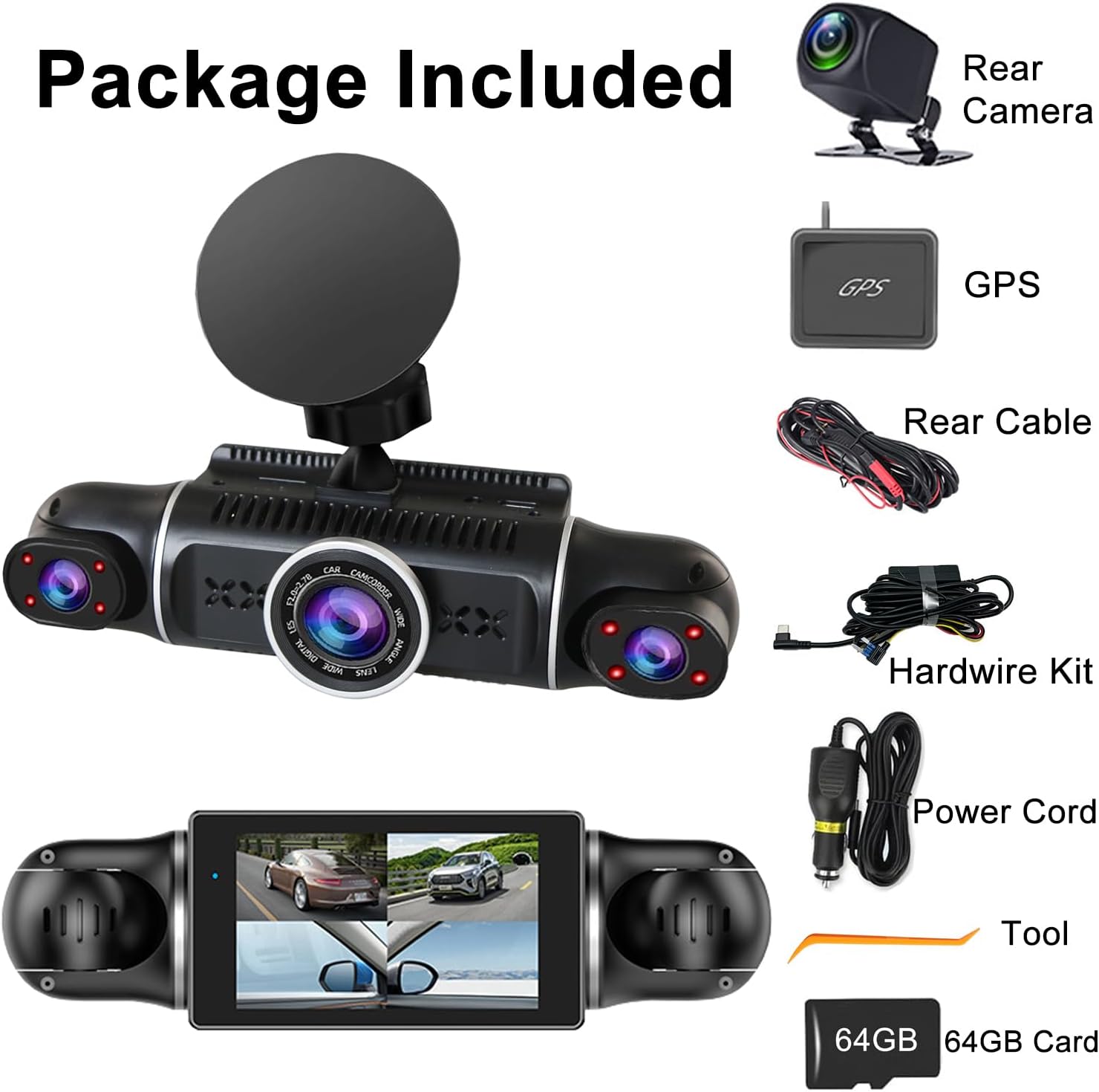
Image: WiFi and App Control setup.
GPS funkcionalnost
The included GPS module provides accurate location and speed data, which is embedded into your video recordings. This information can be crucial for insurance claims or legal disputes, offering verifiable evidence of your vehicle's journey.
Rješavanje problema
Ako naiđete na probleme s kamerom za automobil, pogledajte sljedeće uobičajene probleme i rješenja:
- Kamera u automobilu se ne uključuje: Ensure the power cable is securely connected to both the dash cam and the vehicle's power outlet. Check the vehicle's power outlet for functionality.
- Snimanje se neočekivano zaustavlja: Check if the SD card is full (loop recording should prevent this, but a faulty card might cause issues). Format the SD card regularly. Ensure the power supply is stable.
- Loša kvaliteta videa: Clean the camera lenses. Ensure the dash cam is securely mounted and not vibrating. Check video resolution settings.
- Problemi s WiFi vezom: Ensure the dash cam's WiFi is enabled. Restart both the dash cam and your smartphone. Make sure you are within range of the dash cam's WiFi signal.
- GPS ne radi: Ensure the GPS module is connected correctly and has a clear view of the sky. It may take a few minutes to acquire a signal.
- Dash Cam Overheats: Ensure the dash cam is not exposed to direct sunlight for extended periods, especially in hot weather. Ensure proper ventilation around the device.
Ako se problemi nastave, obratite se korisničkoj podršci za daljnju pomoć.
Tehnički podaci
| Značajka | Detalj |
|---|---|
| Dimenzije proizvoda | 7.48 x 7.28 x 2.56 inča |
| Težina artikla | 1.52 funti |
| Broj modela | 4 kanala 2K Dash Cam |
| Baterije | 1 litij-polimerska baterija (uključena) |
| Povezivost | USB, Wireless (5GHz WiFi) |
| Rezolucija video snimanja | 1440p (2K) Front, 1080p Rear/Left/Right |
| Veličina zaslona | 3 Inches (IPS) |
| Vrsta montaže | Nosač vjetrobranskog stakla |
| Posebne značajke | 4 Channel, G-Sensor, 360° View, Loop Recording, WDR, WiFi, 24/7 Parking Monitor, Night Vision, Motion Detection, 64GB SD Card, 170° Wide Angle, App Control |
| Boja | Crna |
| Vrsta usluge vozila | Autobus, Automobil, Minivan, Kamion |

Slika: Tablica usporedbe značajki.
Jamstvo i podrška
For warranty information and customer support, please refer to the contact details provided on the product packaging or visit the official Meiqils webstranicu. Sačuvajte račun kao dokaz o kupnji.