
Uvod
Thank you for choosing the Amazon Basics Single Outlet Hose Watering Timer. This device is designed to simplify your garden irrigation by providing flexible and automated watering schedules. Please read this manual carefully before installation and use to ensure proper operation and longevity of your product.
Značajke proizvoda
- Smart Watering Timer: Program flexible watering schedules from 1 minute to 3 hours 59 minutes for hassle-free garden irrigation.
- Intuitivne kontrole: Activate manual watering with customizable duration when needed. The program can be paused for 24, 48, or 72 hours.
- Angled Screen Design: The 45% adjustable tilted screen ensures optimal visibility from any angle, displaying time, program, and battery status.
- Leak-Free Connection: Rubber gaskets ensure a tight seal and prevent water waste. Standard 1.9cm BSP thread. Operates on 2 AA alkaline batteries (not included).

Slika 1: Prednja strana view of the Amazon Basics Single Outlet Hose Watering Timer, showing the digital display and control buttons.
Sadržaj paketa
Vaš paket treba sadržavati sljedeće stavke:
- 1 x Amazon Basics Single Outlet Hose Watering Timer
- 1 x korisnički priručnik
- Rubber gaskets (pre-installed or included for leak-free connection)
Note: 2 AA alkaline batteries are required and are NOT included in the package.
Postavljanje
1. Ugradnja baterije
- Pronađite odjeljak za baterije na stražnjoj strani timera.
- Otvorite poklopac odjeljka za baterije.
- Umetnite 2 nove AA alkalne baterije, pazeći na ispravan polaritet (+/-).
- Close the battery compartment cover securely to maintain water resistance.

Figure 2: Top connection of the timer, showing the filter and threaded inlet. Ensure rubber gaskets are in place for a leak-free seal.
2. Connecting to the Faucet
- Ensure the faucet is clean and free of debris.
- Check that the rubber gasket is properly seated inside the timer's inlet connector.
- Screw the timer onto your standard 1.9cm (3/4 inch) outdoor faucet by hand until it is snug. Do not overtighten.
- Connect your garden hose to the outlet of the timer.
- Slowly turn on the faucet. Check for any leaks. If leaks occur, tighten the connections slightly or adjust the rubber gaskets.
Upute za rad
1. Postavljanje trenutnog vremena
Refer to the angled screen for clear visibility of settings.
- Pritisnite tipku "SET" za ulazak u način podešavanja vremena.
- Pomoću tipki "+" i "-" podesite sate. Pritisnite "SET" za potvrdu.
- Use the "+" and "-" buttons to adjust the minute. Press "SET" to confirm.
2. Programming a Watering Schedule
The timer allows flexible schedules from 1 minute to 3 hours 59 minutes.
- Press the "PROG" button to enter program setting mode.
- Set the START TIME: Use "+" and "-" to adjust the hour and minute, pressing "PROG" to confirm each.
- Set the WATERING DURATION: Use "+" and "-" to adjust the duration (minutes/hours), pressing "PROG" to confirm.
- Set the WATERING FREQUENCY: Use "+" and "-" to select how often the timer should water (e.g., every 12 hours, every 24 hours, specific days). Press "PROG" to confirm.
- Once all settings are confirmed, the timer will display the next scheduled watering time.
3. Ručno zalijevanje
To water manually outside of the programmed schedule:
- Pritisnite gumb "RUČNO".
- Use "+" and "-" buttons to set the desired manual watering duration.
- Press "MANUAL" again to start manual watering. The timer will automatically stop after the set duration.
4. Pause Function (Rain Delay)
If it rains or you don't need to water for a few days, you can pause the program:
- Pritisnite tipku "ODGODA".
- Use "+" and "-" buttons to select the pause duration (24, 48, or 72 hours).
- Press "DELAY" again to confirm. The timer will resume its programmed schedule after the delay period.

Figure 3: Visual representation of the timer's main features, including flexible schedules, manual watering, and secure sealing.
Održavanje
- Zamjena baterije: Replace batteries when the low battery indicator appears on the screen to ensure continuous operation.
- Čišćenje filtera: Periodically check and clean the filter located in the inlet connector to prevent blockages and maintain water flow.
- Zimska pohrana: During freezing temperatures, remove the timer from the faucet, drain any remaining water, and store it indoors to prevent damage.
- Generalno čišćenje: Obrišite mjerač vremena mekom, damp tkanina. Nemojte koristiti abrazivna sredstva za čišćenje ili otapala.
Rješavanje problema
| Problem | Mogući uzrok | Otopina |
|---|---|---|
| Tajmer ne zalijeva. | Low batteries, incorrect program, faucet off, water pressure too low. | Check battery status and replace if needed. Verify program settings. Ensure faucet is fully open. Check water supply. |
| Curenje vode iz spojeva. | Loose connection, damaged gasket, missing gasket. | Tighten connections. Check and replace rubber gaskets if damaged or missing. |
| Zaslon je prazan ili taman. | Prazne ili niske baterije. | Zamijenite baterije novim AA alkalnim baterijama. |
Tehnički podaci
- Broj modela: AMZ622617EU
- Dimenzije: 8.2 cm x 13.7 cm x 18.5 cm (Duljina x Širina x Visina)
- Težina: 383.4 g
- Vrsta niti: Standard 1.9cm (3/4 inch) BSP
- Izvor napajanja: 2 x AA alkalne baterije (nisu uključene)
- Trajanje zalijevanja: 1 minuta do 3 sati 59 minuta
- Funkcija pauze: 24, 48 ili 72 sati
- Boja: Grey, Black, Blue
- Zemlja podrijetla: Kina
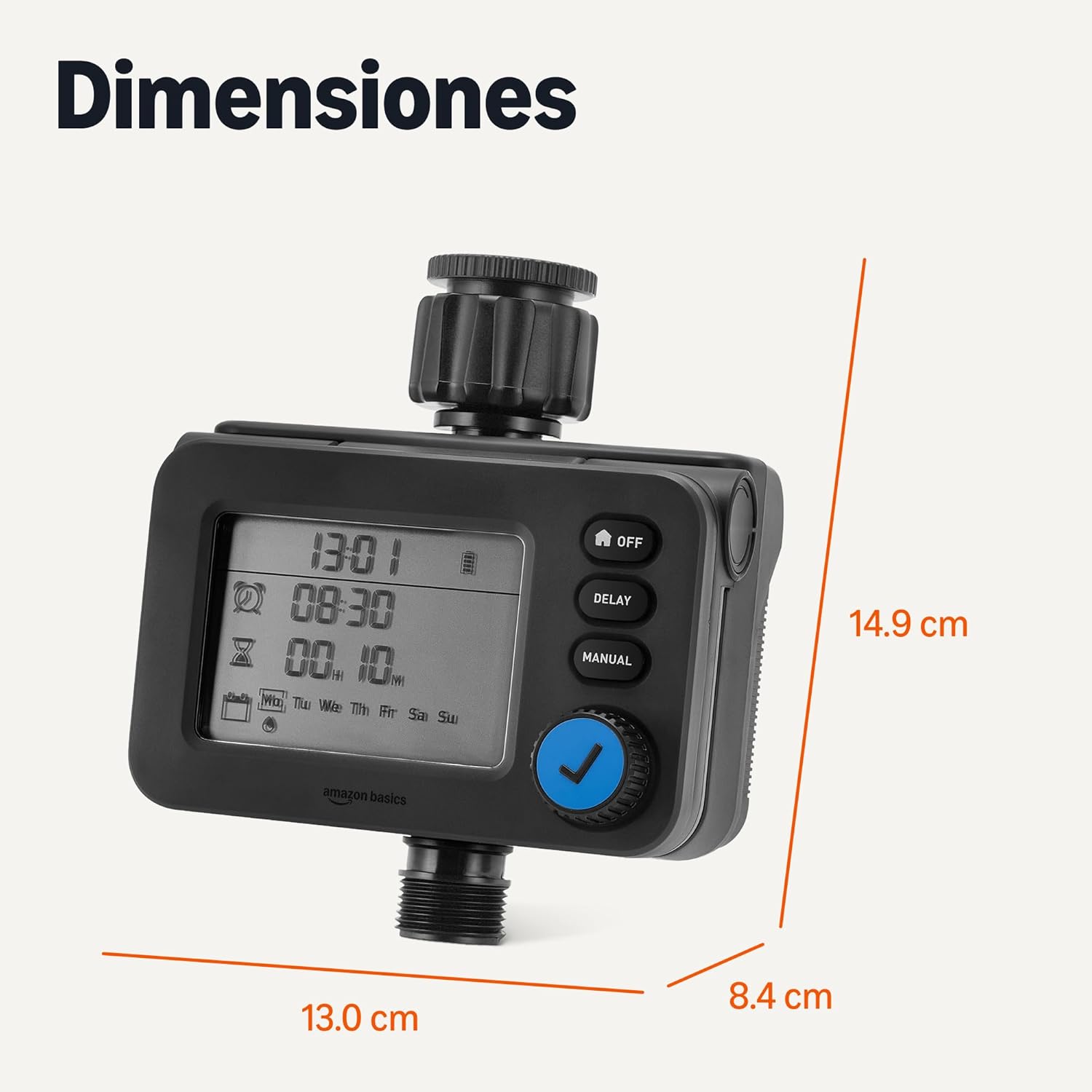
Slika 4: Dimenzije proizvoda za planiranje instalacije.
Jamstvo i podrška
Za informacije o jamstvu i korisničku podršku, pogledajte dokumentaciju priloženu uz kupnju ili posjetite službenu Amazon Basics stranicu webmjesto.