
NIMO Nimo N157L
NIMO 15.6" FHD IPS Student Laptop Computer User Manual
Model: Nimo N157L
Uvod
Thank you for choosing the NIMO 15.6" FHD IPS Student Laptop Computer. This manual provides essential information for setting up, operating, maintaining, and troubleshooting your new device. Please read this manual thoroughly to ensure optimal performance and longevity of your laptop.
Što je u kutiji
Molimo provjerite jesu li svi dolje navedeni artikli uključeni u vaš paket:
- 1 x Nimo N157 Laptop
- 1 x Type-C 65W PD Fast Charger
- 1 x Korisnički priručnik (ovaj dokument)
- Windows 11 Home Operating System (pre-installed)
- Warranty Information (2 Years Warranty, 90 Days Return)
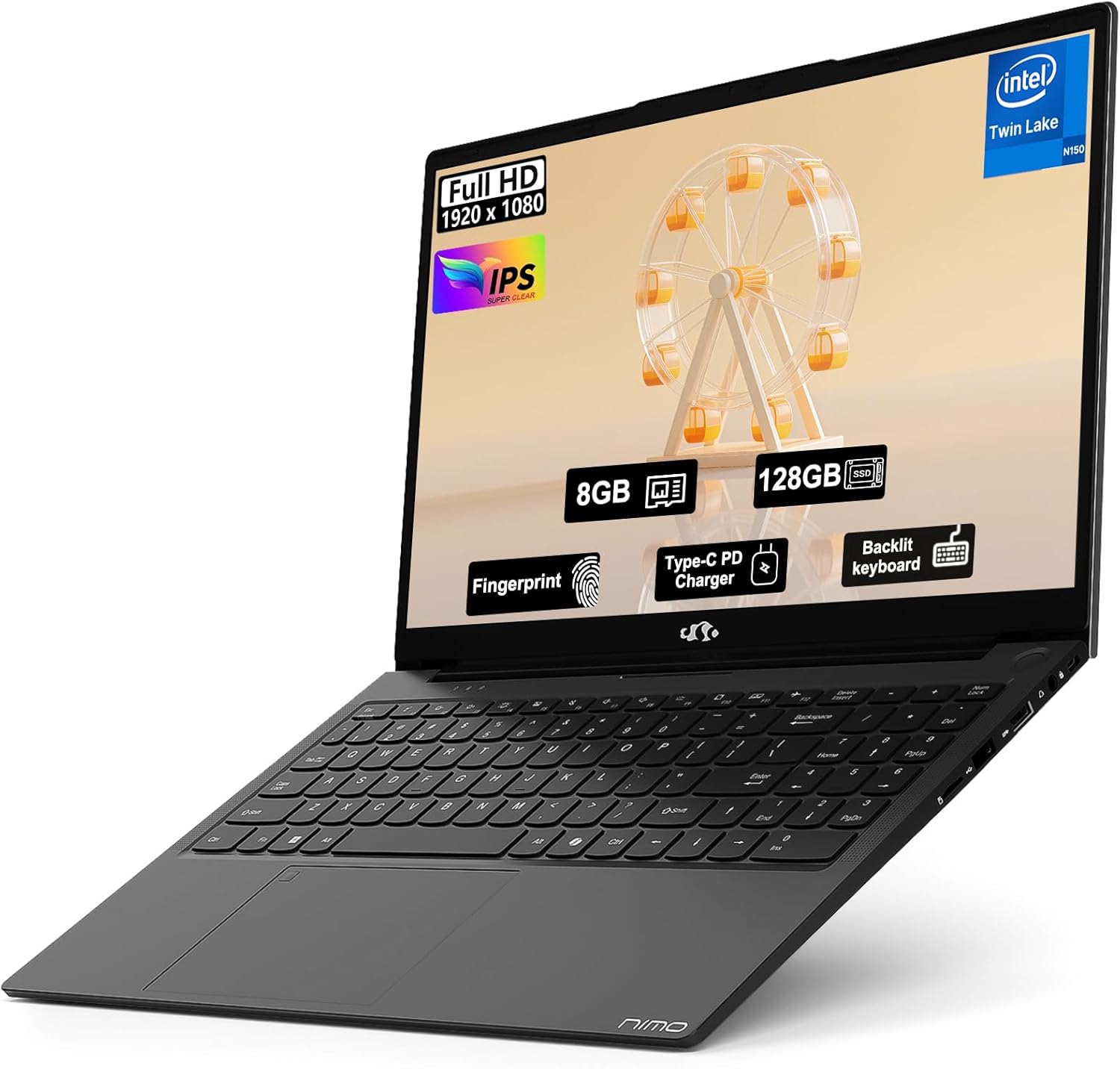
Image: The NIMO 15.6" FHD IPS Student Laptop Computer. The screen highlights key features such as Full HD 1920x1080 resolution, IPS display, 8GB RAM, 128GB SSD, Fingerprint reader, Type-C PD Charger, and Backlit keyboard. The laptop is shown in a sleek black finish.
Vodič za postavljanje
1. Početno uključivanje i punjenje
Before first use, it is recommended to fully charge your NIMO laptop. Connect the included Type-C 65W PD Fast Charger to the laptop's Type-C port and a power outlet. The charging indicator light will illuminate. A 15-minute charge can provide approximately 2 hours of standby time.
2. Postavljanje operativnog sustava
Your NIMO laptop comes with Windows 11 Home pre-installed. Upon first boot, follow the on-screen instructions to complete the initial Windows setup, including language selection, network connection, and user account creation.
3. Postavljanje čitača otiska prsta
For enhanced security and convenient login, set up the fingerprint reader. Navigate to Postavke > Računi > Mogućnosti prijave > Prepoznavanje otiska prsta (Windows Hello) and follow the prompts to register your fingerprints. The fingerprint sensor is integrated into the touchpad.
4. Backlit Keyboard Adjustment
The backlit keyboard allows for comfortable typing in low-light environments. Use the dedicated function keys (usually Fn + a specific F-key, refer to keyboard legends) to turn the backlight on/off and adjust its brightness levels.
Upute za rad
1. Značajke zaslona
Your laptop features a 15.6-inch Full HD (1920x1080) IPS Anti-Glare Display. This provides wide viewing angles, accurate colors, and reduces reflections for a comfortable viewing experience. The 85% screen-to-body ratio and 16:9 aspect ratio optimize screen real estate.
2. Korištenje dodirne podloge
The integrated touchpad supports multi-touch gestures for intuitive navigation. Common gestures include:
- Dodir jednim prstom: Lijevi klik
- Dodir s dva prsta: Desni klik
- Pomicanje s dva prsta: Pomicanje gore/dolje ili lijevo/desno
- Zumiranje štipanjem prstiju: Povećaj/smanji
3. Povezivost
The NIMO laptop supports various connectivity options:
- Wi-Fi 6: For high-speed wireless internet connection.
- Bluetooth 5.2: Za spajanje bežičnih perifernih uređaja poput slušalica, miševa i tipkovnica.
- USB priključci: Includes 1 x USB 2.0 port and 3 x USB 3.0 ports for connecting external devices.
- Vrsta C priključka: Koristi se za punjenje i prijenos podataka.
4. Upravljanje baterijom
The laptop is equipped with a Lithium Polymer battery providing an average battery life of approximately 5 hours. To maximize battery life, adjust screen brightness, close unused applications, and utilize power-saving modes in Windows settings.
Održavanje
1. RAM and SSD Upgrade
The NIMO laptop supports user-detachable RAM and SSD, allowing for future upgrades. If you plan to upgrade, ensure you use compatible components (DDR4 RAM, PCIe SSD) and follow proper electrostatic discharge (ESD) precautions. Consult a professional if you are unsure.
2. Čišćenje prijenosnog računala
Za održavanje izgleda i funkcionalnosti vašeg prijenosnog računala:
- Za čišćenje zaslona i vanjske površine koristite meku krpu koja ne ostavlja dlačice.
- Za tvrdokorne mrlje, lagano dampobrišite krpu vodom ili otopinom za čišćenje zaslona.
- Avoid using harsh chemicals, abrasive cleaners, or direct spraying of liquids onto the laptop.
- Redovito čistite tipkovnicu i dodirnu ploču kako biste uklonili prašinu i nečistoće.
Rješavanje problema
Ovaj odjeljak nudi rješenja za uobičajene probleme s kojima se možete susresti.
| Problem | Moguće rješenje |
|---|---|
| Laptop se ne uključuje. | Ensure the charger is properly connected and the power outlet is functional. Allow the battery to charge for at least 30 minutes before attempting to power on again. |
| Zaslon je prazan ili treperi. | Check display cable connections (if external monitor is used). Restart the laptop. Update graphics drivers. |
| Problemi s Wi-Fi vezom. | Provjerite je li Wi-Fi omogućen u postavkama sustava Windows. Ponovno pokrenite usmjerivač/modem. Ažurirajte upravljačke programe za Wi-Fi. |
| Tipkovnica ili dodirna pločica ne reagiraju. | Restart the laptop. Check for driver updates. Ensure no external devices are interfering. |
If you encounter issues not covered here or require further assistance, please contact NIMO customer support.
Tehnički podaci
Detailed technical specifications for your NIMO N157L laptop:
| Značajka | Detalj |
|---|---|
| Naziv modela | Nimo N157L |
| Veličina zaslona | 15.6 inča |
| Razlučivost zaslona | 1920 x 1080 pixels (FHD IPS Anti-Glare) |
| Procesor | Intel 4 Core N150 (up to 3.6 GHz) |
| OVAN | 8 GB DDR4 (3200 MHz, detachable) |
| Tvrdi disk | 128 GB PCIe SSD (detachable) |
| Grafički koprocesor | Integrirana grafika |
| Operativni sustav | Windows 11 Home |
| Bežična vrsta | 802.11a/b/g/n/ac (Wi-Fi 6), Bluetooth 5.2 |
| USB priključci | 1 x USB 2.0, 3 x USB 3.0 |
| Ostale luke | Type-C (65W PD Fast Charging), Memory Card Slot |
| Posebne značajke | Backlit Keyboard, Fingerprint Reader, HD Audio, Numeric Keypad |
| Trajanje baterije | Approx. 5 Hours (Lithium Polymer) |
| Težina artikla | 3.8 funti |
| Dimenzije proizvoda | 14.07 x 8.98 x 0.76 inča |
| Boja | Crna |
| Stražnji Webrezolucija kamere | 2 MP |
Jamstvo i podrška
NIMO Direct Inc. offers a comprehensive 2-godišnje jamstvo proizvođača for your laptop. This warranty covers defects in materials and workmanship under normal use. Additionally, a 90-Day Hassle-Free Return and Exchange Service pruža se od datuma kupnje.
For warranty claims, technical support, or any concerns regarding your NIMO laptop, please contact the manufacturer's dedicated support team. Refer to the contact information provided on the product packaging or the official NIMO webmjesto.
Bilješka: The laptop is partially assembled in the USA. Please retain your proof of purchase for warranty purposes.
Ask a question about this manual
Ask about setup, troubleshooting, compatibility, parts, safety, or missing instructions. Manuals+ will review the question and use this page’s manual context to help answer it.