
1. Proizvod je gotovview
The Retevis MateTalk B4 is a license-free two-way radio designed for clear and reliable communication. It features AI noise reduction, dual charging options, and a compact, portable design, making it suitable for various outdoor activities and professional environments.
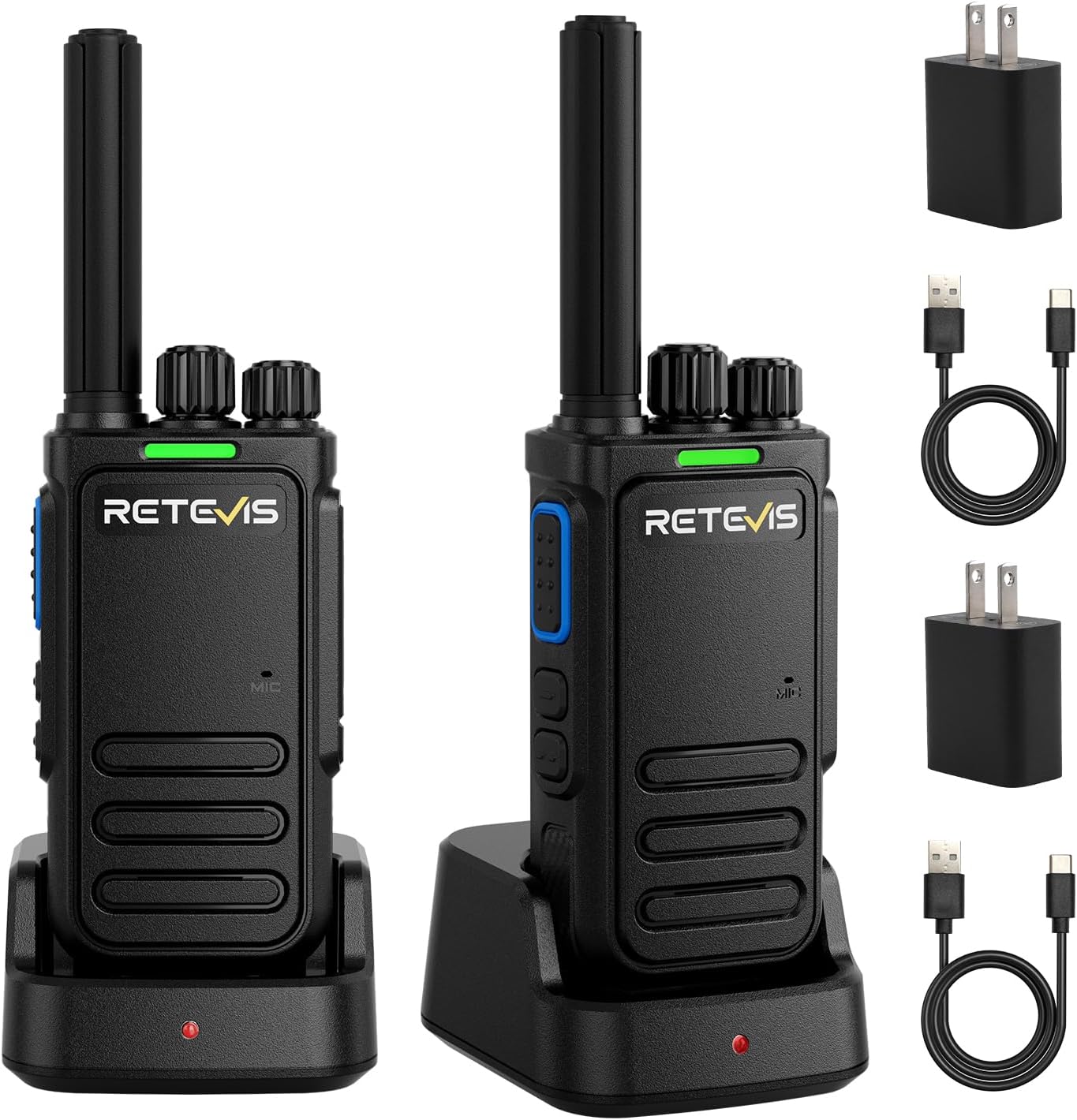
Figure 1: Retevis MateTalk B4 Walkie Talkie

Figure 2: The MateTalk B4 is designed for outdoor use, highlighting its strong noise reduction, long-lasting battery, and compact size.
2. Postavljanje
2.1 Što se nalazi u kutiji
Your Retevis MateTalk B4 package includes the following items:
- 2 x B4 walkie-talkie and 1200mAh battery
- 2 x Baza za punjenje
- 2 x Type-C kabel za punjenje
- 2 x punjač adaptera
- korisnički priručnik

Figure 3: All components included in the MateTalk B4 package.
2.2 Punjenje baterije
Before first use, fully charge the walkie talkie batteries. The MateTalk B4 offers two charging methods:
- Punjenje tipa C: Connect the Type-C cable directly to the walkie talkie.
- Osnovno punjenje: Place the walkie talkie in the provided charging base.
A full charge typically takes 2-3 hours. The radio features a 1200mAh battery, providing over 54 hours of standby time and 19 hours of usage time.

Slika 4: Bočna strana view of the walkie talkie, showing the Type-C charging port and audio jack.

Figure 5: The dedicated charging base for the MateTalk B4.
Figure 6: Illustration of Type-C and base charging options for the walkie talkie.

Figure 7: The 1200mAh battery provides extended usage and standby times.

Figure 8: The radio automatically enters power-saving mode when not in use to extend battery life.

Figure 9: The walkie talkie provides a flashing red signal light and voice prompt when the battery is low.
Video 1: This video demonstrates the dual charging options (Type-C and base charging) and highlights the long-lasting battery of the MateTalk B4.
3. Upute za rad
3.1 Power On/Off and Channel Adjustment
To power on the walkie talkie, rotate the top knob clockwise. To power off, rotate it counter-clockwise. To adjust the channel, rotate the channel selector knob.

Slika 10: Vrh view of the walkie talkie, showing the power/volume knob and channel selector knob.
Video 2: This video demonstrates the simple operation of the walkie talkie, including power on/off and channel adjustment.
3.2 VOX funkcija (glasovno upravljana centrala)
The VOX function allows for hands-free communication. When activated, the radio transmits automatically when it detects your voice, eliminating the need to press the Push-to-Talk (PTT) button. Activate VOX by long-pressing the side key (configurable via PC software).

Figure 11: A user communicating hands-free using the VOX function.

Figure 12: Icon representing the VOX function.
3.3 Uparivanje jednim ključem
The one-key pairing feature simplifies connecting multiple radios. To pair, power on both radios while holding down the bottom side key 2 on one device until a pairing signal is heard. The device enters pairing mode with a flashing green light. Then, press and hold the PTT button on the other device to successfully pair.

Figure 13: Two MateTalk B4 radios demonstrating the one-key pairing process.

Figure 14: Icon representing the one-key pairing function.
3.4 AI Two-way Noise Reduction
The MateTalk B4 incorporates advanced AI noise reduction technology to filter out environmental sounds like wind, river noise, and traffic, ensuring clear communication. This two-way system processes both transmitted and received audio, improving the Signal-to-Noise Ratio (SNR) by an average of 25dB.

Figure 15: Diagram illustrating the 25dB SNR improvement and 10m auto gain for clear audio provided by two-way AI noise reduction.

Figure 16: Comparison showing how digital two-way noise reduction dynamically separates voice from noise for clearer communication, unlike analog one-way systems.

Figure 17: Visual comparison of the MateTalk B4's intelligent noise cancellation (filtering background sound, wind noise reduction, audio preprocessing) against an ordinary walkie-talkie.

Figure 18: Diagram showing how intelligent AI two-way noise reduction separates human voice from background and other noises during both talking and listening.

Figure 19: Comparison of sound clarity with two-way AI noise reduction (tackles intricate noise types) versus normal noise reduction (suppresses steady-state noise).

Figure 20: The MateTalk B4 effectively suppresses wind gusts, rushing water, and other outdoor noises in a campokolina.

Figure 21: The radio significantly reduces persistent wind noise and water flow disruptions during hiking, maintaining clear communication.
Video 3: This video explains the principle behind the two-way noise reduction technology.
Video 4: This video provides a comparison of the noise reduction effect in different environments.
3.5 Alarm za hitne slučajeve
In an emergency, you can activate the alarm function. Long-press the side key 2 (configurable via PC software) to trigger an audible alarm, alerting others to your situation.

Figure 22: Icon representing the emergency alarm function.
3.6 Snimanje i reprodukcija
The MateTalk B4 supports recording and playback of communications. This feature allows you to capture and review messages. The function needs to be set via PC software.

Figure 23: Icon representing the recording and playback function.
3.7 CTCSS/DCS
The MateTalk B4 supports CTCSS (Continuous Tone-Coded Squelch System) and DCS (Digital Coded Squelch) for enhanced privacy and to filter out unwanted conversations on the same channel. This feature needs to be configured via PC software.

Figure 24: Icon representing the CTCSS/DCS function.
4. Održavanje
To ensure the longevity and optimal performance of your Retevis MateTalk B4 walkie talkie, follow these maintenance guidelines:
- Čišćenje: Koristite meku, damp krpom očistite vanjštinu radija. Izbjegavajte korištenje jakih kemikalija ili abrazivnih sredstava za čišćenje.
- Skladištenje: Store the radio in a cool, dry place away from direct sunlight and extreme temperatures. Remove the battery if storing for extended periods.
- Njega baterije: Do not overcharge or completely drain the battery frequently. Charge the battery regularly even if the radio is not in use to maintain battery health.
- Izbjegavajte udar: Protect the radio from drops and strong impacts, which can damage internal components.
5. Rješavanje problema
If you encounter issues with your MateTalk B4, refer to the following common troubleshooting steps:
- Bez napajanja: Ensure the battery is fully charged and correctly installed. Check if the power/volume knob is turned on.
- Ne može se slati ili primati: Verify that both radios are on the same channel and that the battery level is sufficient. Check for obstructions or excessive distance between radios.
- Loša kvaliteta zvuka: Ensure the antenna is securely attached. Move to an area with fewer obstructions. Check if the noise reduction feature is enabled and functioning correctly.
- Kratak domet: Obstacles like buildings, hills, and dense foliage can reduce range. Try moving to a higher or more open area. Ensure the battery is fully charged.
- Radio Not Responding: Try turning the radio off and then on again. If the issue persists, remove and reinsert the battery.
6. Specifikacije
Here are the detailed specifications for the Retevis MateTalk B4 Walkie Talkie:
| Značajka | Specifikacija |
|---|---|
| Težina artikla | 4.9 unci |
| Dimenzije proizvoda | 1.38 x 2 x 3.81 inča |
| Broj modela artikla | Matetalk B4 |
| Baterije | Potrebne su 2 litij-ionske baterije (uključene) |
| Marka | Retevis |
| Boja | Crna |
| Broj kanala | 22 |
| Posebna značajka | Uklanjanje buke |
| Frekvencijski raspon | FRS |
| Maksimalni domet razgovora | 5 kilometara |
| Voltage | 3.72 volti |
| Razina vodootpornosti | Nije vodootporan |

Slika 25: Stražnji dio view of the walkie talkie, displaying model information and FCC ID.
7. Jamstvo i podrška
7.1 Informacije o jamstvu
Retevis provides a 2-year warranty for the radio body and a 1-year warranty for accessories. Additionally, there is a 30-day no-reason return policy.
7.2 Servis nakon isteka jamstva
Beyond the warranty period, maintenance services are still offered. Buyers are responsible for the corresponding costs.
7.3 Korisnička podrška
For any inquiries or support needs, please contact Retevis customer service on Amazon. They aim to reply within 12 hours to assist you in the most hassle-free way possible.