
1. Uvod
This manual provides essential information for the safe operation, setup, and maintenance of your FINOTI S-X1 MAX Drone. Please read this manual thoroughly before operating the drone to ensure proper function and to avoid damage or injury. The S-X1 MAX is an advanced quadcopter featuring an 8K HD camera, 3-axis anti-shake gimbal, 5G GPS, and a remote control with a 4.5-inch LCD screen for real-time FPV.

Image 1.1: The FINOTI S-X1 MAX Drone and its remote control unit, ready for flight in a grassy field.
2. Sadržaj paketa
Provjerite jesu li svi dolje navedeni artikli prisutni u vašem paketu. Ako neki artikli nedostaju ili su oštećeni, obratite se korisničkoj podršci.
- FINOTI S-X1 MAX Drone x 1
- Remote Control with 4.5-inch LCD Screen x 1
- Intelligent Flight Battery x 1 (Triple Battery versions include 3 batteries)
- Rezervne lopatice ventilatora x 8
- USB Charging Cables x 5
- Odvijač x 1
- Korisnički priručnik x 1
- Čitač kartica x 1
- Memorijska kartica x 1
3. Postavljanje
3.1. Punjenje i ugradnja baterije
The intelligent flight battery and remote control battery (if applicable) must be fully charged before first use. Use the provided USB charging cables.
- Baterija truta: Insert the intelligent flight battery into the drone until it clicks securely into place. To charge, connect the battery to a USB power source using the provided USB cable. The indicator lights will show charging status.
- Baterija daljinskog upravljača: The remote control has an internal rechargeable battery. Connect the remote control to a USB power source using a USB cable.
3.2. Ugradnja propelera
Ensure propellers are installed correctly according to their rotation direction. Each propeller is marked (A or B) and corresponds to specific motor arms.
- Match the propeller type (A or B) with the corresponding motor arm.
- Place the propeller onto the motor shaft and secure it firmly.
3.3. Gimbal Protection Removal
Before flight, carefully remove the gimbal protector. Failure to do so may damage the gimbal during operation.

Slika 3.1: Krupni plan view of the drone's 3-axis gimbal, highlighting GPS return and optical flow hover capabilities.
4. Upute za rad
4.1. Kontrolna lista prije leta
- Provjerite jesu li baterije drona i daljinskog upravljača potpuno napunjene.
- Propellers are correctly installed and secure.
- Gimbal protector is removed.
- Fly in an open area, away from obstacles, people, and restricted airspace.
- Check weather conditions; avoid flying in strong winds or rain.
4.2. Uključivanje/isključivanje
- Uključivanje: Press and hold the power button on the drone until indicator lights illuminate. Then, press and hold the power button on the remote control.
- Isključivanje: Press and hold the power button on both the drone and remote control until they power down.
4.3. Vodič za daljinski upravljač
The remote control features a 4.5-inch LCD screen for real-time FPV and various control buttons and joysticks.
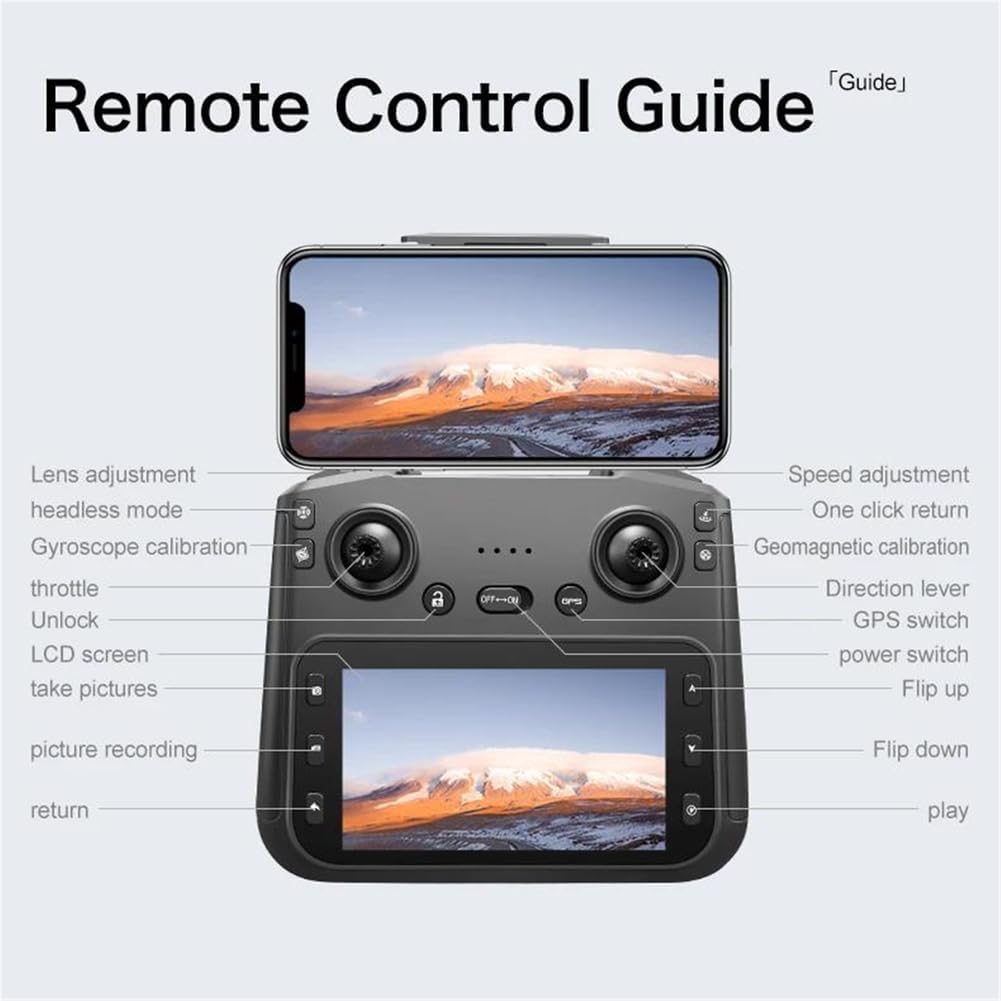
Image 4.1: Detailed diagram of the remote control, indicating the function of each button, joystick, and screen area.
- Lijeva upravljačka palica (gas/skretanje): Kontrolira visinu (gore/dolje) i rotaciju (lijevo/desno).
- Desna upravljačka palica (smjer): Upravlja kretanjem naprijed, nazad, lijevo i desno.
- Prekidač za napajanje: Uključuje/isključuje daljinski upravljač.
- GPS prekidač: Activates/deactivates GPS mode.
- Povrat jednim klikom: Initiates automatic return to home.
- Podešavanje brzine: Prebacuje se između različitih brzina leta.
- Podešavanje objektiva: Controls the camera's vertical angle.
- Bezglavi način rada: Simplifies flight orientation.
- Kalibracija žiroskopa: Kalibrira žiroskop drona.
- Geomagnetska kalibracija: Calibrates the drone's compass.
- Slikaj: Captures a still image.
- Snimanje slike: Pokreće/zaustavlja snimanje videa.
- Otključati: Unlocks the motors for flight.
4.4. Polijetanje i slijetanje
- Automatsko polijetanje: After calibration and GPS lock (if in GPS mode), press the one-key takeoff button or push both joysticks to the bottom-outer corners to unlock motors, then push the left joystick up.
- Automatsko slijetanje: Pritisnite gumb za slijetanje s jednom tipkom. Dron će se automatski spustiti i sletjeti.
- Ručno slijetanje: Slowly pull the left joystick down to descend. Once on the ground, hold the left joystick down for a few seconds to stop the motors.
4.5. GPS funkcije
The S-X1 MAX features advanced GPS capabilities for enhanced flight stability and intelligent functions.
- GPS pozicioniranje: Provides precise hovering and stable flight. Ensure a strong GPS signal before takeoff.
- GPS Return (Return-to-Home): The drone will automatically return to its takeoff point under conditions such as low battery, loss of signal, or manual activation.
- GPS Prati me: The drone will automatically follow the remote control's GPS signal.
- Image Tracking: Identify a subject on the screen, and the drone will automatically track its movement.

Image 4.2: Visual representation of the drone's GPS capabilities, including low power return, over distance return, out of control return, and one-click return.
4.6. Camera Operation and Gimbal
The drone is equipped with an 8K HD dual-camera system and a 3-axis mechanical gimbal with EIS anti-shake for stable and clear aerial photography.

Slika 4.3: Detaljno view of the drone's HD camera and 3-axis self-stabilizing gimbal, showing adjustable angles for roll, heading, and pitch.
- Prednja kamera: Wide-angle 1080P HD lens with EIS.
- Bottom Camera: Optical flow positioning lens.
- Fotografija/video: Za snimanje fotografija ili pokretanje/zaustavljanje snimanja videa koristite namjenske tipke na daljinskom upravljaču.
- Upravljanje kardanom: Adjust the camera's pitch angle using the lens adjustment button on the remote control.
5. Održavanje
5.1. Čišćenje
- Use a soft, dry cloth to clean the drone body and remote control.
- Gently clean camera lenses with a microfiber cloth designed for optics.
- Avoid using solvents or harsh chemicals.
5.2. Skladištenje
- Store the drone and remote control in a cool, dry place, away from direct sunlight.
- U slučaju duljeg skladištenja izvadite baterije.
- Preklopite krakove drona za kompaktno skladištenje.
5.3. Briga o bateriji
- Nemojte prekomjerno puniti ili previše prazniti baterije.
- Charge batteries at least once every three months to maintain health.
- Izbjegavajte izlaganje baterija ekstremnim temperaturama.
6. Rješavanje problema
| Problem | Mogući uzrok | Otopina |
|---|---|---|
| Dron se ne uključuje | Low battery; Incorrect battery installation | Charge battery; Reinstall battery correctly |
| Dron se zanosi tijekom leta | Improper calibration; Strong wind interference | Perform gyroscope and geomagnetic calibration; Fly in calm conditions |
| No image on remote screen | Poor connection; Drone too far | Ensure drone and remote are paired; Fly within transmission range |
| GPS functions not working | Weak GPS signal; Flying indoors | Fly in an open outdoor area with clear sky; Wait for sufficient GPS satellites to connect |
| Motors do not unlock | Drone not calibrated; Safety lock engaged | Perform all necessary calibrations; Ensure one-key unlock or joystick combination is used correctly |
7. Specifikacije
- Marka: FINOTI
- Model: S-X1 MAX
- Fotoaparat: 8K HD Dual Camera (Front 1080P Wide-angle with EIS, Bottom Optical Flow)
- Gimbal: 3-Axis Mechanical Stabilization + EIS Anti-Shake
- Vrsta motora: Bez četkica
- Prijenos slike: 5G Digital Image Transmission (up to 5KM range)
- Daljinski upravljač: 4.5-inch LCD Color Screen for Real-time FPV
- GPS: Yes, with Intelligent Tracking, GPS Follow Me, Return-to-Home functions
- Baterija: 7.4V 1600mAh Intelligent Battery
- Sklopljene dimenzije: Otprilike 8.2 x 14.8 x 6.4 cm
- Boja: Crna
8. Sigurnosne smjernice
Adhere to the following safety guidelines to ensure a safe and enjoyable flight experience:
- Always fly in open areas, away from buildings, trees, power lines, and crowds.
- Maintain a safe distance from people and animals.
- Do not fly in adverse weather conditions (strong winds, rain, snow).
- Respect local regulations and airspace restrictions.
- Keep the drone within your line of sight.
- Perform pre-flight checks before every flight.
- Do not operate the drone under the influence of alcohol or drugs.
- Djeca bi trebala upravljati dronom samo pod nadzorom odrasle osobe.
9. Jamstvo i podrška
FINOTI products are designed for reliability and performance. For warranty information, technical support, or service inquiries, please refer to the warranty card included in your package or contact FINOTI customer service through the retailer where the product was purchased. Please have your model number (S-X1 MAX) and purchase date available when contacting support.