
1. Uvod
This manual provides essential instructions for the safe operation, setup, and maintenance of your FINOTI D27 Pro MAX GPS Drone. The D27 Pro MAX is an advanced quadcopter featuring an 8K EIS HD camera, 5G WiFi FPV transmission, 360° obstacle avoidance, and GPS-assisted flight modes. Please read this manual thoroughly before operating the drone to ensure proper function and to prevent damage or injury.

Image: The FINOTI D27 Pro MAX GPS Drone with its remote control, showcasing its design and integrated screen.
2. Sigurnosne smjernice
Adherence to these safety guidelines is crucial for preventing accidents, injuries, and damage to the drone or property.
- Okruženje: Operate the drone in open areas, away from people, animals, buildings, and power lines. Avoid flying in strong winds, rain, or other adverse weather conditions.
- Udaljenost: Maintain a safe distance from the drone during operation. Do not attempt to catch the drone while it is flying.
- Sigurnost baterije: Keep batteries away from naked flames or direct heat sources. Use only the provided charger and batteries. Do not overcharge or puncture batteries.
- Provjera prije leta: Always perform a pre-flight check to ensure all components are securely attached and functioning correctly.
- Pravna usklađenost: Be aware of and comply with all local regulations regarding drone operation, including airspace restrictions and privacy laws.
- Dobno ograničenje: This product is not suitable for children without adult supervision.
3. Sadržaj paketa
Provjerite jesu li svi artikli prisutni u paketu:
- D27 Pro MAX GPS Drone
- Daljinski upravljač s 4.5-inčnim zaslonom
- Flight Battery (3.7V 3000mAh) - Quantity may vary based on purchase (Single, Dual, or Triple Battery variant)
- USB kabel za punjenje
- Rezervni propeleri (4 komada)
- korisnički priručnik
- Storage Box/Bag
4. Postavljanje
4.1. Punjenje baterija
Before first use, fully charge the drone's flight battery and the remote control's internal battery.
- Connect the USB charging cable to the drone battery and a suitable USB power adapter (not included).
- Connect the USB charging cable to the remote control's charging port.
- Charging indicators will show the charging status. Disconnect once fully charged.
4.2. Ugradnja propelera
Ensure propellers are correctly installed on the corresponding motor shafts. Match 'A' propellers with 'A' motors and 'B' propellers with 'B' motors. Incorrect installation will prevent flight.
4.3. Priprema daljinskog upravljača
Power on the remote control. The integrated 4.5-inch screen will activate. Ensure the remote control's battery is sufficiently charged.
4.4. Preuzimanje aplikacije i povezivanje
For advanced features and real-time FPV, download the dedicated drone application to your smartphone. Refer to the QR code in the quick start guide or search for the app name in your device's app store.
- Uključite dron i daljinski upravljač.
- On your smartphone, connect to the drone's Wi-Fi network (usually named 'D27-XXXXXX').
- Open the drone application. The live video feed should appear.
5. Upute za rad
5.1. Kontrolna lista prije leta
- Provjerite jesu li baterije drona i daljinskog upravljača potpuno napunjene.
- Provjerite jesu li propeleri sigurno pričvršćeni i neoštećeni.
- Verify that the camera lens is clean.
- Confirm GPS signal acquisition (if flying outdoors).
- Check for any obstructions in the flight path.
5.2. Polijetanje i slijetanje
After powering on the drone and remote, and completing calibration (refer to the quick start guide for calibration steps), you can initiate take-off.
- Polijetanje jednim ključem: Pritisnite namjenski gumb za polijetanje na daljinskom upravljaču. Dron će se automatski uzdići na sigurnu visinu i lebdjeti.
- Ručno polijetanje: Push both joysticks simultaneously to the bottom-outer corners to unlock motors, then slowly push the left joystick up to ascend.
- Slijetanje jednim ključem: Press the dedicated landing button. The drone will descend and land automatically.
- Ručno slijetanje: Slowly pull the left joystick down to descend.
5.3. Načini leta i značajke
The D27 Pro MAX offers several intelligent flight modes:
- Inteligentno GPS praćenje: The drone will automatically follow the remote control or a designated target.
- Image Tracking: Identify a target on the screen, and the drone will automatically track its movement.
- Prepoznavanje pokreta: Within 1-3 meters of the drone, perform specific hand gestures towards the camera to trigger photo or video recording.
- Route Multi-Point Planning Flight: Use the app to set multiple waypoints on a map. The drone will fly autonomously along the pre-set route.
- Fiksna točka okruženja: Select a central point on the map, then set a desired radius. The drone will orbit the central point at the specified distance.

Image: Illustration of the GPS homing feature, showing the drone returning to a designated home point.

Image: The drone maintaining a stable hover using optical flow positioning, depicted over a scenic waterfall.
5.4. Izbjegavanje prepreka
The D27 Pro MAX is equipped with 360° omnidirectional obstacle avoidance sensors. These sensors detect obstacles in the drone's path and automatically adjust its flight to prevent collisions. While highly effective, it is not a substitute for careful piloting and visual observation.

Image: Visual representation of the drone's 360° obstacle avoidance system detecting and reacting to its surroundings.
5.5. Return to Home (RTH) Function
The drone features multiple Return to Home functions for enhanced safety:
- GPS One-Click Return: Press the RTH button on the remote control, and the drone will return to its recorded take-off point.
- Povratak niske snage: If the drone's battery level becomes critically low, it will automatically initiate RTH.
- Nema povratnog signala: If the connection between the drone and remote control is lost, the drone will automatically initiate RTH.
5.6. Camera Operation (8K EIS HD)
The D27 Pro MAX is equipped with an 8K EIS (Electronic Image Stabilization) HD camera for high-quality aerial photography and videography.
- Foto/video snimanje: Use the dedicated buttons on the remote control or the app interface to take photos or start/stop video recording.
- Prijenos slike: The 5G image transmission system provides a real-time view on the remote control's screen or connected smartphone.
- Dijeljenje: Photos can be shared individually or in batches. Videos can be shared separately after recording.
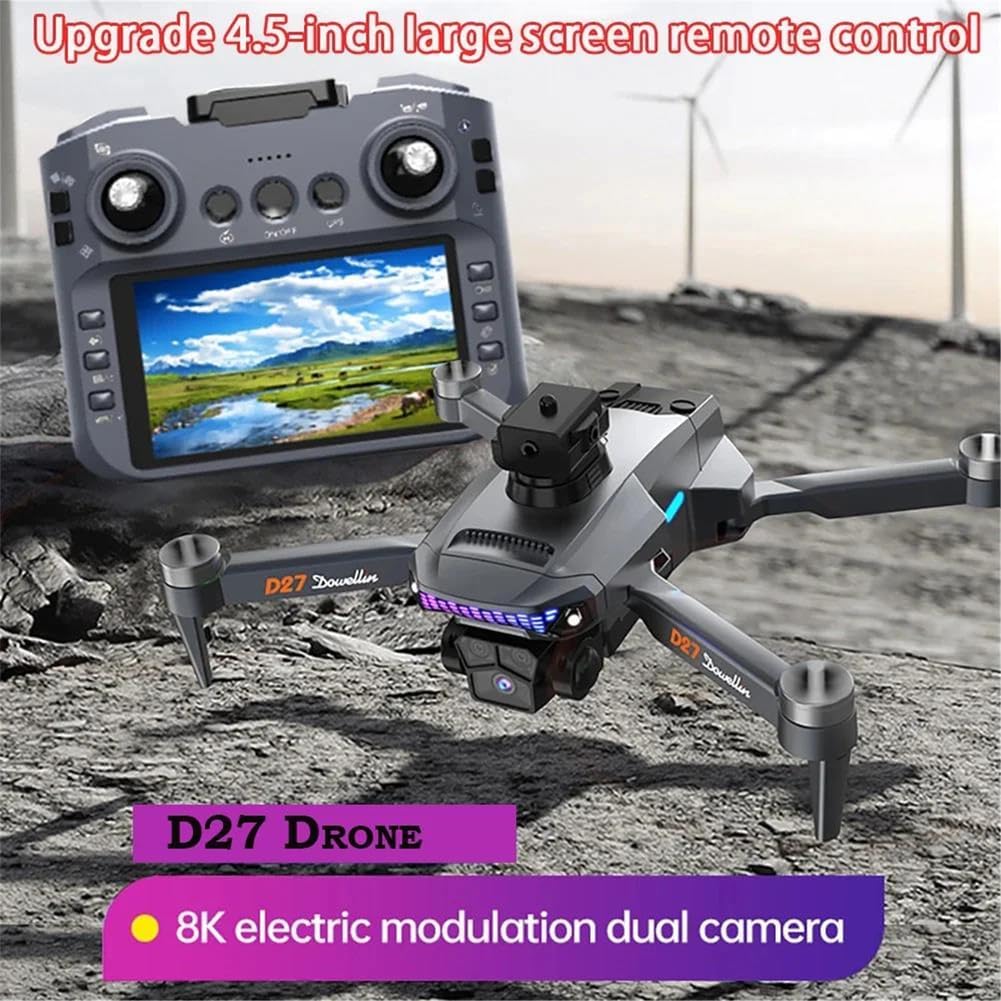
Image: The FINOTI D27 Pro MAX drone and its remote control, highlighting the 8K electric modulation dual camera system.
6. Održavanje
6.1. Čišćenje
Regular cleaning helps maintain performance and longevity.
- Wipe the drone body and remote control with a soft, dry cloth.
- Use a soft brush or compressed air to remove dust from motors and sensors.
- Clean the camera lens with a lens cleaning cloth.
6.2. Zamjena propelera
Inspect propellers for cracks or damage before each flight. Replace damaged propellers immediately using the provided spare parts. Ensure correct 'A' and 'B' propeller placement.
6.3. Briga o bateriji i skladištenje
- Baterije čuvajte na hladnom i suhom mjestu, dalje od izravne sunčeve svjetlosti i topline.
- Do not store fully charged or completely depleted batteries for extended periods. Charge to approximately 50-60% for long-term storage.
- If the drone will not be used for an extended period, remove the flight battery.
7. Rješavanje problema
| Problem | Mogući uzrok | Otopina |
|---|---|---|
| Dron se ne uključuje | Slaba baterija; Baterija nije spojena | Napunite bateriju; Ponovno čvrsto spojite bateriju |
| Drone cannot take off | Motors not unlocked; Incorrect propeller installation; Calibration error | Unlock motors (joysticks to bottom-outer); Check propeller orientation; Perform calibration |
| Poor image transmission/FPV feed | Weak Wi-Fi signal; Interference; Distance too far | Ensure strong Wi-Fi connection; Fly in open areas; Reduce distance to drone |
| Dron se zanosi tijekom leta | Improper calibration; Strong wind | Recalibrate gyroscope/compass; Avoid flying in strong winds |
| Izbjegavanje prepreka ne radi | Sensors obstructed/dirty; Feature disabled | Clean sensors; Ensure feature is enabled in app/remote settings |
8. Specifikacije
- Model: D27 Pro MAX
- Marka: FINOTI
- Fotoaparat: 8K EIS HD Lens
- Prijenos slike: 5G WiFi FPV
- Daljinski upravljač: 4.5-inch Large Screen Remote Control
- Izbjegavanje prepreka: 360° svesmjerno
- Vrsta motora: Bez četkica
- Baterija leta: 3.7V 3000mAh
- Positioning System: GPS + Optical Flow
- Inteligentne funkcije: GPS One-Click Return, Low Power Return, No Signal Return, GPS Intelligent Tracking, Image Tracking, Gesture Recognition, Route Multi-Point Planning, Fixed Point Surround, Aircraft Search Function.

Slika: Krupni plan view of the low-noise brushless motor, emphasizing stability and wind resistance.