1. Uvod
This manual provides comprehensive instructions for the VEKJ L8 Pro Sleep Earbuds. It covers product features, setup, operation, maintenance, and troubleshooting to ensure an optimal user experience. Please read this manual thoroughly before using your earbuds.

Image 1.1: VEKJ L8 Pro Sleep Earbuds and their charging case, displaying a touch screen interface.
2. Sadržaj paketa
Provjerite jesu li svi artikli prisutni u paketu:
- 2 x L8 Pro Sleep Earbuds
- 1 x Kutija za punjenje
- 1 x USB-C kabel za punjenje
- 1 x korisnički priručnik
- 2 x pairs of Earcaps

Image 2.1: Illustration of the items included in the VEKJ L8 Pro product package.
3. Proizvod je gotovview i značajke
The VEKJ L8 Pro Sleep Earbuds are designed for comfort and functionality, especially for extended wear and sleep.
- Ergonomski dizajn: Polished, contoured shape for a snug fit without pressure, ideal for side sleepers. Each earbud weighs approximately 3.0g.
- Multifunctional Touch Screen: The charging case features a full-color LED touch screen for controlling music, calls, volume, voice assistant, sleep mode, language settings, screen brightness, and a "find earphone" function.
- Produljeno trajanje baterije: Up to 6-8 hours of playtime on a single charge, with a total of 48 hours using the charging case. Fast charging via USB-C.
- Clear Audio and Calls: Equipped with 13mm speaker driver units for balanced sound. Features clear voice detection for calls, even in noisy environments.
- Bluetooth 5.4: Ensures faster transmission speed and a stable signal for lossless audio data. One-step pairing with previously connected devices.
- IPX7 Vodootporno: Provides protection against sweat, rain, and dust.
- 5 načina EQ: Includes Standard, Classic, Jazz, Rock, and Pop modes for customized listening.
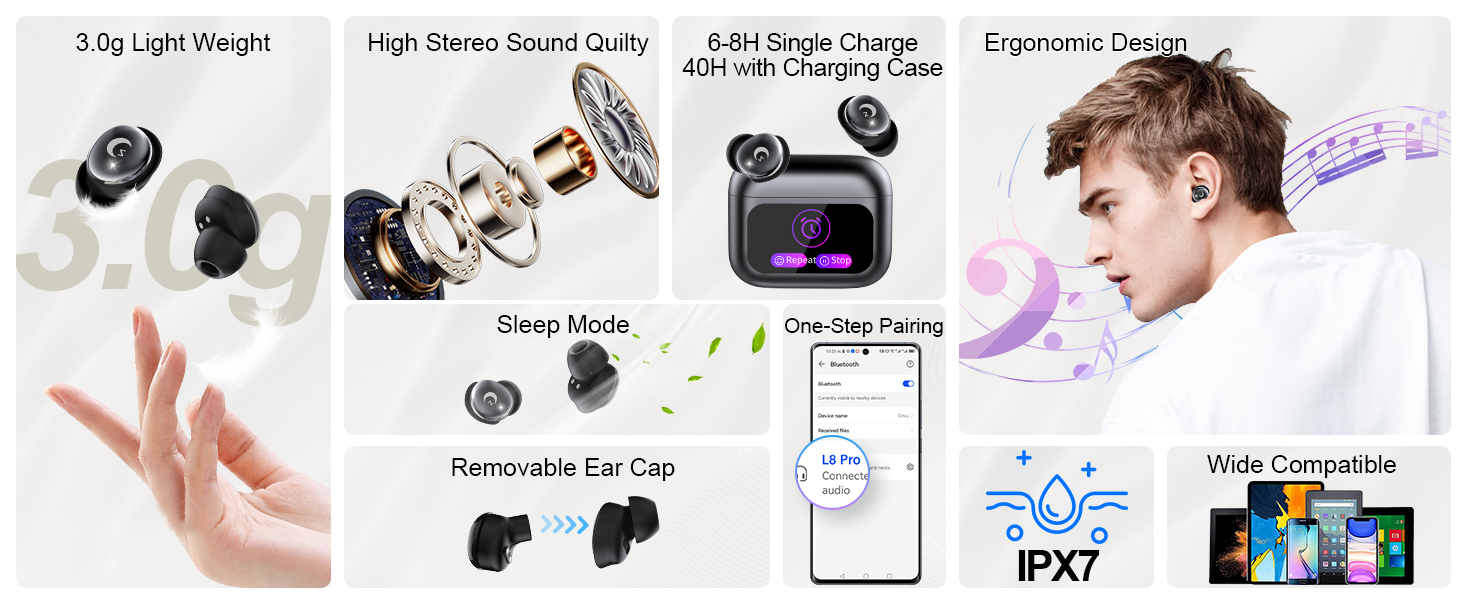
Image 3.1: Visual summary of key features of the VEKJ L8 Pro Sleep Earbuds.

Slika 3.2: Detaljno view of the 13mm audio driver for enhanced sound quality.
4. Postavljanje i prva upotreba
4.1 Punjenje slušalica i kutijice
Prije prve upotrebe, potpuno napunite slušalice i kutijicu za punjenje.
- Stavite slušalice u kućište za punjenje.
- Spojite USB-C kabel za punjenje na priključak za punjenje na kućištu i na izvor napajanja.
- The LED digital display on the case will indicate the charging status. A full charge takes approximately 1.5 hours for the case.

Image 4.1: Battery life indicators for earbuds and charging case.
4.2 Nošenje slušalica
Proper fit is essential for comfort and sound quality.
- Select the appropriate ear tips for your ear size.
- Place the earbud into your ear canal with the ear cap facing downwards.
- Gently rotate the earbud to ensure a secure and comfortable fit.

Image 4.2: Step-by-step guide on how to wear the earbuds for optimal fit.
4.3 Bluetooth uparivanje
Slušalice koriste Bluetooth 5.4 za stabilnu vezu.
- Otvorite poklopac kutijice za punjenje. Slušalice će automatski ući u način uparivanja.
- Na svom uređaju (pametnom telefonu, tabletu itd.) omogućite Bluetooth i potražite dostupne uređaje.
- Select "L8 Pro" from the list of devices to connect.
- Once paired, the earbuds will automatically connect to the last paired device when the case lid is opened.
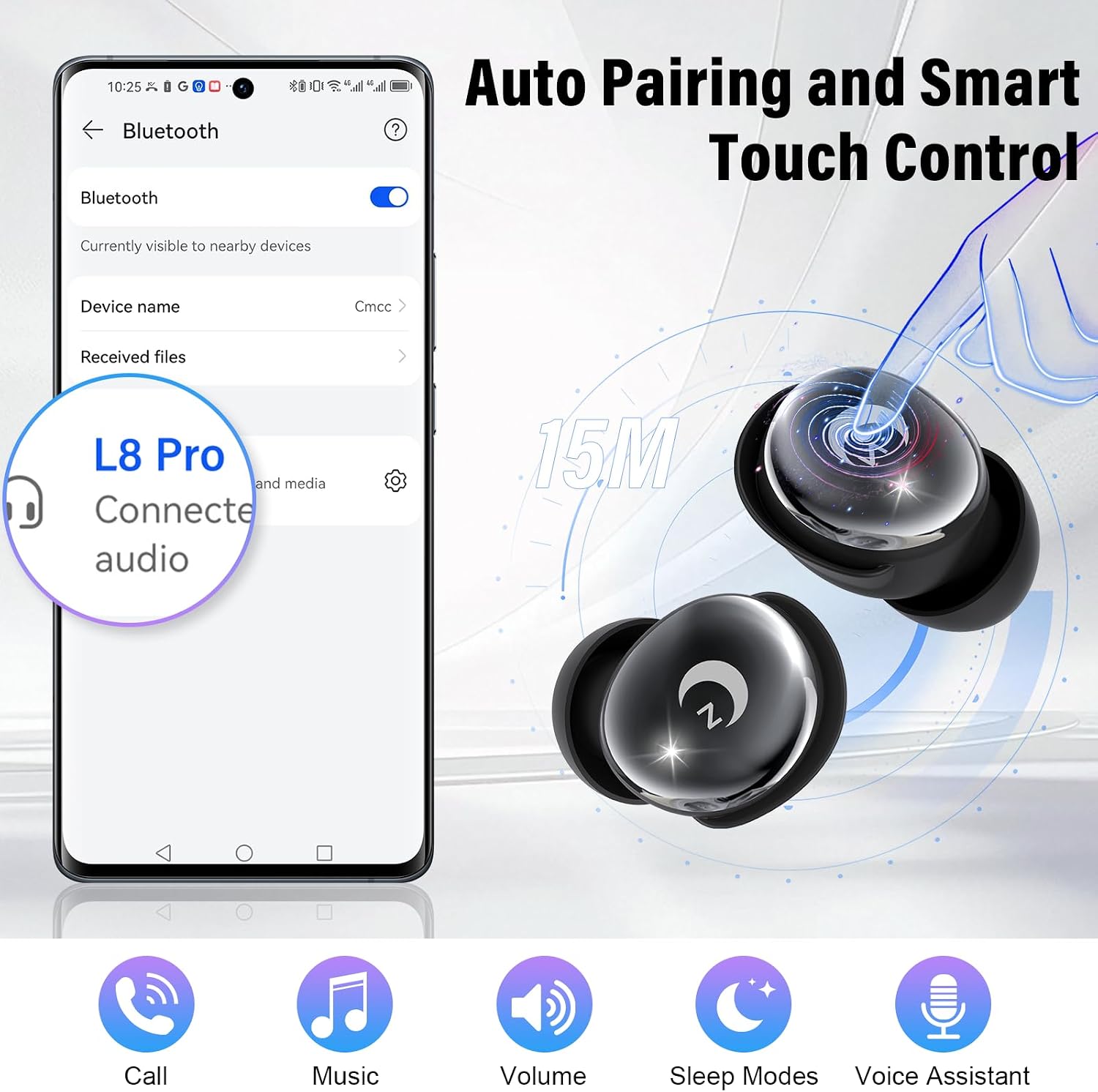
Image 4.3: Bluetooth pairing process with a mobile device.
5. Upute za rad
5.1 Kontrole na dodir
The earbuds feature touch-sensitive areas for various functions.
- Reproduciraj/pauziraj: Double click L/R earbud.
- Glasovni asistent: Triple click L/R earbud.
- Načini mirovanja: Click 4 times L/R earbud.
- Glasnoća +/-: Click 1 time L/R earbud (specific earbud for +/- may vary, refer to on-screen prompts).
- Prethodna/sljedeća pjesma: Long press 2s L/R earbud.
- Odgovori na poziv: Click 1 time L/R earbud.
- Reject/Hang Up Call: Long press 2s L/R earbud.

Image 5.1: Guide to touch controls on the earbuds.
5.2 Funkcije zaslona osjetljivog na dodir kućišta za punjenje
The charging case's touch screen provides additional controls and settings.
- Kontrola reprodukcije glazbe: Reproduciraj, pauziraj, preskači pjesme.
- Upravljanje pozivima: Answer, end calls.
- Kontrola glasnoće: Podesite glasnoću zvuka.
- Voice Assistant Activation.
- Stanje mirovanja: Activates a special mode that disables touch controls, alerts, and call notifications for uninterrupted sleep. Note: Sleep mode is unavailable in single-earbud use; if the main earbud powers off, the secondary one exits sleep mode automatically.
- Promjena jezika: Odaberite između 7 dostupnih jezika.
- Promjena pozadine: Prilagodite pozadinu zaslona.
- Screen Brightness Adjustment.
- "Find Earphone" Function: Helps locate misplaced earbuds.
- Funkcija tajmera.
- EQ načini rada: Switch between Standard, Classic, Jazz, Rock, and Pop.

Slika 5.2: Primjeramples of functions available on the charging case touch screen.

Image 5.3: Sleep mode features for undisturbed rest.
5.3 EQ načina
Customize your audio experience by selecting one of the five equalizer modes.
- Standard
- klasična
- Jazz
- Rock
- Pop

Image 5.4: Available equalizer modes for audio customization.
6. Održavanje
To ensure the longevity and optimal performance of your VEKJ L8 Pro Sleep Earbuds, follow these maintenance guidelines:
- Čišćenje: Redovito čistite slušalice i kutijicu za punjenje mekom, suhom krpom koja ne ostavlja dlačice. Nemojte koristiti abrazivna sredstva za čišćenje ili otapala.
- Savjeti za uho: Remove and clean the ear tips periodically to prevent wax buildup. Ensure they are completely dry before reattaching.
- Priključak za punjenje: USB-C priključak za punjenje držite čistim od prašine i ostataka.
- Skladištenje: Kada se ne koriste, slušalice spremite u kutijicu za punjenje kako biste ih zaštitili i održali napunjenima. Čuvajte ih na hladnom i suhom mjestu, dalje od ekstremnih temperatura.
- Izloženost vodi: While IPX7 waterproof, avoid prolonged submersion in water. Dry thoroughly if exposed to liquids.
7. Rješavanje problema
Ako imate problema sa slušalicama, pogledajte sljedeća uobičajena rješenja:
| Problem | Mogući uzrok | Otopina |
|---|---|---|
| Slušalice se ne uparuju | Bluetooth off on device, earbuds not in pairing mode, interference. | Ensure Bluetooth is enabled on your device. Place earbuds in case, close and reopen lid to re-enter pairing mode. Move closer to your device. |
| Nema zvuka ili je mala glasnoća | Volume too low, earbuds not properly seated, ear tips blocked, device not connected. | Increase volume on both earbuds and connected device. Adjust earbuds for a secure fit. Clean ear tips. Re-pair earbuds. |
| Problemi s punjenjem | Cable or adapter fault, dirty charging contacts, case battery depleted. | Try a different USB-C cable and power adapter. Clean the charging contacts on earbuds and case. Ensure the charging case itself is charged. |
| Kontrole na dodir ne reagiraju | Earbuds in sleep mode, dirty touch surface, temporary software glitch. | Exit sleep mode if active. Clean the touch surface. Place earbuds back in case, close and reopen, then try again. |
| Kratko trajanje baterije | Earbuds not fully charged, high volume usage. | Ensure earbuds and case are fully charged before use. Reduce listening volume. |
8. Specifikacije
| Značajka | Detalj |
|---|---|
| Naziv modela | L8Pro |
| Marka | VEKJ |
| Tehnologija povezivanja | Bežično (Bluetooth 5.4) |
| Bluetooth domet | Do 49 stope (15 metara) |
| Vrsta audio upravljačkog programa | Dinamički upravljački program (13 mm) |
| Trajanje baterije (slušalice) | 6-8 sati po punjenju |
| Ukupno vrijeme reprodukcije (s kutijom) | Do 48 sati |
| Vrijeme punjenja | Approximately 1.5 hours (case) |
| Sučelje za punjenje | USB-C |
| Vrsta kontrole | Touch Control (Earbuds & Case Screen) |
| Razina vodootpornosti | IPX7 vodootporan |
| Težina slušalice | Otprilike 3.0 g po slušalici |
| Kompatibilni uređaji | Smartphones, Tablets, Computers, Smart Home Devices (Bluetooth enabled) |
9. Jamstvo i podrška
VEKJ provides the following support for your L8 Pro Sleep Earbuds:
- Jamstvo: 2 godine jamstva.
- Povrat/Zamjena: 30 Days Exchange or Return policy.
- Služba za korisnike: 24/7 Customer Service available.
For further assistance, please refer to the contact information provided with your purchase or visit the official VEKJ support channels.

Image 9.1: Summary of warranty and customer support details.