
1. Uvod
This manual provides essential instructions for the safe and effective use, installation, and maintenance of your POWTREE 7000mAh 25.2V Li-ion replacement battery for Dyson V10 and SV12 series vacuum cleaners. Please read this manual thoroughly before installation and use.
2. Sigurnosne informacije
- Nemojte rastavljati, lomiti ili bušiti bateriju.
- Avoid exposing the battery to high temperatures (above 60°C/140°F) or direct sunlight.
- Nemojte kratko spajati terminale baterije.
- Držite bateriju dalje od vode ili drugih tekućina.
- Čuvajte bateriju na hladnom i suhom mjestu kada nije u upotrebi.
- Istrošene baterije zbrinite u skladu s lokalnim propisima. Ne odlažite ih s kućnim otpadom.
- Use only the original Dyson charger or a compatible charger designed for V10/SV12 batteries.
- If the battery shows signs of damage, overheating, or leakage, discontinue use immediately.
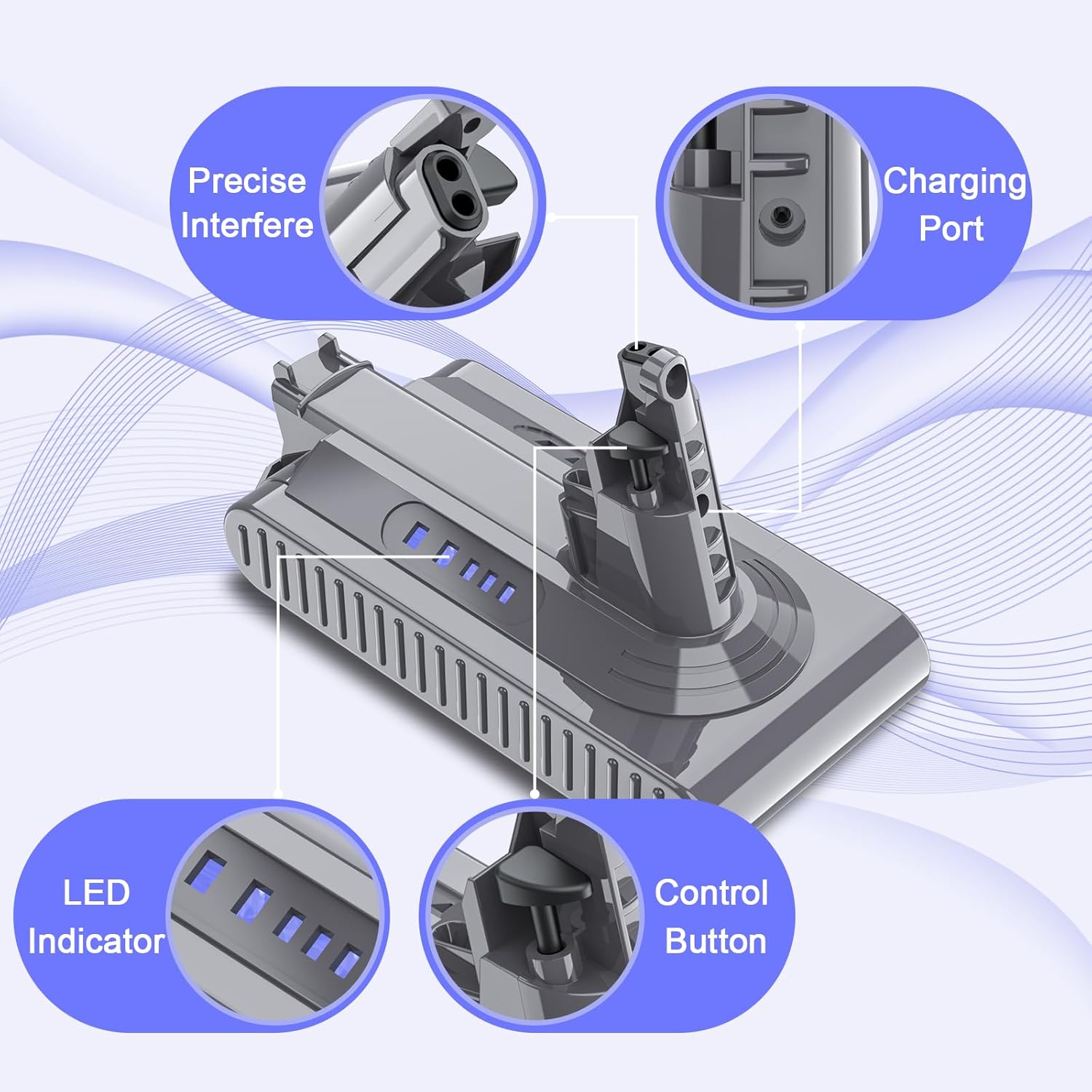
Image: The POWTREE V10 replacement battery features multiple safety protections, including overcharge, overvoltage, short circuit, and overcurrent protection, indicated by CE, FC, and RoHS certifications.
3. Sadržaj paketa
Provjerite jesu li svi artikli prisutni u paketu:
- 1 x POWTREE 7000mAh 25.2V Replacement Battery
- 1 x odvijač
- 3 x vijka
- 1 x Post Filter
- 1 x Battery Protection Cap

Image: The complete package includes the replacement battery, a screwdriver, three screws, a post filter, and a battery protection cap for a comprehensive replacement solution.
4. Upute za instalaciju
Follow these steps to replace the battery in your Dyson V10 or SV12 series vacuum cleaner:
- Isključivanje: Ensure your Dyson vacuum cleaner is turned off and unplugged from any charging source.
- Pronađite bateriju: The battery is typically located at the bottom of the main unit handle.
- Uklonite vijke: Use the provided screwdriver to remove the screws securing the old battery. There are usually two screws: one near the charging port and another behind the pull-out washable filter.
- Detach Old Battery: Carefully slide the old battery out of its housing.
- Instalirajte novu bateriju: Align the POWTREE replacement battery with the vacuum cleaner's battery slot. Ensure the connectors are properly seated.
- Secure New Battery: Use the provided new screws to fasten the replacement battery securely into place. Do not overtighten.
- Install Post Filter: If replacing the post filter, remove the old filter by twisting it counter-clockwise and then insert the new filter, twisting clockwise to secure it.
- Početna naplata: Preporučuje se potpuno napuniti novu bateriju prije prve upotrebe.

Image: This diagram illustrates the components included in the package, which are essential for the battery replacement process.

Image: Visual guide demonstrating the simple steps to install and clean the included post filter, ensuring optimal vacuum performance.
5. Upute za rad
5.1 Punjenje baterije
- The POWTREE replacement battery is designed to be compatible with your original Dyson V10/SV12 charger and charging stand.
- Connect the vacuum cleaner to its charging station or directly to the charger.
- The LED indicators on the battery will illuminate to show the charging status. A full charge is indicated when all LEDs are solid.
- Avoid leaving the battery on the charger for extended periods after it is fully charged to prolong its lifespan.
5.2 Pokazatelji baterije
The battery features LED indicators to display the remaining charge level and charging status. Refer to your Dyson vacuum cleaner's original manual for specific indicator patterns, as they typically reflect the battery status.

Slika: Detaljna view of the battery's design, highlighting the charging port, LED indicators for charge status, and the control button.
6. Održavanje
6.1 Njega baterija
- For optimal performance, fully charge the battery before each use.
- If the vacuum cleaner will not be used for an extended period, store the battery at approximately 50% charge in a cool, dry place.
- Izbjegavajte često potpuno pražnjenje baterije jer to može smanjiti njezin ukupni vijek trajanja.
6.2 Održavanje filtera
The included post filter is washable and reusable. Regular cleaning of the filter is crucial for maintaining optimal suction power and battery efficiency.
- Ukloni filter: Twist the post filter counter-clockwise to detach it from the vacuum cleaner.
- Pranje: Rinse the filter under cold running water until the water runs clear. Do not use detergents.
- Suho: Allow the filter to air dry completely for at least 24 hours before reinserting it. Ensure it is thoroughly dry to prevent damage to the motor.
- Ponovno instaliranje: Once dry, reinsert the filter by twisting it clockwise until secure.
7. Rješavanje problema
| Problem | Mogući uzrok | Otopina |
|---|---|---|
| Baterija se ne puni | Charger not connected properly; Faulty charger; Battery issue | Ensure charger is securely connected. Try a different outlet. If problem persists, contact support. |
| Kratko vrijeme rada | Filter clogged; Battery not fully charged; Battery degradation | Clean the filter. Ensure battery is fully charged. If battery is old, consider replacement. |
| Vacuum cleaner not turning on | Battery not installed correctly; Battery completely drained; Safety cutoff activated | Reinstall battery, ensuring secure connection. Charge battery. Check for obstructions in the vacuum. |
If you encounter issues not listed here or if the suggested solutions do not resolve the problem, please contact POWTREE customer support for assistance.
8. Specifikacije
| Značajka | Detalj |
|---|---|
| Model | V10 |
| Voltage | 25.2 V |
| Kapacitet | 7000 mAh |
| Vrsta baterije | Litij ion |
| Watt-sat | 1176.4 Wh |
| Kompatibilnost | Dyson V10 Allergy, Cyclone V10 Animal, V10 Absolute, V10 Motorhead, V10 Motorhead Origin, V10 Total Clean+, SV12 Series |
| Certifikati | CE, FCC, ROHS |
| Dimenzije paketa | 7.56 x 5.67 x 3.9 inča |
| Težina artikla | 1.43 funti |

Image: Key product parameters are displayed, confirming the battery type as Li-ion, voltage at 25.2V, and a capacity of 7000mAh.

Image: This visual confirms the battery's compatibility with Dyson V10 and SV12 series vacuum cleaners, including models like V10 Animal, V10 Absolute, and V10 Motorhead.
9. Jamstvo i podrška
POWTREE provides a Jamstvo 12 mjeseci for this V10 replacement battery. For any questions, concerns, or technical assistance, please contact our professional customer support team. We offer 24-hour online support to ensure your satisfaction.
For support, please refer to the contact information provided with your purchase or visit the official POWTREE store on Amazon.