
1. Uvod
This manual provides detailed instructions for the assembly, operation, and maintenance of your BEISHI Motorized TV Stand with Wheels. Please read this manual thoroughly before installation and use to ensure proper function and safety. Keep this manual for future reference.
2. Važne sigurnosne informacije
Failure to follow these safety instructions may result in property damage or personal injury.
- Always secure the stand when in use to prevent tip-over.
- Do not place heavy objects on the lower shelf exceeding its weight capacity.
- Keep the remote control out of reach of young children to prevent choking hazards.
- Always lock the wheels when the stand is stationary to ensure stability.
- Ensure the area beneath the TV is clear before lowering the height to prevent obstructions.
- Do not exceed the maximum weight capacity of 154 lbs (70 kg) for the TV.
- Ensure your TV's VESA pattern is compatible with the stand (100x100mm to 600x400mm).
3. Sadržaj paketa
Prije početka sastavljanja provjerite jesu li sve komponente prisutne i neoštećene. Ako neki dijelovi nedostaju ili su oštećeni, obratite se korisničkoj podršci.
- Main Stand Components (Base, Columns, TV Mount)
- Wooden Shelf & Panel
- Motorized Height Adjustment System
- Daljinski upravljač
- Caster Wheels (with locking mechanism)
- Hardware Kit (screws, washers, spacers, tools)
- Priručnik s uputama
4. Upute za sastavljanje
Follow these steps carefully for proper assembly. It is recommended to have two people for certain steps, especially when mounting the TV.
- Raspakiraj i identificiraj dijelove: Lay out all components on a soft, clean surface. Refer to the parts list in your hardware kit to identify each piece.
- Sastavite bazu: Attach the vertical columns to the base feet, ensuring all screws are securely tightened.
- Install Caster Wheels: Securely attach the locking caster wheels to the base feet. Ensure the locking mechanism functions correctly.
- Attach the Wooden Shelf: Mount the wooden shelf and panel to the designated positions on the vertical columns.
- Install the Motorized System: Integrate the motorized height adjustment mechanism into the stand structure as per the detailed diagrams in your included guide. Connect all necessary cables.
- Prepare TV for Mounting: Attach the TV mounting brackets to the back of your television, ensuring the correct VESA pattern screws and spacers are used. Refer to your TV's manual for specific VESA hole locations.
- Montirajte televizor: Carefully lift the TV and hook the brackets onto the TV mount on the stand. Secure the TV with the safety screws or locking mechanisms provided.
- Priključite napajanje: Plug the power cord for the motorized system into a suitable electrical outlet.

Slika: Prekoview of stand dimensions, VESA compatibility, and weight capacity.

Slika: Detaljna view of the motorized mechanism and TV mounting brackets.
5. Upute za rad
5.1 Electric Height Adjustment
The BEISHI Motorized TV Stand features an electric height adjustment system controlled by a remote.
- Podešavanje visine: Use the UP and DOWN buttons on the remote control to smoothly adjust the TV height between 46.5 inches and 62.2 inches.
- Memorijske postavke: The stand allows you to store two preferred height settings. To set a memory position:
- Adjust the stand to your desired height.
- Press the 'SET' button once.
- Press either 'M1' or 'M2' button within 3 seconds to save the current height to that memory slot.
- Pozivanje memorijskih postavki: Press 'M1' or 'M2' to automatically move the TV to the saved height.
- Početna pozicija: Press the 'HOME' button to return the TV to a default or pre-set home position.

Image: Electric height adjustment range.
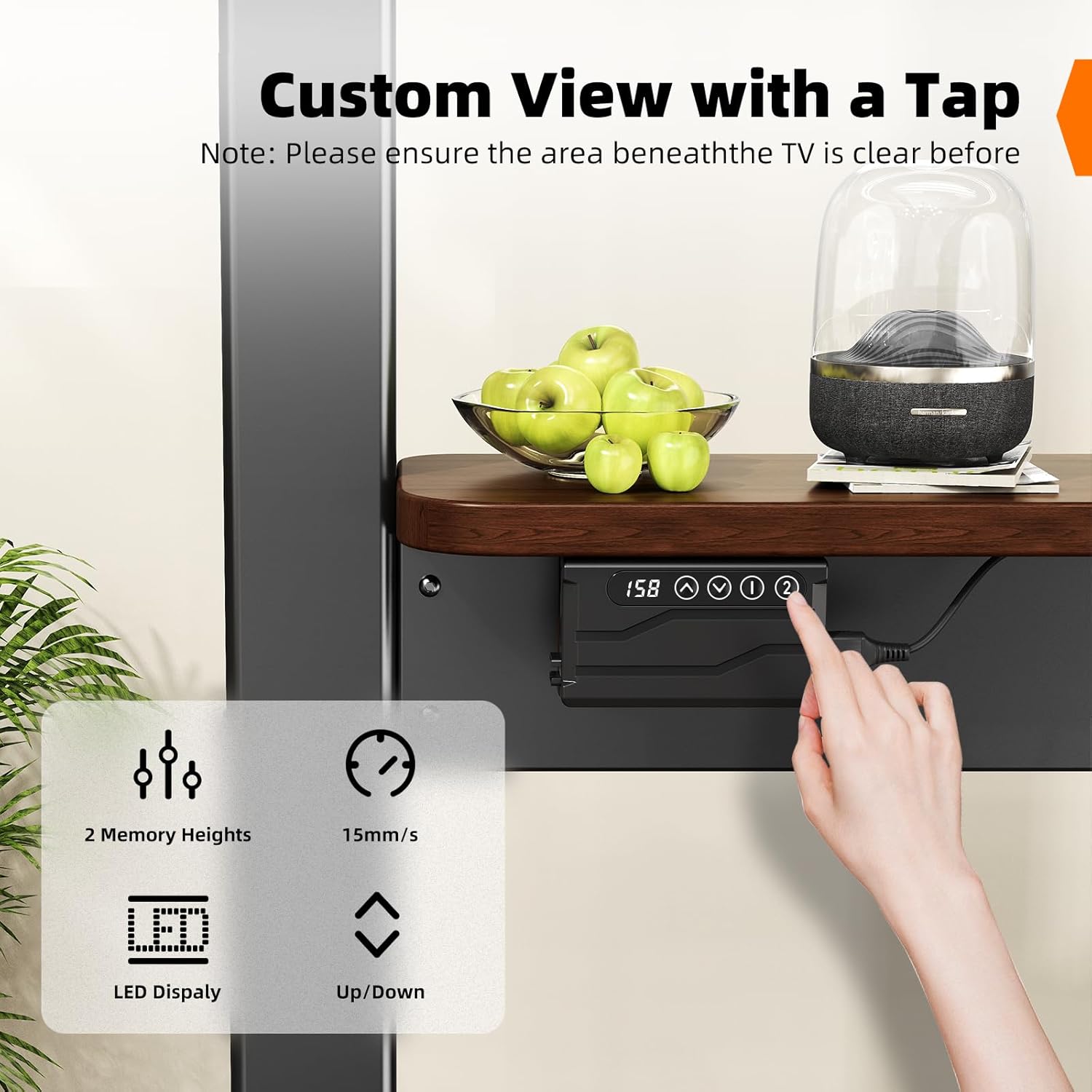
Image: Control panel for height adjustment and memory presets.
5.2 Mobilnost i blokiranje kotača
The stand is equipped with caster wheels for easy movement and locking mechanisms for stability.
- Pomicanje stalka: Unlock all caster wheels before moving the stand. Gently push the stand to your desired location.
- Osiguravanje stalka: Once the stand is in position, engage the locking mechanism on all wheels to prevent unintended movement.

Image: Caster wheels with 360-degree rotation and locking function.
6. Značajke proizvoda
- Motorizirano podešavanje visine: Electric system with remote control for smooth height adjustments from 46.5" to 62.2". Includes 2 memory presets.
- Široka kompatibilnost: Supports LCD, LED, and OLED 4K TVs from 37 to 86 inches, with VESA standards from 100x100mm to 600x400mm. Maximum TV weight capacity is 154 lbs (70 kg).
- Mobilni dizajn: Equipped with lockable caster wheels for easy relocation and secure positioning.
- Integrirana pohrana: Features a wooden shelf (25.59" x 7.87") capable of holding up to 22 lbs, suitable for media devices, gaming consoles, or other accessories. Includes a detachable top shelf for projectors.
- Izdržljiva konstrukcija: Sturdy carbon steel frame ensures stable support.

Image: Wooden storage shelf details.
7. Održavanje
To ensure the longevity and proper functioning of your TV stand, follow these maintenance guidelines:
- Čišćenje: Wipe the stand with a soft, dry cloth. For stubborn marks, use a slightly damp cloth with mild soap, then dry immediately. Avoid abrasive cleaners or solvents.
- Provjera hardvera: Povremeno provjeravajte sve vijke i matice kako biste bili sigurni da su čvrsto zategnuti. Po potrebi ih ponovno zategnite.
- Pregled motora: Ensure the motorized components are free from dust and obstructions. Do not attempt to lubricate or disassemble the motor.
- Uprava za kabele: Keep all power and TV cables neatly organized to prevent snagging or damage during movement or height adjustment.
8. Rješavanje problema
If you encounter any issues with your BEISHI Motorized TV Stand, refer to the table below for common problems and solutions.
| Problem | Mogući uzrok | Otopina |
|---|---|---|
| Stand does not move up or down. | Power cord disconnected; Remote control battery low; Motor obstruction. | Check power connection; Replace remote batteries; Remove any obstructions around the motor or columns. |
| Daljinski upravljač ne reagira. | Remote batteries depleted; Remote out of range; Signal interference. | Replace remote batteries; Ensure remote is pointed at the receiver; Reduce interference from other electronic devices. |
| TV wobbles or feels unstable. | Wheels unlocked; Loose assembly screws; TV weight exceeds capacity. | Lock all caster wheels; Re-tighten all assembly screws; Ensure TV weight is within 154 lbs limit. |
| Memory presets not saving/recalling. | Nepravilan postupak spremanja. | Follow the memory preset instructions carefully: adjust height, press 'SET', then press 'M1' or 'M2' within 3 seconds. |
If the problem persists after attempting these solutions, please contact BEISHI customer support for further assistance.
9. Specifikacije
| Značajka | Specifikacija |
|---|---|
| Marka | BEISHI |
| Model | B0FHGSX9LB |
| Kompatibilnost veličine televizora | 37 - 86 inča |
| Max TV Weight Capacity | 154 lbs (70 kg) |
| VESA kompatibilnost | 100x100mm do 600x400mm |
| Raspon podešavanja visine | 46.5 inča - 62.2 inča |
| Materijal | Ugljični čelik |
| Težina artikla | 45.7 funti |
| Dimenzije paketa | 51.5 x 11.5 x 6 inča |
| Kapacitet police za pohranu | 22 lbs |
| Boja | Crna |
10. Jamstvo i podrška
BEISHI products are manufactured with quality and durability in mind. This product comes with a standard manufacturer's warranty against defects in materials and workmanship. For specific warranty details, claims, or technical support, please refer to the warranty card included with your product or contact BEISHI customer service directly through their official webweb-mjesto ili prodavač gdje je proizvod kupljen.