
1. Važne sigurnosne upute
Molimo pažljivo pročitajte sve upute prije upotrebe ovog uređaja i sačuvajte ih za buduću upotrebu. Nepoštivanje ovih uputa može uzrokovati strujni udar, požar ili ozbiljne tjelesne ozljede.
- Provjerite je li napajanje voltage odgovara naljepnici s nazivnim vrijednostima na uređaju.
- Ne koristite ventilator s oštećenim kabelom ili utikačem. Ako je kabel oštećen, mora ga zamijeniti proizvođač, njegov servisni agent ili slično kvalificirana osoba kako bi se izbjegla opasnost.
- Uvijek isključite ventilator iz utičnice prije čišćenja, servisiranja ili premještanja.
- Ne stavljajte prste ili bilo kakve predmete u rešetku ventilatora dok radi.
- Keep the fan away from water or other liquids. Do not use it in wet or damp okruženja.
- Ovaj je uređaj namijenjen samo za unutarnju upotrebu. Ne koristiti na otvorenom.
- Do not place the fan near heat sources such as radiators, heat registers, stoves, or other appliances that produce heat.
- Nadzirite djecu kako biste bili sigurni da se ne igraju s uređajem.
- Do not use the fan in areas where gasoline, paint, or flammable liquids are stored.
2. Proizvod je gotovview
The Altus AL 40 TFB is a sleek and efficient tower air cooler designed for indoor use. It features a compact design, multiple speed settings, and easy-to-use push-button controls.
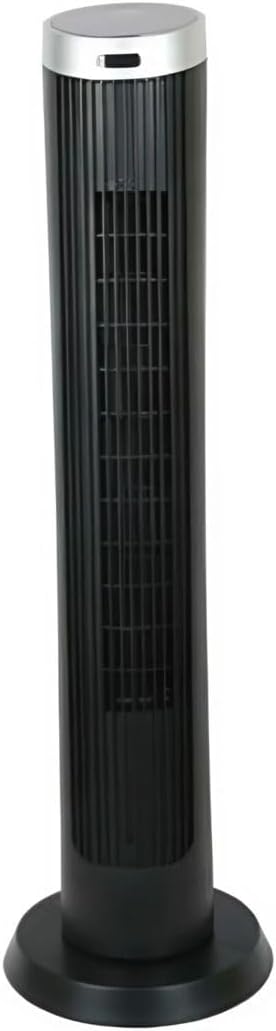
Slika 2.1: Ispred view of the Altus AL 40 TFB Tower Air Cooler. This image shows the tall, slender black body of the fan with its air outlet grille and a stable round base.
Komponente:
- Upravljačka ploča: Located on the top of the unit for easy access to all functions.
- Rešetka za izlaz zraka: Vertical grille on the front for air dispersion.
- Baza: Stable round base for secure placement.
- Kabel za napajanje: Smješten na stražnjoj strani jedinice.

Slika 2.2: Detaljan view of the control panel on top of the Altus AL 40 TFB Tower Air Cooler. The panel features a digital display showing '28' and several push buttons for various functions.
3. Postavljanje
Follow these steps to set up your Altus AL 40 TFB Tower Air Cooler:
- Raspakirati: Pažljivo izvadite ventilator iz ambalaže. Sačuvajte ambalažu za buduće skladištenje ili transport.
- Sastavljanje baze (ako je potrebno): Some models may require minor base assembly. If your unit's base is detached, align the base sections and secure them according to the diagrams in the packaging. Ensure it is firmly attached.
- Plasman: Place the fan on a firm, level surface. Ensure there is adequate space around the fan for proper airflow, at least 30 cm (12 inches) from walls or furniture. This appliance is designed for indoor use only.
- Priključak za napajanje: Plug the power cord into a standard electrical outlet. Ensure the outlet meets the voltagZahtjevi navedeni na etiketi proizvoda.
4. Upute za rad
Your Altus AL 40 TFB Tower Air Cooler is equipped with user-friendly push-button controls on the top panel.
Funkcije upravljačke ploče:
- Gumb za napajanje (⏻): Press once to turn the fan ON, press again to turn it OFF.
- Gumb za brzinu (💨): Press repeatedly to cycle through the 3 available fan speeds: Low, Medium, and High. The current speed setting may be indicated on the digital display.
- Gumb za način rada (M): If available, press to select different operating modes (e.g., Normal, Natural, Sleep). Refer to the digital display for the active mode.
- Tipka za oscilaciju (↔): Press to activate or deactivate the oscillation function, which allows the fan to rotate from side to side to distribute air over a wider area.
- Gumb tajmera (🕒): If available, press to set an automatic shut-off timer. Each press typically increases the timer duration by a set increment (e.g., 1 hour).
Opći rad:
- Uključite ventilator u odgovarajuću utičnicu.
- Pritisnite tipku za uključivanje (⏻) to turn on the fan.
- Select your desired fan speed using the Speed Button (💨).
- Activate oscillation if desired by pressing the Oscillation Button (↔).
- To turn off the fan, press the Power Button (⏻) opet.
5. Održavanje
Regular maintenance ensures optimal performance and extends the lifespan of your Altus AL 40 TFB Tower Air Cooler.
Čišćenje:
- Uvijek isključite ventilator prije čišćenja.
- Vanjsko čišćenje: Obrišite vanjske površine ventilatora mekom,amp krpom. Nemojte koristiti abrazivna sredstva za čišćenje, voskove ili sredstva za poliranje jer mogu oštetiti završnu obradu.
- Rešetke za ulaz/izlaz zraka: Use a vacuum cleaner with a brush attachment to gently remove dust and debris from the air inlet and outlet grilles. Do not attempt to disassemble the fan for cleaning.
- Prije ponovnog uključivanja i rada provjerite je li ventilator potpuno suh.
Skladištenje:
Kada se ventilator ne koristi dulje vrijeme, čuvajte ga na hladnom i suhom mjestu. Preporučuje se čuvanje u originalnoj ambalaži kako biste ga zaštitili od prašine i oštećenja.
6. Rješavanje problema
If you encounter any issues with your Altus AL 40 TFB Tower Air Cooler, please refer to the following common problems and solutions:
- Ventilator se ne uključuje:
- Provjerite je li kabel za napajanje sigurno uključen u ispravnu električnu utičnicu.
- Ensure the power button on the control panel has been pressed.
- Verify that the household circuit breaker or fuse has not tripped.
- Slab protok zraka:
- Check if the fan speed is set to a higher setting.
- Ensure the air inlet and outlet grilles are not blocked by dust or obstructions. Clean them if necessary.
- Neobična buka:
- Pazite da ventilator bude postavljen na stabilnu, ravnu površinu.
- Check for any foreign objects that might have fallen into the fan grilles.
- Ako buka i dalje postoji, prekinite korištenje i obratite se korisničkoj podršci.
If the problem cannot be resolved using the above steps, please contact Altus customer support.
7. Specifikacije
Detailed technical specifications for the Altus AL 40 TFB Tower Air Cooler:
| Značajka | Specifikacija |
|---|---|
| Marka | Altus |
| Naziv modela | AL 40 TFB |
| Boja | Crna |
| Dizajn električnog ventilatora | Floor Fan (Tower Type) |
| Izvor napajanja | Električni na kabel |
| Dimenzije proizvoda (D x Š x V) | 29 D x 29 Š x 101 V cm |
| Vrsta montaže | Podno postolje |
| Vrsta završetka | Slikano |
| Unutarnja/vanjska upotreba | Zatvoreni |
| Metoda kontrole | Pritisni gumb |
| Broj razina snage | 3 |
| Bežični | Ne |
8. Jamstvo i podrška
Altus provides comprehensive support for its products. For any assistance or warranty-related inquiries, please contact our customer service.

Slika 8.1: Altus customer service and warranty information. The image displays the Altus logo, a message about service availability, and a contact number for support.
Our services are always available for your Altus products. You can benefit from our door-to-door service by calling our support line for any assistance you may need.
Arçelik Service Warranty: For products under warranty, our home product pickup service is provided free of charge.
Customer Support Line: 0850 210 0 888
Please have your product model number (AL 40 TFB) and purchase details ready when contacting support.