
Uvod
The VAIO FS 16-inch Laptop is a powerful and versatile device designed for both productivity and entertainment. Featuring an Intel Core Ultra 7 processor, 16GB of RAM, and a 1TB SSD, it delivers fast and efficient performance. The 16-inch Full HD touch display with THX Spatial Audio provides an immersive user experience. This manual will guide you through the essential steps to get the most out of your new laptop.
Postavljanje
1. Raspakiranje i prvi pregled
Carefully remove your VAIO FS laptop and all accessories from the packaging. Ensure all components are present and undamaged. The box should contain the laptop, power adapter, and this instruction manual.

Image: The VAIO FS 16-inch Laptop, still partially covered in its protective sleeve, resting within its black packaging box.
2. Spajanje na napajanje
Spojite adapter za napajanje na priključak za napajanje prijenosnog računala, a zatim ga uključite u zidnu utičnicu. Preporučuje se potpuno napuniti bateriju prije prve upotrebe.

Image: A closed VAIO FS 16-inch Laptop, highlighting its slim profile and the VAIO logo on the lid.
3. Početno pokretanje i postavljanje sustava Windows
Open the laptop lid and press the power button. Follow the on-screen instructions to complete the Windows 11 Home setup process. This includes setting up your user account, network connection, and privacy settings.
4. Fingerprint Reader and Windows Hello IR Setup
For enhanced security and convenience, set up the integrated fingerprint reader and Windows Hello IR camera. Navigate to Windows Settings > Accounts > Sign-in options to configure these features for fast, secure logins.
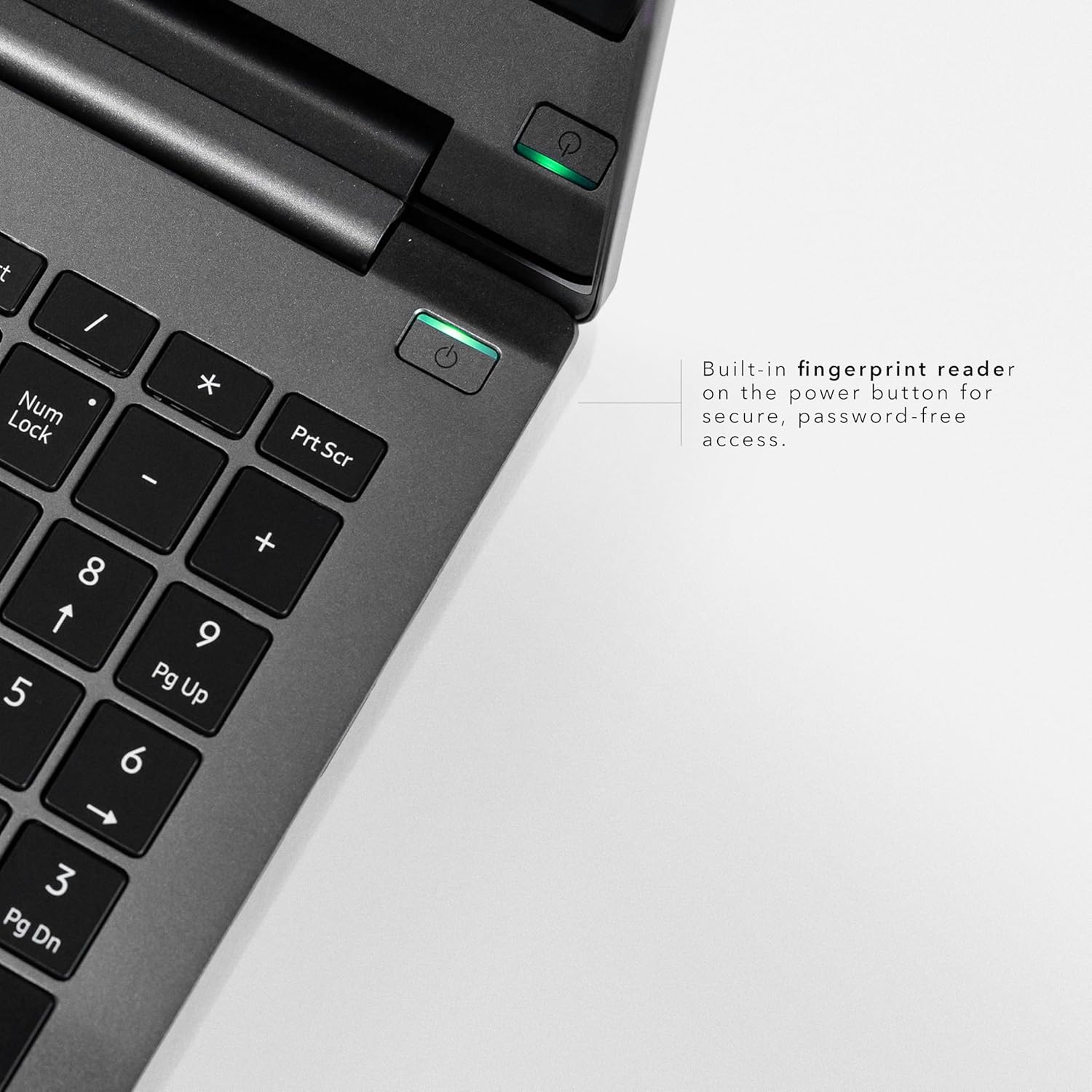
Slika: Detaljna view of the VAIO FS 16-inch Laptop's keyboard area, focusing on the power button with its built-in fingerprint reader for secure, password-free access.
Operating Your VAIO FS Laptop
1. Display and Touch Functionality
The 16-inch Full HD IPS touch display (1920x1200, 300 nits) with a 16:10 aspect ratio offers sharp visuals and more vertical space. Utilize the touch functionality for intuitive navigation and interaction with Windows 11.
2. Tipkovnica i dodirna podloga
The laptop features a spill-resistant backlit keyboard for comfortable typing in various lighting conditions. The precision touchpad supports multi-touch gestures for smooth control.
3. Priključci i povezivost
Your VAIO FS laptop is equipped with a variety of ports for versatile connectivity:
- 2 x USB Type-C Ports with Charge Capability
- 1 x HDMI V.4 with 8K Display Support
- 2 x USB 3.2 Super Speed ports
- 1 x RJ45 Ethernet priključak
- x SD card reader with eMMC Support
- 3.5 mm utičnica za slušalice

Slika: Strana A view of the VAIO FS 16-inch Laptop, clearly labeling its various ports including USB-C, HDMI, USB 3.2, RJ45 Ethernet, and an SD card reader.
4. THX prostorni zvuk
Experience enhanced audio quality with THX Spatial Audio. This technology optimizes sound for immersive listening, 3D audio, and crystal-clear voice capture during calls and streams.

Image: A graphic detailing THX-tuned audio features, including immersive sound, 3D audio optimization, and crystal-clear voice capture, highlighting the audio capabilities of the VAIO FS 16-inch Laptop.
5. AI-Powered Performance
The Intel Meteor Lake H-series CPU with Intel Arc graphics and AI capabilities ensures smooth multitasking and fast performance. The integrated AI features optimize device performance based on usage patterns, enhancing CPU and memory efficiency.
6. Copilot Assistant
Utilize the dedicated Copilot button to quickly launch Microsoft's AI assistant, enhancing your productivity and workflow.
Održavanje
1. Čišćenje prijenosnog računala
Use a soft, lint-free cloth to clean the screen and exterior. For stubborn smudges, lightly dampOperite krpu vodom ili sredstvom za čišćenje ekrana. Izbjegavajte jake kemikalije.
2. Briga o bateriji
To prolong battery life, avoid extreme temperatures and fully discharging the battery frequently. The AI optimizer helps manage battery usage for all-day power.
3. Ažuriranja softvera
Regularly check for and install Windows updates and VAIO driver updates to ensure optimal performance and security.
Rješavanje problema
Uobičajeni problemi i rješenja:
- Laptop se ne uključuje: Provjerite je li adapter za napajanje sigurno spojen i je li utičnica ispravna. Pokušajte s drugom utičnicom.
- Problemi s prikazom: If the screen is blank or flickering, try restarting the laptop. Check external display connections if applicable.
- Problemi s povezivanjem: For Wi-Fi issues, restart your router and the laptop. For wired connections, ensure the Ethernet cable is properly connected.
- Spore performanse: Close unnecessary applications, check for background updates, or restart the laptop. The AI optimizer should help maintain performance.
For further assistance, please refer to the support section or contact VAIO customer service.
Tehnički podaci
| Značajka | Opis |
|---|---|
| Naziv modela | VAIO FS16 Touch |
| Veličina zaslona | 16 inča |
| Razlučivost zaslona | 1920 x 1200 piksela |
| Procesor | Intel Core Ultra 7 (1.4 GHz) |
| OVAN | 16 GB LPDDR5 |
| Tvrdi disk | 1 TB SSD (PCIe Gen 4) |
| Grafička kartica | Intel Arc grafika (integrirana) |
| Operativni sustav | Windows 11 Home |
| Posebne značajke | Backlit Keyboard, Fingerprint Reader, HD Audio, Lightweight, Spill Resistant |
| Prosječno trajanje baterije | 10 sata |
| Težina artikla | 8.1 funti |
| Dimenzije proizvoda | 14.45 x 10.11 x 0.7 inča |
Jamstvo i podrška
Your VAIO FS 16-inch Laptop comes with a manufacturer's warranty. Please refer to the warranty card included in your packaging for specific terms and conditions. For technical support, driver downloads, or service inquiries, please visit the official VAIO support webstranicu ili se obratite njihovoj službi za korisnike.
Mrežna podrška: www.vaio.com/support
Video zapisi proizvoda
VAIO Manufacturing and Durability Testing
Video: This video showcases the rigorous manufacturing process and durability testing that VAIO laptops undergo, ensuring high quality and reliability.
FS16 from VAIO
Video: Kratak pregledview of the VAIO FS16 laptop, highlighting its key features and design.
VAIO SX-R The Best All-Round Laptop You're Not Using!
Video: An in-depth review of the VAIO SX-R laptop, discussing its features, performance, and user experience. While this video refers to the SX-R model, many features and design principles are shared with the FS series.