
1. Uvod
Thank you for choosing the DazzlingStage 60W 9LED RGBW Stage Wall Wash Bar Light. This manual provides essential information for the safe and effective operation of your lighting fixture. Please read it thoroughly before installation and use, and retain it for future reference.
Ovo stage light bar features 9 high-power RGBW LEDs, offering a wide spectrum of colors and dynamic lighting effects suitable for various events and venues.

Slika 1.1: Gotovoview of the DazzlingStage 60W 9LED RGBW Stage Wall Wash Bar Lights in various colors.
2. Sigurnosne upute
- Električna sigurnost: Provjerite je li napajanje voltage matches the specifications of the fixture. Always disconnect power before cleaning, servicing, or moving the unit.
- Montaža: Install the fixture in a well-ventilated area, away from heat sources. Ensure secure mounting to prevent accidental falls.
- Operacija: Do not look directly into the light source when the fixture is operating, as it can cause eye damage. Avoid operating the unit in wet or damp uvjetima.
- Održavanje: Za sve servisne radove obratite se kvalificiranom osoblju. Ne pokušavajte sami popravljati uređaj.
- djeca: Držite uređaj izvan dohvata djece.
3. Sadržaj paketa
Prilikom raspakiranja, molimo provjerite jesu li svi dolje navedeni artikli uključeni i u dobrom stanju:
- DazzlingStage 60W 9LED RGBW Stage Wall Wash Bar Light (x1 per pack)
- Power Cord (x1 per pack)
- Remote Control (x1 per pack)
- Mounting Bracket (x1 per pack)
- Knobs (x2 per pack)
- Black Gaskets (x2 per pack)
- Instruction Manual (x1 per pack)

Slika 3.1: Sadržaj uključen u pakiranje proizvoda.
4. Komponente proizvoda
Familiarize yourself with the main components of the light bar:
- LED niz: 9 RGBW LEDs for color mixing.
- Upravljačka ploča: Features a 4-digit LED display and control buttons (MENU, UP, DOWN, ENTER) for mode selection and parameter adjustment.
- DMX IN/OUT Ports: For connecting to a DMX controller or linking multiple units.
- Ulaz/izlaz napajanja: For power connection and daisy-chaining power to other units.
- Nosač: Adjustable bracket for floor standing or truss mounting.
- Hladnjak: Integrated cooling system to maintain optimal operating temperature.

Image 4.1: Key components and dimensions of the light bar.
5. Postavljanje i instalacija
The DazzlingStage Wall Wash Bar Light offers flexible installation options:
5.1 Montaža nosača
Attach the included mounting bracket to the light bar using the provided knobs and gaskets. Ensure the bracket is securely fastened.
5.2 Mogućnosti smještaja
- Podno stajanje: The bracket allows the light bar to stand upright on a flat surface. Adjust the angle as needed.
- Montaža rešetke: Koristite odgovarajuće clamps (not included) to attach the bracket to a lighting truss. Ensure the truss and clamps can support the weight of the fixture.
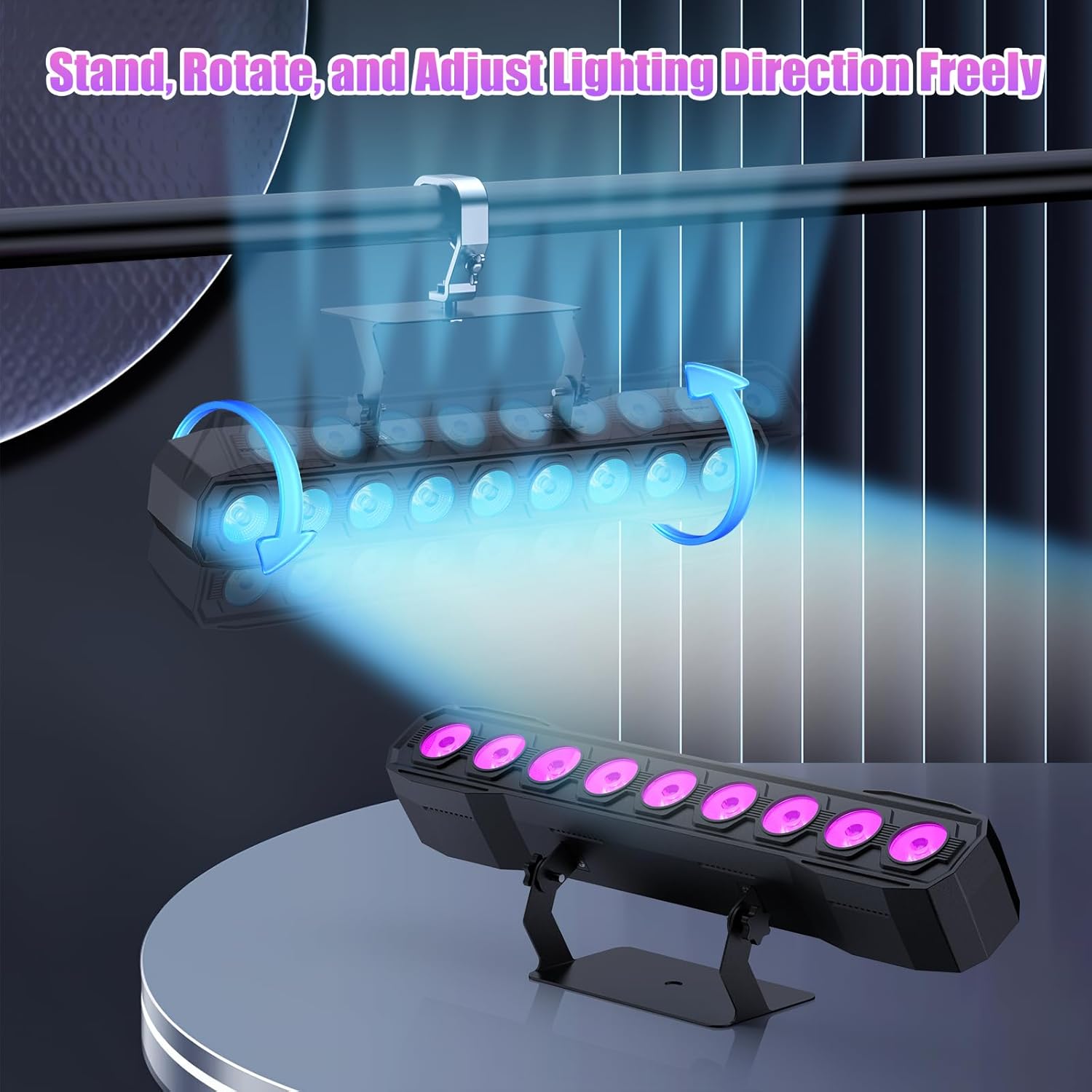
Image 5.1: Illustration of mounting and angle adjustment options.
5.3 Priključak za napajanje
Connect the power cord to the Power IN port on the back of the fixture and then to a suitable power outlet. Multiple units can be daisy-chained using the Power OUT port to simplify wiring for larger setups.
6. Načini rada
The DazzlingStage Wall Wash Bar Light supports several control modes:
- DMX512 kontrola: Za profesionalno upravljanje putem DMX konzole.
- Automatski način rada: Pre-programmed lighting sequences.
- Sound-Activated Control: Lights react to ambient sound.
- Daljinski upravljač: Convenient wireless control using the included remote.
- Način rada Master-Slave: Link multiple units where one acts as a master and others as slaves, synchronizing effects.
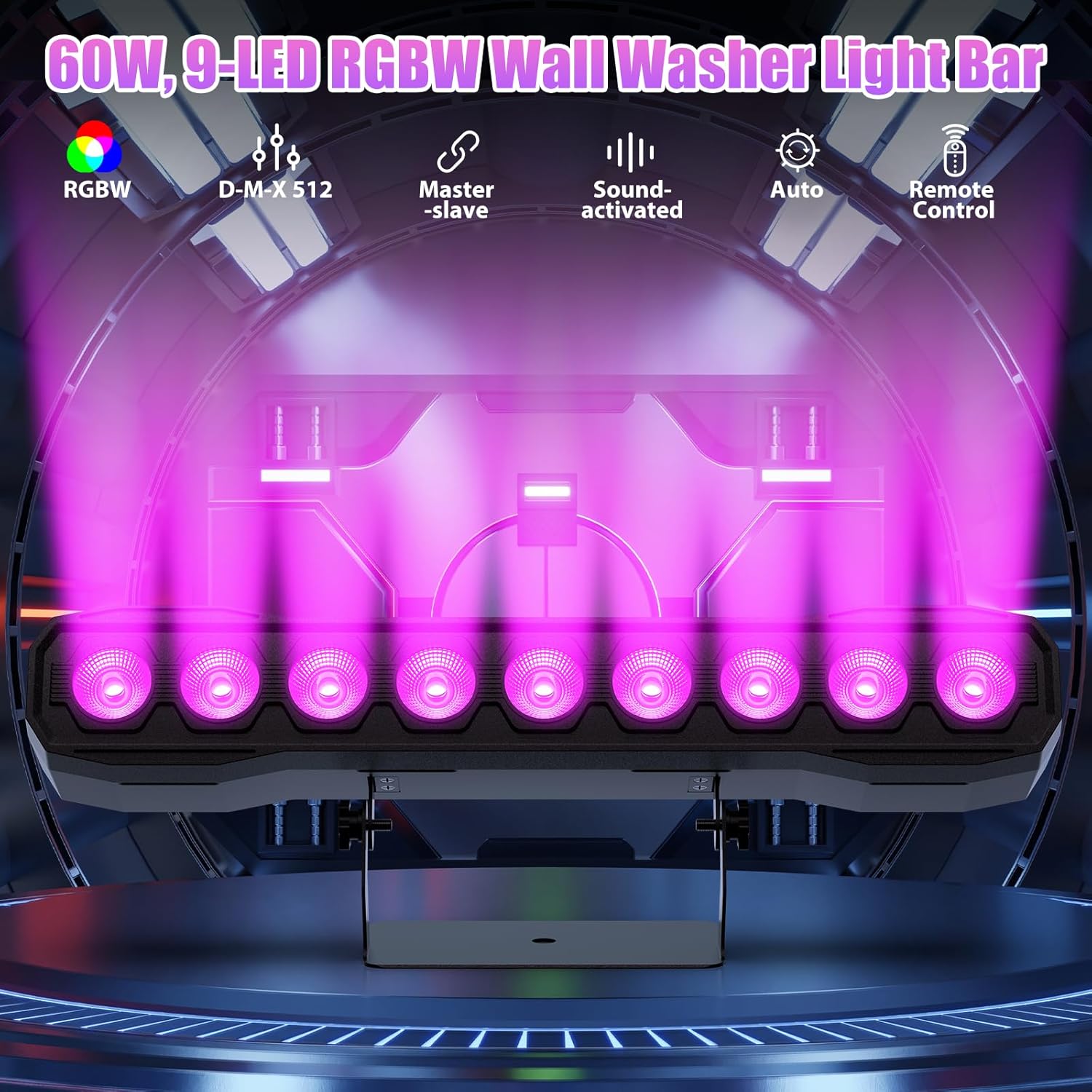
Slika 6.1: Gotovoview of available control modes.
6.1 Display Panel Operation
Use the buttons on the back of the fixture to navigate the menu and select modes:
- IZBORNIK: Kruži kroz opcije glavnog izbornika.
- GORE DOLJE: Adjusts values or navigates sub-menus.
- UNESI: Potvrđuje odabir.
6.2 svjetlosnih efekata
The fixture supports various dynamic effects:
- Miješanje boja: Over 16.7 million color combinations with 0-100% linear dimming.
- Strobe: Flashing effect.
- Skok: Instant color changes.
- Uvenuti: Smooth transitions between colors.
- Puls: Gradual changing effects.
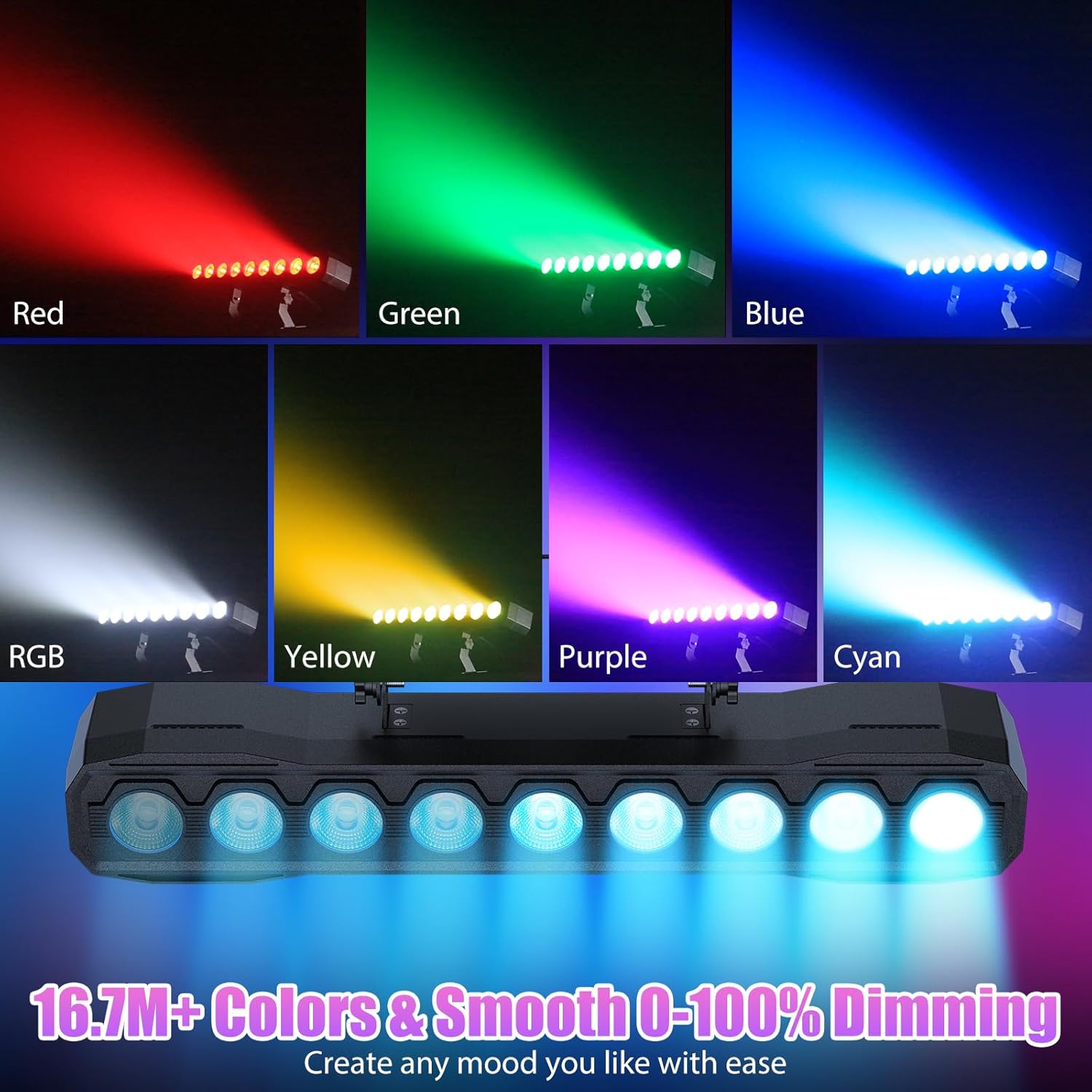
Slika 6.2: Primjeramples of color mixing and dimming capabilities.

Image 6.3: Visual representation of Strobe, Jump, Fade, and Pulse effects.
7. Funkcije daljinskog upravljača
Priloženi daljinski upravljač omogućuje praktičan pristup raznim funkcijama:
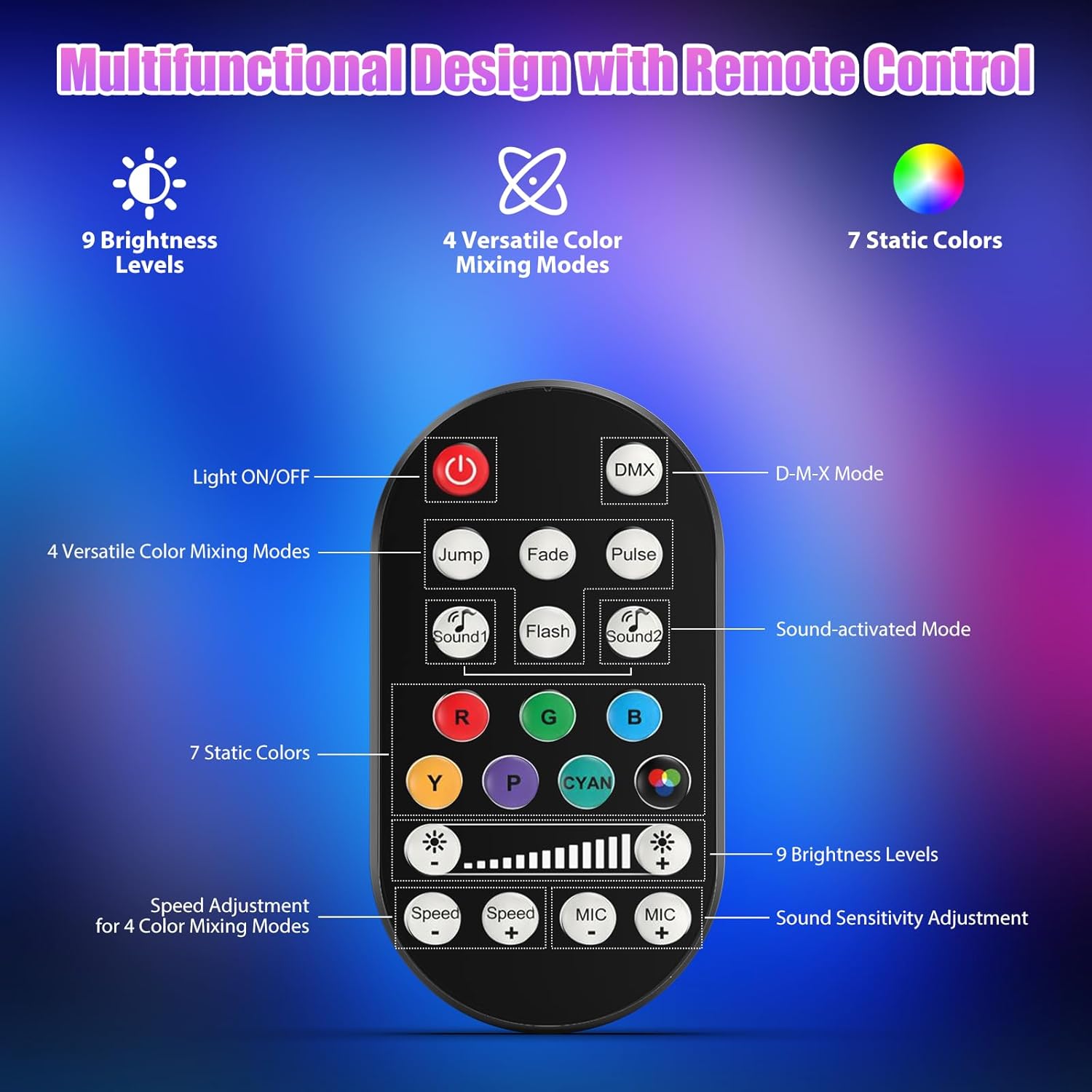
Slika 7.1: Raspored i funkcije daljinskog upravljača.
- Svjetlo UKLJUČENO/ISKLJUČENO: Uključuje ili isključuje jedinicu.
- DMX: Aktivira DMX način upravljanja.
- Jump, Fade, Pulse, Flash: Selects different color mixing modes.
- Sound1, Sound2: Activates sound-activated modes with different sensitivities.
- R, G, B, Y, P, Cyan, White: Selects static colors.
- Razine svjetline: Adjusts the overall intensity of the light (9 levels).
- Brzina +/-: Adjusts the speed of dynamic effects.
- MIKROFONI +/-: Adjusts the sound sensitivity for sound-activated modes (15 levels).
8. DMX512 upravljanje
For advanced control, connect the fixture to a DMX512 controller. The light bar typically uses 4 or 8 DMX channels. Refer to the display panel for DMX address setting and channel assignments.
8.1 Postavljanje DMX adrese
Use the MENU, UP, DOWN, and ENTER buttons on the fixture's display panel to set the DMX starting address. The display will show 'AXXX' where XXX is the address (e.g., A001).
8.2 DMX Channel Functions (Example - 8 Channel Mode)
| Kanal | Funkcija | Raspon vrijednosti | Opis |
|---|---|---|---|
| CH1 | Učitelj Dimmer | 0-255 | Ukupna svjetlina (0% do 100%) |
| CH2 | Intenzitet crvene boje | 0-255 | Red LED brightness (0% to 100%) |
| CH3 | Intenzitet zelene boje | 0-255 | Green LED brightness (0% to 100%) |
| CH4 | Plavi intenzitet | 0-255 | Blue LED brightness (0% to 100%) |
| CH5 | Intenzitet bijele boje | 0-255 | White LED brightness (0% to 100%) |
| CH6 | Strobe/Effect | 0-255 | 0-10: No function; 11-255: Strobe speed (slow to fast) |
| CH7 | Automatski program | 0-255 | Selects and controls speed of built-in auto programs |
| CH8 | Zvuk aktivan | 0-255 | Activates sound mode and adjusts sensitivity |
Tablica 8.1: Nprample DMX Channel Functions (may vary slightly by firmware version).
9. Održavanje
Redovito održavanje osigurava optimalne performanse i produžuje vijek trajanja vašeg uređaja.
- Čišćenje: Periodically clean the lens and housing with a soft, lint-free cloth. Do not use abrasive cleaners or solvents. Ensure the fixture is powered off and cool before cleaning.
- Inspekcija: Redovito provjeravajte kabele za napajanje, DMX kabele i montažni pribor na znakove istrošenosti ili oštećenja. Odmah zamijenite oštećene komponente.
- Skladištenje: When not in use for extended periods, store the fixture in a dry, dust-free environment.
10. Rješavanje problema
Ako naiđete na probleme, pogledajte sljedeće uobičajene probleme i rješenja:
| Problem | Mogući uzrok | Otopina |
|---|---|---|
| Nema struje | Power cable disconnected; No power from outlet; Blown fuse | Check power cable connection; Test outlet with another device; Replace fuse if necessary |
| Nema izlaza svjetla | Dimmer channel at 0%; Incorrect mode selected; DMX signal issue | Increase dimmer level; Select desired operating mode; Check DMX cable and address settings |
| Incorrect colors/effects | Incorrect DMX channel values; Remote control interference | Verify DMX channel settings; Ensure remote is pointed directly at the sensor; Check for other IR interference |
| Način aktiviranja zvukom ne radi | Microphone sensitivity too low; No sound input | Increase MIC sensitivity via remote or display; Ensure sufficient sound is present near the fixture |
| Pregrijavanje učvršćenja | Poor ventilation; Blocked heat sink | Ensure adequate airflow around the unit; Clean any dust or debris from the heat sink fins |
11. Specifikacije
| Značajka | Detalj |
|---|---|
| Marka | DazzlingStage |
| Broj modela | ZQ06190 |
| Izvor svjetlosti | 9 x 60W RGBW LED dioda |
| Miješanje boja | RGBW 4-in-1, 16.7 million colors |
| Zatamnjenje | 0-100% linearno elektroničko zatamnjivanje |
| Kut snopa | Široki kut od 35° |
| Načini upravljanja | DMX512, Auto, Sound-Activated, Remote Control, Master-Slave |
| DMX kanali | 4 or 8 Channels (selectable) |
| Prikaz | 4-znamenkasti LED zaslon |
| Materijal | Akrilonitril butadien stiren (ABS) |
| Dimenzije proizvoda | 18.1 x 5.5 x 5.1 inča (46 x 14 x 13 cm) |
| Težina artikla | cca. 1.98 lbs (0.9 kg) |
| Ulazna snaga | AC 100-240V, 50/60Hz |
| Proizvođač | Shenzhen Zhuoqiong Technology Co., Ltd. |
12. Jamstvo i podrška
DazzlingStage products are designed for reliability and performance. For warranty information, please refer to the terms and conditions provided at the time of purchase or contact your retailer.
If you require technical assistance or have questions not covered in this manual, please contact DazzlingStage customer support through the retailer's platform or the official brand website. Please have your model number (ZQ06190) and purchase details ready when contacting support.