
1. Uvod
Thank you for choosing the T-Wolf T61 60% Wired Mechanical Gaming Keyboard. This manual provides detailed instructions for setting up, operating, and maintaining your keyboard to ensure optimal performance and longevity. Please read this manual carefully before using the product.
2. Proizvod je gotovview
2.1 Ključne značajke
- Mehanički prekidači: Delivers precise tactile feedback and long-lasting performance.
- Žičana USB veza: Stable USB 2.0 plug-and-play interface; no drivers required.
- 60% Kompaktni raspored: Functional design that saves space while maintaining key usability.
- Multi-Key Rollover: Supports simultaneous key presses without input errors, ensuring precise performance during intense typing or gaming sessions.
- RGB pozadinsko osvjetljenje: Customizable vibrant RGB backlighting for enhanced aesthetics.
- Tihi rad: Moderate sound level suitable for various environments.
- Dizajn otporan na prolijevanje: Helps protect against light spills (not waterproof).
2.2 Sadržaj paketa
- 1 x T-Wolf T61 60% Wired Mechanical Gaming Keyboard
- 1 x Korisnički priručnik (ovaj dokument)
2.3 Dijagram tipkovnice
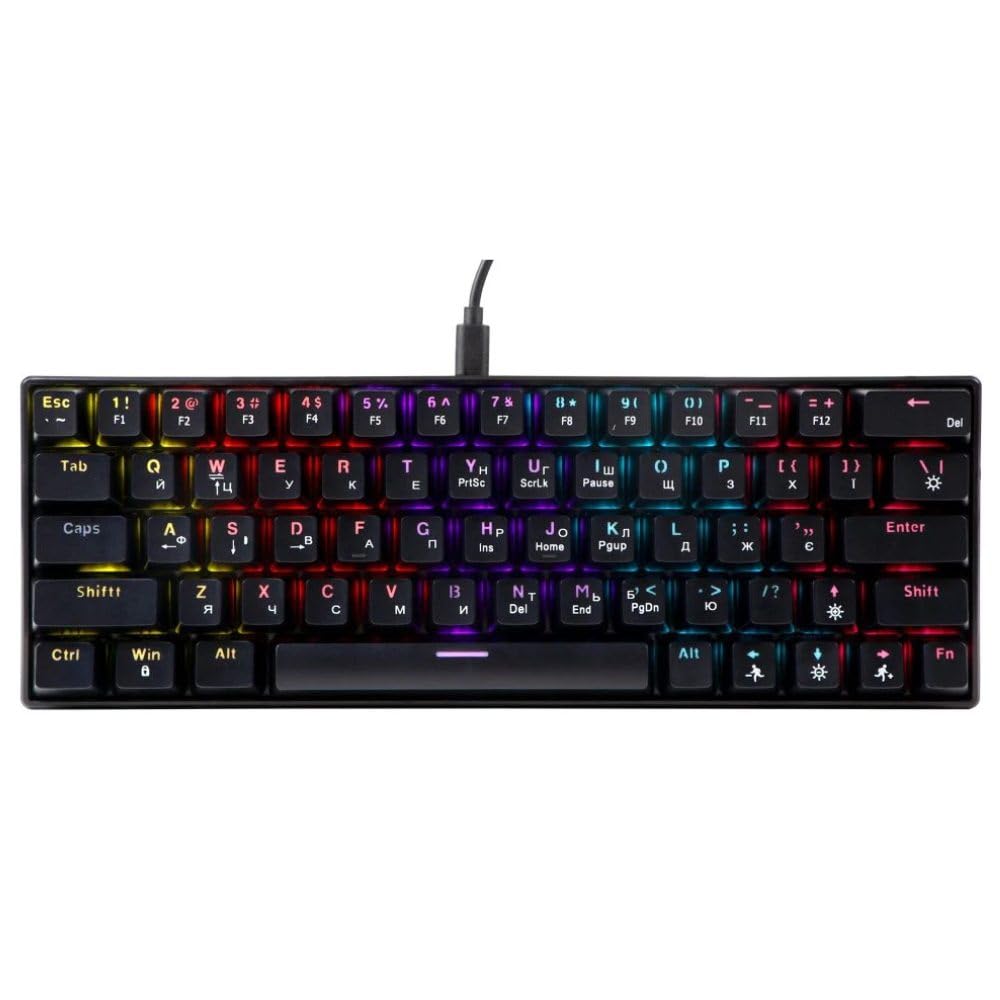
An image showing the T-Wolf T61 60% Wired Mechanical Gaming Keyboard, highlighting its compact layout and design.
3. Postavljanje
- Raspakirajte tipkovnicu: Pažljivo izvadite tipkovnicu i sav pribor iz pakiranja.
- Povežite se sa svojim uređajem: Locate an available USB port on your computer (PC, laptop) or gaming console. Insert the USB connector of the T-Wolf T61 keyboard into the USB port.
- Automatska instalacija upravljačkih programa: The keyboard is plug-and-play. Your operating system will automatically detect and install the necessary drivers. This process may take a few moments.
- Spremno za upotrebu: Once the drivers are installed, the keyboard is ready for immediate use.
4. Upute za rad
The T-Wolf T61 keyboard functions as a standard QWERTY layout keyboard. Its 60% compact design means some functions are accessed via key combinations.
4.1 Upravljanje RGB pozadinskim osvjetljenjem
The keyboard features customizable RGB backlighting. Specific key combinations are used to change lighting modes and effects. Refer to the keyboard's function layer markings for exact controls, typically involving the Fn key combined with other keys (e.g., Fn + \| for mode changes, Fn + [{ or Fn +]} for brightness/speed adjustments).
- Promjena načina osvjetljenja: Pritisnite Fn + \| za cikličko prebacivanje između različitih RGB svjetlosnih efekata.
- Podešavanje svjetline: Koristiti Fn + [{ smanjiti svjetlinu i Fn +]} za povećanje svjetline.
- Podešavanje brzine: Koristiti Fn +;: smanjiti brzinu učinka i Fn + '" za povećanje brzine učinka.
4.2 Multi-Key Rollover
The T61 keyboard supports multi-key rollover, allowing multiple keys to be pressed simultaneously without ghosting or missed inputs. This feature is particularly beneficial for fast typing and complex gaming commands.
5. Održavanje
Pravilno održavanje osigurava dugotrajnost i performanse vaše tipkovnice.
- Čišćenje: Use a soft, dry cloth to wipe the surface of the keyboard. For deeper cleaning, use a can of compressed air to remove dust and debris from between the keycaps. For stubborn dirt, a slightly damp cloth with a mild cleaning solution can be used, ensuring no liquid enters the keyboard.
- Dizajn otporan na prolijevanje: While the keyboard features a spill-resistant design to protect against light spills, it is nije vodootporan. In case of a spill, immediately disconnect the keyboard from your device, gently wipe away any liquid, and allow it to air dry completely before reconnecting.
- Skladištenje: Tipkovnicu čuvajte na hladnom i suhom mjestu, dalje od izravne sunčeve svjetlosti i ekstremnih temperatura.
6. Rješavanje problema
If you encounter issues with your T-Wolf T61 keyboard, please refer to the following common solutions:
- Tipkovnica ne reagira:
- Provjerite je li USB kabel sigurno spojen i na tipkovnicu i na vaš uređaj.
- Pokušajte spojiti tipkovnicu na drugi USB priključak.
- Test the keyboard on another computer to rule out a device-specific issue.
- Ponovno pokrenite računalo.
- RGB pozadinsko osvjetljenje ne radi/neispravno je:
- Provjerite je li tipkovnica ispravno uključena.
- Cycle through the RGB modes using the designated key combinations (e.g., Fn + \|).
- Adjust brightness settings (e.g., Fn + [{ / Fn +]}).
- Tipke se ne registriraju ili se tipkaju dvaput:
- Clean the affected keycap and switch area using compressed air to remove any debris.
- Ensure no software conflicts are present (e.g., other keyboard drivers or utilities).
Ako problem i dalje postoji nakon što ste isprobali ove korake, obratite se korisničkoj podršci.
7. Specifikacije
| Značajka | Opis |
|---|---|
| Marka | T-WOLF |
| Model | T61 |
| Tehnologija povezivanja | Žičani USB |
| Opis tipkovnice | Mehanički |
| Broj tipki | 65 |
| Raspored tipkovnice | QWERTY |
| Posebne značajke | RGB Backlit, Multi-Key Rollover, Low-Noise Operation, Spill-Resistant Design |
| Kompatibilni uređaji | PC, laptop, gaming consoles |
| Materijal | Metal, Plastika |
| Boja | Crna |
| Zemlja podrijetla | Kina |
8. Jamstvo i podrška
The T-Wolf T61 keyboard comes with a standard manufacturer's warranty. Please refer to the warranty card included with your purchase or contact your retailer for specific warranty terms and conditions.
For technical support, troubleshooting assistance, or warranty claims, please contact the retailer where you purchased the product or visit the official T-Wolf webmjesto za resurse podrške.