
Uvod
This manual provides instructions for the setup, operation, maintenance, and troubleshooting of your ATTACK SHARK V5 Wireless Gaming Mouse. Please read this manual carefully before using the product to ensure optimal performance and longevity.

Image: The ATTACK SHARK V5 Wireless Gaming Mouse, highlighting its 8000Hz wireless polling rate capability.
Postavljanje
Sadržaj paketa
- ATTACK SHARK V5 Wireless Gaming Mouse
- USB prijemnik (2.4 GHz)
- USB-C kabel za punjenje/podatkovni kabel
- korisnički priručnik
Načini povezivanja
The ATTACK SHARK V5 mouse supports three connectivity modes: Wired, 2.4GHz Wireless, and Bluetooth.
- 2.4GHz bežični način rada: Insert the USB receiver into an available USB port on your computer. The mouse will automatically connect. The transparent LED lighting on the receiver indicates connection status.
- Bluetooth način rada: Switch the mouse to Bluetooth mode. On your computer or device, search for Bluetooth devices and select "ATTACK SHARK V5" to pair.
- Ožičeni način: Connect the mouse to your computer using the provided USB-C cable. This mode also charges the mouse.

Image: The ATTACK SHARK V5 mouse connected via its USB-C cable and showing the 2.4GHz wireless receiver, illustrating its triple-mode connectivity.
Instalacija upravljačkog programa
The mouse supports cloud-driven technology, which automatically identifies devices upon connection. For advanced customization, independent driver software is available for download from the official ATTACK SHARK website. This software allows for optimization of response speed, accuracy, and programmable features.
Upute za rad
Podešavanje DPI
The PixArt 3950MAX sensor offers a DPI range of up to 42,000. DPI settings can be adjusted in precise 50 DPI increments using the dedicated driver software. The mouse typically has a DPI button for on-the-fly adjustments through preset levels.
Polling Rate
The mouse features an 8000Hz polling rate in wireless mode and a 1000Hz polling rate in wired mode. This high polling rate ensures rapid and responsive cursor movement.
Programmable Buttons and Macros
The ATTACK SHARK V5 has 6 buttons. Utilize the downloadable software to customize button functions, create macros, and adjust other settings such as DPI speed and lighting effects. This software provides a comprehensive interface for personalizing your mouse experience.
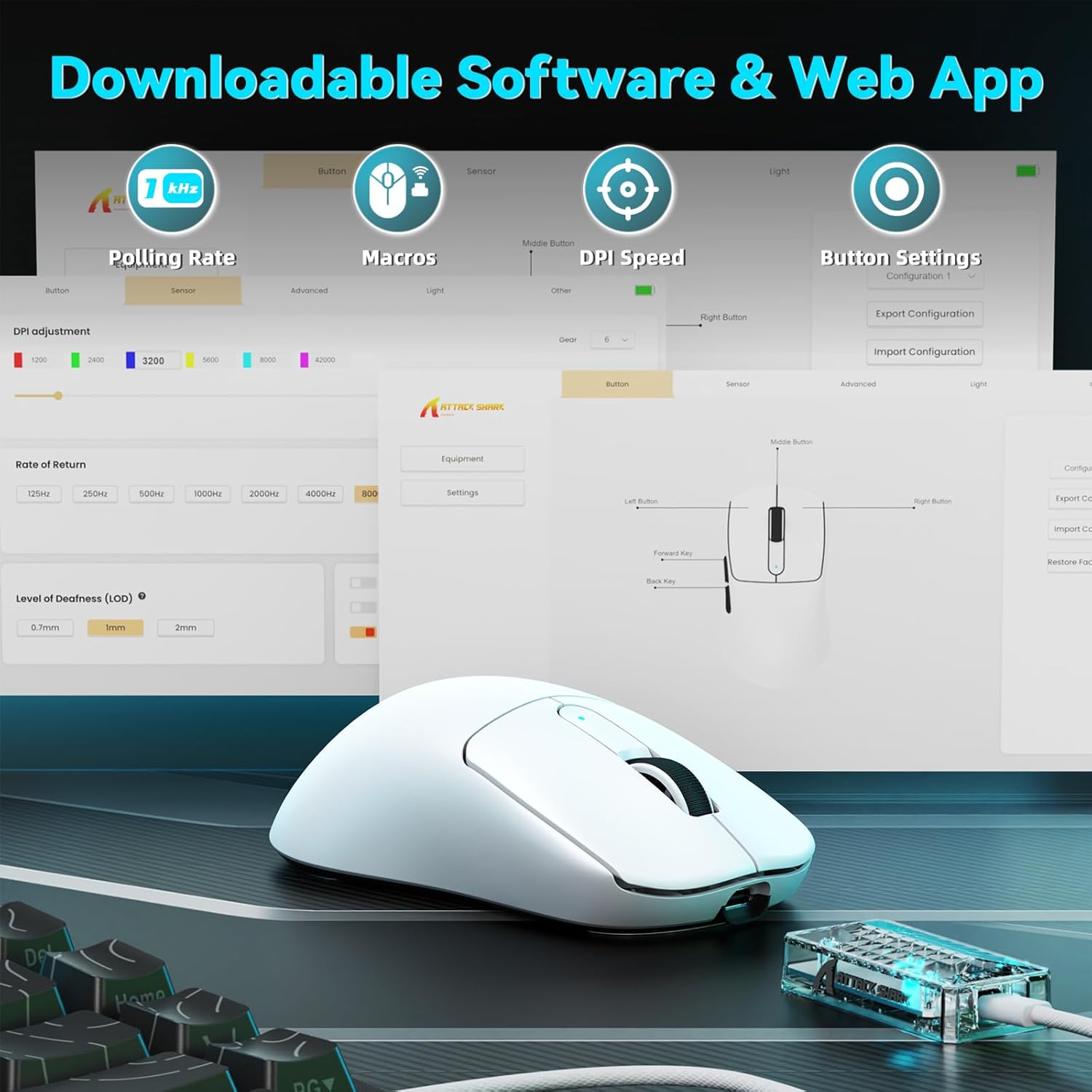
Image: A visual representation of the downloadable software interface, showing options for polling rate, macros, DPI speed, and button settings.
Upravljanje baterijom
The mouse is equipped with a 500mAh battery, providing extended usage. To charge, connect the mouse using the USB-C cable. The LED indicator on the mouse will show charging status.

Slika: Interni view of the ATTACK SHARK V5 mouse, highlighting its high-capacity 500mAh battery.
Održavanje
Čišćenje
Za održavanje optimalnih performansi i izgleda, redovito čistite miš. Za brisanje površine koristite meku, suhu krpu. Za tvrdokornu prljavštinu, laganoamp Može se koristiti krpa, pazeći da vlaga ne uđe u unutarnje komponente. Izbjegavajte jake kemikalije ili abrazivne materijale.
Nano Ice-Sense Coating
The mouse features a nano ice-sense coating designed to prevent slippage and ensure a firm grip, even during extended use or with sweaty hands. This coating requires no special maintenance beyond regular cleaning.
Rješavanje problema
Miš ne reagira
- Provjerite povezanost: Ensure the USB receiver is properly inserted for 2.4GHz mode, or that the USB-C cable is securely connected for wired mode. For Bluetooth, verify the mouse is paired and selected in your device's Bluetooth settings.
- Razina baterije: If in wireless mode, check the mouse's battery level. Connect the USB-C cable to charge if the battery is low.
- Ponovno pokretanje: Pokušajte ponovno pokrenuti računalo ili uređaj.
- Vozač: Ensure the necessary drivers are installed and up to date.
Inconsistent Tracking or Lag
- Površinski: Use the mouse on a clean, uniform surface. Avoid highly reflective or transparent surfaces.
- smetnje: For wireless modes, ensure there are no strong sources of wireless interference nearby (e.g., other 2.4GHz devices, Wi-Fi routers).
- DPI postavke: Adjust DPI settings via the software to find a comfortable and stable tracking speed.
Tehnički podaci
| Značajka | Detalj |
|---|---|
| Marka | NAPADAJ MORSKI PAS |
| Model | V5 |
| Boja | Bijela |
| Povezivost | Žičano (USB-C), bežično 2.4 GHz, Bluetooth |
| Senzor | PixArt 3950MAX |
| Raspon DPI-ja | Up to 42,000 (50 DPI adjustable) |
| Stopa bežičnog pozivanja | 8000 Hz |
| Brzina žičanog anketiranja | 1000 Hz |
| Težina | Otprilike 55 grama |
| Prekidači | Optical, 100 million click lifespan |
| Ubrzanje | 60G |
| Koder | Richwell's 200W |
| Kapacitet baterije | 500 mAh |
| Broj gumba | 6 |
| Orijentacija ruke | Pravo |
| Kompatibilni operativni sustavi | Windows, macOS, Linux (e.g., Mac OS 14 Sonoma, Ubuntu 22.04 Jammy Jellyfish, Windows 11) |
| Bežični raspon | 10 metara |
| Materijal | Plastični |
| UPC | 752010843312 |
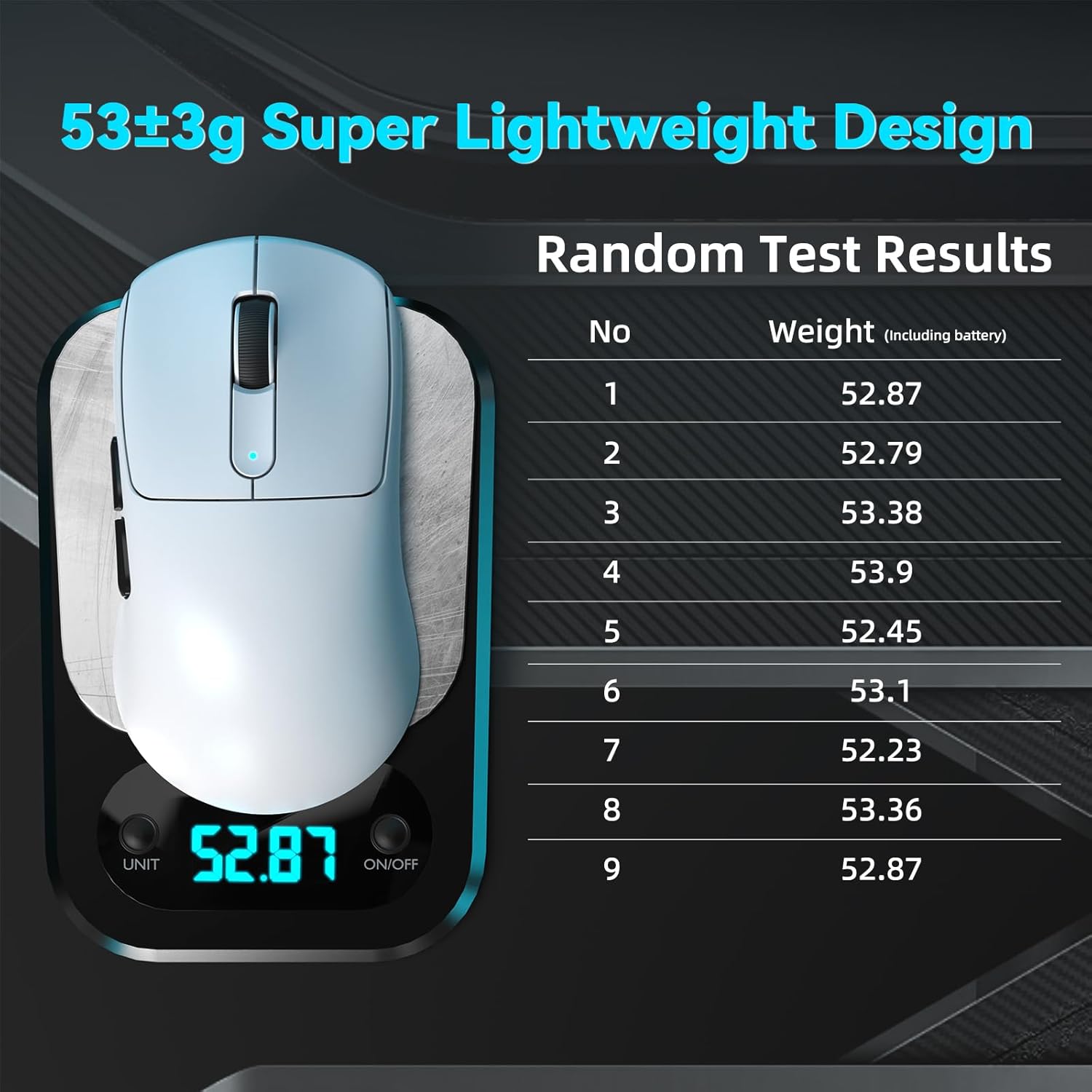
Image: The ATTACK SHARK V5 mouse on a digital scale, demonstrating its ultra-lightweight design at approximately 53 grams.

Slika: Detaljna view of the Omron Optical Microswitch used in the ATTACK SHARK V5 mouse, known for its durability and precise clicks.
Jamstvo i podrška
Informacije o jamstvu
The ATTACK SHARK V5 Wireless Gaming Mouse comes with a 1-godišnje jamstvo proizvođačaOvo jamstvo pokriva nedostatke u materijalu i izradi pri normalnoj uporabi. Molimo sačuvajte dokaz o kupnji za potrebe jamstvenog zahtjeva.
Korisnička podrška
For technical assistance, troubleshooting, or warranty inquiries, please visit the official ATTACK SHARK website or contact their customer support directly. Refer to the product packaging or the official webstranicu za najnovije kontaktne podatke.