
1. Uvod
This manual provides essential information for the NIMO 15.6" Gaming Laptop (Model N159). It covers product features, setup procedures, operating instructions, maintenance guidelines, troubleshooting tips, and detailed specifications. Please read this manual thoroughly before using your new laptop to ensure optimal performance and longevity.

Image: The NIMO 15.6" Gaming Laptop, showcasing its display and key features like fingerprint unlock, Type-C PD charger, and backlit keyboard.
2. Što je u kutiji
Provjerite jesu li svi artikli prisutni u pakiranju:
- 1 x NIMO N159 Laptop
- 1 x Type-C 100W PD Fast Charger
- 1 x Korisnički priručnik (ovaj dokument)
- Windows 11 Home Operating System (pre-installed)
- Warranty Information (2 Years Warranty, 90 Days Return)
3. Proizvod je gotovview
3.1 Ključne značajke
- Procesor: AMD Ryzen 7 7735HS (8 jezgri, 16 niti, do 4.75 GHz)
- Grafika: Integrated AMD Radeon 680M GPU
- Prikaz: 15.6" Full HD (1920x1080) IPS Anti-Glare Display
- Memorija: 16 GB DDR5 RAM-a (mogućnost nadogradnje)
- Skladištenje: 1TB PCIe 4.0 SSD (upgradeable)
- Punjenje: 100W Type-C PD Fast Charger
- Sigurnost: Fingerprint Reader for secure unlock
- Tipkovnica: Pozadinsko osvjetljena tipkovnica s numeričkom tipkovnicom
- Audio: Dual 2W stereo speakers, dual beamforming microphones
- Webkamera: 2MP with physical camera shutter
- Operativni sustav: Windows 11 Home

Image: An illustration detailing the AMD Ryzen 7 7735HS processor, highlighting its 8 cores, 16 threads, and integrated Radeon 680M graphics for balanced performance.
3.2 Priključci i priključci
Familiarize yourself with the available ports on your NIMO laptop:

Image: A detailed diagram illustrating the location and type of ports on the NIMO laptop, including USB 2.0, USB 3.2 Gen1, Type-C Gen2 (multifunction), HDMI 2.0, Audio Jack, Micro SD Reader, and Kensington Lock.
- USB 2.0 priključak: Za spajanje starijih USB uređaja.
- USB 3.2 Gen1 Ports (x4): Za brzi prijenos podataka s kompatibilnim USB uređajima.
- Type-C Gen2 Ports (x2, Multifunction): Supports data transfer, video output, and power delivery (100W PD fast charging).
- HDMI 2.0 priključak: Za spajanje na vanjske zaslone ili televizore.
- Audio priključak: Za spajanje slušalica ili vanjskih zvučnika.
- Čitač mikro SD kartica: Za čitanje Micro SD memorijskih kartica.
- Utor za Kensington Lock: Za osiguranje vašeg prijenosnog računala kompatibilnom bravom.
4. Postavljanje
4.1 Početno uključivanje
- Izvadite laptop i svu dodatnu opremu iz kutije.
- Connect the 100W Type-C PD Fast Charger to one of the Type-C ports on the laptop and then to a power outlet.
- Otvorite poklopac prijenosnog računala. Prijenosno računalo se može automatski uključiti ili ćete možda morati pritisnuti gumb za uključivanje/isključivanje.
- Slijedite upute na zaslonu da biste dovršili postavljanje sustava Windows 11 Home, uključujući odabir jezika, mrežnu vezu i stvaranje korisničkog računa.
4.2 Punjenje baterije
Before first use, it is recommended to fully charge the laptop battery. The 100W Type-C PD Fast Charger can provide approximately 5 hours of usage time with just 1 hour of charging.

Image: A visual representation of the 100W Type-C lightning-fast charger connected to the NIMO laptop, demonstrating its ability to charge quickly and efficiently.
5. Upute za rad
5.1 Uključivanje/isključivanje i način rada za spavanje
- Uključivanje: Pritisnite gumb za napajanje koji se nalazi na tipkovnici.
- Isključivanje: Kliknite gumb Start u sustavu Windows, a zatim odaberite Napajanje > Isključi.
- Stanje mirovanja: Kliknite gumb Start, a zatim odaberite Napajanje > Stanje mirovanja ili zatvorite poklopac prijenosnog računala.
5.2 Using the Fingerprint Unlock
The fingerprint reader is integrated into the touchpad for quick and secure access.
- During Windows setup or later in Windows Settings, configure your fingerprint for login.
- To unlock, simply place your registered finger on the fingerprint reader on the touchpad.
5.3 Adjusting the Backlit Keyboard
The keyboard backlight can be adjusted for comfortable typing in various lighting conditions.

Image: A visual guide demonstrating the fingerprint unlock feature on the touchpad and the functionality of the backlit keyboard, including how to cycle through brightness settings using the F9 key.
- Pritisnite tipku F9 key to cycle through backlight settings:
- 1 Tap: Light (Temporary)
- 2 Taps: Light (Temporary)
- 3 Taps: Light (Constant)
- 4 Taps: Off
5.4 Korištenje Webcam Shutter
For privacy, the laptop includes a physical camera shutter.
- Slide the shutter to the left to open the camera.
- Slide the shutter to the right to close and cover the camera lens.

Image: A visual guide demonstrating the physical camera shutter, showing both the 'Camera Open' and 'Camera Close' statuses for enhanced privacy.
6. Održavanje
6.1 Čišćenje prijenosnog računala
- Always power off the laptop and disconnect the charger before cleaning.
- Koristite mekanu krpu koja ne ostavlja dlačice dampoprano vodom ili sredstvom za čišćenje ekrana.
- Za tipkovnicu i kućište koristite meku, suhu krpu. Izbjegavajte jake kemikalije ili abrazivne materijale.
- Povremeno koristite komprimirani zrak za uklanjanje prašine iz ventilacijskih otvora.
6.2 Njega baterija
- Izbjegavajte često potpuno pražnjenje baterije.
- Prijenosno računalo čuvajte na hladnom i suhom mjestu ako ga ne koristite dulje vrijeme.
- Ne izlažite laptop ekstremnim temperaturama.
6.3 Ažuriranja softvera
Redovito provjeravajte i instalirajte ažuriranja operacijskog sustava i upravljačkih programa kako biste osigurali optimalne performanse i sigurnost.
7. Rješavanje problema
| Problem | Mogući uzrok | Otopina |
|---|---|---|
| Laptop se ne uključuje. | Problem s slabo napunjenom baterijom ili adapterom za napajanje. | Connect the charger and wait a few minutes before attempting to power on. Ensure the charger is properly connected to both the laptop and the power outlet. |
| Zaslon je prazan ili crn. | Prijenosno računalo u stanju mirovanja, problem s postavkama zaslona ili problem s hardverom. | Press any key or the power button to wake from sleep. Try connecting an external monitor to check if the display output works. Restart the laptop. |
| Pozadinsko osvjetljenje tipkovnice ne radi. | Backlight turned off or at lowest setting. | Pritisnite tipku F9 key repeatedly to cycle through brightness levels and turn on the backlight. |
| Fingerprint unlock not working. | Finger not properly placed, or sensor issue. | Ensure your finger is clean and dry and covers the sensor completely. Re-register your fingerprint in Windows Settings if the issue persists. |
| Spore performanse. | Too many applications running, insufficient storage, or outdated drivers. | Close unnecessary applications. Check available storage space. Update Windows and device drivers. |
If you encounter issues not listed here or require further assistance, please contact NIMO customer support.
8. Specifikacije
| Marka | NIMO |
| Naziv modela | NIMO N159B |
| Veličina zaslona | 15.6 inča |
| Razlučivost zaslona | 1920 x 1080 piksela (FHD IPS) |
| Procesor | AMD Ryzen 7 7735HS (8 Cores, 4.75 GHz Max Turbo) |
| OVAN | 16 GB DDR5 (4800 MHz) |
| Tvrdi disk | 1024 GB SSD (PCIe 4.0) |
| Grafički koprocesor | AMD Radeon 680M (integrirana) |
| Operativni sustav | Windows 11 Home |
| Bežična vrsta | 802.11a/b/g/n/ac |
| USB 2.0 priključci | 1 |
| USB 3.0 priključci | 4 |
| Prosječno trajanje baterije | 5 Hours (54Wh, 11.4V/4700mAh) |
| Težina artikla | 3.8 funti |
| Dimenzije proizvoda | 14.07 x 8.98 x 0.76 inča |
| Boja | Plava |
| Stražnji Webrezolucija kamere | 2 MP |
| Posebne značajke | Backlit Keyboard, Fingerprint Reader, HD Audio, Numeric Keypad |
9. Jamstvo i podrška
9.1 Jamstvo proizvođača
Your NIMO N159 laptop is covered by a comprehensive 2-godišnje jamstvo proizvođača from Nimo Direct Inc. This warranty covers defects in materials and workmanship under normal use. For warranty claims, please contact customer support.
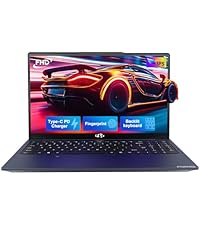
Image: A technician working on a laptop's internal components, representing the 2-year support provided for Nimo products.
9.2 Politika povrata
Nimo Direct Inc. offers a 90-Day Hassle-Free Return Policy. You may return any Nimo product for any reason within 90 days of purchase. Please refer to your purchase documentation for specific return procedures.
Image: A delivery person handing a package to a customer, illustrating the 90-day return policy for Nimo products.
9.3 Korisnička podrška
For any product-related questions, technical assistance, or warranty claims, please contact our professional after-sales service team. Our dedicated support team is available to resolve issues or facilitate replacements.
- Email: service@nimopc.com
- Online: Visit the official NIMO website or product page for contact options.
Image: Customer service representatives wearing headsets, indicating professional customer assistance available via phone and live chat.