
Uvod
Hvala na kupnjiasing the Anker Soundcore P31i True Wireless Earbuds. This manual provides detailed instructions on how to set up, operate, and maintain your earbuds to ensure optimal performance and longevity. Please read this manual carefully before use and retain it for future reference.
Što je uključeno
Your Soundcore P31i package includes the following items:
- Soundcore P31i Earbuds (Left and Right)
- Kutija za punjenje
- Ear Tips (XS, S, M, L - M size pre-installed)
- Kabel za punjenje od USB-C do USB-A
- Kratki vodič za početak
- Sigurnosni priručnik
Proizvod gotovview
The Soundcore P31i earbuds are designed for comfort and high-quality audio. Each earbud features a touch control area and an indicator light. The charging case protects the earbuds and provides additional battery life.
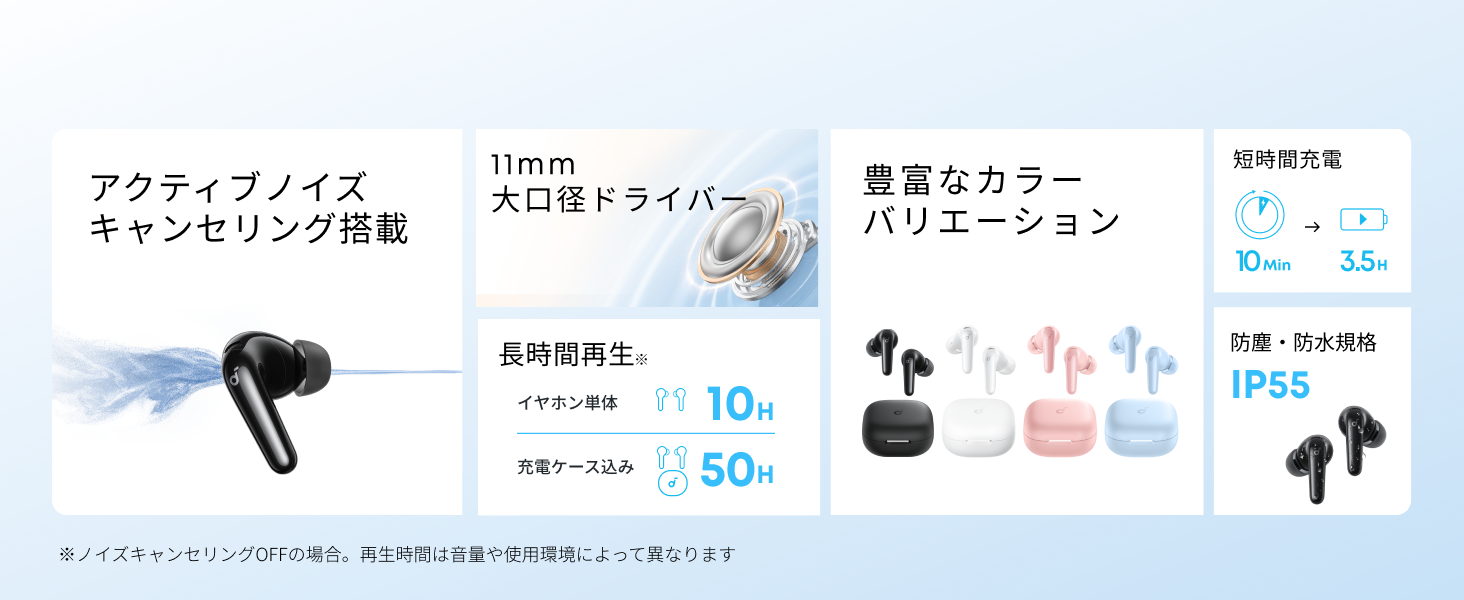
Diagram showing the Soundcore P31i earbuds and charging case with key components labeled.
slušalice: Each earbud is equipped with an 11mm dynamic driver for powerful bass and clear sound. They feature active noise cancellation and AI noise reduction for calls. The ergonomic design ensures a secure and comfortable fit.
Kutija za punjenje: The compact charging case not only stores and protects your earbuds but also recharges them on the go. It has a USB-C charging port and a strap hole for portability.
Punjenje vaših slušalica i kućišta
Prije prve upotrebe, potpuno napunite i slušalice i kutijicu za punjenje.
- Punjenje slušalica: Place the earbuds into the charging case. The indicator lights on the earbuds will show charging status.
- Punjenje kućišta: Connect the charging case to a power source using the provided USB-C to USB-A cable. A full charge for the case and earbuds takes approximately 3 hours.
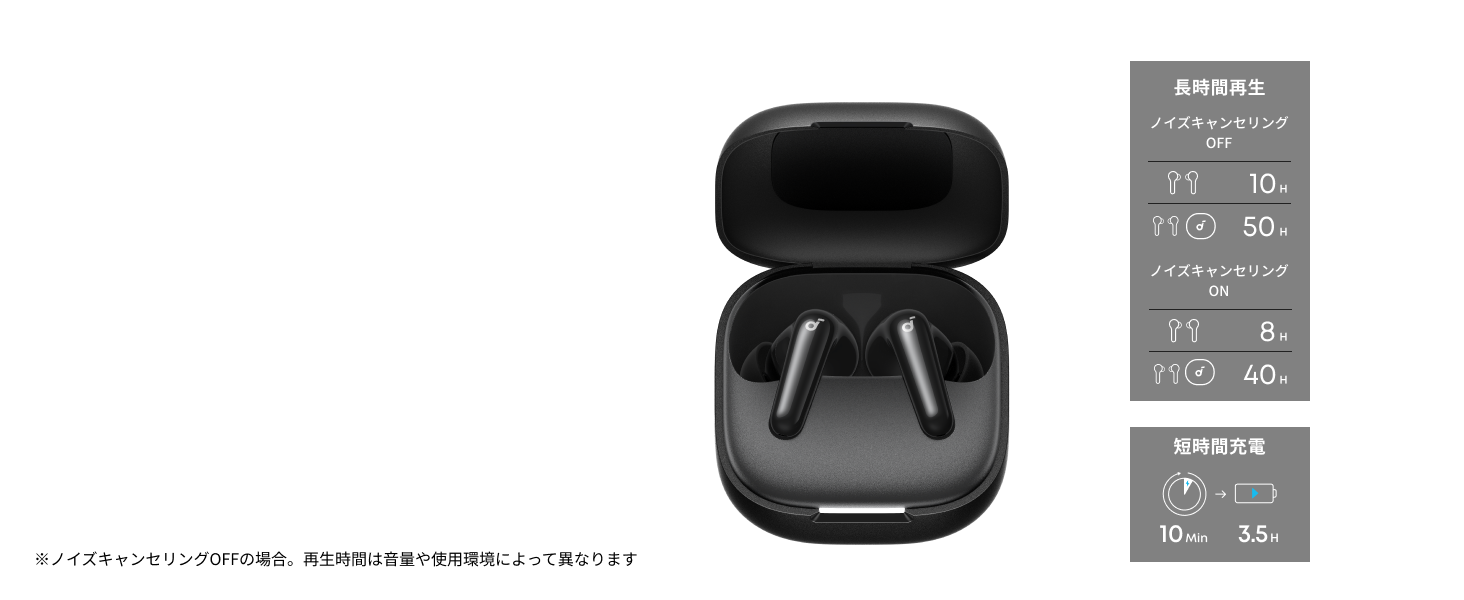
Diagram illustrating charging times and playback duration for Soundcore P31i earbuds.
Trajanje baterije:
- Up to 10 hours of playback on a single charge (earbuds only).
- Do 50 sati ukupne reprodukcije s kutijicom za punjenje.
- A quick 10-minute charge provides up to 3.5 hours of listening time.
Note: Playback time varies depending on volume level and audio content.
Nošenje slušalica
For optimal sound quality and comfort, it is important to wear your earbuds correctly.
- Odaberite desne vrhove za uši: Select the ear tips that provide the best seal and comfort for your ears. Experiment with different sizes (XS, S, M, L) to find the perfect fit.
- Umetnite slušalice: Pažljivo umetnite slušalice u ušne kanale.
- Okrenite za učvršćivanje: Twist the earbuds slightly until they fit snugly and securely in your ears.

Image showing a person wearing the Soundcore P31i earbuds correctly.
Uparivanje Bluetooth veze
Follow these steps to pair your Soundcore P31i earbuds with your device:
- Prvo uparivanje:
- Open the charging case. The earbuds will automatically enter Bluetooth pairing mode. The indicator lights on the earbuds will flash white.
- Na svom uređaju (pametnom telefonu, tabletu itd.) idite na postavke Bluetootha.
- Select "Soundcore P31i" from the list of available devices.
- Once connected, the indicator lights on the earbuds will turn solid white for 1 second and then turn off.
- Uparivanje s drugim uređajem:
- Stavite slušalice u kutijicu za punjenje i ostavite poklopac otvoren.
- Press and hold the button on the charging case for 3 seconds until the earbud indicator lights flash white rapidly.
- Repeat steps 2 and 3 from "First-Time Pairing" on your new device.
Kontrole
The Soundcore P31i earbuds feature touch controls for managing playback, calls, and other functions. Specific control configurations can often be customized via the Soundcore app.
General Touch Controls (Default):
- Reproduciraj/pauziraj: Jednom dodirnite bilo koju slušalicu.
- Sljedeća pjesma: Dvaput dodirnite desnu slušalicu.
- Prethodni zapis: Dvaput dodirnite lijevu slušalicu.
- Odgovori/prekini poziv: Jednom dodirnite bilo koju slušalicu.
- Odbij poziv: Pritisnite i držite bilo koju slušalicu 2 sekunde.
- Aktiviranje glasovnog asistenta: Triple-tap either earbud (may vary).
- Prebacivanje između ANC/transparentnog načina rada: Press and hold the right earbud for 2 seconds (may vary).
For detailed and customizable controls, please refer to the Soundcore app or the included Quick Start Guide.
Aktivno potiskivanje buke (ANC)
The Soundcore P31i earbuds feature Active Noise Cancelling technology to minimize ambient noise, allowing for an immersive listening experience.

Illustration demonstrating the active noise cancelling feature of the Soundcore P31i earbuds.
ANC detects and reduces various types of noise, such as engine hum on trains or buses, and chatter in cafes. This allows you to enjoy your music or podcasts with greater clarity and fewer distractions.
To switch between ANC, Normal, and Transparency modes, use the touch controls on the earbuds or adjust settings within the Soundcore app.
Kvaliteta zvuka
The Soundcore P31i earbuds are engineered to deliver a rich audio experience.

Diagram illustrating the 11mm dynamic driver responsible for the audio output.
- Dinamički pokretači od 11 mm: Equipped with large 11mm drivers, these earbuds produce a wide frequency range and detailed sound.
- BassUp™ tehnologija: Anker's proprietary BassUp™ technology enhances low frequencies, delivering powerful and impactful bass.
You can further customize the sound profile using the equalizer settings within the Soundcore app.
Kvaliteta poziva
The Soundcore P31i earbuds ensure clear voice calls and web konferencije.

Illustration depicting AI noise reduction technology for clear voice calls.
AI smanjenje šuma: Integrated AI noise reduction technology effectively filters out background noise, ensuring your voice is transmitted clearly to the person on the other end of the call, even in noisy environments.
Spajanje u više točaka
The Soundcore P31i supports multi-point connection, allowing you to connect to two Bluetooth devices simultaneously.

Illustration showing the Soundcore P31i connected to multiple devices simultaneously.
This feature enables seamless switching between devices. For example, you can listen to music on your laptop and instantly switch to answer a call on your phone without manually re-pairing.
To enable multi-point connection, ensure both devices are paired with your earbuds. The earbuds will automatically connect to the last two paired devices when powered on.
Soundcore aplikacija
Download the Soundcore app to enhance your experience with the P31i earbuds. The app offers various features and customization options.

Screenshots of the Soundcore app interface, highlighting customization features.
App Features include:
- Prilagodljive kontrole: Personalize touch controls for playback, calls, and voice assistant.
- Postavke ekvilizatora: Podesite audio profiles to your preference or choose from preset EQs.
- ANC/Transparency Mode Switching: Easily toggle between noise cancelling and transparency modes.
- Ažuriranja firmvera: Redovito ažurirajte svoje slušalice najnovijim značajkama i poboljšanjima.
- AI Translation Function: (Available from Spring 2026, requires Soundcore app ver 4.0.0 or higher).
The Soundcore app is available for download on both iOS and Android devices.
Proizvod gotovview Video
Službeni video prikaz proizvodaasing the key features and design of the Soundcore P31i True Wireless Earbuds, including active noise cancellation, powerful bass, long battery life, and multi-point connectivity.
Održavanje i njega
Proper maintenance ensures the longevity and performance of your Soundcore P31i earbuds.
- Čišćenje: Redovito čistite slušalice i kutijicu za punjenje mekom, suhom krpom koja ne ostavlja dlačice. Nemojte koristiti jake kemikalije ili abrazivne materijale.
- Savjeti za uho: Uklonite nastavke za uši i po potrebi ih operite vodom i blagim sapunom. Prije ponovnog pričvršćivanja provjerite jesu li potpuno suhi.
- Kontakti za punjenje: Održavajte kontakte za punjenje na slušalicama i kutijici čistima i suhima kako biste osigurali pravilno punjenje.
- Skladištenje: Kada se ne koriste, slušalice spremite u kutijicu za punjenje kako biste ih zaštitili od prašine i oštećenja.
- Vodootpornost: The earbuds are rated IP55 for dust and water resistance. This means they can withstand sweat and light rain, but are not designed for submersion in water. Ensure the earbuds are dry before placing them back in the charging case.

Image showing Soundcore P31i earbuds with water droplets, highlighting their IP55 water resistance.
Rješavanje problema
If you encounter any issues with your Soundcore P31i earbuds, refer to the following common solutions:
- Slušalice se ne uparuju:
- Provjerite jesu li obje slušalice u potpunosti napunjene.
- Stavite slušalice u kutijicu, zatvorite poklopac, a zatim ga ponovno otvorite kako biste ponovno ušli u način uparivanja.
- Forget "Soundcore P31i" from your device's Bluetooth list and try pairing again.
- Reset the earbuds (refer to the Quick Start Guide for specific reset instructions).
- Only One Earbud Playing Audio:
- Place both earbuds back into the charging case and close the lid for 5 seconds, then open it again.
- Ensure both earbuds have sufficient battery.
- Resetirajte slušalice.
- Loša kvaliteta zvuka:
- Pazite da nastavci za uši dobro prianjaju u ušni kanal. Isprobajte različite veličine.
- Očistite sve ostatke s mlaznica slušalica.
- Približite se povezanom uređaju kako biste izbjegli smetnje.
- Problemi s punjenjem:
- Provjerite kabel za punjenje i adapter na oštećenja.
- Ensure the charging contacts on the earbuds and case are clean.
- Pokušajte s drugim kabelom za punjenje ili drugim izvorom napajanja.
Tehnički podaci
| Značajka | Detalj |
|---|---|
| Marka | Soundcore |
| Naziv modela | P31i |
| Broj modela | D1202 |
| Boja | Black (This specific variant) |
| Form Factor | In-ear |
| Tehnologija povezivanja | Bežično (Bluetooth 6.1) |
| Kontrola buke | Aktivno poništavanje buke |
| Veličina vozača | 11 mm dinamički pokretači |
| Vrijeme reprodukcije (slušalice) | Do 10 sati |
| Ukupno vrijeme reprodukcije (s kutijom) | Do 50 sati |
| Brzo punjenje | 10 minuta punjenja za 3.5 sata reprodukcije |
| Vrijeme punjenja (puno) | Otprilike 3 sata |
| Vodootpornost | IP55 |
| Spajanje u više točaka | Podržano |
| UPC | 194644251543 |
| Zemlja podrijetla | Kina |
Jamstvo i korisnička podrška
Soundcore provides a comprehensive warranty for your P31i earbuds.

Image detailing the warranty period and extension for Soundcore P31i.
- Standardno jamstvo: An 18-month warranty is provided for products purchased from authorized retailer AnkerDirect.
- Produljeno jamstvo: Anker members can extend their warranty up to a maximum of 24 months.
- Važna napomena: Purchases from unauthorized sellers may not be covered under warranty.
For product inquiries, delivery questions, or technical support, please contact Soundcore customer support. Contact details can typically be found on the official Soundcore webweb-mjestu ili u vašem Vodiču za brzi početak.
Sigurnosne informacije
Molimo pročitajte i slijedite ove sigurnosne upute kako biste spriječili oštećenje uređaja ili ozljede:
- Nemojte rastavljati ili modificirati slušalice ili kutijicu za punjenje.
- Uređaj držite dalje od ekstremnih temperatura, izravne sunčeve svjetlosti i otvorenog plamena.
- Avoid exposing the device to excessive moisture or liquids, beyond its IP55 rating.
- Do not use the device at high volume levels for extended periods to prevent hearing damage.
- Čuvati izvan dohvata djece i kućnih ljubimaca.
- Odložite proizvod odgovorno u skladu s lokalnim propisima.