
Minuteman EN450G
Minuteman EN450G 450VA Standby UPS User Manual
Model: EN450G
1. Uvod
This manual provides essential instructions for the safe and efficient operation of your Minuteman EN450G 450VA Standby Uninterruptible Power Supply (UPS). The EN450G is designed to provide reliable backup power and surge protection for various electronic devices, including gaming consoles, desktop PCs, home office equipment, and network devices. Please read this manual thoroughly before installation and use, and retain it for future reference.
2. Važne sigurnosne upute
WARNING: To reduce the risk of electric shock, fire, or injury to persons, read all instructions before using this product.
- Ovaj UPS sadrži opasne tvaritages. Do not attempt to disassemble the unit. Servicing should be performed by qualified service personnel only.
- Na UPS nemojte povezivati predmete koji nisu povezani s računalom kao što su medicinska oprema, oprema za održavanje života, mikrovalne pećnice ili usisavači.
- Ne blokirajte ventilacijske otvore. Osigurajte dovoljan protok zraka oko uređaja.
- Do not install the UPS in direct sunlight, near heat sources, or in areas with excessive dust, moisture, or flammable liquids.
- Connect the UPS to a properly grounded AC power outlet.
- The battery is hot-swappable. Exercise caution when replacing the battery. Refer to the Maintenance section for instructions.
- In case of emergency, press the power button to turn off the UPS and disconnect the power cord from the AC power outlet.
3. Proizvod je gotovview
The Minuteman EN450G UPS provides comprehensive power protection. Familiarize yourself with its components:
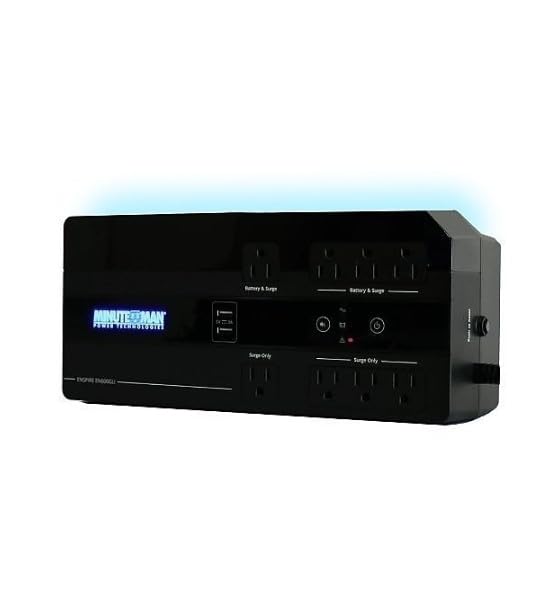
Slika 1: Minuteman EN450G UPS Unit. This image displays the Minuteman EN450G UPS unit. The front panel features the 'Minuteman Power Technologies' logo, two USB charging ports, and control buttons. The top surface shows four 'Battery & Surge' protected outlets and four 'Surge Only' outlets, clearly labeled. The unit is black and designed for compact placement.
3.1 Značajke prednje ploče
- Gumb za napajanje: Uključuje ili isključuje UPS.
- USB portovi za punjenje: Two ports for charging mobile devices.
- Pokazatelji stanja: LEDs indicating power status, battery status, and fault conditions.
3.2 Značajke stražnje ploče
- Battery & Surge Outlets (x4): Provide battery backup power and surge protection for critical devices.
- Surge Only Outlets (x4): Provide surge protection only for non-critical devices.
- AC ulaz: Connects the UPS to the wall power outlet.
- Osigurač: Zaštita od preopterećenja koja se može resetirati.
4. Postavljanje i instalacija
4.1 Raspakiranje
Pažljivo raspakirajte UPS i pregledajte ima li oštećenja tijekom transporta. Ako pronađete oštećenja, nemojte koristiti uređaj i obratite se prodavaču.
4.2 Postavljanje
The EN450G is designed for versatile placement:
- Desktop: Postavite jedinicu na stabilnu, ravnu površinu.
- Kat: Position on the floor, ensuring ventilation is not obstructed.
- Zidni nosač: The unit can be mounted on a wall using appropriate hardware (not included). Ensure the mounting surface can support the weight of the UPS.
Ensure the installation area is clean, dry, and has adequate ventilation. Avoid placing the UPS near heat-emitting appliances or in direct sunlight.
4.3 Priključivanje na napajanje
- Ensure the UPS is turned off.
- Plug the UPS power cord into a grounded 120V AC wall outlet.
- Allow the UPS to charge for at least 8 hours before initial use to ensure optimal battery runtime.
4.4 Povezivanje uređaja
- Battery & Surge Protected Outlets: Connect critical devices such as your computer, monitor, router, or other essential electronics that require continuous power during outages.
- Samo priključci za prenapone: Connect non-critical devices like printers, scanners, or desk lamps that only require surge protection.
CAUTION: Do not connect laser printers or shredders to the battery backup outlets, as their high power draw can overload the UPS.
5. Operacija
5.1 Uključivanje/isključivanje UPS-a
- Upaliti: Press and hold the power button for approximately 2 seconds until you hear a beep and the power indicator illuminates.
- Isključiti: Press and hold the power button for approximately 2 seconds until you hear a beep and the power indicator turns off.
5.2 Indikatori statusa
The front panel LEDs provide information about the UPS status:
- Zelena LED (stalno svijetli): UPS is operating normally, providing AC power.
- Green LED (Flashing) & Audible Alarm: UPS radi na baterijsko napajanje tijekom prekidatage.
- Red LED (Solid) & Audible Alarm: Battery low or fault condition. Refer to Troubleshooting.
5.3 Vrijeme rada baterije
The EN450G provides approximately 3 minutes of runtime at full load (450VA/255W) and 11 minutes at half load. Actual runtime may vary based on connected equipment and battery age.
6. Održavanje
6.1 Zamjena baterije
The EN450G features a hot-swappable Sealed Lead Acid (SLA) battery, allowing replacement without interrupting power to connected devices. Batteries typically last 3-5 years depending on usage and environmental conditions. A flashing red LED or continuous alarm may indicate a need for battery replacement.
- Ensure the UPS is connected to AC power and operating normally.
- Locate the battery access panel (refer to product diagram if available).
- Carefully slide out the old battery pack.
- Insert the new, fully charged replacement battery pack, ensuring correct orientation.
- Osigurajte pristupnu ploču baterije.
- Allow the new battery to charge for 8-12 hours to reach full capacity.
WARNING: Use only approved replacement batteries. Improper battery replacement can result in fire or explosion. Dispose of old batteries properly at a recycling facility.
6.2 Čišćenje
Periodically clean the exterior of the UPS with a soft, dry cloth. Do not use liquid or aerosol cleaners. Ensure ventilation openings remain clear of dust and debris.
7. Rješavanje problema
This section addresses common issues you may encounter with the EN450G UPS. If a problem persists after attempting the solutions below, contact technical support.
| Problem | Mogući uzrok | Otopina |
|---|---|---|
| UPS se ne uključuje. | Baterija nije spojena ili je prazna. Kabel za napajanje nije spojen. | Ensure battery is properly connected and charged. Verify power cord is securely plugged into wall outlet and UPS. |
| UPS beeps continuously or red LED is solid. | Slaba baterija ili kvar. Overload on battery outlets. | Allow battery to charge. If problem persists, battery may need replacement. Disconnect non-essential devices from battery outlets. Check circuit breaker. |
| UPS operates on battery frequently. | Nestabilno dolazno izmjenično napajanje. UPS sensitivity setting (if applicable, though not specified for this model). | Check the quality of your incoming AC power. Consider connecting to a different outlet. |
| No power from surge-only outlets. | Prekinuo se prekidač. | Press the circuit breaker reset button on the rear panel. Reduce load if necessary. |
8. Specifikacije
| Značajka | Detalj |
|---|---|
| Model | EN450G |
| Kapacitet | 450 VA / 255 W |
| Ulaz/Izlaz Voltage | 120 V AC |
| Izlazni valni oblik | Simulirani sinusni val |
| Utičnice | 4 x Battery & Surge Protected, 4 x Surge Only |
| Vrsta baterije | Sealed Lead Acid (SLA), Hot-Swappable |
| Typical Runtime (Full Load) | Do 3 minuta |
| Typical Runtime (Half Load) | Do 11 minuta |
| Dimenzije (D x Š x V) | 12.8 x 5.7 x 4.1 inča (32.5 x 14.5 x 10.4 cm) |
| Težina | 4.4 funti (2 kg) |
| Mogućnosti montaže | Desktop, Floor, Wall Mount |
9. Informacije o jamstvu
Please refer to the warranty card included with your product or visit the manufacturer's webZa detaljne uvjete jamstva posjetite stranicu. Sačuvajte dokaz o kupnji za slučaj zahtjeva za jamstvo.
10. Tehnička podrška
If you require technical assistance or have questions regarding your Minuteman EN450G UPS, please contact your dealer or the manufacturer's customer support. Have your model number (EN450G) and serial number ready when contacting support.
For more information, you may visit the official Minuteman webmjesto.
Ask a question about this manual
Ask about setup, troubleshooting, compatibility, parts, safety, or missing instructions. Manuals+ will review the question and use this page’s manual context to help answer it.