
1. Uvod
This manual provides essential information for the safe operation and maintenance of your FINOTI XIL 017 4K Camera Drone. Please read this manual thoroughly before operating the drone to ensure proper usage and to prevent damage or injury. The XIL 017 is a lightweight, foldable quadcopter equipped with a 4K camera and a 3-axis gimbal, designed for high-quality aerial photography and videography.
2. Sigurnosne smjernice
Operating a drone requires responsibility. Adhere to the following safety guidelines:
- Pročitajte priručnik: Understand all instructions and warnings before flight.
- Provjera prije leta: Ensure the drone, remote control, and batteries are in good condition and fully charged.
- Ekološka svijest: Fly in open areas, away from people, animals, buildings, and obstacles. Avoid flying over private property without permission.
- Vremenski uvjeti: Do not fly in strong winds (above Level 5), rain, snow, or fog.
- Održavajte liniju vidljivosti: Dron uvijek držite unutar svoje vizualne linije.
- Poštujte privatnost: Do not use the drone to photograph or record individuals without their consent.
- Sigurnost baterije: Koristite samo odobrene punjače i baterije. Nemojte prepunjavati ili bušiti baterije. Baterije čuvajte na hladnom i suhom mjestu.
- Hitni postupci: Familiarize yourself with emergency landing procedures.
3. Sadržaj paketa
Provjerite jesu li svi artikli prisutni u vašem paketu:
- FINOTI XIL 017 Drone
- Remote Control with Built-in Screen
- Intelligent Flight Batteries (Quantity may vary based on purchase, e.g., Triple Battery)
- USB kabel za punjenje
- Rezervni propeleri
- Odvijač
- korisnički priručnik
4. Proizvod je gotovview
4.1 Komponente drona
The FINOTI XIL 017 drone features a compact, foldable design for portability and ease of use. It weighs under 249g, which may exempt it from certain registration requirements in some regions.

Image: The FINOTI XIL 017 drone in both its folded, compact state and its unfolded, flight-ready configuration. The image highlights its portability and its weight being under 249g, indicating no registration is required in some jurisdictions.
- Sklopive ruke: Za kompaktno skladištenje i transport.
- propeleri: Efficient flight.
- 4K Camera with 3-Axis Gimbal: Provides stable, high-resolution video and photos.
- Odjeljak za baterije: Houses the intelligent flight battery.
- TOF Sensors: For precise positioning and stable hovering.
4.2 Daljinski upravljač
The remote control features a built-in screen for direct live view, eliminating the need for a separate smartphone. It offers a stable 10KM HD image transmission range.

Image: The remote control for the FINOTI XIL 017 drone, featuring a large built-in screen that displays live footage. The image emphasizes the 10KM HD image transmission range and the convenience of not needing a separate phone.

Image: A detailed diagram illustrating the various buttons and functions of the remote control, including roller camera adjustment, record button, speed key, throttle, steering, one-touch takeoff/landing, return button, forward/backward/left/right flying keys, obstacle avoidance switch, GPS switch, and On/Off key.
- Kontrolne palice: For flight direction and altitude.
- Ugrađeni zaslon: For real-time video feed and flight data.
- Funkcijski gumbi: Dedicated buttons for takeoff/landing, return to home, photo/video, gimbal control, and flight modes.
- Antene: For stable signal transmission.
5. Postavljanje
5.1 Punjenje baterija
- Connect the USB charging cable to the intelligent flight battery.
- Drugi kraj USB kabela priključite na kompatibilni USB adapter za napajanje (nije uključen).
- Charge until the battery indicator lights show a full charge.
- Charge the remote control using its dedicated charging port and cable.
5.2 Rasklapanje drona
- Gently unfold the front arms of the drone until they lock into place.
- Then, unfold the rear arms.
- Ensure all propellers are free to rotate.
5.3 Instaliranje baterije
- Slide the fully charged intelligent flight battery into the battery compartment on the drone until it clicks securely into place.
- Ensure the battery is firmly seated to prevent dislodgement during flight.
5.4 Uključivanje/isključivanje
- Dron: Press the power button once briefly, then press and hold for 2 seconds until the indicator lights illuminate.
- Daljinski upravljač: Press the power button once briefly, then press and hold for 2 seconds.
- To power off, repeat the same sequence.
5.5 Uparivanje drona i daljinskog upravljača
The drone and remote control are typically pre-paired. If re-pairing is necessary, refer to the specific instructions in the full manual or the drone's companion app for the pairing procedure.
6. Upravljanje dronom
6.1 Kontrolni popis prije leta
- Provjerite jesu li baterije drona i daljinskog upravljača potpuno napunjene.
- Provjerite ima li propelera oštećenja i jesu li sigurno pričvršćeni.
- Verify the camera gimbal is free to move.
- Choose an open, clear flying area.
- Wait for sufficient GPS signal acquisition before takeoff.
6.2 Polijetanje i slijetanje
- One-Touch Takeoff: Press the dedicated takeoff button on the remote control. The drone will ascend to a safe altitude and hover.
- Ručno polijetanje: Push both control sticks down and outwards to start the motors, then slowly push the left stick up to ascend.
- One-Touch Landing: Press the dedicated landing button. The drone will descend and land automatically.
- Ručno slijetanje: Slowly pull the left control stick down to descend. Once landed, push both sticks down and inwards to stop the motors.
6.3 Osnovne kontrole leta
Refer to the remote control diagram for button locations.
- Lijeva palica (gas/skretanje): Gore/dolje za visinu, lijevo/desno za rotaciju (skretanje).
- Desna palica (nagib/rotacija): Gore/dolje za kretanje naprijed/natrag (nagib), Lijevo/Desno za kretanje lijevo/desno (kotrljanje).
- Speed Key: Adjusts flight speed (e.g., beginner, normal, sport modes).
6.4 Rad kamere
The drone is equipped with a 4K camera and a 3-axis brushless gimbal for stable, clear shots.

Slika: Detaljna view of the drone's 3-axis brushless gimbal, showing its range of motion for stabilization. It also highlights the 4K HD video capability and electronic image stabilization (EIS).
- Gumb za fotografije/video zapise: Press once to take a photo, press and hold to start/stop video recording.
- Upravljanje kardanom: Use the roller on the remote control to adjust the camera's vertical angle (90° adjustable).
- AI Night Scene: The camera automatically enhances low-light scenes for clearer images.
6.5 Inteligentni načini leta
Utilize smart features for cinematic results.

Image: A composite image detailing the drone's intelligent flight capabilities. This includes 360° Smart Tracking, which follows a subject, Smart Flight Path Planning, allowing users to draw a route, and TOF Visual & Optical Flow Positioning for stable hovering.
- 360° Smart Tracking: The drone can lock onto and follow a designated subject from any direction.
- Smart Flight Path Planning: Draw a desired flight route in the companion app, and the drone will follow it automatically.
- TOF Visual & Optical Flow Positioning: Achieves precise and stable hovering, especially useful in indoor environments or when GPS is weak.
6.6 HD Image Transmission
The drone provides up to 10KM HD digital transmission, allowing for smooth, real-time viewing od footage directly on the remote control's screen.
7. Održavanje
7.1 Čišćenje
- Wipe the drone body with a soft, dry cloth.
- Clean the camera lens with a microfiber cloth designed for optics.
- Remove any debris from propellers and motors.
7.2 Njega baterija
- Store batteries in a cool, dry place, away from direct sunlight.
- Do not store fully charged or completely depleted batteries for extended periods. Charge them to approximately 50-60% for long-term storage.
- If a battery appears swollen, damaged, or leaks, discontinue use immediately and dispose of it properly.
7.3 Zamjena propelera
If a propeller is damaged, replace it with a new one from the spare parts kit. Use the provided screwdriver to remove and install propellers, ensuring they are correctly oriented (e.g., 'A' with 'A', 'B' with 'B').
8. Rješavanje problema
| Problem | Mogući uzrok | Otopina |
|---|---|---|
| Dron se ne uključuje | Battery depleted or not installed correctly. | Charge battery fully. Reinstall battery securely. |
| No image on remote control screen | Drone and remote not paired. Signal interference. | Ensure drone and remote are paired. Move to an area with less interference. |
| Dron se zanosi tijekom leta | Insufficient GPS signal. Calibration needed. Wind interference. | Wait for strong GPS signal. Perform IMU/compass calibration. Avoid flying in strong winds. |
| Loša kvaliteta videa/fotografija | Dirty camera lens. Gimbal obstruction. Low light conditions. | Clean lens. Check gimbal for obstructions. Utilize AI Night Scene feature. |
| Kratko vrijeme leta | Battery not fully charged. Old/damaged battery. Aggressive flying. | Ensure full charge. Replace old batteries. Fly more conservatively. |
9. Specifikacije
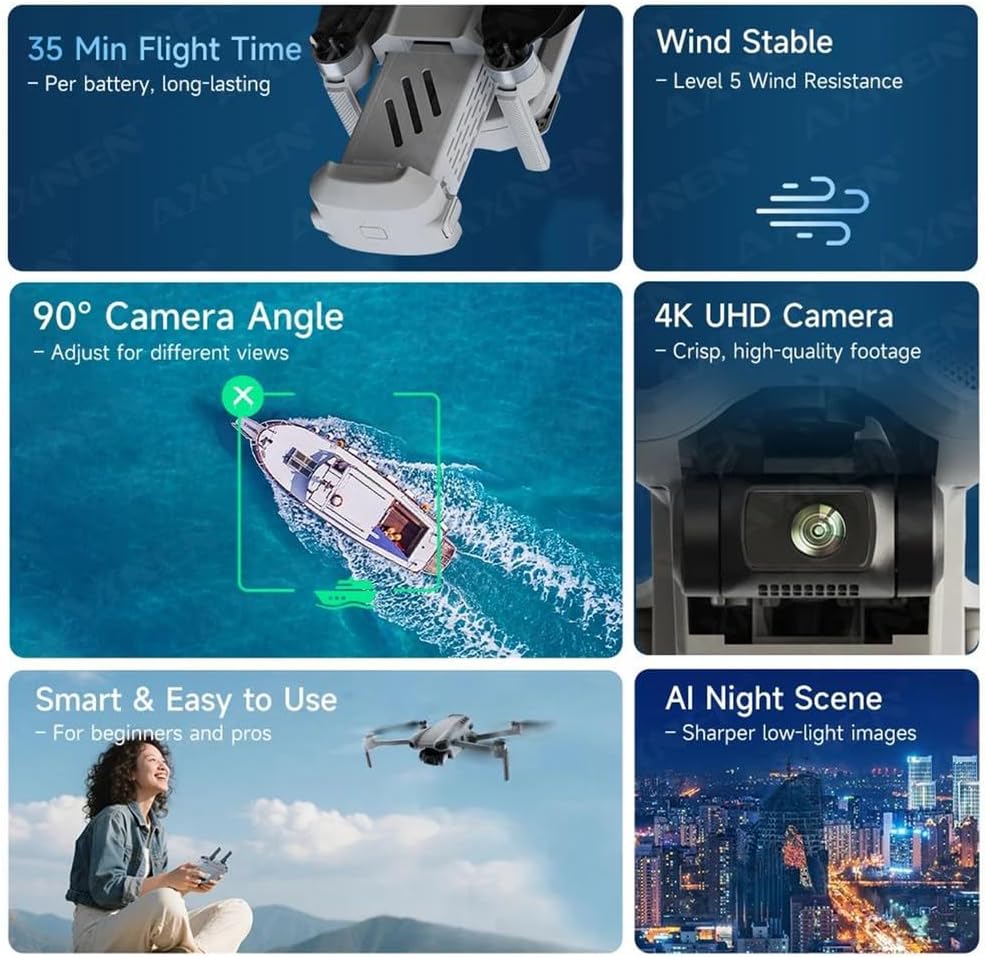
Image: An infographic summarizing key performance features of the drone, including 35 minutes of flight time per battery, Level 5 wind resistance, a 90° adjustable camera angle, 4K UHD camera capabilities, ease of use, and AI Night Scene enhancement.

Image: A diagram illustrating the physical dimensions of the FINOTI XIL 017 drone, both in its folded state (e.g., 11cm x 20cm x 8.5cm) and unfolded state, providing clear measurements for portability and operational size.
- Model: XIL 017
- Težina: Ispod 249 g
- Fotoaparat: 4K UHD
- Gimbal: 3-Axis Brushless
- Vrijeme leta: Do 35 minuta po bateriji
- Prijenos slike: 10KM HD
- Otpornost na vjetar: Razina 5
- Pozicioniranje: GPS, TOF Visual, Optical Flow
- Podesivi kut kamere: 90°
10. Jamstvo i podrška
For warranty information and technical support, please refer to the warranty card included with your product or visit the official FINOTI website. Keep your proof of purchase for warranty claims. If you encounter issues not covered in this manual, contact FINOTI customer service for assistance.