
1. Uvod
This manual provides comprehensive instructions for the proper use and care of your Casio W220H Illuminator Digital Watch. Please read this manual thoroughly to ensure optimal performance and longevity of your timepiece. Keep this manual for future reference.
2. Proizvod je gotovview
The Casio W220H is a durable digital watch designed for everyday use, featuring an Illuminator backlight, stopwatch, alarm functions, and water resistance. Its robust resin construction ensures reliability.
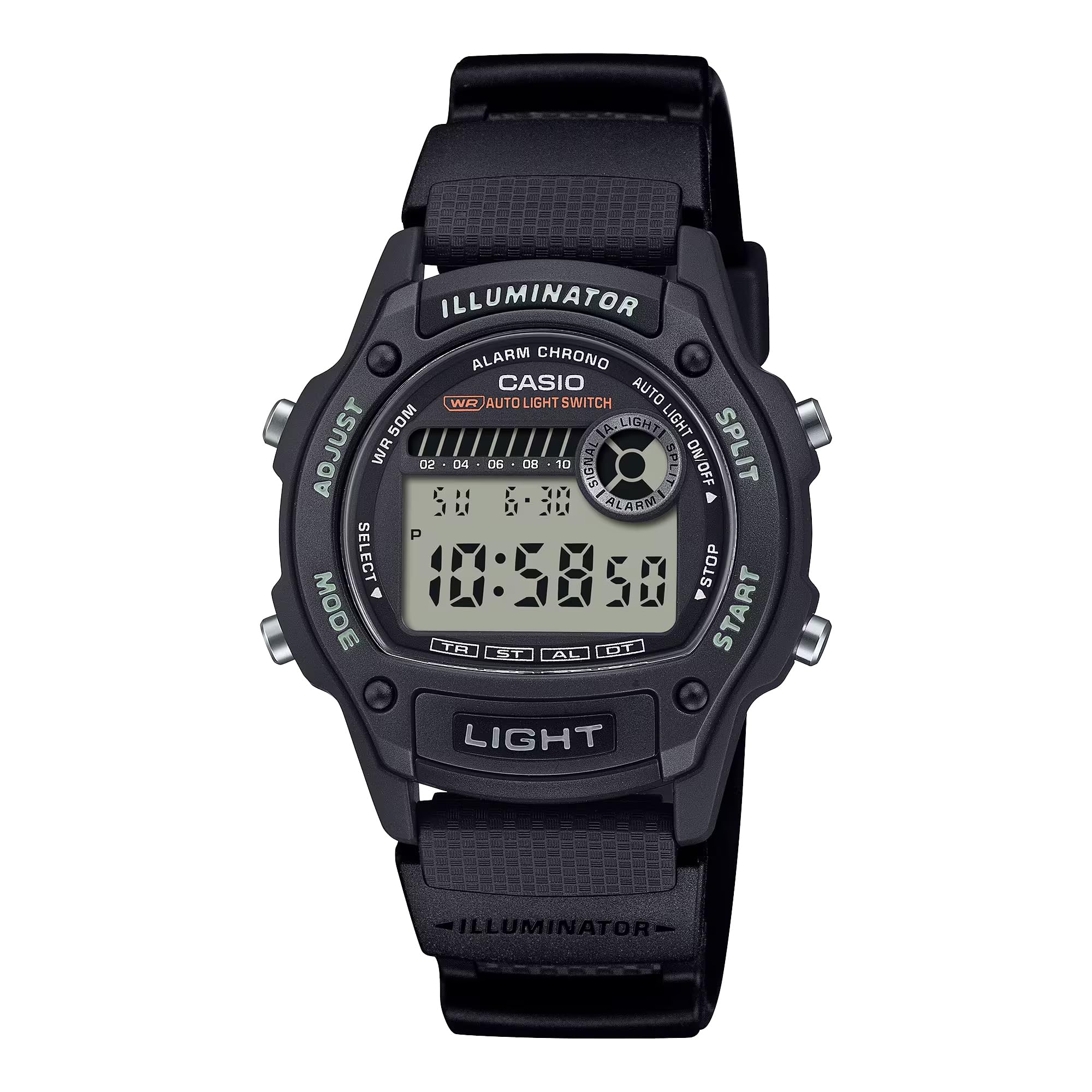
Slika 2.1: Prednja strana view of the Casio W220H Illuminator Digital Watch. The watch features a black resin case and band, with a clear digital display showing time and date. Buttons are visible on both sides of the case.
Funkcije gumba:
- Gumb ZA PODEŠAVANJE (gore lijevo): Koristi se za ulazak i izlazak iz načina rada postavki i za potvrdu odabira.
- Tipka MODE (dolje lijevo): Cycles through different watch modes (Timekeeping, Stopwatch, Countdown Timer, Alarm, Dual Time).
- LIGHT Button (Bottom Front): Activates the Illuminator backlight.
- Tipka START (dolje desno): Used to start/stop stopwatch or timer, and to change settings in setting modes.
- SPLIT Button (Top Right): Used for split times in stopwatch mode, and to change settings in setting modes.
3. Početno postavljanje
3.1 Postavljanje vremena i datuma:
- U načinu rada za mjerenje vremena pritisnite i držite PRILAGODITI gumb dok znamenke sekundi ne počnu treptati, što označava zaslon za postavljanje.
- Pritisnite tipku NAČIN RADA gumb za cikličko mijenjanje postavki: Sekunde → Sat → Minuta → Godina → Mjesec → Dan.
- Koristite START or PODJELA buttons to increase or decrease the flashing value.
- Nakon što su sve postavke ispravne, pritisnite tipku PRILAGODITI gumb za izlaz iz moda podešavanja.
3.2 Auto Light Switch:
The watch features an auto light switch that illuminates the display when you angle the watch towards your face. This feature can be toggled on or off.
- U načinu rada za mjerenje vremena pritisnite i držite SVJETLO button for approximately three seconds.
- An indicator (e.g., "AUTO LIGHT ON") will appear or disappear on the display to confirm the change.
- Note that the auto light switch automatically disables after approximately three hours to conserve battery life.
4. Upute za rad
This section details the various modes and functions of your Casio W220H watch.
4.1 Mode Navigation:
Pritisnite tipku NAČIN RADA gumb za kretanje kroz sljedeće načine:
- Način mjerenja vremena
- Način štoperice
- Način odbrojavanja vremena
- Način alarma
- Način dvostrukog vremena
4.2 Stopwatch/Chronograph:
The stopwatch measures elapsed time, split times, and two finishes. It has a 1/100-second accuracy and can measure up to 23 hours, 59 minutes, 59.99 seconds.
- Uđite u način rada štoperice pritiskom na NAČIN RADA dugme.
- Pritisnite tipku START gumb za početak mjerenja vremena.
- Pritisnite tipku START button again to stop timing.
- Pritisnite tipku PRILAGODITI gumb za resetiranje štoperice na nulu.
- Za snimanje međuvrijeme, pritisnite PODJELA button while the stopwatch is running. The display will show the split time while the internal timer continues. Press PODJELA again to return to elapsed time.
4.3 Daily Alarm & HourlVremenski signal:
Sat ima dnevni alarm iurly vremenski signal.
- Uđite u način alarma pritiskom na NAČIN RADA dugme.
- Pritisnite tipku PRILAGODITI gumb za ulazak u način podešavanja alarma. Znamenke sati će bljeskati.
- Koristite START or PODJELA tipke za postavljanje sata.
- Pritisnite tipku NAČIN RADA button to move to the minute digits, then use START or PODJELA za postavljanje minuta.
- Pritisnite tipku PRILAGODITI gumb za izlaz iz načina podešavanja alarma.
- To toggle the alarm or hourly time signal on/off, press the START button in Alarm Mode (without holding PRILAGODITI).
4.4 Illuminator Backlight:
The Illuminator backlight provides easy readability in low-light conditions.
- Pritisnite tipku SVJETLO gumb za osvjetljavanje zaslona.
- The light will stay on for a few seconds.
Video 4.1: A demonstration of the Casio W220H Illuminator backlight function. The video shows the watch display lighting up with an orange glow when the light button is pressed, enhancing visibility in dark environments.
Video 4.2: Detaljan pregledview of the Casio W220H Series watch, demonstrating various functions including time setting, mode navigation, and the Illuminator backlight. This video provides a comprehensive guide to operating the watch.
5. Ključne značajke
- Illuminator Backlight: Fully automatic LED backlight for clear visibility in any lighting condition.
- Dugo trajanje baterije: Approximately 3 years with the included CR1616 battery.
- Stopwatch/Chronograph: 1/100-second stopwatch functions for precise time measurement.
- Dnevni alarm i HourlVremenski signal: Convenient alerts and time markers.
- Otpornost na vodu 50M: Suitable for swimming and showering, but not for diving.
- Potpuni automatski kalendar: Pre-programmed calendar up to the year 2099, automatically adjusting for month lengths and leap years.
6. Održavanje
6.1 Otpornost na vodu:
The Casio W220H is water resistant to 50 meters. This means it is suitable for everyday use and can withstand splashes, rain, and brief immersion in water. However, it is not recommended for prolonged underwater use or high-pressure water activities like diving. Do not operate buttons while the watch is wet or submerged.
6.2 Čišćenje:
Za čišćenje sata obrišite ga mekom, suhom krpom. Za tvrdokornu prljavštinu upotrijebite meku krpu.ampisperite vodom i blagim neutralnim deterdžentom, a zatim obrišite suhom krpom. Izbjegavajte korištenje hlapljivih sredstava poput razrjeđivača, benzina ili alkohola, jer mogu oštetiti komponente smole.
6.3 Zamjena baterije:
The watch uses a CR1616 battery. When the display becomes dim or functions become erratic, it is time to replace the battery. Battery replacement should ideally be performed by a qualified technician to ensure proper sealing and water resistance.
7. Rješavanje problema
- Zaslon je prazan ili taman: Baterija je možda slaba ili ispražnjena. Zamijenite bateriju.
- Vrijeme je netočno: Re-set the time and date as described in the "Setting the Time and Date" section. Ensure the correct AM/PM setting is selected.
- Alarm se ne oglašava: Check if the alarm is enabled in Alarm Mode. Ensure the volume is not muted if applicable (this model does not have volume control, but general advice).
- Voda unutar sata: Immediately take the watch to an authorized service center. Do not attempt to open or dry the watch yourself, as this may cause further damage.
8. Specifikacije
| Značajka | Detalj |
|---|---|
| Broj modela | W220H-1AV |
| Vrsta zaslona | Digitalni |
| Vrsta kretanja | Kvarcni |
| Materijal kućišta | Smola |
| Materijal trake | Najlon |
| Promjer kućišta | 36.6 milimetara |
| Debljina kućišta | 10.9 milimetara |
| Dubina vodootpornosti | 50 metara |
| Izvor napajanja | Napajanje baterijama (CR1616) |
| Približno trajanje baterije | 3 godina |
| Značajke | Illuminator Backlight, 1/100-Second Stopwatch, Daily Alarm, Hourly Vremenski signal, Potpuni automatski kalendar |
9. Jamstvo i podrška
Your Casio W220H watch comes with a limited warranty. For specific warranty terms and conditions, please refer to the warranty card included with your product or visit the official Casio webmjesto.
For technical support, service, or inquiries regarding your watch, please contact Casio customer service through their official webweb-mjesto ili kontaktne podatke navedene u pakiranju proizvoda.
Službeni Casio Webstranica: www.casio.com