
1. Uvod
The T-WOLF G520 is a high-performance wired gaming mouse designed for precision and comfort. It features a USB2.0 wired connection, 7 customizable buttons, and dynamic RGB lighting. This manual provides essential information for setting up, operating, and maintaining your G520 gaming mouse.
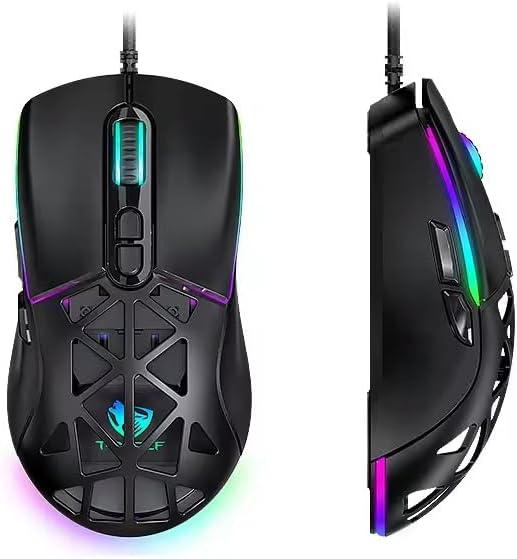
Figure 1: T-WOLF G520 Gaming Mouse (Front and Side View)
2. Značajke proizvoda
- veza: Wired USB2.0 for stable and responsive performance.
- Vrsta senzora: Optical sensor for accurate tracking.
- DPI postavke: Adjustable DPI from 800 to 12800 (800 / 1600 / 3200 / 4800 / 6400 / 12800).
- Stopa glasanja: 1000Hz for rapid response times.
- Gumbi: 7 programmable buttons (Left, Right, Middle, Forward, Back, DPI+, DPI-).
- RGB osvjetljenje: 13 dynamic RGB lighting modes.
- Izdržljivost: 10 million click lifespan for micro switches.
- Kabel: 1.5m braided cable for enhanced durability and tangle resistance.
- Dizajn: Lightweight honeycomb structure and ergonomic shape for comfortable grip and ventilation.
- Prilagodba: Magnetic interchangeable back cover.

Slika 2: Ključne značajke iznadview
3. Sadržaj paketa
- T-WOLF G520 Gaming Mouse Unit
- Interchangeable Magnetic Back Covers (2 types)

Figure 3: G520 Mouse with Interchangeable Back Covers
4. Upute za postavljanje
- Connect the USB connector of the T-WOLF G520 gaming mouse to an available USB 2.0 port on your computer.
- The mouse is Plug & Play compatible and does not require additional drivers for basic functionality. Your operating system will automatically detect and install the necessary drivers.
- Once detected, the mouse will be ready for use.
5. Upute za rad
5.1 Funkcije gumba
The T-WOLF G520 mouse features 7 buttons with the following default functions:
- Lijevi gumb: Primarna funkcija klika.
- Desni gumb: Funkcija sekundarnog klika (kontekstni izbornik).
- Middle Button / Scroll Wheel: Scroll up/down, click for universal scroll or other functions.
- Gumb naprijed: Navigira naprijed u web preglednici ili file istraživači.
- Gumb Natrag: Navigacija unatrag web preglednici ili file istraživači.
- Tipka DPI+: Povećava DPI osjetljivost.
- DPI gumb: Smanjuje osjetljivost DPI-ja.
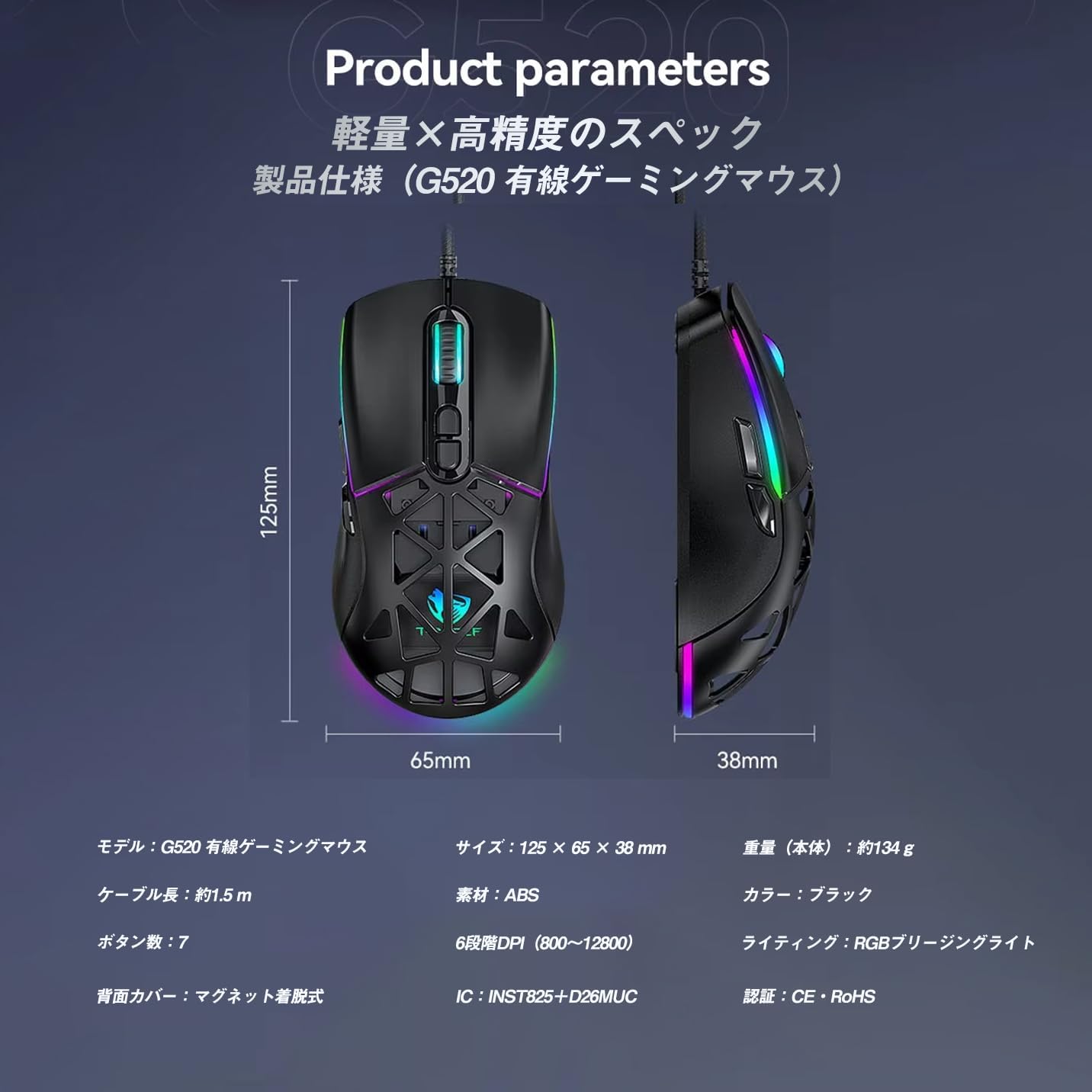
Figure 4: G520 Button Layout
5.2 Podešavanje DPI
The mouse supports 6 adjustable DPI levels. To change the DPI, press the DPI+ or DPI- buttons located on the top of the mouse. Each press will cycle through the available DPI settings: 800, 1600, 3200, 4800, 6400, and 12800.

Figure 5: DPI Adjustment Levels
5.3 Upravljanje RGB rasvjetom
The T-WOLF G520 features 13 RGB lighting modes. To change the RGB lighting mode, press and hold the Gumb Natrag i DPI- Gumb simultaneously for approximately 3 seconds. Repeat this action to cycle through the different lighting effects.
5.4 Magnetic Back Cover
The mouse comes with two types of magnetic back covers that can be easily interchanged. To remove a cover, gently lift it from the back of the mouse. To attach a cover, align it with the mouse body and allow the magnets to secure it in place.

Figure 6: Magnetic Back Cover Exchange
6. Održavanje
- Čišćenje: Za čišćenje miša koristite meku, suhu krpu. Za tvrdokornu prljavštinu, laganoamp cloth can be used, ensuring no liquid enters the mouse.
- Izbjegavajte tekućine: Ne uranjajte miša u vodu niti ga izlažite prekomjernoj vlazi.
- Skladištenje: Miša čuvajte na hladnom i suhom mjestu, dalje od izravne sunčeve svjetlosti i ekstremnih temperatura.
- Održavanje kabela: Avoid bending or twisting the braided cable excessively to prevent damage.
7. Rješavanje problema
- Miš ne reagira:
- Provjerite je li USB kabel sigurno spojen na USB priključak vašeg računala.
- Pokušajte spojiti miš na drugi USB priključak.
- Ponovno pokrenite računalo.
- DPI se ne mijenja:
- Ensure you are pressing the correct DPI+ or DPI- buttons.
- The mouse cycles through 6 fixed DPI levels; there is no software adjustment.
- RGB Lighting Not Working/Changing:
- Provjerite je li miš ispravno spojen.
- Pritisnite i držite Gumb Natrag i DPI- Gumb simultaneously for 3 seconds to cycle through modes.
- Problemi s praćenjem:
- Očistite optički senzor na donjoj strani miša.
- Koristite miš na čistoj, ujednačenoj površini ili podlozi za miš.
8. Specifikacije
| Značajka | Specifikacija |
|---|---|
| Model | G520 |
| Vrsta veze | Wired USB2.0 |
| Vrsta senzora | Optički |
| DPI postavke | 800/1600/3200/4800/6400/12800 |
| Polling Rate | 1000 Hz |
| Broj gumba | 7 |
| Duljina kabela | 1.5 m (pleteno) |
| Dimenzije (D׊×V) | 124 × 65 × 40 mm |
| Težina | cca. 132g |
| Operativni svtage/struja | 5V / 150mA |
| Rasvjeta | RGB (13 načina rada) |
| Materijal | plastika (ABS) |
| Kompatibilan OS | Windows 10, Windows 11, Mac OS, Linux (OS standard, no driver required) |

Slika 7: Dijagram specifikacija proizvoda
9. Jamstvo i podrška
This product is covered by a standard manufacturer's warranty. Please refer to your purchase documentation for specific warranty terms and conditions. For technical support or warranty claims, please contact the retailer or the manufacturer's customer service.