
1. Uvod
Thank you for choosing the FINOTI M66 MAX Professional Drone. This manual provides essential information for safe operation, setup, and maintenance of your drone. Please read it thoroughly before first use to ensure optimal performance and to prevent damage.
Sigurnosne informacije
Keep away from naked flame or direct heat sources. Always refer to this manual for detailed safety guidelines and operational procedures. Ensure all components are securely attached before flight. Operate the drone in open, clear areas, away from people, animals, and obstacles.
2. Sadržaj paketa
The FINOTI M66 MAX Professional Drone package includes the following items:
- 1 x FINOTI M66 MAX Drone
- 1 x Screen Remote Control
- 1 x Battery (Quad Battery variant includes 4 batteries total)
- 1 x memorijska kartica
- 1 x čitač kartica
- 1 x USB kabel
- 1 x odvijač
- 4 x Rezervne lopatice ventilatora
- 1 x Operation Instructions Manual
- 1 x App Instruction Manual
- 1 x torbica za nošenje
3. Značajke proizvoda
- Sklopivi dizajn: Compact and easy to carry (15×8×7.5cm).
- 8K HD Dual-Lens Camera: Captures high-resolution photos and videos with adjustable shooting angle.
- Screen Remote Control: Features a 4.3-inch screen for real-time 5G WiFi FPV transmission.
- Način održavanja nadmorske visine: Maintains a stable altitude for steady flight.
- Pozicioniranje optičkog toka: Enhances stability for precise hovering.
- Izbjegavanje prepreka od 360°: Intelligent perception to prevent collisions.
- Povratak jednim ključem: Automatski vraća dron na mjesto polijetanja.
- Bezglavi način rada: Simplifies control by eliminating the need to adjust the drone's orientation.
- Motori bez četkica: Provides powerful and quiet flight with strong wind resistance.
- Produženo vrijeme leta: Up to 25 minutes per 3000mAh battery.
- 2.4 GHz tehnologija protiv interferencije: Ensures stable signal transmission.
- Šestoosni žiroskop: For smoother and more convenient control.
- LED svjetla: Enhances visibility and creates spectacular effects, especially in the dark.
- WiFi FPV Function: Connects to the application for real-time transmission and control via mobile phone.
- Putanja leta: Draw a flight path on the screen, and the drone will automatically follow it.
- Dual-Lens Switch Function: Allows switching between different camera views.

Figure 1: Visual representation of key drone features.
4. Postavljanje
4.1. Ugradnja baterije
Before operating the drone, ensure the battery is properly installed and charged. Remove any insulating stickers from the battery terminals if present.
Video 1: Demonstrates how to install the battery into the drone and power it on. (Source: QQCHGOL D18 Drone with Dual Camera for Adults 2K)
4.2. Postavljanje daljinskog upravljača
The remote control features a built-in screen for direct FPV viewing. Familiarize yourself with the button layout and functions.
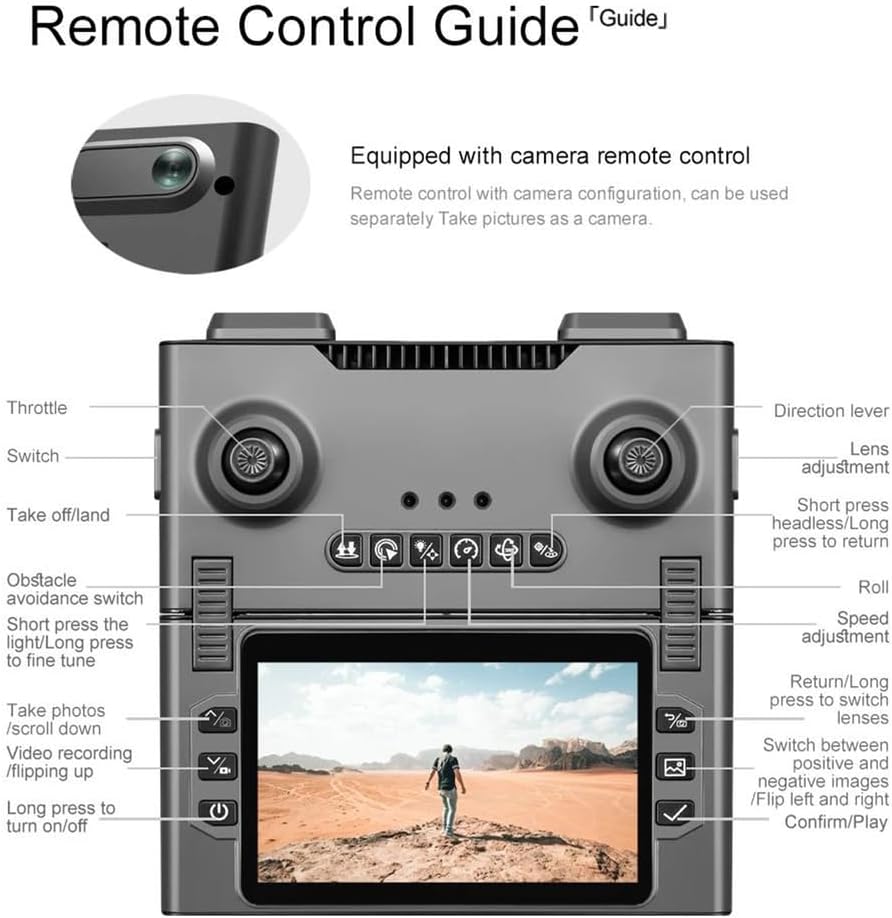
Figure 2: Detailed guide to the remote control buttons and their functions.
To pair the remote control with the drone:
- Power on the drone by pressing and holding the power button.
- Uključite daljinski upravljač.
- Push the left joystick up and down quickly. The remote will beep, and the drone's lights will become solid, indicating successful pairing.
Video 2: Shows the remote control pairing process with the drone. (Source: QQCHGOL D18 Drone with Dual Camera for Adults 2K)
4.3. App Connection (for Mobile Device FPV)
For mobile device FPV and advanced features, download the companion app:
- Scan the QR code provided in the App Instruction Manual to download the KY UFO app.
- Ensure your phone's GPS location is turned on.
- Connect your mobile device to the drone's Wi-Fi network (usually starts with
Ask a question about this manual
Ask about setup, troubleshooting, compatibility, parts, safety, or missing instructions. Manuals+ will review the question and use this page’s manual context to help answer it.