
1. Uvod
This manual provides essential information for the safe operation and maintenance of your FINOTI RG806 MAX GPS Drone. Please read it thoroughly before operating the drone to ensure proper function and to prevent damage or injury. The RG806 MAX features a 5.6-inch integrated screen, GPS, three-sided obstacle avoidance, optical flow positioning, and a 4K camera for high-quality aerial photography and videography.
2. Sigurnosne smjernice
- Provjera prije leta: Uvijek pregledajte dron, propelere i bateriju prije svakog leta. Provjerite jesu li sve komponente sigurno pričvršćene i neoštećene.
- Uvjeti okoliša: Do not fly in strong winds (above 10 km/h), rain, snow, or fog. Maintain a clear line of sight to the drone at all times.
- Područje leta: Operate the drone in open areas, away from people, animals, buildings, and power lines. Avoid flying over private property without permission.
- Sigurnost baterije: Keep batteries away from naked flames or direct heat sources. Use only the provided charging cable and charger. Do not overcharge or puncture batteries.
- Izbjegavanje prepreka: While the drone features three-sided visual obstacle avoidance, it is not foolproof. Always exercise caution and maintain manual control.
- Dobno ograničenje: This product is not suitable for children under 14 years old. Adult supervision is recommended for all users.
3. Sadržaj paketa
Provjerite jesu li svi artikli prisutni u vašem paketu:
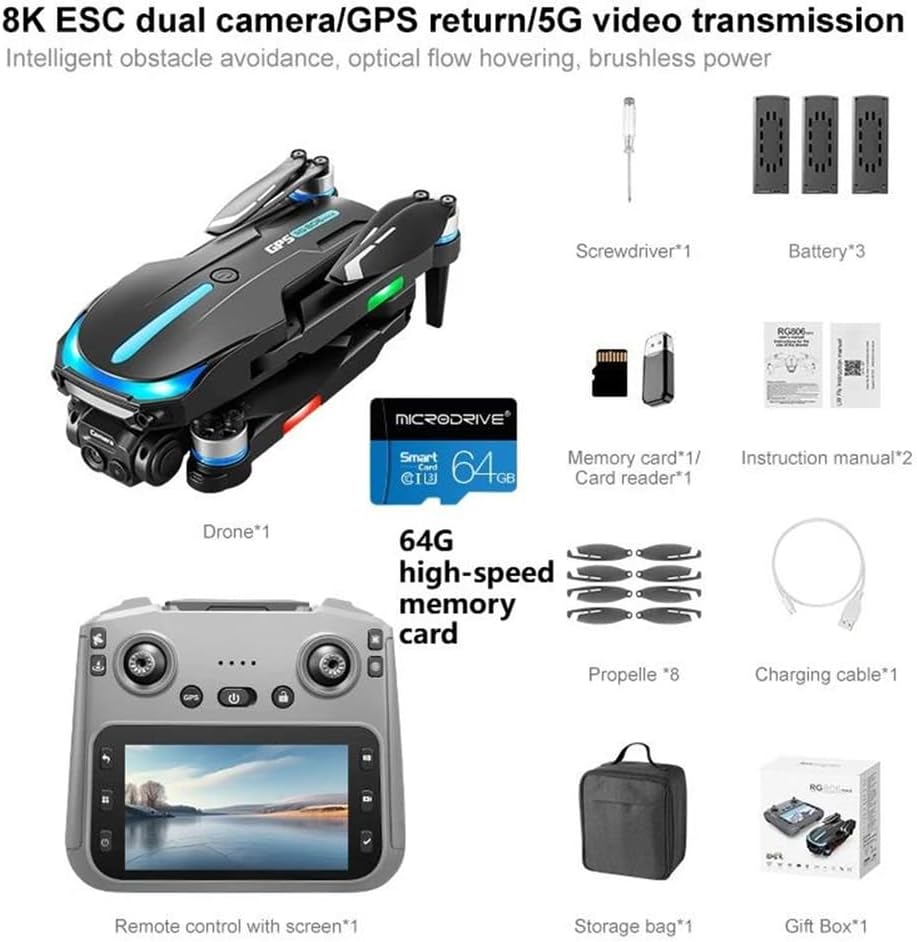
Slika 3.1: Sadržaj paketa. This image displays the drone, remote control with screen, screwdriver, one battery (for this variant), memory card, card reader, eight propellers, charging cable, storage bag, and gift box.
- Drone (x1)
- Remote Control with Integrated Screen (x1)
- Flight Battery (x1)
- Propeleri (x8)
- Kabel za punjenje (x1)
- Odvijač (x1)
- 64GB High-Speed Memory Card (x1)
- Card Reader (x1)
- Vrećica za pohranu (x1)
4. Proizvod je gotovview
4.1 Komponente drona

Figure 4.1: Drone with Obstacle Avoidance. This image shows the drone's design and the location of its three-way intelligent perception obstacle avoidance sensors.
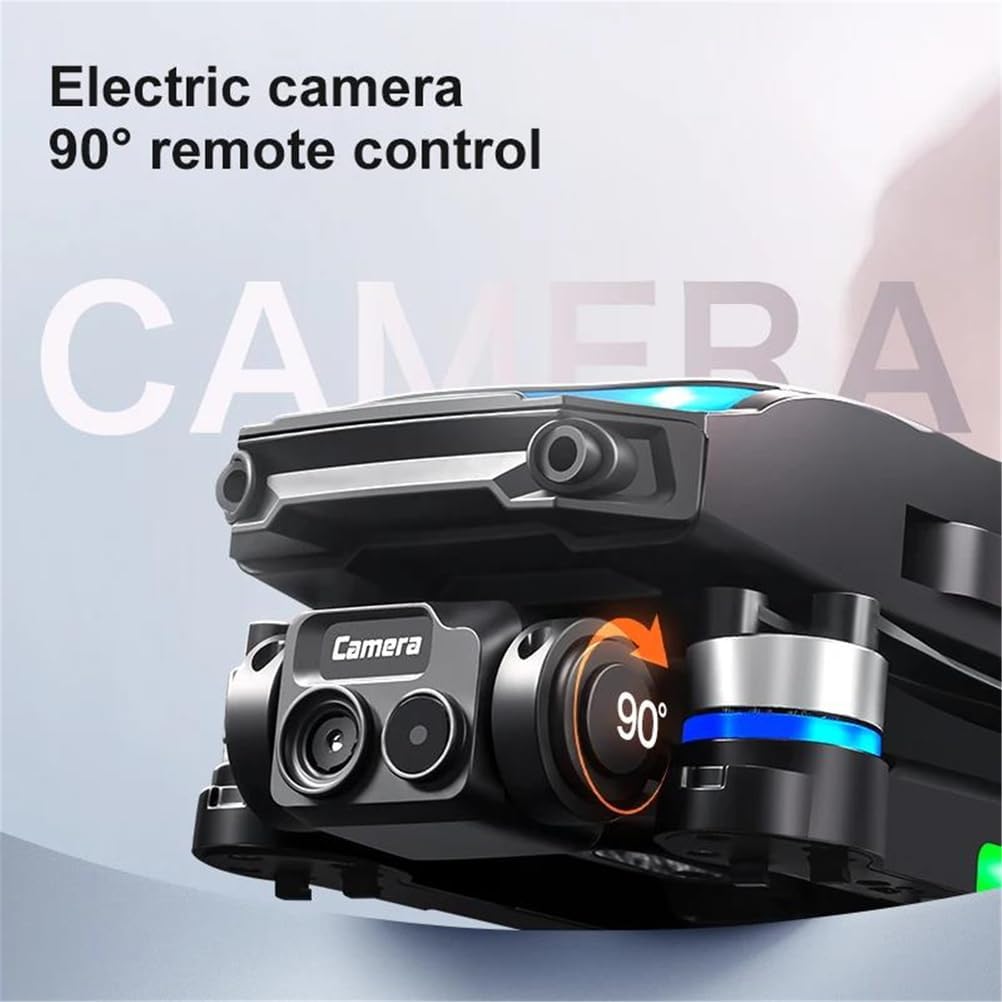
Figure 4.2: Electric Camera. This image highlights the drone's electric camera, which can be adjusted 90 degrees via remote control.
The RG806 MAX drone features a foldable design for portability. Key components include:
- 4K HD kamera: Located at the front, capable of 90-degree remote adjustment.
- Obstacle Avoidance Sensors: Integrated for three-sided intelligent perception.
- Motori bez četkica: Provide stable and powerful flight.
- GPS modul: For precise positioning and return-to-home functions.
- LED svjetla: Indicate drone status and aid visibility.
4.2 Raspored daljinskog upravljača
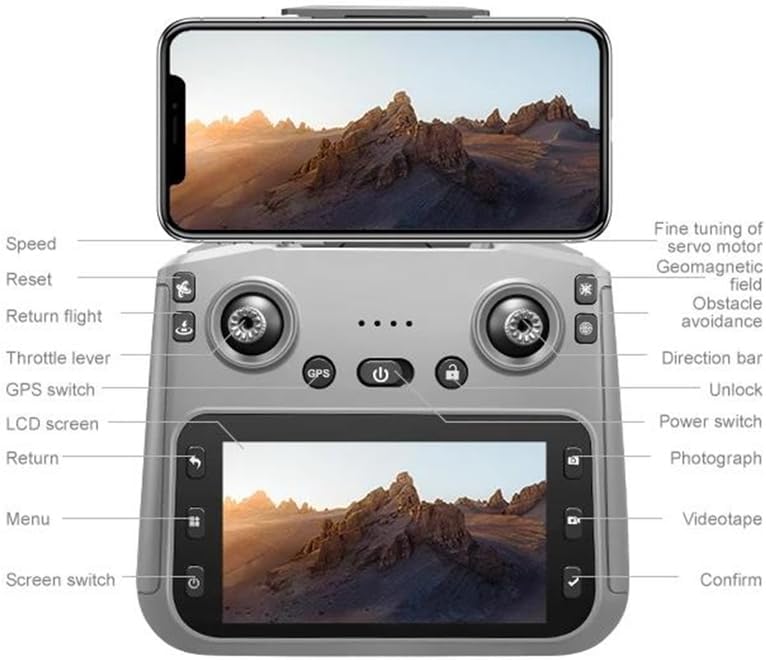
Slika 4.3: Raspored daljinskog upravljača. This diagram illustrates the functions of each button and joystick on the remote control, including the integrated 5.6-inch display.
The remote control features an integrated 5.6-inch screen for real-time flight data and video feed. Key controls include:
- Lijevi joystick: Throttle lever (up/down), Yaw (left/right).
- Desni joystick: Direction bar (forward/backward, left/right).
- Gumbi: Speed, Reset, Return flight, GPS switch, LCD screen, Return, Menu, Screen switch, Unlock, Power switch, Photograph, Videotape, Confirm.
- Fino podešavanje: For servo motor, geomagnetic field, and obstacle avoidance adjustments.
5. Postavljanje
5.1 Punjenje i ugradnja baterije
- Baterija truta: Connect the drone battery to the charging cable and a suitable USB power adapter (not included). Charge until the indicator light shows full. Insert the charged battery into the drone's battery compartment, ensuring it clicks into place.
- Baterija daljinskog upravljača: The remote control has a built-in rechargeable battery. Connect the remote control to the charging cable and a USB power adapter. Charge until fully indicated.
5.2 Ugradnja propelera
Attach the propellers to the corresponding motor shafts. Ensure the correct propeller type (A or B) is matched with the correct motor. Use the provided screwdriver to secure them firmly.
5.3 Drone and Remote Control Pairing
- Power on the drone by pressing and holding the power button.
- Uključite daljinski upravljač.
- The drone and remote control will automatically attempt to pair. Wait for the indicator lights on both devices to stabilize, indicating a successful connection.
5.4 Kalibracija GPS-a
For optimal GPS performance, perform a calibration before the first flight in a new location:
- Postavite dron na ravnu, otvorenu površinu.
- Follow the on-screen prompts on the remote control or refer to the specific calibration sequence in the included manual. This typically involves rotating the drone horizontally and vertically.
6. Upute za rad
6.1 Osnovne kontrole leta
Upoznajte se s rasporedom daljinskog upravljača (Slika 4.3) prije nego što pokušate letjeti.
- Polijetanje/Slijetanje: Use the dedicated one-key takeoff/landing button or manually control with the throttle lever.
- Kontrola nadmorske visine: Pomaknite lijevu upravljačku palicu prema gore za uspon, povucite prema dolje za spuštanje.
- Kontrola smjera: Push the right joystick forward/backward to move the drone forward/backward. Push left/right to move left/right.
- Yaw Control: Push the left joystick left/right to rotate the drone left/right.
6.2 GPS and Optical Flow Positioning
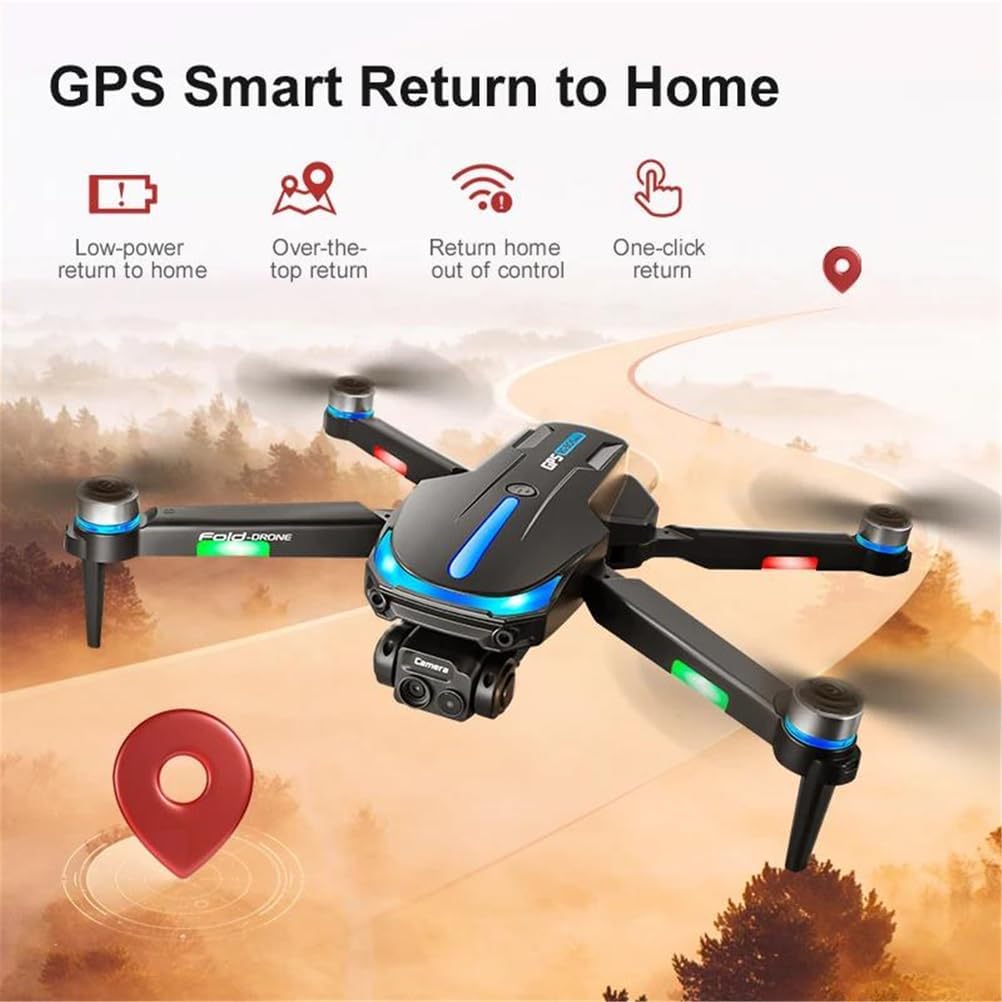
Figure 6.1: GPS Smart Return to Home. This image details the various return-to-home functions enabled by GPS, including low-power, over-the-top, out-of-control, and one-click return.
The drone utilizes GPS for outdoor stability and optical flow sensors for indoor hovering. Ensure GPS signal is strong before outdoor flights.
- GPS način rada: Provides precise positioning, altitude hold, and enables features like Return to Home and Custom Course.
- Pozicioniranje optičkog toka: Automatically engages in indoor environments or when GPS signal is weak, using downward-facing sensors for stable hovering.
- Povratak kući (RTH): Press the RTH button on the remote control, or the drone will automatically return if battery is low or connection is lost (if GPS signal is available).
- Custom Course: Plan flight paths directly on the remote control's screen for automated flight.
6.3 Obstacle Avoidance System
The RG806 MAX is equipped with three-sided visual obstacle avoidance. This system helps the drone detect and avoid obstacles in its path, enhancing flight safety. However, it is crucial to remain vigilant and not solely rely on this feature, especially in complex environments or at high speeds.
6.4 Rad kamere
The integrated 4K camera allows for high-resolution photo and video capture.
- Snimi fotografiju: Press the 'Photograph' button on the remote control.
- Snimi video: Press the 'Videotape' button to start recording, press again to stop.
- Podešavanje kuta kamere: Use the dedicated buttons or fine-tuning controls on the remote to adjust the camera's 90-degree tilt.
- Pohrana medija: Photos and videos are saved to the installed 64GB memory card.
6.5 Pametne značajke
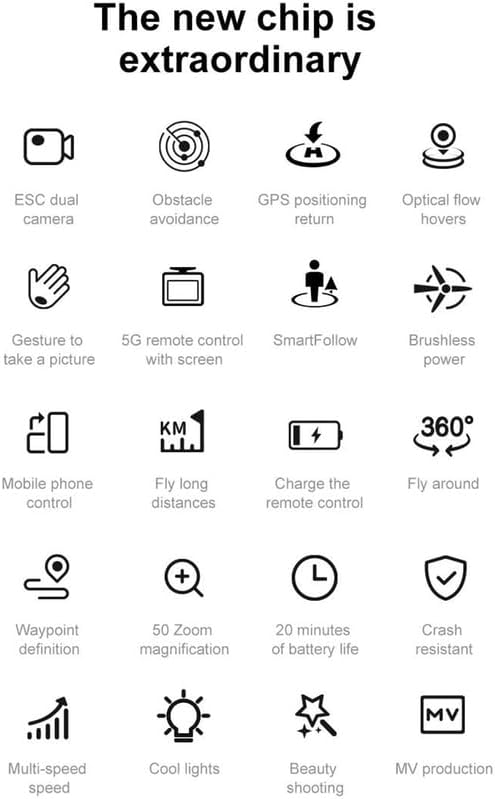
Figure 6.2: Drone Features Overview. This image displays icons representing various intelligent features of the drone, such as gesture control, SmartFollow, and waypoint definition.
- Kontrola gestama: Perform specific hand gestures to trigger photo or video capture. Refer to the detailed manual for specific gestures.
- SmartFollow: Dron može automatski pratiti određeni subjekt.
- Fly Around: Program the drone to orbit a point of interest.
- Waypoint Definition: Set multiple waypoints for the drone to follow a pre-defined flight path.
7. Održavanje
- Čišćenje: Use a soft, dry cloth to clean the drone and remote control. Avoid using liquids or solvents. Ensure camera lens and sensors are free of dust and debris.
- Zamjena propelera: If propellers are damaged or bent, replace them immediately using the provided spares and screwdriver. Ensure correct A/B propeller types are installed.
- Njega baterije: Store batteries in a cool, dry place. Do not fully discharge batteries for extended periods. Charge them to approximately 50-60% for long-term storage.
- Skladištenje: When not in use, store the drone and remote control in the provided storage bag in a dry environment, away from direct sunlight and extreme temperatures.
8. Rješavanje problema
| Problem | Mogući uzrok | Otopina |
|---|---|---|
| Dron se ne uključuje | Slaba baterija; Baterija nije ispravno umetnuta | Charge drone battery; Reinstall battery securely |
| Daljinski upravljač se ne povezuje | Low remote battery; Pairing failed | Charge remote control; Re-attempt pairing process |
| Nestabilan let/Drifting | No GPS signal (outdoor); No optical flow (indoor); Calibration needed; Damaged propellers | Fly in open area with clear GPS; Ensure good lighting for optical flow; Perform GPS calibration; Replace damaged propellers |
| Camera not recording/taking photos | Memory card full/not inserted; Camera not activated | Insert/replace memory card; Ensure camera is powered on and connected |
| Izbjegavanje prepreka ne radi | Sensors blocked/dirty; System error | Clean sensors; Restart drone and remote; Avoid flying in complex environments |
9. Specifikacije
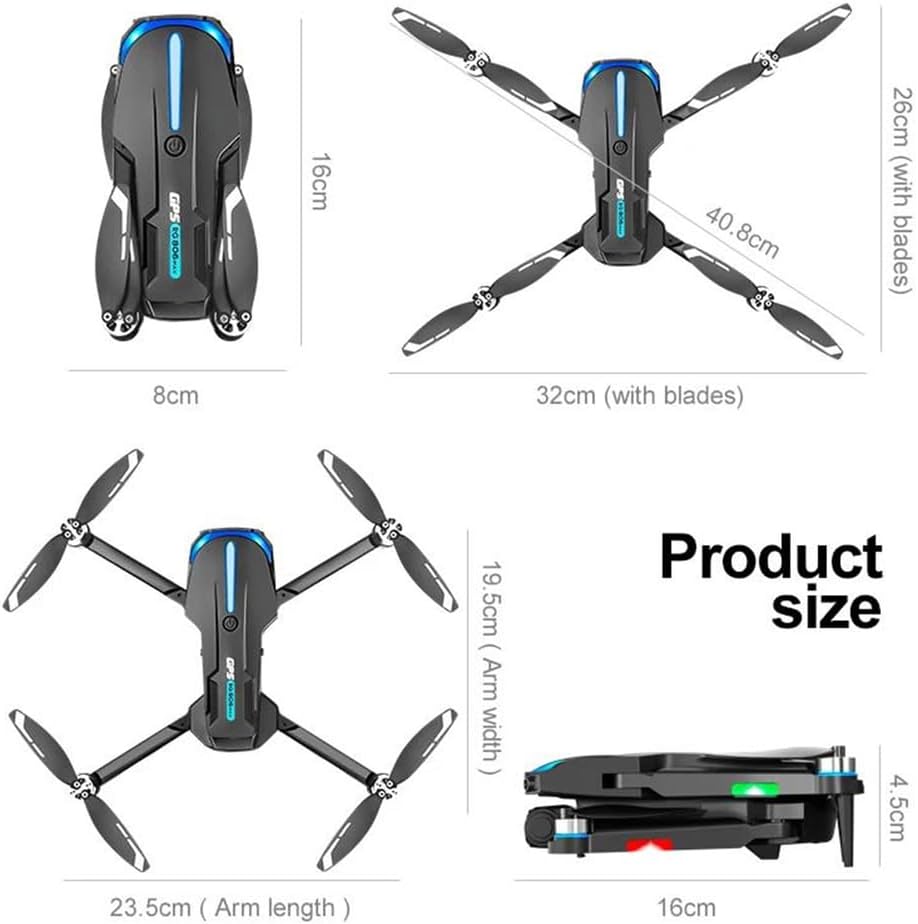
Slika 9.1: Dimenzije proizvoda. This image provides the folded and unfolded dimensions of the drone.
- Model: RG806 MAX
- Težina drona: 190g
- Vrijeme leta: Otprilike 20 minuta
- Daljinska udaljenost: Do 250m
- Fotoaparat: 4K HD Video Recording, 1/1.28 Inches Sensor Size
- Podešavanje kamere: 90-degree remote control electric adjustment
- Radna frekvencija: 5 GHz
- Maksimalna otpornost na brzinu vjetra: <10 KM/H
- Vrsta motora: Motor bez četkica
- Izbjegavanje prepreka: Three-sided Visual Avoidance
- Pozicioniranje: GPS, pozicioniranje optičkim tokom
- Povezivost: WiFi
- Remote Control Display: Integrated 5.6-inch screen
- Sklopljene dimenzije: 16 cm (duljina) x 8 cm (širina) x 4.5 cm (visina)
- Rasklopljene dimenzije: 32cm (with blades) x 40.8cm (with blades)
- Arm Length (unfolded): 23.5 cm
- Arm Width (unfolded): 19.5 cm
10. Jamstvo i podrška
For warranty information, technical support, or service inquiries, please refer to the contact details provided with your purchase documentation or contact the manufacturer directly. Keep your proof of purchase for warranty claims.