
Uvod
Thank you for choosing the Digitus DA-70919 USB-C 8K 12-Port Docking Station. This device is designed to expand the connectivity of your USB-C enabled laptop or computer, providing a comprehensive solution for video output, data transfer, network access, and power delivery. Please read this manual carefully to ensure proper installation and operation.
Proizvod gotovview
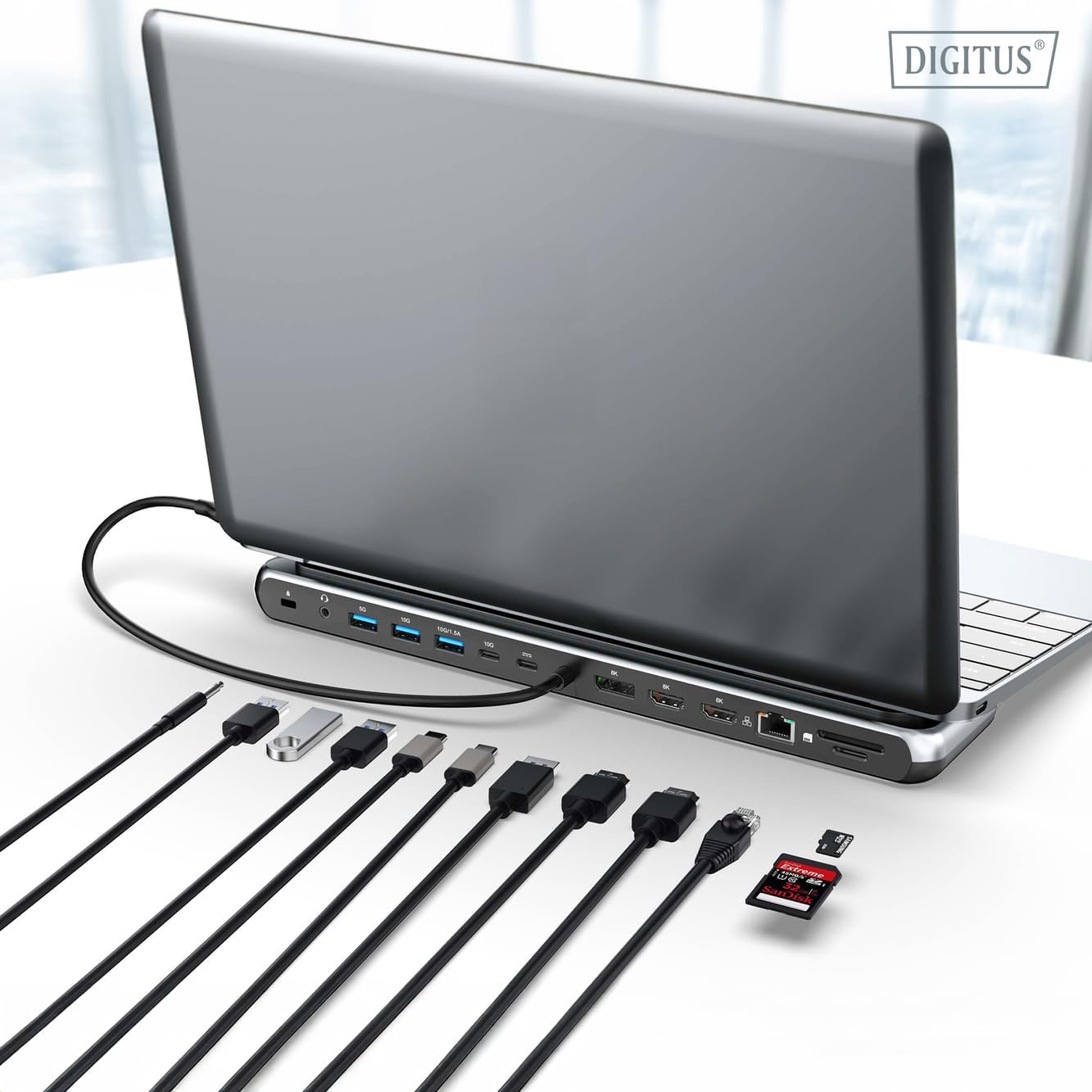
The Digitus DA-70919 docking station offers 12 essential ports to enhance your workspace. It supports high-resolution video output, fast data transfer, and efficient power delivery to your host device.

Slika 1: Detailed diagram of the Digitus DA-70919 docking station ports and their functions. This diagram labels each of the 12 ports on the docking station, including Audio Jack, USB-A, USB-C, USB-C PD, DisplayPort, HDMI, RJ45 Gigabit Ethernet, and SD/MicroSD card slots, along with anti-theft protection.

Slika 2: Ispred view of the Digitus DA-70919 docking station showing all accessible ports. A clear view of the docking station's front panel, displaying the various input and output ports including USB-A, USB-C, HDMI, DisplayPort, Ethernet, and card readers.
Ključne karakteristike:
- Video izlaz: 2x HDMI, 1x DisplayPort (DP) supporting up to 8K/30Hz for single display, or multi-display configurations.
- USB podatkovni priključci: 2x USB-A 3.2 Gen 2 (10Gbps), 1x USB-A 3.2 Gen 1 (5Gbps), 1x USB-C 3.2 Gen 2 (10Gbps).
- Isporuka energije (PD): USB-C PD 3.0 port for charging your host laptop (up to 85W output).
- Mreža: Gigabit Ethernet (RJ45) for stable wired internet connection.
- Čitači kartica: SD and MicroSD card slots with 104 MBps transfer speed.
- Audio: 3.5mm audio jack for headphones or speakers.
Upute za postavljanje
Follow these steps to set up your Digitus DA-70919 docking station:
- Check Host USB-C Port Compatibility: Ensure your laptop's USB-C port supports DisplayPort Alternate Mode (DP Alt Mode) for video output and Power Delivery for charging. Without DP Alt Mode, video output will not function.

Slika 3: Guide to USB-C port compatibility for DisplayPort Alternate Mode. This graphic explains which types of USB-C ports on your laptop support the full functionality of the docking station, specifically highlighting the requirement for DisplayPort Alternate Mode (DP Alt Mode) for video output.
- Povezivanje s glavnim uređajem: Connect the integrated USB-C cable from the docking station to the USB-C port on your laptop.
- Spojite adapter za napajanje (opcionalno, ali preporučeno): If you wish to charge your laptop via the docking station or power high-demand peripherals, connect a USB-C Power Delivery adapter (not included, up to 100W recommended) to the USB-C PD input port on the docking station.
- Spojite vanjske zaslone: Spojite monitore na HDMI i/ili DisplayPort izlaze na priključnoj stanici pomoću odgovarajućih kabela.
- Povežite periferne uređaje: Plug in your USB devices (keyboard, mouse, external drives), Ethernet cable, SD/MicroSD cards, and audio devices to the corresponding ports on the docking station.
- Instalacija upravljačkog programa: In most cases, the docking station is plug-and-play and does not require additional drivers. If prompted, allow your operating system to install any necessary drivers automatically.
Upute za rad
Načini prikaza
Priključna stanica podržava različite konfiguracije zaslona:
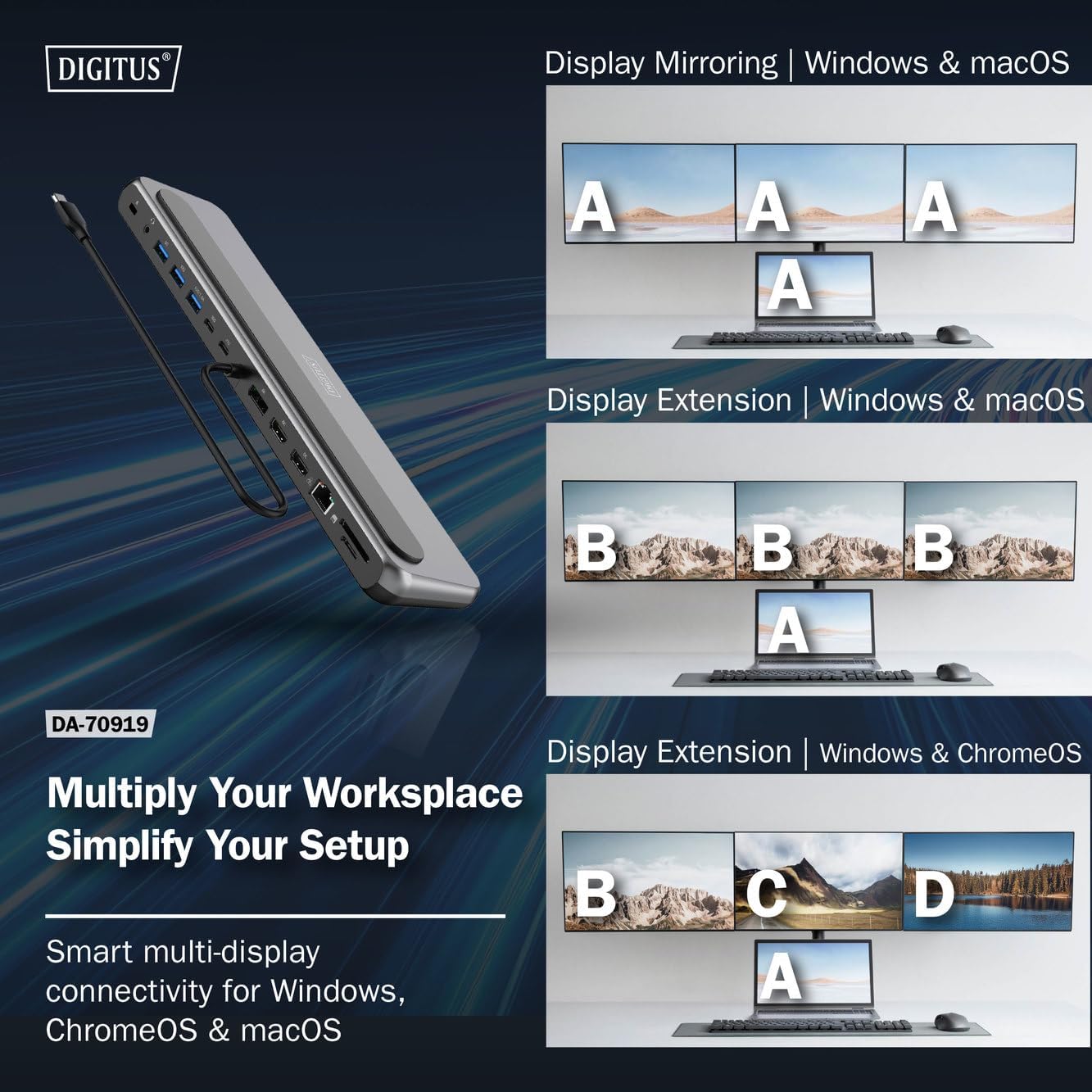
Slika 4: Diagram showing display mirroring and extension modes for Windows, macOS, and ChromeOS. This image illustrates the various display configurations supported by the docking station, including mirroring your screen or extending it across multiple external monitors on Windows, macOS, and ChromeOS.
- Način zrcala: Duplicates your laptop's display onto the external monitors.
- Extend Mode (Windows/ChromeOS): Extends your desktop across multiple external monitors, allowing for a multi-tasking environment. Supports dual monitors (2x 4K/60Hz) and triple monitors (1x 4K/60Hz + 2x 4K/30Hz) in MST (Multi Stream Transport) mode.
- Extend Mode (macOS): macOS typically supports extended desktop to one external monitor, with other external monitors mirroring each other.
To configure display settings, access your operating system's display settings (e.g., Windows Display Settings, macOS System Preferences > Displays).
Prijenos podataka
Utilize the USB-A and USB-C data ports for connecting external storage devices, keyboards, mice, and other USB peripherals. The USB 3.2 Gen 2 ports offer speeds up to 10Gbps, while the USB 3.2 Gen 1 port offers speeds up to 5Gbps.
Isporuka energije
When a compatible USB-C PD power adapter is connected to the docking station's PD input port, the docking station can deliver up to 85W of power to charge your connected laptop. This allows you to power your laptop and peripherals through a single USB-C connection.
Slika 5: Illustration of the docking station's fast charging capability via USB-C Power Delivery. This image demonstrates the Power Delivery function, showing a 100W input to the docking station and an 85W output to charge the connected laptop.
Mrežna veza
Connect an Ethernet cable to the RJ45 port for a stable and high-speed wired network connection (10/100/1000 Mbps Gigabit Ethernet).
Čitači kartica
Insert SD or MicroSD cards into the dedicated slots for quick access to photos, videos, and other files. The card readers support transfer speeds up to 104 MBps.
Audio izlaz
Connect your headphones or speakers to the 3.5mm audio jack for audio output.
Održavanje
- Čišćenje: Use a soft, dry cloth to clean the surface of the docking station. Avoid using liquid cleaners or solvents.
- Skladištenje: Priključnu stanicu čuvajte na hladnom i suhom mjestu, dalje od izravne sunčeve svjetlosti i ekstremnih temperatura.
- Rukovanje: Avoid dropping or subjecting the device to strong impacts. Do not attempt to disassemble the docking station.
Rješavanje problema
Ako naiđete na probleme s priključnom stanicom, pogledajte sljedeća uobičajena rješenja:
- Nema izlaza za prikaz:
- Provjerite podržava li USB-C priključak vašeg prijenosnog računala DisplayPort Alternate Mode.
- Check all video cables (HDMI/DP) are securely connected to both the docking station and the monitor.
- Provjerite je li monitor uključen i postavljen na ispravan ulazni izvor.
- Pokušajte spajati jedan monitor istovremeno kako biste izolirali problem.
- Ažurirajte upravljačke programe za grafiku vašeg prijenosnog računala.
- Nema napajanja prijenosnog računala:
- Ensure a compatible USB-C PD power adapter (up to 100W) is connected to the docking station's PD input port.
- Verify that your laptop's USB-C port supports Power Delivery.
- Provjerite adapter za napajanje i kabel ima li oštećenja.
- USB uređaji nisu prepoznati:
- Ponovno spojite USB uređaj na drugi priključak na priključnoj stanici.
- Ensure the docking station is properly connected to the host laptop.
- If using a high-power USB device, ensure the docking station is connected to an external power adapter.
- Problemi s Ethernet vezom:
- Provjerite Ethernet kabelsku vezu s priključnom stanicom i usmjerivačem/modemom.
- Provjerite mrežne postavke na prijenosnom računalu.
- Ponovno pokrenite ruter/modem i prijenosno računalo.
- Čitač kartica ne radi:
- Ensure the SD/MicroSD card is inserted correctly and fully.
- Test the card with another device to confirm it is not damaged.
Tehnički podaci
| Značajka | Specifikacija |
|---|---|
| Model | DA-70919 |
| Veza s domaćinom | USB-C (integrirani kabel) |
| Video izlaz | 2x HDMI, 1x DisplayPort (DP) |
| Max. Single Display Resolution | 8K (7680x4320) pri 30Hz |
| Max. Dual Display Resolution (MST) | 2x 4K (3840x2160) @ 60Hz |
| Max. Triple Display Resolution (MST) | 1x 4K@60Hz + 2x 4K@30Hz |
| USB-A podatkovni priključci | 2x USB 3.2 Gen 2 (10Gbps), 1x USB 3.2 Gen 1 (5Gbps) |
| USB-C podatkovni priključak | 1x USB 3.2 Gen 2 (10Gbps) |
| Power Delivery (PD) Input | USB-C PD 3.0 (up to 100W) |
| Power Delivery (PD) Output to Host | Do 85W |
| Ethernet | RJ45 Gigabit (10/100/1000 Mbps) |
| Čitači kartica | SD, MicroSD (104 MBps) |
| Audio | 1x 3.5 mm audio utičnica |
| Kompatibilnost | Windows, macOS, ChromeOS |
| Radna temperatura | 0°C do 45°C (32°F do 113°F) |
| Temperatura skladištenja | -10°C do 70°C (14°F do 158°F) |
Jamstvo i podrška
The Digitus DA-70919 USB-C 8K 12-Port Docking Station comes with a Jamstvo 2 godine od datuma kupnje. Ovo jamstvo pokriva nedostatke u proizvodnji i osigurava da proizvod funkcionira kako je opisano pri normalnoj uporabi.
For technical support, warranty claims, or further assistance, please contact your retailer or visit the official Digitus website for contact information. Please have your product model number (DA-70919) and proof of purchase ready when seeking support.