
1. Uvod
Thank you for choosing the suevery All-in-One PC. This manual provides essential information for setting up, operating, and maintaining your new computer. The suevery All-in-One PC is designed for productivity, entertainment, and various applications, featuring a 21.5-inch Full HD display, Intel Core i5 processor, 16GB RAM, and a 256GB SSD. It comes equipped with a built-in HD webcam, Wi-Fi 6, and includes a keyboard and mouse for a complete out-of-the-box experience.
2. Što je u kutiji
Molimo provjerite sadržaj paketa. Ako bilo koji artikl nedostaje ili je oštećen, obratite se korisničkoj podršci.
- suevery 21.5-inch All-in-One PC
- Adapter napajanja
- Tipkovnica
- Miš
- Korisnički priručnik (ovaj dokument)
3. Proizvod je gotovview
3.1 Prednja strana View i Prikaz
The All-in-One PC features a 21.5-inch Full HD (1920x1080) IPS Anti-glare display, providing clear and vibrant visuals. The display is tiltable for ergonomic adjustment.

Slika 3.1: Prednja strana view of the suevery All-in-One PC, showcasinnjegov 21.5-inčni zaslon.
3.2 Built-in Audio-Video Components
The PC integrates a high-definition camera, microphone, and speakers, eliminating the need for external peripherals for video communication.

Figure 3.2: Illustration of the integrated speaker, camera, and microphone for video communication.
3.3 Portovi i sučelja
The device provides various ports for connectivity. Refer to the diagram below for port locations and types.
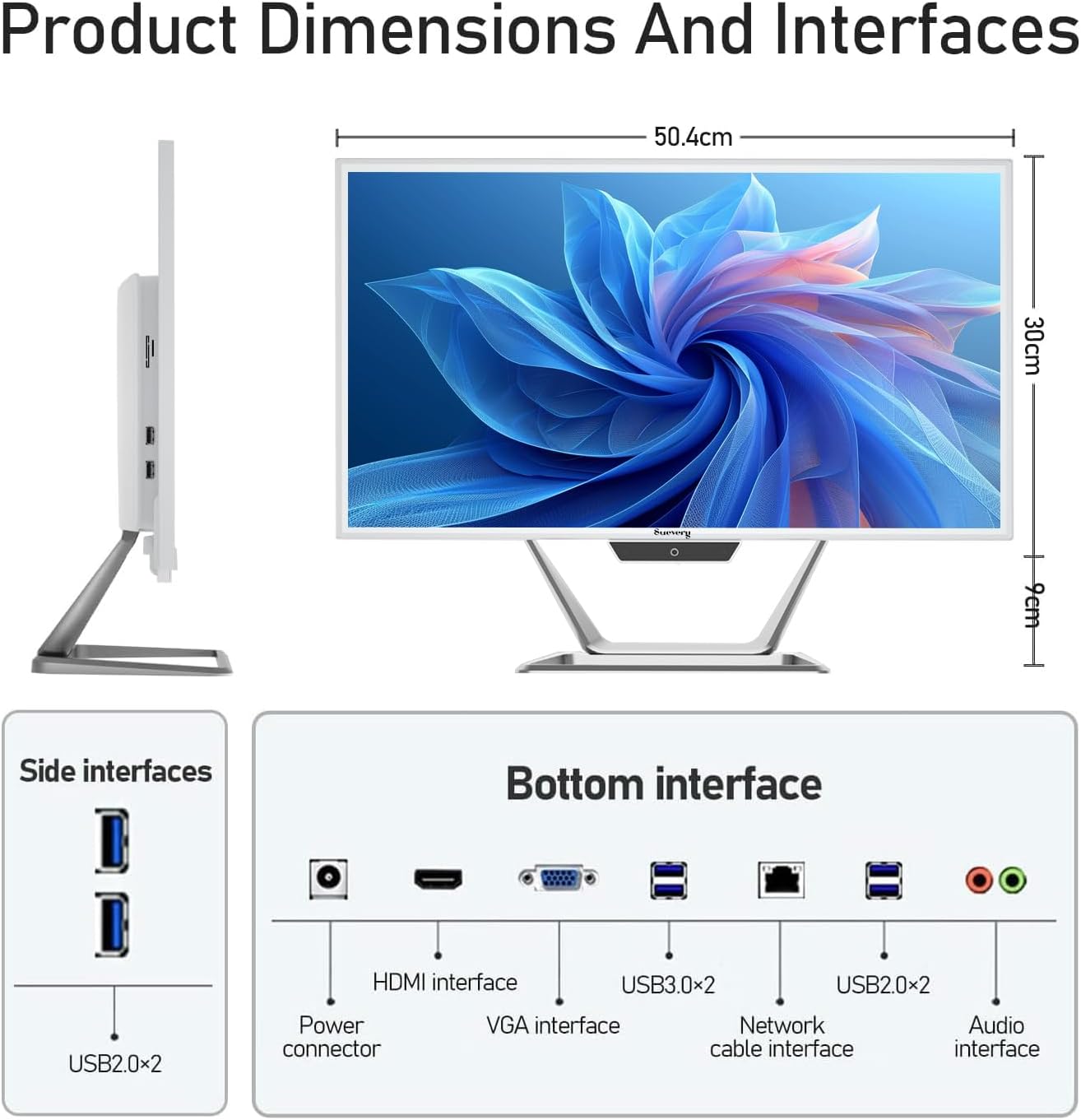
Figure 3.3: Product dimensions and interface layout. Includes USB 2.0, USB 3.0, HDMI, VGA, Network, Audio, and Power ports.
- Priključak za napajanje: Za spajanje strujnog adaptera.
- HDMI sučelje: Za spajanje na vanjske zaslone.
- VGA sučelje: Za spajanje na starije vanjske zaslone.
- USB 3.0 x 2: High-speed data transfer ports.
- USB 2.0 x 4: Standard data transfer ports (2 on side, 2 on bottom).
- Network Cable Interface: Za žičanu Ethernet vezu.
- Audio sučelje: Za spajanje vanjskih slušalica ili zvučnika.
4. Vodič za postavljanje
Follow these steps to set up your suevery All-in-One PC.
- Raspakirajte računalo: Carefully remove the All-in-One PC and all accessories from the packaging. Place the PC on a stable, flat surface.
- Spojite tipkovnicu i miš: Connect the included keyboard and mouse to the available USB ports on the back or side of the PC.
- Priključite napajanje: Connect the power adapter to the power connector on the PC, then plug the power cord into a wall outlet.
- Uključivanje: Press the power button, usually located on the bottom bezel or side of the display. The PC will boot up.
- Početna postavka operativnog sustava: Your PC comes with DOS pre-installed. You will need to install your preferred operating system (e.g., Windows, Linux) following its specific installation instructions. This typically involves booting from a USB drive or DVD.
- Povežite se na mrežu: Once the OS is installed, connect to your network via Wi-Fi 6 or an Ethernet cable.
5. Upute za rad
5.1 Osnovni rad
- Uključivanje/isključivanje: Press the power button to turn the PC on. To turn off, use the operating system's shutdown function. A short press on the power button can put the PC to sleep.
- Podešavanje zaslona: The display can be tilted from -5 to 25 degrees to achieve an optimal viewing angle. Gently adjust the top or bottom edge of the screen to tilt it.

Figure 5.1: The display supports tilt angle adjustment for ergonomic viewing.
5.2 Using Integrated Peripherals
- Webkamera: The built-in 5MP HD webcam is ready for video calls and conferences. Ensure your operating system and applications have permission to access the camera.
- Mikrofon: The integrated microphone captures audio for calls and voice commands. Adjust microphone levels in your operating system's sound settings.
- Govornici: The built-in speakers provide audio output. Adjust volume using your operating system's sound controls or external keyboard media keys.
5.3 Povezivost
- Wi-Fi 6: Connect to wireless networks for internet access. Configure Wi-Fi settings through your operating system.
- Ethernet: For a stable wired connection, plug an Ethernet cable into the network port.
- USB priključci: Use the USB 2.0 and USB 3.0 ports to connect external devices such as USB drives, printers, or additional peripherals.
- HDMI/VGA: Connect an external monitor or projector using the HDMI or VGA port for extended display options.
6. Održavanje
Pravilno održavanje osigurava dugotrajnost i optimalne performanse vašeg računala.
- Čišćenje ekrana: Koristite mekanu krpu koja ne ostavlja dlačice dampened with water or a screen cleaner specifically designed for electronics. Do not spray cleaner directly onto the screen.
- Čišćenje kućišta: Obrišite vanjske površine mekom, suhom krpom. Izbjegavajte abrazivna sredstva za čišćenje ili otapala.
- Ventilacija: Ensure the ventilation openings on the back and sides of the PC are not blocked to prevent overheating.
- Ažuriranja softvera: Redovito ažurirajte operativni sustav i upravljačke programe kako biste osigurali sigurnost i performanse.
- Sigurnosna kopija podataka: Povremeno napravite sigurnosnu kopiju važnih podataka na vanjski disk ili u oblaku.
7. Rješavanje problema
Ako naiđete na probleme, pogledajte sljedeće uobičajene probleme i rješenja.
| Problem | Moguće rješenje |
|---|---|
| Računalo se ne uključuje. | Check if the power adapter is securely connected to both the PC and the wall outlet. Ensure the power outlet is functional. |
| Nema prikaza na ekranu. | Ensure the PC is powered on. If an external monitor is connected, check its power and cable connection. Try restarting the PC. |
| Tipkovnica ili miš ne reagiraju. | Check USB connections. Try plugging them into different USB ports. If wireless, ensure batteries are charged and dongle is connected. |
| Nema internetske veze (Wi-Fi/Ethernet). | For Wi-Fi, check if Wi-Fi is enabled in your OS settings and if you're connected to the correct network. For Ethernet, ensure the cable is properly connected to both the PC and the router/modem. Restart your router/modem. |
| Webcam or microphone not working. | Check privacy settings in your operating system to ensure applications have permission to access the camera and microphone. Ensure drivers are up to date. |
8. Specifikacije
Detailed technical specifications for the suevery All-in-One PC (Model: I22X W1-99).
| Značajka | Detalj |
|---|---|
| Marka | suevery |
| Broj modela | I22X W1-99 |
| Operativni sustav | DOS (User-installable OS) |
| Model procesora | Intel Core i5 7300U |
| Brzina procesora | 2.6 GHz (up to 3.5 GHz Turbo) |
| Instalirana RAM memorija | 16 GB DDR3 |
| Maksimalna veličina RAM memorije | 32 GB |
| Kapacitet pohrane memorije | 256 GB SSD (PCIE x 2) |
| Grafički koprocesor | Intel HD grafika 620 (integrirana) |
| Veličina zaslona | 21.5 inča |
| Maksimalna razlučivost zaslona | 1920x1080 Pixels (Full HD) |
| Vrsta zaslona | LED IPS Anti-glare |
| Tehnologija povezivanja | Ethernet, Wi-Fi 6 |
| Video izlazno sučelje | hdmi, vga |
| Ukupno USB priključaka | 6 (2x USB 3.0, 4x USB 2.0) |
| Ugrađeni mediji | Webcam (5MP), Speakers, Microphone |
| Potrošnja energije | 90 vata |
| Boja | Bijela |
9. Informacije o jamstvu
The suevery All-in-One PC comes with a 1-godišnje ograničeno jamstvo from the date of purchase. This warranty covers manufacturing defects and workmanship under normal use. It does not cover damage caused by misuse, accidents, unauthorized modifications, or external factors. Please retain your proof of purchase for warranty claims.
10. Korisnička podrška
For technical assistance, troubleshooting beyond this manual, or warranty inquiries, please contact suevery customer support through the retailer where you purchased the product or refer to the official suevery webstranica za kontakt podatke.
Please have your product model number (I22X W1-99) and proof of purchase ready when contacting support.