
1. Uvod
This manual provides detailed instructions for the safe and efficient use of your Surfans F20 Pro Android Hi-Res Music Player. Please read this manual thoroughly before operating the device and retain it for future reference.
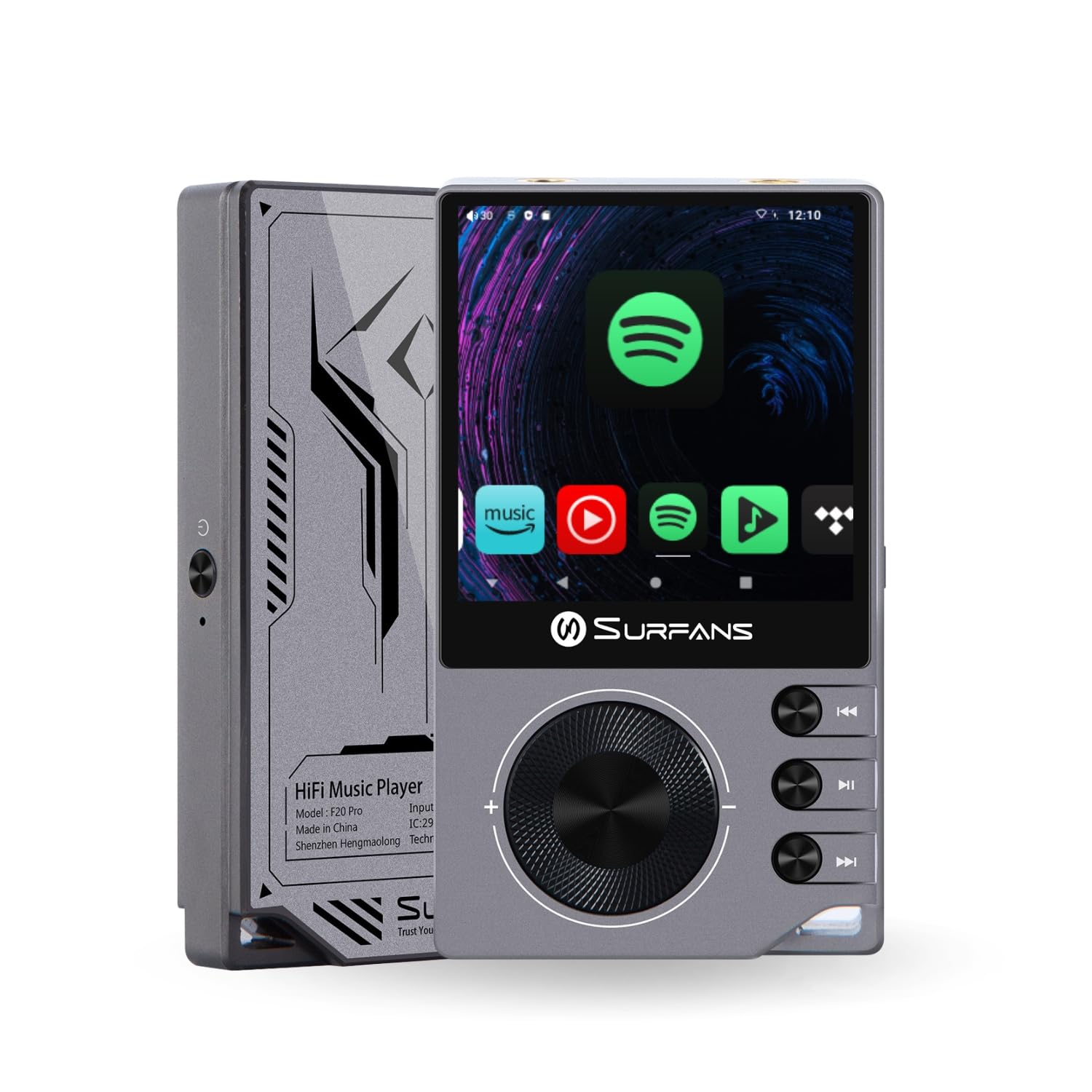
The Surfans F20 Pro Hi-Res Music Player, showcasing its compact design and touchscreen interface.
2. Sadržaj paketa
Provjerite jesu li svi artikli prisutni u paketu:
- Surfans F20 Pro Hi-Res Music Player
- USB kabel vrste C
- 32 GB MicroSD Memory Card (pre-installed or separate)
- Zaštitna torbica
- Korisnički priručnik (ovaj dokument)
3. Uređaj prekoview
Familiarize yourself with the physical components and ports of your F20 Pro player.

Sprijeda i straga view of the Surfans F20 Pro, highlighting its robust CNC metal chassis and button layout.
3.1. Ključne značajke
- Dual ESS9018Q2M DACs: For high-fidelity audio processing.
- Octa-Core Android 12 System: Enables streaming app compatibility and smooth operation.
- 3.5mm Single-Ended & 4.4mm Balanced Outputs: Versatile headphone connectivity.
- Bluetooth 5.0 with LDAC: High-quality wireless audio transmission.
- Dvopojasni Wi-Fi (2.4 GHz i 5 GHz): For stable internet connectivity.
- Proširiva pohrana: Supports up to 1TB via MicroSD card.
- 2.7-inčni zaslon osjetljiv na dodir: Intuitivno korisničko sučelje.
4. Postavljanje
4.1. Punjenje uređaja
Before first use, fully charge the F20 Pro. Connect the included USB Type-C cable to the device's charging port and a compatible USB power adapter (not included) or computer USB port. The charging indicator will show the charging status.
4.2. Umetanje MicroSD kartice
The F20 Pro supports MicroSD cards up to 1TB for expanded storage. Locate the MicroSD card slot on the side of the device. Gently insert the card until it clicks into place. To remove, push the card in again until it springs out.
4.3. Početno uključivanje
Press and hold the power button until the screen illuminates. Follow the on-screen prompts to complete the initial setup, including language selection and Wi-Fi connection.
4.4. Povezivanje na Wi-Fi
Idite do Postavke > Mreža i internet > Wi-Fi. Select your desired network and enter the password if prompted. The F20 Pro supports both 2.4GHz and 5GHz Wi-Fi bands.

The Surfans F20 Pro demonstrating its dual-band Wi-Fi capability for fast and stable connections.
4.5. Bluetooth uparivanje
Za spajanje Bluetooth slušalica ili zvučnika:
- Provjerite je li vaš Bluetooth uređaj u načinu uparivanja.
- On the F20 Pro, go to Postavke > Povezani uređaji > Uparite novi uređaj.
- Select your device from the list and confirm pairing.

An illustration of the Bluetooth 5.0 chip, indicating support for high-resolution wireless audio codecs like LDAC.
5. Rukovanje uređajem
5.1. Osnovna navigacija
The F20 Pro features a 2.7-inch touchscreen for navigation. Swipe to scroll, tap to select, and use the physical buttons for quick controls:
- Gumb za napajanje: Power on/off, screen on/off.
- Kotačić za glasnoću: Podešava glasnoću audio izlaza.
- Gumbi za kontrolu reprodukcije: Reprodukcija/Pauza, Sljedeća pjesma, Prethodna pjesma.
5.2. Reprodukcija glazbe
The F20 Pro supports various audio formats including DSD512, 192kHz/24bit, FLAC, WAV, WMA, M4A, MP3, MP2, and AAC.
5.2.1. Lokalni Files
Prijenos glazbe files to the device's internal storage or MicroSD card via USB connection to a computer. Use the pre-installed music player application to browse and play your library.
5.2.2. Aplikacije za strujanje
The Android 12 operating system allows installation of streaming apps like Spotify, Apple Music, Tidal, or YouTube. Connect to Wi-Fi and download apps from the Google Play Store or other compatible sources.

The Surfans F20 Pro's screen showing various streaming application icons, demonstrating its Android capabilities.
5.3. Priključci za slušalice
The device offers both single-ended and balanced audio outputs.
- 3.5 mm jednostrani izlaz: Standard headphone jack (125mW/32Ω).
- 4.4 mm balansirani izlaz: For enhanced audio performance with compatible headphones (500mW/32Ω).

Krupni plan view of the 3.5mm single-ended and 4.4mm balanced audio output ports on the Surfans F20 Pro.
6. Održavanje
6.1. Čišćenje
Use a soft, dry, lint-free cloth to clean the device. Avoid using abrasive cleaners or solvents, which may damage the surface.
6.2. Ažuriranja softvera
Periodically check for software updates to ensure optimal performance and access to new features. Updates can typically be found in Postavke > Sustav > Ažuriranje sustava.
6.3. Briga o bateriji
Kako biste produžili vijek trajanja baterije, izbjegavajte često potpuno pražnjenje uređaja. Uređaj čuvajte na hladnom i suhom mjestu kada ga ne koristite dulje vrijeme.

Interni view of battery cells, representing the long-lasting battery capacity of the F20 Pro.
7. Rješavanje problema
If you encounter issues with your F20 Pro, refer to the following common problems and solutions:
| Problem | Mogući uzrok | Otopina |
|---|---|---|
| Uređaj se ne uključuje | Slaba baterija; Pad sustava | Napunite uređaj; Pritisnite i držite gumb za napajanje 10-15 sekundi za prisilno ponovno pokretanje. |
| Nema zvuka | Volume too low; Incorrect output selected; Faulty headphones | Increase volume; Check headphone connection; Test with different headphones. |
| Ne mogu se spojiti na Wi-Fi | Netočna lozinka; Izvan dometa; Problem s usmjerivačem | Potvrdite lozinku; Približite se ruteru; Ponovno pokrenite ruter. |
| Spore performanse/Rušenje aplikacije | Previše pokrenutih aplikacija; Malo prostora za pohranu; Zastarjeli softver | Close background apps; Free up storage; Check for system updates. |
8. Specifikacije
Detailed technical specifications for the Surfans F20 Pro:
| Značajka | Detalj |
|---|---|
| Marka | Surfani |
| Naziv modela | F20 PRO |
| DAC čipovi | Dual ESS9018Q2M |
| Op-Amps | Dual OPA1612 |
| Operativni sustav | Android 12 |
| OVAN | 3 GB |
| Unutarnja pohrana | 32 GB |
| Proširiva pohrana | Do 1 TB putem MicroSD kartice |
| Veličina zaslona | 2.73 inča |
| Povezivost | Aux, Bluetooth 5.0 (LDAC), USB Type-C, Wi-Fi (2.4GHz & 5GHz) |
| Audio izlazi | 3.5mm Single-Ended (125mW/32Ω), 4.4mm Balanced (500mW/32Ω) |
| Podržani audio formati | DSD512, 192kHz/24bit, FLAC, WAV, WMA, M4A, MP3, MP2, AAC |
| Boja | Sivo |

An illustration of the dual ESS9018K2M DAC chips, central to the F20 Pro's high-resolution audio capabilities.
9. Informacije o jamstvu
The Surfans F20 Pro comes with a 1-godišnje jamstvo od datuma kupnje. Ovo jamstvo pokriva nedostatke u proizvodnji i izradi pri normalnoj uporabi. Ne pokriva štetu uzrokovanu nepravilnom upotrebom, nezgodama, neovlaštenim preinakama ili normalnim habanjem. Molimo sačuvajte dokaz o kupnji za reklamacije.
10. Korisnička podrška
For further assistance, technical support, or warranty inquiries, please contact Surfans customer service through the official website or your retailer. You may also find additional resources and FAQs online.