
1. Uvod
Thank you for choosing the Thomson 24-inch HD LED Smart TV, model 24HT2S15. This manual provides essential information to help you set up, operate, and maintain your new television. Please read it thoroughly before use and retain it for future reference.

Slika: prednja strana view of the Thomson 24-inch HD LED Smart TV, showcasing its frameless design and key features like HD resolution and Dolby Audio.
Ključne karakteristike:
- TiVo OS with Voice Control: Intuitive interface combining live TV and streaming apps, personalized recommendations, and voice commands.
- Bežični zaslon: Mirror your smartphone, tablet, or laptop screen to the TV.
- Dolby Audio: Enhanced sound experience with improved dialogue, detail, and surround effects.
- HDR10: Sharper contrast and realistic colors for an immersive viewiskustvo.
- Daljinski upravljač s pozadinskim osvjetljenjem: Easy navigation in low light with direct access buttons for popular streaming services.
- Adjustable Side Feet: Flexible positioning options for the TV.
- Trostruki tuner: Integrated tuners for cable, satellite, and antenna reception.
2. Što je u kutiji
Prilikom raspakiranja, molimo provjerite jesu li prisutni svi sljedeći predmeti:
- Thomson 24-inch HD LED Smart TV (Model 24HT2S15)
- Daljinski upravljač
- Adapter napajanja
- korisnički priručnik
- Jamstveni list
- Adjustable Side Feet (2x)
If any items are missing or damaged, please contact your retailer or Thomson customer support.
3. Postavljanje
3.1 Raspakiranje i postavljanje
Carefully remove the TV from its packaging. It is recommended to have two people for this process. Place the TV on a stable, flat surface or mount it on a wall using a compatible VESA mount (not included).
Osigurajte odgovarajuću ventilaciju oko televizora. Ne blokirajte ventilacijske otvore.
3.2 Pričvršćivanje postolja
If you are not wall-mounting the TV, attach the included side feet:
- Postavite televizor licem prema dolje na meku, čistu krpu kako biste spriječili oštećenje zaslona.
- Poravnajte svaki stalak s odgovarajućim otvorima za vijke na dnu televizora.
- Secure the stands using the provided screws. The feet are adjustable from 30 cm to 60 cm distance.

Image: The Thomson 24-inch Smart TV showing its dimensions, including a screen diagonal of 60 cm (24 inches), width of 53 cm, and height of 37 cm with the stand. The adjustable stand feet are also illustrated.
3.3 Spajanje perifernih uređaja
Connect your external devices to the TV's ports. Refer to the diagram below for port locations.

Slika: Detaljna view of the rear connection panel of the Thomson 24-inch Smart TV, illustrating various ports including 2x USB 2.0, Antenna input, Satellite input, 3x HDMI 1.4 (one with ARC), Service port, Headphone jack, AV IN, Digital Optical Audio Out, and LAN port.
- Vlast: Connect the power adapter to the TV and then to a wall outlet.
- Antena/Satelit: Connect your antenna or satellite cable to the respective input.
- HDMI: Koristite HDMI kabele za spajanje uređaja poput Blu-ray playera, igraćih konzola ili set-top box uređaja. HDMI 1.4/ARC podržava Audio Return Channel.
- USB: Umetnite USB pogone za reprodukciju medija ili ažuriranja softvera.
- LAN: Spojite Ethernet kabel za žičanu internetsku vezu.
- AV IN: Za starije uređaje koji koriste kompozitni video i stereo audio.
- Slušalica: Priključite slušalice za privatno slušanje.
- Digitalni optički audio izlaz: Connect to an external sound system for digital audio.
3.4 Početno uključivanje i prvo postavljanje
- Uključite televizor u električnu utičnicu.
- Pritisnite gumb za napajanje na daljinskom upravljaču ili televizoru.
- Follow the on-screen instructions to select your language, country, and perform channel scanning for your triple tuner (cable/satellite/antenna).
- Spojite se na svoju Wi-Fi mrežu odabirom s popisa i unosom lozinke.
- Complete the TiVo OS setup, including signing in or creating an account.
4. Upravljanje televizorom
4.1 Funkcije daljinskog upravljača
The backlit remote control provides easy access to all TV functions, even in dim lighting. It includes dedicated buttons for popular streaming services.

Image: The Thomson Smart TV remote control, highlighting its backlit buttons, voice control microphone, and direct access buttons for Netflix, YouTube, Prime Video, Disney+, and Canal+.
- Gumb za napajanje: Uključuje/isključuje TV.
- Brojčani gumbi: Izravno odaberite kanale.
- Navigacijska tipka (gore/dolje/lijevo/desno/u redu): Navigacija kroz izbornike i odabir opcija.
- Natrag/Izlaz: Povratak na prethodni zaslon ili izlaz iz izbornika.
- Pojačavanje/stišavanje glasnoće: Podesite razinu glasnoće.
- Kanal gore/dolje: Promijenite TV kanale.
- Isključi zvuk: Isključite ili uključite zvuk.
- Dom: Access the TiVo OS home screen.
- Gumb za glasovnu kontrolu: Activate voice commands (microphone icon).
- Gumbi za izravan pristup: Launch Netflix, YouTube, Prime Video, Disney+, Canal+ instantly.
4.2 TiVo OS and Smart Features
The TiVo OS provides a unified platform for live TV and streaming content. Explore personalized recommendations and access your favorite apps.

Image: The Thomson Smart TV screen showing various streaming application icons like Netflix, YouTube, Disney+, Prime Video, Plex, DAZN, Canal+, and Pluto TV, indicating integrated smart TV capabilities.
- Pristup aplikaciji: Navigate to the home screen to find and launch pre-installed apps or download new ones from the app store.
- Glasovno upravljanje: Press the voice control button on your remote and speak commands to search for content, launch apps, or control TV functions.
- Bežični zaslon: Use the Wireless Display feature to mirror content from your compatible smartphone, tablet, or laptop directly to your TV screen.

Image: An illustration demonstrating the voice control feature of the Thomson Smart TV, showing a remote control with a microphone icon and examples of voice commands like "Open Netflix" or "Play movies with Tom Hanks."

Image: The Thomson Smart TV displaying content mirrored from a smartphone, illustrating the Wireless Display and Google Cast features for seamless content sharing.
4.3 Poboljšanja slike i zvuka
- HDR10: Experience improved contrast, brightness, and color accuracy with HDR10 content. This technology enhances both bright and dark scenes for a more dynamic picture.
- Dolby Audio: Enjoy rich, clear, and powerful sound. Dolby Audio optimizes dialogue, enhances detail, and provides an immersive surround sound experience.

Image: A side-by-side comparison of picture quality, demonstrating the enhanced contrast and color vibrancy of HDR10 on the right compared to standard SDR on the left, with a building and landscape scene.

Image: An illustration depicting sound waves emanating from a TV screen, with the Dolby Audio logo prominently displayed, signifying enhanced audio quality for an immersive viewiskustvo.
5. Održavanje
5.1 Čišćenje TV-a
- Zaslon: Nježno obrišite zaslon mekom krpom koja ne ostavlja dlačice. Za tvrdokorne mrlje, laganoampIsperite krpu vodom ili specijaliziranim sredstvom za čišćenje zaslona. Nikada ne prskajte tekućinu izravno na zaslon.
- Kabinet: Obrišite kućište i postolje televizora mekom, suhom krpom.
- Daljinski upravljač: Daljinski upravljač očistite mekom, suhom krpom.
Oprez:
- Uvijek isključite televizor iz struje prije čišćenja.
- Ne koristite abrazivna sredstva za čišćenje, voskove ili otapala.
5.2 Ažuriranja softvera
Your Smart TV may receive software updates to improve performance and add new features. It is recommended to enable automatic updates or check for updates periodically through the TV's settings menu to ensure optimal functionality and security.
6. Rješavanje problema
Ako imate problema s televizorom, pogledajte sljedeće uobičajene probleme i rješenja:
| Problem | Mogući uzrok | Otopina |
|---|---|---|
| Nema struje | Kabel za napajanje isključen; problem s utičnicom | Provjerite je li kabel za napajanje sigurno spojen. Testirajte utičnicu s drugim uređajem. |
| Nema slike, ali je zvuk prisutan | Incorrect input source; faulty cable | Check the input source (e.g., HDMI 1, Antenna). Ensure cables are connected correctly. |
| Nema zvuka, ali je slika prisutna | Glasnoća je prigušena ili preniska; problem s vanjskim audio sustavom | Unmute the TV or increase volume. Check audio settings and external audio connections. |
| Daljinski upravljač ne radi | Prazne baterije; prepreka; daljinski upravljač nije uparen | Replace batteries. Remove any obstructions. Re-pair the remote if necessary (refer to TV settings). |
| Ne mogu se spojiti na Wi-Fi | Netočna lozinka; problem s usmjerivačem; TV predaleko od usmjerivača | Verify Wi-Fi password. Restart your router. Move TV closer or use a wired LAN connection. |
| Pametne značajke ne reagiraju | Network issue; temporary software glitch | Check internet connection. Restart the TV by unplugging it for a minute and plugging it back in. |
If the problem persists after trying these solutions, please contact Thomson customer support.
7. Specifikacije
Detailed technical specifications for the Thomson 24HT2S15 Smart TV:
| Značajka | Detalj |
|---|---|
| Marka | Thomson |
| Broj modela | 24HT2S15 |
| Veličina zaslona | 24 inča (60 cm) |
| Tehnologija zaslona | LED |
| Rezolucija | 768p (1366 x 768 piksela) |
| Brzina osvježavanja | 60 Hz |
| Omjer slike | 16:9 |
| Tehnologija povezivanja | Ethernet, HDMI, USB, Wi-Fi |
| Posebne značajke | Parental Controls, TiVo OS, Voice Control, HDR10, Dolby Audio |
| Dimenzije proizvoda (sa stalkom) | 8P x 53d x 37V cm (cca. 8 x 53 x 37 cm) |
| Težina | 3.33 kg |
| Uključene komponente | Power Adapter, User Manual, Warranty Card, Remote Control |
| Podržani jezici | French, English, Italian, Spanish, German |
| Klasa energetske učinkovitosti | E |
| Informacije o proizvodu EPREL | https://eprel.ec.europa.eu/qr/1969520 |
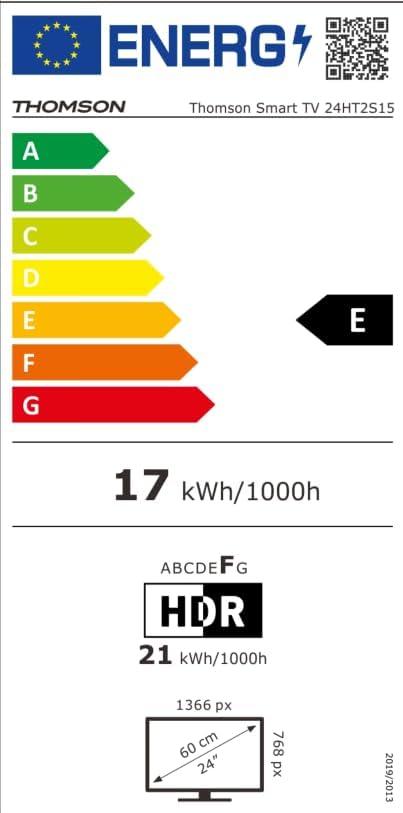
Image: The EU Energy Label for the Thomson Smart TV 24HT2S15, showing an energy efficiency class of E and energy consumption of 17 kWh/1000h for SDR and 21 kWh/1000h for HDR.
8. Jamstvo i podrška
8.1 Informacije o jamstvu
Thomson products are covered by a 3-year warranty. For detailed information regarding warranty claims, returns, or defective products, please refer to the warranty card included in your package or visit the Thomson support webmjesto.
For specific information on purchases made via Amazon, consult Amazon's help pages regarding returns and defective products.
8.2 Korisnička podrška
If you require further assistance or have questions not covered in this manual, please contact Thomson customer support:
- Proizvođač: Streamview GmbH
- Email: kontakt@streamview.com
- Webstranica: www.streamview.com
- Telefon: +4318900066
Please have your model number (24HT2S15) and purchase details ready when contacting support.