
1. Uvod
This manual provides essential information for the safe and efficient use of your Haier H55C95EUX 55-inch OLED 4K HDR Smart TV. Please read these instructions thoroughly before operating your television and retain them for future reference.
The Haier H55C95EUX features a 55-inch OLED display for deep blacks and vibrant colors, 4K HDR resolution, a 144Hz refresh rate for smooth motion, integrated Harman Kardon sound, and the Google TV operating system for smart functionality and voice control.

Slika 1.1: Gotovoview of Haier C95 Series OLED TV features, highlighting Harman Kardon audio, 144Hz gaming, Dolby Vision IQ, Dolby Atmos, HDR10+, Google TV, and 3GB RAM with 32GB storage.
2. Sigurnosne informacije
Uvijek slijedite osnovne sigurnosne mjere prilikom korištenja ovog televizora kako biste smanjili rizik od požara, strujnog udara i ozljeda.
- Izvor napajanja: Televizor spajajte samo na izmjeničnu struju od 220-240 V, 50/60 Hz.
- Ventilacija: Osigurajte odgovarajuću ventilaciju oko televizora. Ne blokirajte ventilacijske otvore.
- Voda i vlaga: Ne izlažite televizor kiši ili vlazi. Ne stavljajte na televizor predmete napunjene tekućinom, poput vaza.
- Čišćenje: Prije čišćenja isključite televizor iz zidne utičnice. Koristite meku, suhu krpu. Nemojte koristiti tekuća sredstva za čišćenje ili aerosolna sredstva za čišćenje.
- Montaža: If wall-mounting, ensure the wall mount is compatible with the VESA standard (100 x 100 mm) and can support the TV's weight.
- djeca: Supervise children to ensure they do not play with the television.
3. Što je u kutiji
Pažljivo raspakirajte kutiju i provjerite jesu li svi predmeti prisutni i neoštećeni.
- Haier H55C95EUX 55-inch OLED 4K HDR Smart TV
- Daljinski upravljač
- Korisnički priručnik (ovaj dokument)
- Kabel za napajanje
- Komponente TV stalka (ako je primjenjivo)
4. Postavljanje
4.1 Fizička instalacija
Before installation, consider the TV's dimensions to ensure proper placement.

Slika 4.1: Prednja strana view dimensions of the 55-inch Haier TV, indicating a width of 1225mm and a height of 749mm.

Image 4.2: Detailed dimensions of the Haier 55-inch TV, showing measurements with and without the stand.
Montaža postolja
- Postavite televizor licem prema dolje na meku, ravnu površinu kako biste spriječili oštećenje zaslona.
- Pričvrstite komponente postolja na predviđene utore na donjoj strani televizora pomoću priloženih vijaka.
- Prije postavljanja televizora u uspravan položaj provjerite je li stalak sigurno pričvršćen.
Montaža na zid
If wall-mounting, use a VESA-compatible mount (100 x 100 mm) and follow the mount manufacturer's instructions. Ensure the wall can support the TV's weight.
4.2 Povezivanje uređaja
Vaš televizor je opremljen s više priključaka za spajanje vanjskih uređaja.
- HDMI: Connect Blu-ray players, game consoles, or set-top boxes to the HDMI 2.1 ports for high-quality audio and video.
- USB: Spojite USB uređaje za pohranu podataka za reprodukciju medija.
- Ethernet: Za stabilnu žičanu internetsku vezu.
- Bluetooth: Spojite bežične slušalice ili druge Bluetooth uređaje.
4.3 Početno uključivanje i postavljanje
- Spojite kabel za napajanje na televizor i zidnu utičnicu.
- Pritisnite gumb za napajanje na daljinskom upravljaču ili televizoru.
- Follow the on-screen instructions to complete the initial setup, including language selection, network connection (Wi-Fi or Ethernet), and Google TV account login.
5. Upravljanje televizorom
5.1 Daljinski upravljač
The included remote control allows you to navigate the TV's features. It may feature a solar cell for eco-friendly charging and USB-C for backup charging.

Image 5.1: The Haier TV remote control, featuring navigation, volume, and app access buttons.
5.2 Sučelje Google TV-a
Your TV runs on Google TV, providing access to a wide range of streaming services, apps, and personalized content.

Image 5.2: The Google TV home screen, showcasinrazne aplikacije za streaming i preporuke sadržaja.
Glasovno upravljanje
Use the built-in voice control feature to search for content, launch apps, and control your TV hands-free. Simply say "Hey Google" or press the voice assistant button on your remote.

Image 5.3: Demonstrating voice control functionality with the Haier TV and Google TV.
5.3 Postavke slike i zvuka
OLED tehnologija
The OLED display provides absolute blacks and infinite contrast for a lifelike viewiskustvo.

Image 5.4: Visual representation of OLED technology, showcasing duboke crne i žive boje.
Harman Kardon Sound
Experience immersive audio with clear dialogues and cinematic depth, delivered by the integrated Harman Kardon sound system.

Image 5.5: Depiction of the Harman Kardon sound system, emphasizing clear and powerful audio.
Dolby Atmos
Enjoy three-dimensional, immersive sound that moves around you, enhancing your audio experience.
Brzina osvježavanja od 144Hz
The 144Hz refresh rate ensures smooth and fluid motion, ideal for fast-paced content like gaming and sports.

Image 5.6: Visual comparison illustrating the fluidity of 144Hz motion compared to 60Hz, particularly beneficial for gaming.
6. Održavanje
6.1 Čišćenje TV-a
- Uvijek isključite televizor iz struje prije čišćenja.
- Za brisanje zaslona i kućišta koristite meku, suhu krpu koja ne ostavlja dlačice.
- Za tvrdokorne mrlje, lagano dampIsperite krpu vodom ili specijaliziranim sredstvom za čišćenje ekrana. Nikada ne prskajte sredstvo za čišćenje izravno na ekran.
- Izbjegavajte korištenje abrazivnih sredstava za čišćenje, voskova ili otapala.
6.2 Ažuriranja softvera
Your Haier TV may receive software updates to improve performance and add new features. Ensure your TV is connected to the internet to receive these updates automatically or check for them manually through the settings menu.
7. Rješavanje problema
Ako imate problema s televizorom, pogledajte sljedeća uobičajena rješenja:
| Problem | Moguće rješenje |
|---|---|
| Nema snage | Check if the power cable is securely connected to the TV and the wall outlet. Ensure the outlet is functioning. Try pressing the power button on the TV itself. |
| Nema slike, ali je zvuk prisutan | Provjerite ulazni izvor. Provjerite je li spojeni uređaj uključen i ispravno radi. Pokušajte s drugim HDMI kabelom ili priključkom. |
| Nema zvuka, ali je slika prisutna | Check the volume level. Ensure the TV is not muted. Verify audio output settings (e.g., internal speakers, external sound system). Check audio cables if using external speakers. |
| Daljinski upravljač ne radi | Check the remote control's battery level. Ensure there are no obstructions between the remote and the TV's IR sensor. If it's a solar remote, ensure it has sufficient light exposure. |
| Problemi s mrežnom vezom | Restart your router and modem. Check Wi-Fi password. If using Ethernet, ensure the cable is connected properly. Try connecting to a different network if available. |
8. Specifikacije
| Značajka | Detalj |
|---|---|
| Naziv modela | H55C95EUX |
| Veličina zaslona | 55 inča |
| Tehnologija zaslona | OLED |
| Rezolucija | 4K (3840 x 2160) |
| Brzina osvježavanja | 120 Hz (Motion Enhancement: 144Hz) |
| HDR format podržan | Dolby Vision |
| Operativni sustav | Google TV |
| Unutarnja pohrana | 32 GB |
| Audio sustav | Harman Kardon 2.1 Sound System |
| Surround Sound Format | Dolby Atmos |
| Povezivost | Bluetooth, Ethernet, HDMI (x4), USB (x1) |
| Bežična tehnologija | Bluetooth, WiFi |
| Metoda kontrole | Daljinski upravljač, Glas |
| Dimenzije proizvoda (DxŠxV) | 29.5P x 122.5l x 76.8H cm (with stand) |
| VESA standard za montažu | 100 x 100 mm |
| Klasa energetske učinkovitosti (SDR) | F (77 kWh/1000 h) |
| Klasa energetske učinkovitosti (HDR) | G (70 kWh/1000 h) |
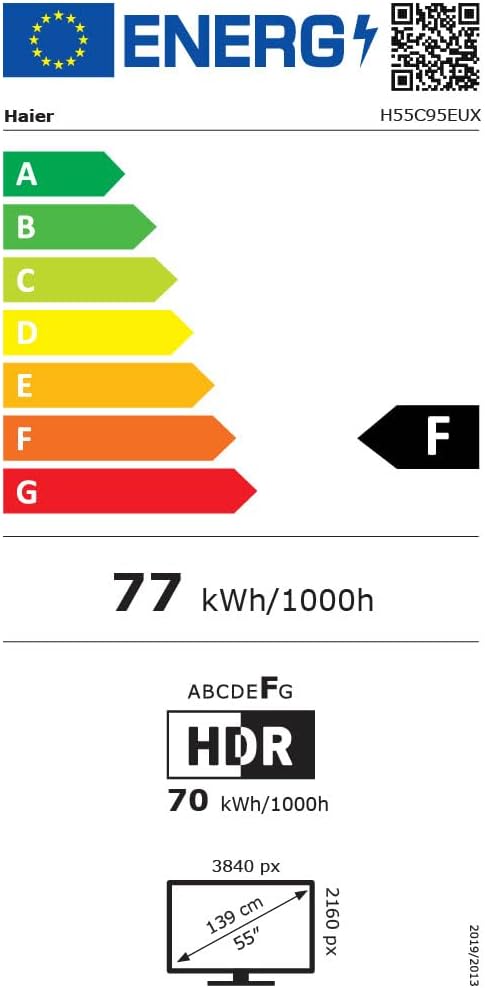
Image 8.1: EU Energy Label for the Haier H55C95EUX TV. For more details, visit the EPREL baza podataka.
9. Jamstvo i podrška
Your Haier H55C95EUX television comes with a 2-godišnje jamstvo proizvođačaMolimo sačuvajte dokaz o kupnji za potrebe jamstva.
For technical support, service, or further inquiries, please refer to the contact information provided on the official Haier webstranicu ili vaš lokalni ovlašteni servisni centar.