
1. Uvod
The LAUNCH X431 i-TPMS TSGUN is a professional, handheld Tire Pressure Monitoring System (TPMS) tool designed for comprehensive TPMS sensor management. This device integrates functionalities for TPMS sensor activation, reading, relearning, and programming. It is compatible with both 315MHz and 433MHz sensors and can be used in conjunction with a LAUNCH X431 diagnostic scanner or the dedicated i-TPMS Android application.
This manual provides detailed instructions for the safe and effective use of your i-TPMS TSGUN, ensuring optimal tire pressure system diagnosis and maintenance.
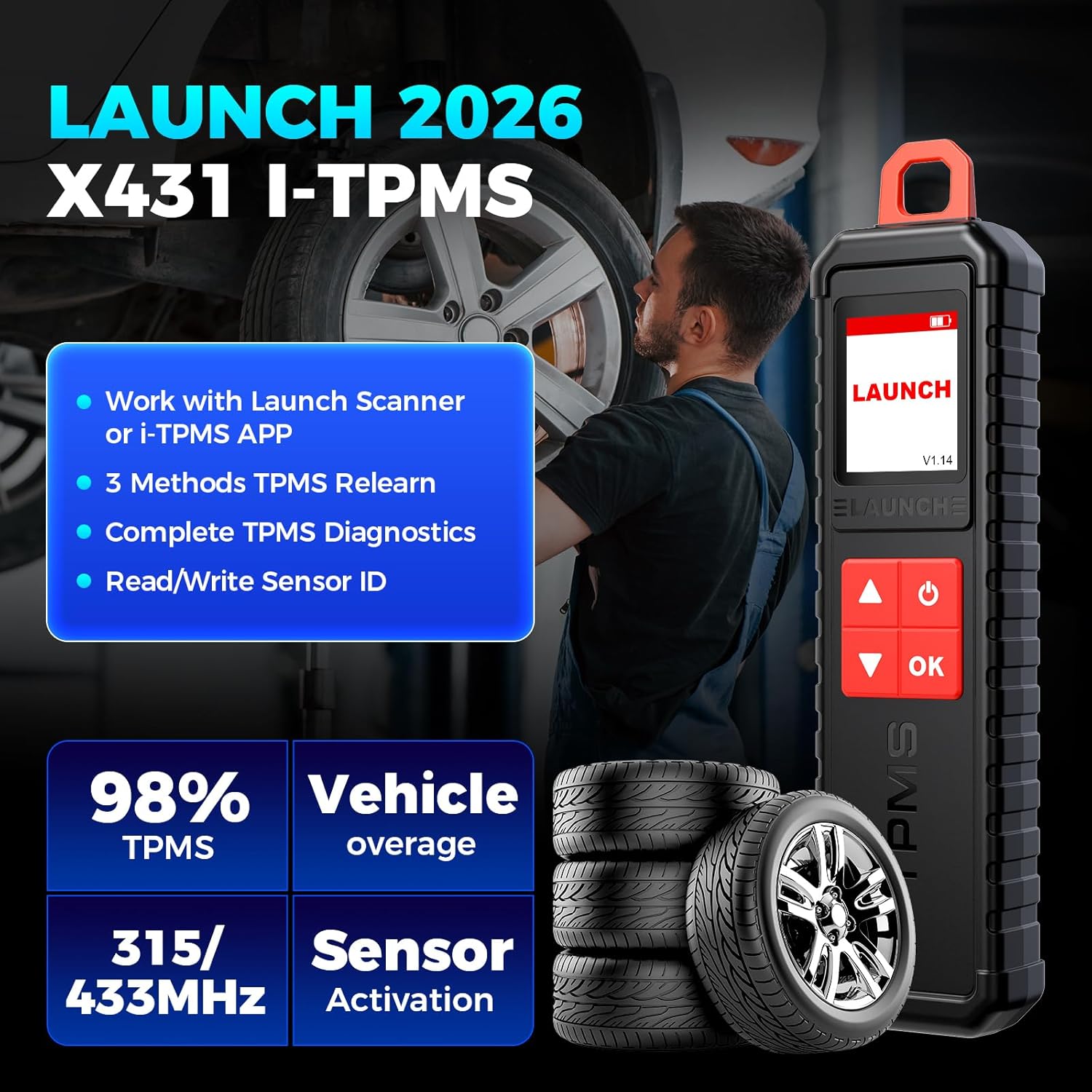
Image 1.1: The LAUNCH X431 i-TPMS TSGUN device, highlighting its core capabilities including working with LAUNCH scanners or the i-TPMS app, 3 methods for TPMS relearn, complete TPMS diagnostics, and read/write sensor ID.
2. Sigurnosne informacije
Please read all safety warnings and instructions before using this product. Failure to follow these instructions may result in electric shock, fire, and/or serious injury.
- Opća sigurnost: Always operate the device in a well-ventilated area. Keep the device away from water, moisture, and extreme temperatures.
- Sigurnost baterije: The device contains a rechargeable battery. Do not disassemble, crush, or expose the battery to high temperatures. Use only the provided charging cable.
- Upotreba u automobilskoj industriji: When working on vehicles, ensure the vehicle is safely parked with the engine off and the parking brake engaged. Avoid contact with hot engine components.
- Električna sigurnost: Do not use the device if it appears damaged. Avoid touching internal components.
- Odlaganje: Uređaj i bateriju odložite u skladu s lokalnim propisima. Ne bacajte u kućni otpad.
3. Što je u kutiji
Nakon otvaranja pakiranja provjerite jesu li sve komponente prisutne i neoštećene:
- 1 x LAUNCH X431 i-TPMS TSGUN Handheld Tool
- 1 x kabel za punjenje
- 1 x korisnički priručnik

Image 3.1: The LAUNCH X431 i-TPMS TSGUN package contents, showing the handheld tool, charging cable, and user manual.
4. Postavljanje
4.1 Punjenje uređaja
Before initial use, fully charge the i-TPMS TSGUN using the provided charging cable. Connect the cable to the device's charging port and a standard USB power adapter (not included).
4.2 Connecting to a LAUNCH X431 Scanner
The i-TPMS TSGUN can be paired with compatible LAUNCH X431 diagnostic tablets (8 inches or above) via Bluetooth. Refer to your X431 scanner's manual for specific pairing instructions. Once connected, the full range of TPMS functionalities will be accessible through the scanner's interface.
4.3 Connecting to the i-TPMS Android App
For standalone use with an Android smartphone or tablet, download and install the i-TPMS application. The app is not available on the Google Play Store. To download, locate the official QR code printed on the back of the i-TPMS TSGUN device or within this user manual. Scan the QR code with your Android device to download and install the application securely. After installation, enable Bluetooth on your Android device and pair it with the i-TPMS TSGUN.

Image 4.1: The i-TPMS TSGUN can be used with a LAUNCH X431 scanner for full functionality or with the i-TPMS Android app for essential tasks.
5. Upute za rad
5.1 Aktiviranje TPMS senzora
The i-TPMS TSGUN can activate both 315MHz and 433MHz OEM and universal TPMS sensors. This process wakes up the sensor and allows the tool to read its data.
- Ensure the i-TPMS TSGUN is powered on and connected to your X431 scanner or i-TPMS app.
- Select the "Activate" function from the menu.
- Hold the i-TPMS TSGUN near the tire valve stem of the sensor you wish to activate.
- Press the "OK" button on the device. The tool will emit a signal to activate the sensor.
- Once activated, the sensor data (ID, pressure, temperature, battery status) will be displayed on the screen.

Image 5.1: Steps for activating TPMS sensors: scan each sensor, connect the LAUNCH scanner to the OBD port, follow instructions, and transfer sensor IDs.
5.2 Reading Sensor Status
After activation, the i-TPMS TSGUN can display real-time data from the TPMS sensors, including:
- ID senzora
- Tire Pressure (kPa/PSI/Bar)
- Tire Temperature (°C/°F)
- Status baterije
- Položaj senzora
- Frekvencija senzora

Image 5.2: The i-TPMS TSGUN provides quick and easy TPMS diagnosis, allowing users to read tire status, clear codes, check ID matching, and turn off the TPMS light.
5.3 Ponovno učenje TPMS senzora
After replacing a TPMS sensor or performing tire service, the new sensor IDs must be relearned to the vehicle's ECU. The i-TPMS TSGUN supports three relearn methods:
- Ponovno učenje OBD-a: Connect the X431 scanner (or i-TPMS app with OBD dongle, if supported) to the vehicle's OBD-II port. Follow the on-screen instructions to transfer new sensor IDs to the vehicle's computer.
- Automatsko ponovno učenje: For vehicles that support automatic relearn, drive the vehicle for a specified period (e.g., 10-20 minutes) at a certain speed (e.g., above 25 mph) after sensor replacement. The vehicle's ECU will automatically learn the new sensor IDs.
- Stacionarno ponovno učenje: Some vehicles require a stationary relearn procedure, often involving specific steps like inflating/deflating tires in a particular sequence. The i-TPMS TSGUN, when connected to an X431 scanner, provides guided instructions for these procedures.

Image 5.3: The three easy ways to relearn TPMS sensors: OBD Relearn, Automatic Relearn, and Stationary Relearn, with visual cues for each method.
5.4 Programming TPMS Sensors
The i-TPMS TSGUN exclusively supports programming of LAUNCH LTR RF sensors. It can program these sensors an unlimited number of times, offering a cost-effective alternative to expensive OE sensors. Four programming methods are available:
- Automatsko stvaranje: The tool generates a new, unique sensor ID.
- Ručno stvaranje: Allows you to manually input a desired sensor ID.
- Kopiraj aktivacijom: Reads the ID from an existing sensor and copies it to a new LAUNCH sensor.
- Kopija putem OBD-a: Retrieves sensor IDs from the vehicle's ECU via the OBD-II port and copies them to new LAUNCH sensors.
Note: This tool does not program OEM sensors; it is designed for LAUNCH LTR RF sensors only.

Image 5.4: Four flexible ways to program LAUNCH TPMS sensors: Auto Create, Manual Create, Copy by Activation, and Copy by OBD. This functionality is for LAUNCH sensors only.
6. Održavanje
- Čišćenje: Za čišćenje uređaja koristite meku, suhu krpu. Nemojte koristiti abrazivna sredstva za čišćenje ili otapala.
- Skladištenje: Uređaj čuvajte na hladnom i suhom mjestu, dalje od izravne sunčeve svjetlosti i ekstremnih temperatura.
- Njega baterije: Kako biste produžili vijek trajanja baterije, izbjegavajte često potpuno pražnjenje baterije. Redovito punite uređaj, čak i ako ga ne koristite dulje vrijeme.
- Ažuriranja firmvera: Periodically check for firmware updates through the LAUNCH X431 scanner or the i-TPMS app to ensure optimal performance and compatibility with new sensors and vehicles.
7. Rješavanje problema
| Problem | Mogući uzrok | Otopina |
|---|---|---|
| Uređaj se ne uključuje | Slaba baterija; Oštećenje uređaja | Potpuno napunite uređaj. Ako problem i dalje postoji, obratite se podršci. |
| Ne može se aktivirati senzor | Incorrect positioning; Sensor fault; Incorrect frequency | Ensure tool is close to valve stem. Verify sensor is functional and matches 315/433MHz. |
| OBD Relearn fails | Incorrect vehicle selection; OBD connection issue; Vehicle specific procedure not followed | Confirm correct vehicle make/model/year. Check OBD-II cable connection. Follow on-screen guidance precisely. |
| i-TPMS app not installing | App downloaded from unofficial source; Android security settings blocking installation | Ensure you scan the official QR code from the device or manual. Adjust Android security settings to allow installation from unknown sources (temporarily, if necessary). |
| Cannot program OEM sensors | Ograničenje uređaja | The i-TPMS TSGUN is designed to program LAUNCH LTR RF sensors only. It does not support programming of OEM sensors. |
8. Specifikacije
| Značajka | Detalj |
|---|---|
| Marka | POKRETANJE |
| Model | X431 i-TPMS TSGUN |
| Izvor napajanja | Napajanje na baterije |
| Operating System (for app) | Android |
| Veličina zaslona | 1.77 inches (168*128 DPI) |
| Automobilska vrsta | Univerzalno pristajanje |
| Ulazni voltage | DC5V |
| Radna temperatura | -10°C do 50°C (14°F do 122°F) |
| Temperatura skladištenja | -20°C do 60°C (-4°F do 140°F) |
| Kapacitet baterije | 3000 mAh |
| Težina artikla | 0.69 funte (približno 313 g) |
9. Jamstvo i podrška
9.1 Informacije o jamstvu
LAUNCH provides reliable after-sales protection for every i-TPMS tool. Specific warranty terms and conditions may vary by region and retailer. Please refer to your purchase documentation or contact your point of sale for detailed warranty information.
9.2 Tehnička podrška
Should you encounter any questions or issues regarding the operation or functionality of your LAUNCH X431 i-TPMS TSGUN, please feel free to contact LAUNCH customer support. Support can typically be reached via email or through the Q&A section on the product's official sales platform.


