
Cillso H97
Cillso H97 Wireless Earbuds User Manual
Model: H97
Brand: Cillso
Uvod
Thank you for choosing the Cillso H97 Wireless Earbuds. These earbuds feature advanced Bluetooth 5.4 technology, HiFi stereo sound with deep bass, Environmental Noise Cancelling (ENC) for clear calls, and an IPX7 waterproof rating. Designed for comfort and extended use, they offer up to 40 hours of total playtime with the charging case. This manual provides essential information for setup, operation, maintenance, and troubleshooting to ensure optimal performance.
Što je u kutiji
- Cillso H97 Wireless Earbuds (Left and Right)
- Kutija za punjenje
- USB-C kabel za punjenje
- korisnički priručnik
Proizvod gotovview
Familiarize yourself with the components and features of your Cillso H97 Wireless Earbuds.
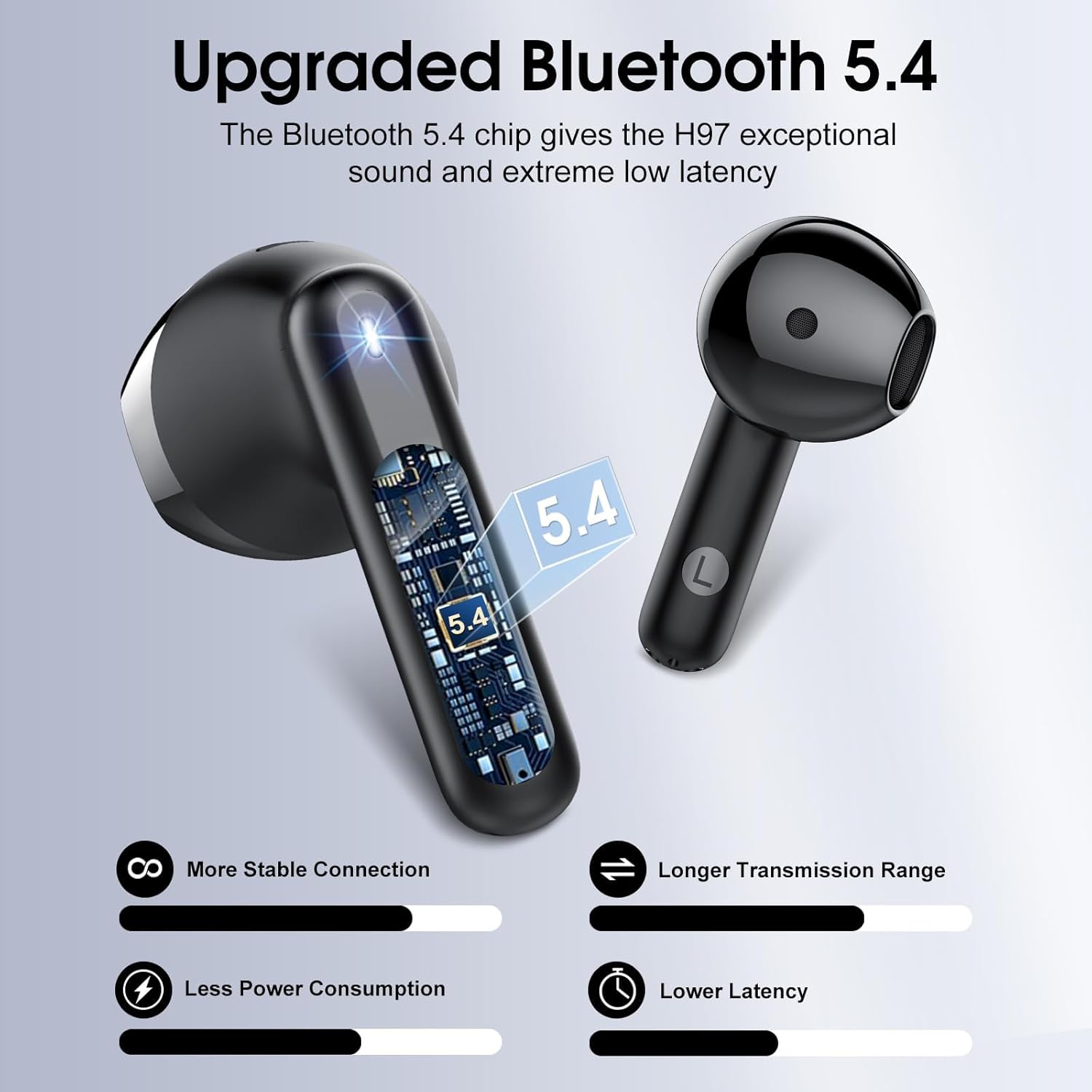
Slika 1: Interni view slušalice, showcasing the advanced Bluetooth 5.4 chip for stable connection and low latency.
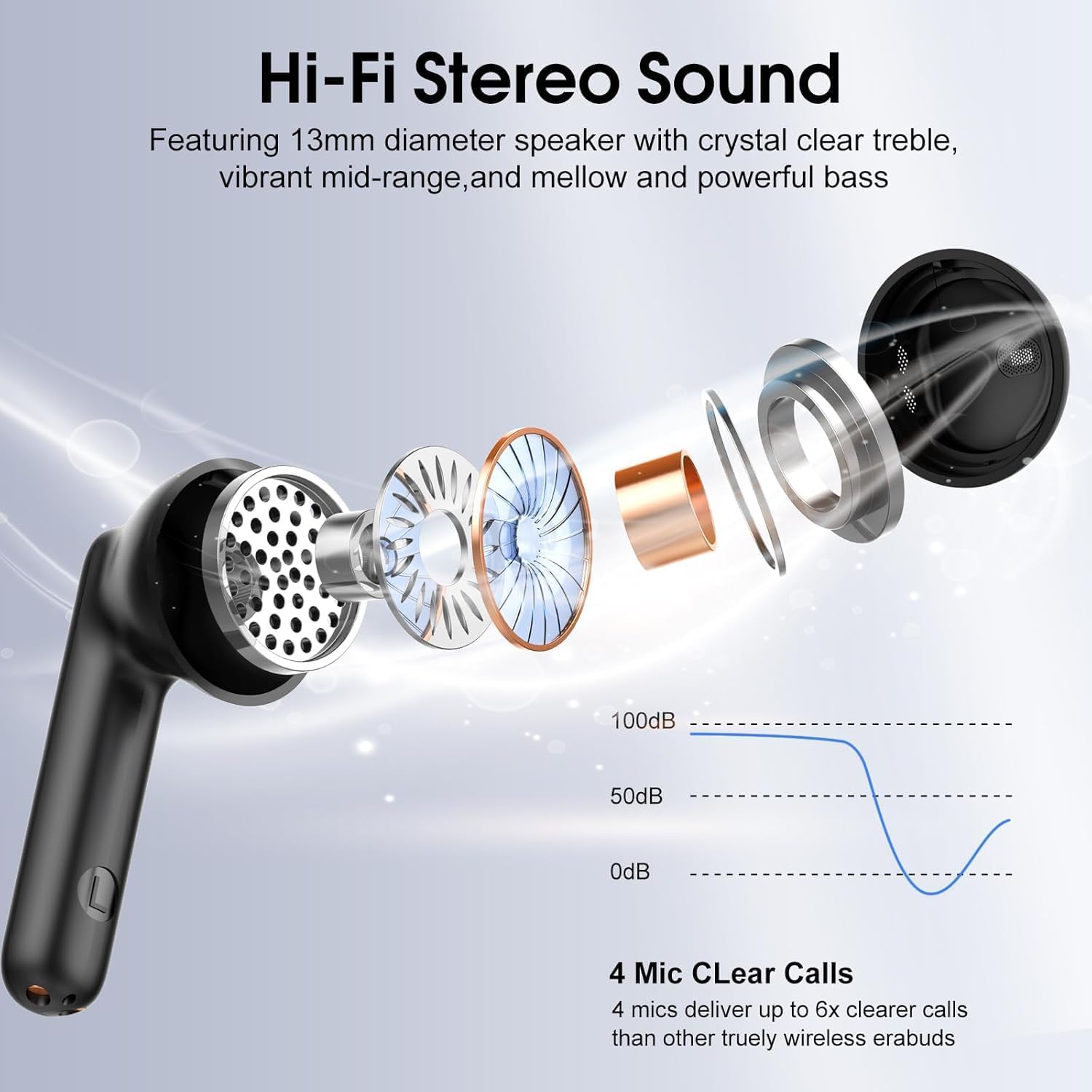
Slika 2: Eksplodirao view illustrating the 13mm diaphragm drivers responsible for Hi-Fi stereo sound with deep bass and clear highs.

Slika 3: The charging case features an independent LED display to show real-time battery levels for both earbuds and the case.

Slika 4: Dimensions of the earbuds and charging case, emphasizing their lightweight and portable design. Each earbud weighs 3.5 grams, and the case weighs 32 grams.

Slika 5: Nadview of the sensitive touch controls on the earbuds for various functions.

Slika 6: The earbuds feature an IPX7 waterproof rating, providing protection against sweat, rain, and splashes.
Postavljanje
1. Početno punjenje
- Prije prve upotrebe, stavite obje slušalice u kutijicu za punjenje.
- Spojite USB-C kabel za punjenje na priključak za punjenje na kućištu i izvor napajanja.
- The LED display on the case will indicate the charging status. A full charge for the case takes approximately 1.5 hours.
- Ensure the earbuds are fully charged before initial use for optimal battery performance.
2. Uparivanje s uređajem
- Otvorite kutijicu za punjenje. Slušalice će se automatski uključiti i ući u način rada za uparivanje.
- Na svom uređaju (pametnom telefonu, tabletu, prijenosnom računalu) omogućite Bluetooth.
- Tražiti available Bluetooth devices and select "H97" from the list.
- Once connected, your device will confirm successful pairing. The earbuds will automatically reconnect to the last paired device when removed from the case and within range (up to 15 meters).
Upute za rad
The Cillso H97 earbuds feature sensitive touch controls for easy management of audio playback and calls.
| Akcijski | Funkcija |
|---|---|
| Double tap Left/Right earbud | Pusti/pauziraj glazbu |
| One tap Left/Right earbud | Odgovori/prekini poziv |
| Long press Right earbud (2s) | Sljedeća pjesma |
| Long press Left earbud (2s) | Prethodna pjesma |
| One tap Left/Right earbud (during call) | Volume control (specific tap pattern may vary, refer to device settings if needed) |
| Triple tap Left/Right earbud (typically) | Aktivirajte glasovnog pomoćnika |
Održavanje
Čišćenje
- Redovito čistite slušalice i kutijicu za punjenje mekom, suhom krpom koja ne ostavlja dlačice.
- Ne koristite abrazivna sredstva za čišćenje, alkohol ili kemijska otapala.
- Provjerite jesu li kontakti za punjenje na slušalicama i kutijici čisti i suhi za pravilno punjenje.
Skladištenje
- Kada se ne koriste, slušalice spremite u kutijicu za punjenje kako biste ih zaštitili i održali napunjenima.
- Čuvati na hladnom i suhom mjestu, dalje od ekstremnih temperatura i izravne sunčeve svjetlosti.
Vodootpornost
- The earbuds are IPX7 waterproof, meaning they are protected against temporary immersion in water up to 1 meter for 30 minutes.
- This rating protects against sweat, rain, and splashes. However, it is not recommended to swim or shower with the earbuds.
- Prije nego što vratite slušalice u kutijicu za punjenje, provjerite jesu li suhe kako biste spriječili oštećenja.
Rješavanje problema
Slušalice se ne uparuju ili ne povezuju
- Provjerite jesu li obje slušalice napunjene i izvađene iz kutijice za punjenje.
- Isključite, a zatim uključite Bluetooth na svom uređaju.
- Delete "H97" from your device's Bluetooth list and attempt to pair again.
- Try resetting the earbuds (refer to specific reset instructions if available in a separate quick start guide, or place them back in the case and close for 10 seconds, then reopen).
Samo jedna slušalica radi
- Provjerite jesu li obje slušalice napunjene.
- Vratite obje slušalice u kutijicu za punjenje, zatvorite poklopac, pričekajte nekoliko sekundi, a zatim otvorite poklopac i istovremeno ih izvadite.
- If the issue persists, try resetting the earbuds and re-pairing.
Problemi s punjenjem
- Check that the USB-C cable is securely connected to both the charging case and the power source.
- Provjerite jesu li kontakti za punjenje na slušalicama i unutar kućišta čisti i bez nečistoća.
- Pokušajte upotrijebiti drugi USB-C kabel ili adapter za napajanje.
Loša kvaliteta zvuka
- Provjerite jesu li slušalice pravilno smještene u ušima.
- Check the audio source and volume levels on your connected device.
- Move closer to your connected device to reduce potential interference.
- Clean any earwax or debris from the earbud speaker grilles.
Tehnički podaci
| Značajka | Detalj |
|---|---|
| Naziv modela | H97 |
| Bluetooth verzija | 5.4 |
| Bluetooth domet | Do 15 metara (49 stope) |
| Veličina audio upravljačkog programa | Dinamički pokretač od 13 mm |
| Frekvencijski odziv | 20 Hz - 20 kHz |
| Kontrola buke | Uklanjanje buke iz okoliša (ENC) |
| Trajanje baterije (slušalice) | Do 8 sati s jednim punjenjem |
| Ukupno vrijeme reprodukcije (s kućištem za punjenje) | Do 40 sati |
| Vrijeme punjenja (kutija) | Otprilike 1.5 sata (USB-C) |
| Razina vodootpornosti | IPX7 |
| Težina slušalice | 3.5 grama (svaki) |
| Težina kutije za punjenje | 32 grama |
| Vrsta kontrole | Kontrola na dodir |
| Kompatibilni uređaji | iOS 9.0+/Android 5.0+ and Bluetooth 4.0+ devices |
Jamstvo i podrška
Cillso products are designed for reliability and performance. For warranty information, technical support, or any questions regarding your H97 Wireless Earbuds, please refer to the warranty card included in your packaging or contact Cillso customer service through the retailer where you purchased the product.
Molimo sačuvajte dokaz o kupnji za bilo kakve reklamacije u jamstvenom roku.
Ask a question about this manual
Ask about setup, troubleshooting, compatibility, parts, safety, or missing instructions. Manuals+ will review the question and use this page’s manual context to help answer it.