
1. Uvod
Thank you for choosing the FINOTI F204 RC Drone. This manual provides essential information for the safe operation, setup, and maintenance of your drone. Please read this manual thoroughly before operating the aircraft to ensure proper function and to avoid damage or injury. Keep this manual for future reference.

Figure 1.1: The FINOTI F204 RC Drone in its folded, portable configuration.
2. Proizvod je gotovview
2.1 Ključne značajke
- 4K profesionalna HD kamera: Captures high-resolution photos and 1080p videos with a 1/1.28-inch sensor.
- 3-Axis Mechanical Stabilizing Gimbal: Ensures smooth and stable footage during flight.
- Laser Obstacle Avoidance: Intelligently detects obstacles ahead for safer flight.
- GPS pozicioniranje: Provides stable hovering, intelligent following, and precise return-to-home functions.
- Motori bez četkica: Offers powerful, quiet, and durable performance.
- Sklopivi dizajn: Kompaktan i prenosiv za jednostavan transport.
- Dugo vrijeme leta: Up to 25 minutes on a single charge.
- 5G WiFi Image Transmission: Real-time video feed to your smartphone.
- Kontrole jednostavne za korištenje: Features like one-key takeoff/landing and headless mode for ease of use.
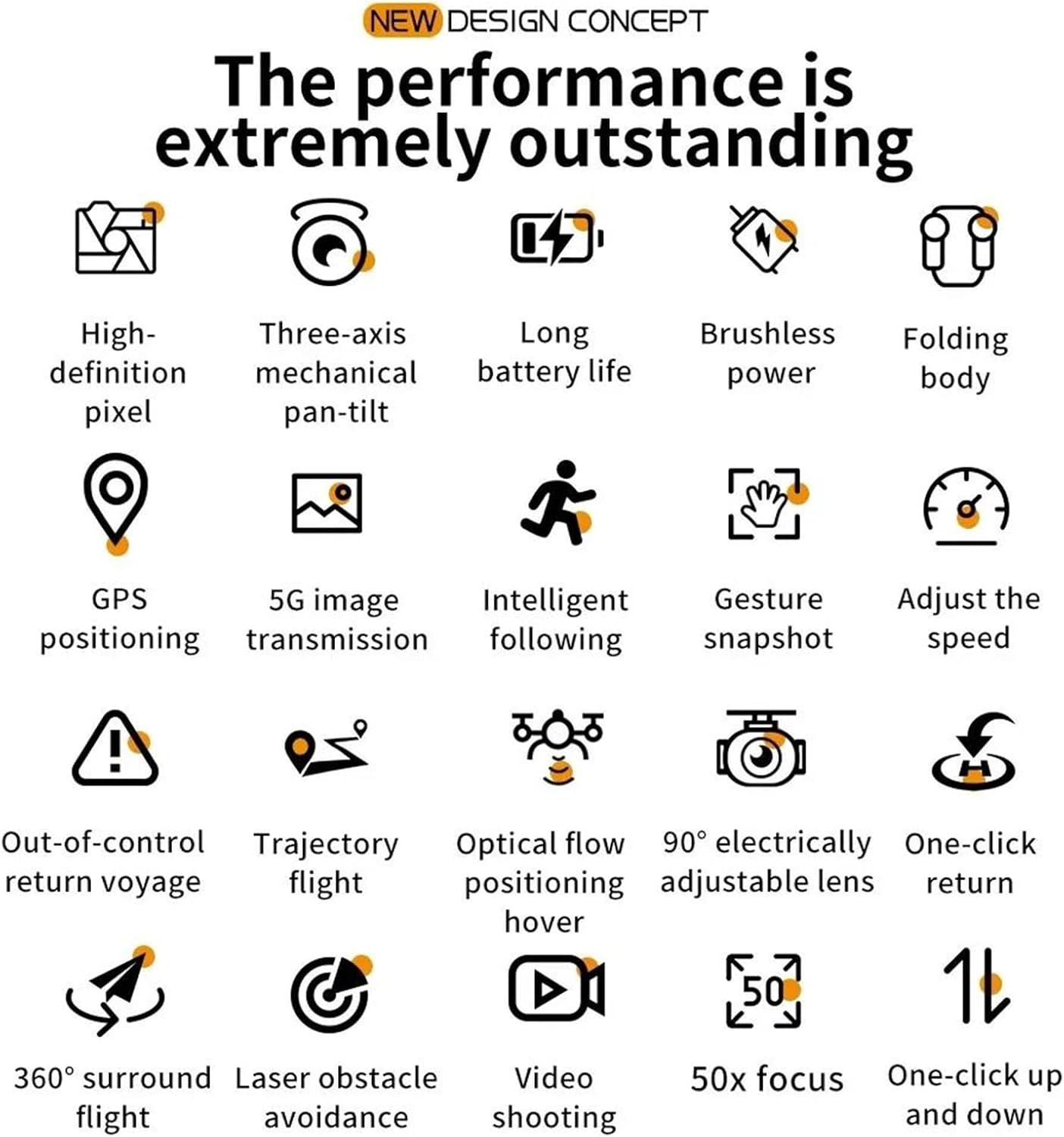
Figure 2.1: Visual representation of the drone's core features, including high-definition pixel, three-axis mechanical pan-tilt, long battery life, brushless power, folding body, GPS positioning, 5G image transmission, intelligent following, gesture snapshot, speed adjustment, out-of-control return, trajectory flight, optical flow positioning hover, 90° electrically adjustable lens, one-click return, 360° surround flight, laser obstacle avoidance, video shooting, 50x focus, and one-click up and down.
2.2 Sadržaj paketa
Molimo provjerite sadržaj paketa nakon raspakiranja. Ako bilo koji predmet nedostaje ili je oštećen, obratite se prodavaču.
- FINOTI F204 RC Drone
- Daljinski upravljač
- Flight Battery (Single Battery variant)
- USB kabel za punjenje
- Rezervni propeleri
- Odvijač
- korisnički priručnik
2.3 Komponente drona
Familiarize yourself with the drone's main parts:
- Foldable Arms with Motors and Propellers
- 4K HD Camera with 3-Axis Gimbal
- Laser Obstacle Avoidance Sensor
- LED indikatorska svjetla
- Odjeljak za baterije

Figure 2.2: The drone's three-axis mechanical stabilizing gimbal, capable of vertical, horizontal, and overhead shooting, with examples of 45° frontal, side 65°, and 110° vertical camera angles.
2.4 Komponente daljinskog upravljača
The remote controller is your primary interface for controlling the drone. Refer to the diagram below for button functions.
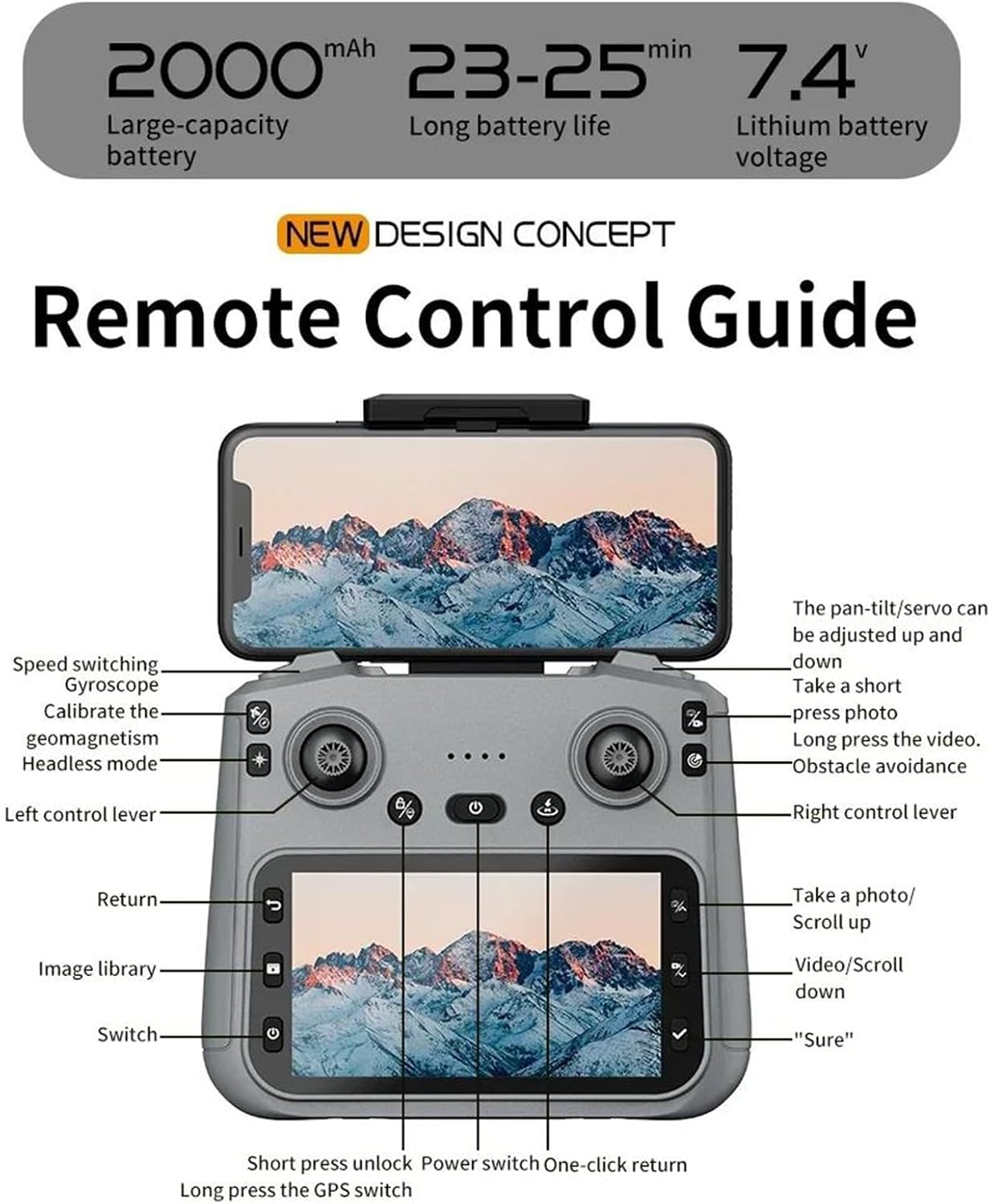
Figure 2.3: Remote Control Guide. Key controls include: Speed switching, Gyroscope, Calibrate geomagnetism, Headless mode, Left control lever, Return, Image library, Switch, Short press unlock, Power switch, One-click return, Long press GPS switch, Pan-tilt/servo adjustment, Take a short press photo, Long press video, Obstacle avoidance, Right control lever, Take a photo/Scroll up, Video/Scroll down, and 'Sure' button.
3. Vodič za postavljanje
3.1 Charging the Flight Battery
- Uklonite letnu bateriju iz drona.
- Spojite bateriju na priloženi USB kabel za punjenje.
- Plug the USB cable into a 5V/2A USB power adapter (not included).
- The charging indicator on the battery will show its status (e.g., red for charging, green for fully charged).
- Charging typically takes 120-150 minutes. Do not leave batteries unattended while charging.
3.2 Ugradnja propelera
Ensure propellers are installed correctly according to their rotation direction (A and B). Match the propellers to the corresponding motor arms.
- Rasklopite ruke drona.
- Attach the propellers to the motor shafts, ensuring a secure fit. Use the provided screwdriver if necessary.
3.3 Priprema daljinskog upravljača
- Install 3x AA batteries (not included) into the remote controller.
- Izvucite držač telefona na daljinskom upravljaču i sigurno pričvrstite svoj pametni telefon.
3.4 Downloading and Connecting the App
- Scan the QR code in the manual or search for the designated drone app (e.g., 'FINOTI Drone' or similar, check packaging) in your smartphone's app store.
- Instalirajte aplikaciju.
- Uključite dron i daljinski upravljač.
- On your smartphone, go to Wi-Fi settings and connect to the drone's Wi-Fi network (e.g., 'FINOTI-F204-XXXX').
- Open the drone app. The live video feed should appear, indicating a successful connection.
4. Operacija leta
4.1 Kontrolni popis prije leta
- Ensure drone battery and remote controller batteries are fully charged.
- Propellers are correctly installed and free from damage.
- Choose an open area free from obstacles, people, and electromagnetic interference.
- Check weather conditions; avoid flying in strong winds (above 10 KM/H) or rain.
- Ensure the drone and app are connected and GPS signal is acquired (if applicable).

Figure 4.1: The drone utilizing GPS positioning for stable flight and to prevent loss of contact.
4.2 Pairing the Drone and Controller
- Dron postavite na ravnu, ravnu površinu.
- Uključite dron.
- Uključite daljinski upravljač.
- Push the left joystick up then down. The drone's indicator lights will stop flashing and become solid, indicating successful pairing.
4.3 Polijetanje i slijetanje
- Polijetanje jednim ključem: Press the one-key takeoff button on the remote controller (refer to Figure 2.3). The drone will automatically ascend to a safe height and hover.
- Ručno polijetanje: Push both joysticks down and outwards to unlock the motors. Then, slowly push the left joystick up to ascend.
- Slijetanje jednim ključem: Press the one-key landing button. The drone will automatically descend and land.
- Ručno slijetanje: Slowly pull the left joystick down to descend. Once landed, push both joysticks down and inwards to lock the motors.
4.4 Osnovne kontrole leta
Refer to the Remote Control Guide (Figure 2.3) for joystick and button functions.
- Lijeva upravljačka palica (gas/skretanje): Gore/dolje za visinu, lijevo/desno za rotaciju (skretanje).
- Desna upravljačka palica (nagib/rotacija): Gore/dolje za kretanje naprijed/natrag (nagib), Lijevo/Desno za kretanje lijevo/desno (kotrljanje).
- Prebacivanje brzine: Adjust flight speed (e.g., low, medium, high) using the dedicated button.
4.5 Napredne značajke leta
- GPS način rada: Provides stable hovering and precise positioning. Ensure sufficient GPS satellites are acquired before flight.
- Prati me način rada: The drone will automatically follow the remote controller or a designated subject (via app).
- Putanja leta: Draw a path on the app interface, and the drone will fly along the specified route.
- Laser Obstacle Avoidance: The drone uses its laser sensor to detect and avoid obstacles, enhancing flight safety. This feature is particularly useful in complex environments.

Figure 4.2: The drone equipped with a laser obstacle avoidance sensor to intelligently detect potential hazards, ensuring a safer flight experience.
- 360° Surround Flight: The drone can orbit a point of interest.
- Pozicioniranje optičkog toka: Assists with stable hovering indoors or in areas with weak GPS signals.
- Povrat jednim klikom: Press the return button, and the drone will automatically fly back to its takeoff point.
5. Rad kamere
The F204 drone is equipped with a 4K professional HD camera for capturing aerial photos and videos.

Figure 5.1: The drone's anti-shake dual cameras, featuring a built-in Electronic Image Stabilization (EIS) chip for improved image quality. The image also contrasts self-stabilizing gimbal shooting effect with non-stabilized shooting.
5.1 Fotografiranje
- Daljinski upravljač: Press the dedicated photo button (short press) on the remote controller (refer to Figure 2.3).
- Kontrola aplikacije: Tap the photo icon in the drone app interface.
- Snimka geste: Perform the designated hand gesture (refer to app instructions) while facing the drone's camera to trigger a photo.
5.2 Snimanje videa
- Daljinski upravljač: Press and hold the video button on the remote controller to start/stop recording.
- Kontrola aplikacije: Tap the video icon in the drone app interface to start/stop recording.
5.3 Gimbal Adjustment
The drone features a 3-axis mechanical gimbal for camera stabilization. You can adjust the camera angle during flight:
- Use the pan-tilt/servo adjustment wheel/button on the remote controller (refer to Figure 2.3) to tilt the camera up or down.
- The camera supports 90° electrically adjustable lens movement.
6. Održavanje
6.1 Cleaning the Drone
- Always power off the drone and remove the battery before cleaning.
- Use a soft, dry cloth to wipe the drone's body.
- For the camera lens, use a specialized lens cleaning cloth and solution.
- Remove any debris from the motors and propellers.
6.2 Briga o bateriji i skladištenje
- Baterije čuvajte na hladnom i suhom mjestu, dalje od izravne sunčeve svjetlosti i izvora topline.
- Nemojte prekomjerno puniti ili previše prazniti baterije.
- For long-term storage, charge batteries to approximately 50-60% capacity.
- Inspect batteries regularly for any signs of swelling or damage. Discontinue use if damaged.
6.3 Zamjena propelera
- If a propeller is damaged, replace it immediately with a new one.
- Ensure you use the correct type of propeller (A or B) for the corresponding motor arm.
- Use the provided screwdriver to remove and install propellers.
7. Rješavanje problema
Ovaj odjeljak obrađuje uobičajene probleme s kojima se možete susresti.
| Problem | Mogući uzrok | Otopina |
|---|---|---|
| Dron se ne uključuje | Baterija nije napunjena ili je nepravilno instalirana | Charge battery fully; ensure it is securely inserted. |
| Drone cannot pair with controller | Incorrect pairing sequence; low controller battery | Follow pairing steps (Section 4.2); replace controller batteries. |
| Nestabilan let/Drifting | Drone not calibrated; damaged propeller; strong wind | Calibrate gyroscope/geomagnetism (refer to Figure 2.3); replace damaged propellers; avoid flying in strong winds. |
| Nema prijenosa videa uživo u aplikaciji | Wi-Fi not connected; app not open; drone/phone too far | Ensure phone is connected to drone's Wi-Fi; restart app; keep drone and phone within range. |
| GPS functions not working | Insufficient GPS signal; flying indoors | Fly in an open outdoor area; wait for sufficient GPS satellites to be acquired. |
8. Specifikacije
| Značajka | Specifikacija |
|---|---|
| Model | F204 (Model Number: 66655594-SINGLEBATTERY) |
| Marka | FINOTI |
| Vrsta motora | Motor bez četkica |
| Maksimalno vrijeme leta | 23-25 minuta |
| Težina drona | 245g |
| Fotoaparat | 4K Professional HD Camera |
| Video rezolucija | 1080p HD Recording |
| Veličina senzora | 1/1.28 inča |
| Gimbal | 3-Axis Mechanical Stabilizing Gimbal, 90° Electrically Adjustable Lens |
| Izbjegavanje prepreka | Laser Barrier Avoidance |
| GPS | Da |
| Daljinska udaljenost | Do 1000 metara |
| Radna frekvencija | 2.4 GHz (Aircraft), 5G WiFi (Image Transmission) |
| Povezivost | APP kontroler, daljinski upravljač, WiFi |
| Maksimalna težina pri polijetanju | <1 kg |
| Maksimalna otpornost na brzinu vjetra | <10 KM/H |
| Kapacitet baterije | 2000mAh, 7.4V Lithium Battery |
9. Jamstvo i podrška
Specific warranty information for the FINOTI F204 RC Drone is not provided in this manual. For details regarding warranty coverage, return policies, or technical support, please refer to the product packaging, the retailer's website, or contact FINOTI customer service directly.
Always ensure you purchase from authorized sellers to guarantee valid warranty and support services.