
Uvod
This manual provides comprehensive instructions for the setup, operation, and maintenance of your ASUS ROG Strix 27” 5K HDR Gaming Monitor (Model: XG27JCG). Please read this manual thoroughly before using the monitor to ensure proper functionality and to maximize your user experience.
The ROG Strix XG27JCG is a 27-inch 5K (5120 x 2880) Fast IPS display designed for high-performance gaming and detailed visual tasks. It features a 180Hz (overclocked) refresh rate, 0.3ms GTG response time, and a Dual Mode function allowing switching between 5K 180Hz and QHD 330Hz. Advanced features include G-SYNC Compatible technology, VESA DisplayHDR 600, and ROG Gaming A.I. Technology.
Video: Nadview of the ASUS ROG Strix XG27JCG 27-inch 5K monitor, highlighting its key features and design.
Što je u kutiji
Prije nego što nastavite s postavljanjem, provjerite jesu li sve komponente prisutne u pakiranju.
- ASUS ROG Strix XG27JCG Monitor
- DisplayPort kabel
- Vodič za brzi početak
- ROG torbica
- ROG naljepnica
- ROG tripod stand
- Jamstveni list
- Kabel za napajanje
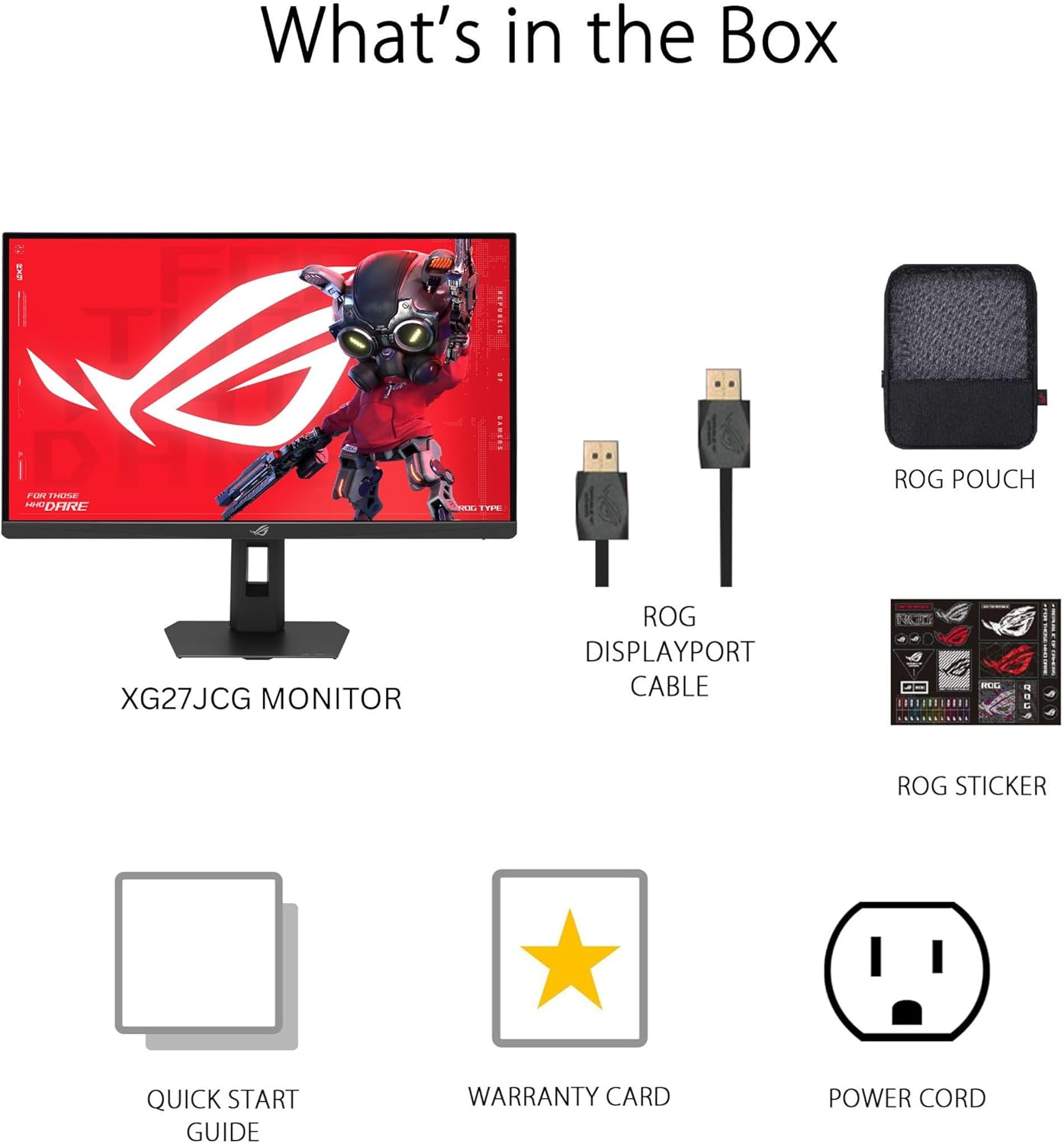
Slika: Contents of the monitor packaging, showing the monitor, DisplayPort cable, ROG pouch, ROG sticker, Quick Start Guide, Warranty Card, and Power Cord.
Upute za postavljanje
1. Sastavljanje stalka
Carefully remove the monitor from its packaging. Attach the stand base to the stand neck, securing it with the provided screw. Then, attach the assembled stand to the back of the monitor until it clicks into place. Ensure all connections are firm.
2. Povezivanje s računalom
The monitor supports DisplayPort 1.4 (DSC), HDMI 2.1, and USB-C connectivity. Choose the appropriate cable for your system.
- DisplayPort: Connect one end of the DisplayPort cable to the monitor's DisplayPort input and the other end to your computer's DisplayPort output.
- HDMI: Connect one end of an HDMI 2.1 cable to the monitor's HDMI input and the other end to your computer's HDMI output.
- USB-C: Connect a USB-C cable to the monitor's USB-C port and to a compatible USB-C port on your computer. This connection also supports 15W power delivery.

Slika: Stražnji view of the monitor's connectivity ports, including HDMI 2.1, DisplayPort 1.4, USB Type-C, and a Headphone Jack.
3. Priključak za napajanje
Spojite kabel za napajanje na ulaz za napajanje monitora, a zatim drugi kraj uključite u utičnicu.
4. Početno uključivanje
Press the power button located on the monitor to turn it on. The monitor will automatically detect the input source. If no image appears, ensure all cables are securely connected and the computer is powered on.
Upute za rad
Izbornik s prikazom na zaslonu (OSD).
Use the joystick and buttons on the back of the monitor to navigate the OSD menu. The OSD allows you to adjust various settings such as brightness, contrast, color, input source, and gaming features.
Display Modes and Refresh Rate
The monitor features a Dual Mode function, allowing you to switch between two primary display configurations:
- 5K (5120 x 2880) at 180Hz (OC): Provides ultra-sharp, immersive visuals suitable for cinematic content and detailed work.
- QHD (2560 x 1440) at 330Hz: Offers extremely high frame rates and responsive gaming action, ideal for competitive esports.
Switching between modes can be done via the OSD menu or a dedicated hotkey, if configured.

Slika: Visual representation of the monitor's Dual Mode, allowing users to switch between 5K 180Hz and QHD 330Hz for different gaming experiences.
ROG Gaming A.I. Technology
This monitor includes AI-powered features designed to enhance your gaming experience:
- Dynamic Shadow Boost: Automatically brightens dark areas of the game world without overexposing bright areas, improving visibility of hidden enemies or details.
- Dynamic Crosshair: Provides an on-screen crosshair that can adapt to the game environment, ensuring it remains visible against various backgrounds.
- Vizualizacija umjetne inteligencije: Optimizes visual settings based on the game content for improved clarity and detail.

Slika: Examples of Dynamic Crosshair and Dynamic Shadow Boost in action, showing how these features enhance visibility in games.
DisplayWidget centar
The DisplayWidget Center software provides seamless control over monitor settings directly from your Windows or macOS operating system. This utility allows for easy adjustment of GameVisual modes, MultiScreen configurations, and system settings without using the OSD buttons.

Slika: Screenshot of the DisplayWidget Center software, demonstrating its user interface for adjusting monitor settings.
Ergonomics and Adjustments
The monitor stand offers multiple adjustment options to optimize your viewudobnost:
- Nagib: +20° do -5°
- Zakretanje: +40° do -40°
- Stožer: +90° to -90° (for portrait mode)
- Podešavanje visine: 0 do 110 mm
Adjust the monitor to an ergonomic position that reduces strain on your neck and eyes. Ensure the top of the screen is at or slightly below eye level.

Slika: Diagram illustrating the monitor's ergonomic adjustments, including tilt, swivel, pivot, and height.
Održavanje
Čišćenje monitora
- Prije čišćenja uvijek isključite monitor i iskopčajte kabel za napajanje.
- Koristite mekanu krpu koja ne ostavlja dlačice dampvodom ili blagim, neabrazivnim sredstvom za čišćenje ekrana.
- Ne prskajte sredstvo za čišćenje izravno na ekran. Prvo ga nanesite na krpu.
- Avoid using alcohol-based cleaners, ammonia, or abrasive materials, as these can damage the screen surface.
Opća njega
- Držite monitor dalje od izravne sunčeve svjetlosti, prekomjerne topline i vlage.
- Osigurajte odgovarajuću ventilaciju oko monitora kako biste spriječili pregrijavanje.
- Izbjegavajte stavljanje teških predmeta na monitor ili njegove kabele.
Rješavanje problema
| Problem | Moguće rješenje |
|---|---|
| Nema slike na ekranu |
|
| Slika je mutna ili iskrivljena |
|
| Screen flickers or shows artifacts |
|
| No sound from headphones (if connected to monitor) |
|
Tehnički podaci
| Značajka | Detalj |
|---|---|
| Marka | ASUS |
| Broj modela | XG27JCG |
| Veličina zaslona | 27 inča |
| Rezolucija | 5120 x 2880 (5K UHD) |
| Vrsta ploče | Gotovo IPS |
| Brzina osvježavanja | 180 Hz (OC) / QHD 330Hz (Dual Mode) |
| Vrijeme odziva | 0.3 ms (GTG) |
| Omjer slike | 16:9 |
| Omjer kontrasta | 600:1 |
| Viewing kut | 178 Degrees (H/V) |
| HDR podrška | VESA DisplayHDR 600 |
| Raspon boja | 97% DCI-P3 |
| Adaptivna sinkronizacija | AMD FreeSync Premium Pro, G-SYNC Compatible |
| Povezivost | 1x DisplayPort 1.4 (DSC), 2x HDMI 2.1, 1x USB-C (with 15W PD), Headphone Jack |
| Potrošnja energije | 40 vata |
| Dimenzije predmeta (D x Š x V) | 8.59"D x 24.2"Š x 20.1"V |
| Težina artikla | 6.9 funti |
| Ergonomske prilagodbe | Tilt (+20° ~ -5°), Swivel (+40° ~ -40°), Pivot (+90° ~ -90°), Height (0~110mm) |
Jamstvo i podrška
This ASUS ROG Strix XG27JCG monitor comes with a Jamstvo 3 godine. For warranty claims, technical support, or service inquiries, please contact ASUS customer support. Refer to the included Warranty Card for detailed terms and conditions.
You can find additional support resources, drivers, and FAQs on the official ASUS support webstranica: www.asus.com/support/