
1. Uvod
This manual provides essential information for the safe and efficient use of your HP 17.3 Inch FHD Business Laptop. Please read this guide thoroughly before operating your device to ensure optimal performance and longevity. This laptop is designed for business and everyday computing tasks, offering a large display, robust performance, and portability.
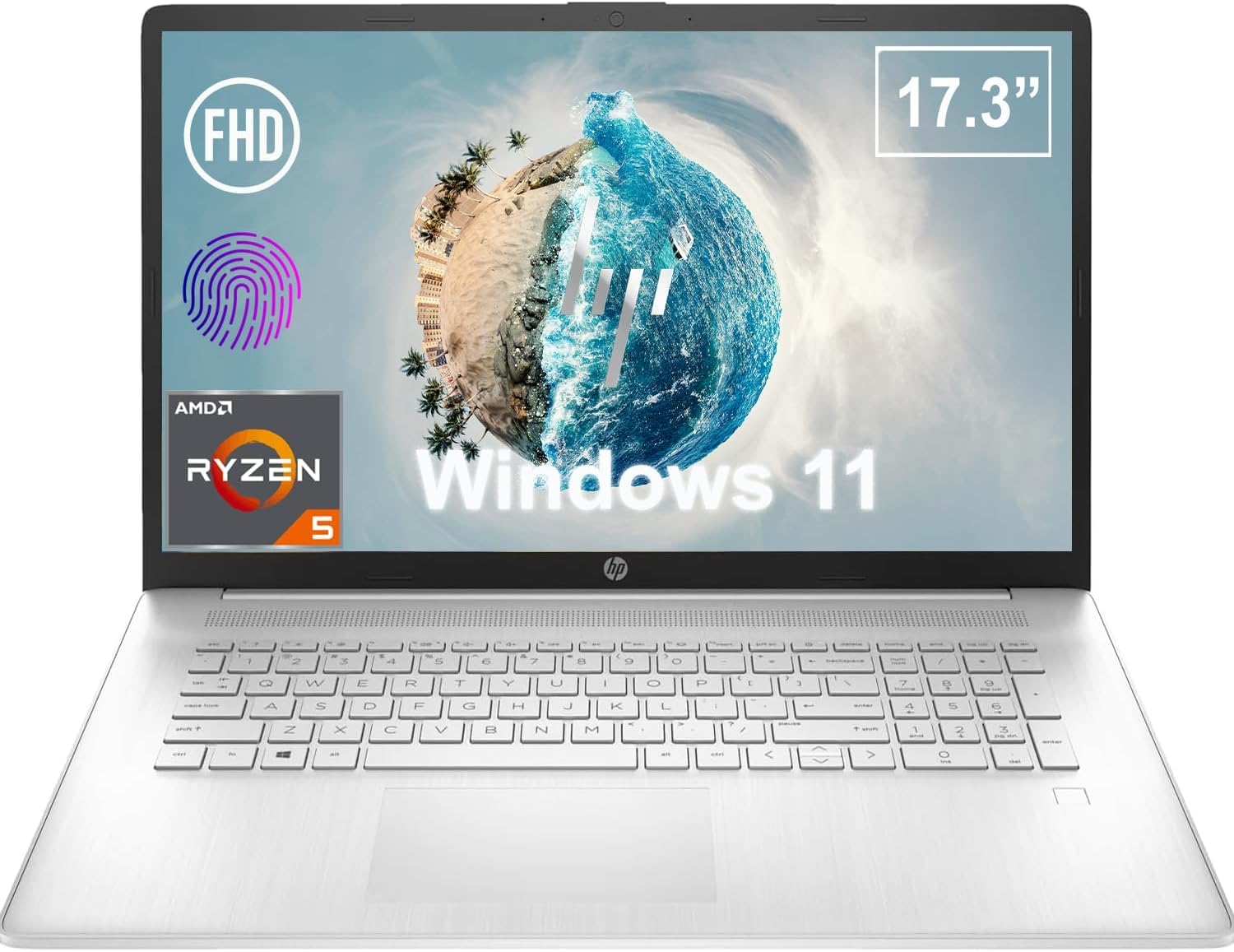
Slika 1.1: Prednja strana view of the HP 17.3 Inch FHD Business Laptop, showcasing the large display and keyboard.
2. Postavljanje
2.1 Raspakiranje i početni pregled
Pažljivo izvadite sve komponente iz pakiranja. Provjerite jesu li sljedeće stavke prisutne:
- HP 17.3 Inch FHD Business Laptop
- Power Adapter (45 W Smart AC Power Adapter)
- Dokumentacija (ovaj priručnik, informacije o jamstvu)
Inspect the laptop and accessories for any signs of damage. If any items are missing or damaged, contact your retailer or HP support immediately.
2.2 Spajanje adaptera za napajanje
Before first use, ensure the laptop is fully charged. Connect the power adapter to the AC smart pin port on the side of the laptop and then plug the adapter into a power outlet.
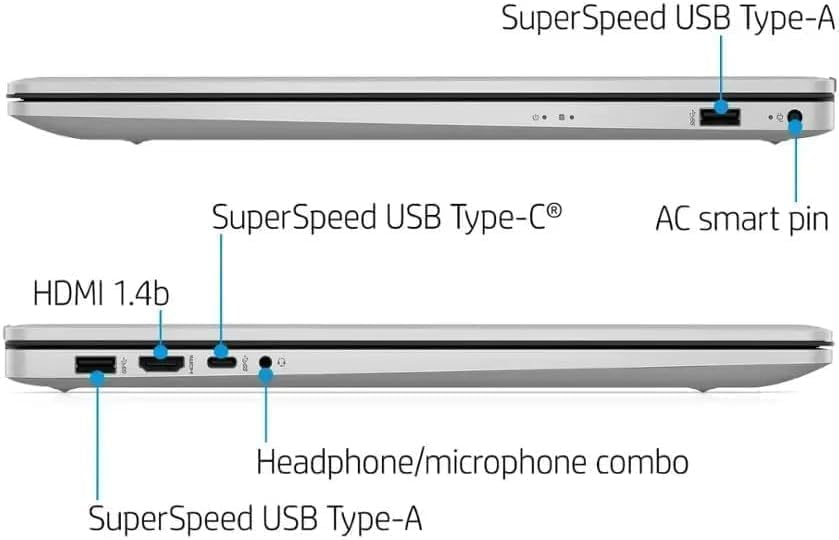
Slika 2.1: Bočna strana view illustrating the location of the AC smart pin and other ports.
2.3 Početno uključivanje i postavljanje sustava Windows
Press the power button to turn on the laptop. Follow the on-screen instructions to complete the Windows 11 Home setup process. This includes setting up your user account, network connection, and initial preferences.
3. Upravljanje prijenosnim računalom
3.1 Tipkovnica i dodirna podloga
The laptop features a full-size QWERTY keyboard with a 10-key number pad for efficient data entry. The integrated touchpad provides precise cursor control. Refer to the operating system's settings for customizing touchpad gestures and keyboard shortcuts.
3.2 Čitač otiska prsta
For enhanced security and convenient login, utilize the integrated fingerprint reader. Set up your fingerprints through Windows Hello in the Windows 11 settings.
3.3 Webcam and Microphones
The HP True Vision 720p HD Camera and integrated dual array digital microphones are located at the top of the display. These are suitable for video conferencing and online communication.
3.4 Povezivost
- Wi-Fi: The laptop supports 802.11a/b/g/n/ac Wi-Fi for wireless internet access. Connect to available networks via the Windows network settings.
- Bluetooth: Bluetooth 5 allows for wireless connection to compatible devices such as headphones, mice, and keyboards. Enable and manage Bluetooth devices through Windows settings.
3.5 Ports and External Devices
Prijenosno računalo je opremljeno raznim priključcima za spajanje vanjskih uređaja:
- 1 x USB Type-C (5Gbps, Data Only): For connecting USB-C compatible devices and data transfer.
- 2 x USB Type-A (5Gbps): For connecting standard USB devices like external drives, mice, or keyboards.
- 1 x HDMI 1.4b: For connecting to external displays or projectors.
- 1 x Headphone/Microphone Combo: For connecting a headset with a single 3.5mm jack.
- 1 x AC Smart Pin: For connecting the power adapter.

Slika 3.1: Otvori view of the laptop, highlighting the keyboard and touchpad area.
3.6 Upravljanje baterijom
The laptop is powered by a 3-Cell, 41 Wh Li-ion battery, offering up to 8 hours and 30 minutes of video playback. Use the provided 45 W Smart AC Power Adapter for charging. HP Fast Charge technology allows for quicker charging times.
4. Održavanje
4.1 Čišćenje prijenosnog računala
To maintain the laptop's appearance and functionality:
- Koristite meku krpu koja ne ostavlja dlačice dampvodom ili specijaliziranim sredstvom za čišćenje ekrana.
- Za tipkovnicu i kućište koristite meku, suhu krpu. Izbjegavajte jake kemikalije ili abrazivne materijale.
- Prije čišćenja provjerite je li prijenosno računalo isključeno i iskopčano iz struje.
4.2 Ažuriranja softvera
Redovito ažurirajte operativni sustav Windows i upravljačke programe kako biste osigurali optimalne performanse, sigurnost i kompatibilnost. Windows Updateu možete pristupiti putem izbornika Postavke.
4.3 Security Software
The laptop comes preloaded with McAfee LiveSafe for security. Ensure this software is active and updated to protect against viruses and other threats.
5. Rješavanje problema
Ovaj odjeljak obrađuje uobičajene probleme s kojima se možete susresti na svom HP prijenosnom računalu.
5.1 Problemi s napajanjem
- Laptop se ne uključuje: Ensure the power adapter is securely connected to both the laptop and a working power outlet. Verify the battery is charged.
- Baterija se ne puni: Provjerite jesu li adapter i kabel oštećeni. Pokušajte s drugom utičnicom.
5.2 Problemi s prikazom
- Nema slike na ekranu: Spojite vanjski monitor kako biste provjerili je li problem u zaslonu prijenosnog računala. Ponovno pokrenite prijenosno računalo.
- Treperenje ili iskrivljena slika: Ažurirajte upravljačke programe za grafičku karticu. Podesite razlučivost zaslona i brzinu osvježavanja u postavkama sustava Windows.
5.3 Problemi s povezivanjem
- Wi-Fi se ne povezuje: Ensure Wi-Fi is enabled. Restart your router and the laptop. Check network settings for correct password and configuration.
- Bluetooth uređaj se ne uparuje: Provjerite je li Bluetooth omogućen na oba uređaja. Provjerite je li uređaj u načinu uparivanja i unutar dometa.
Za složenije probleme obratite se HP-ovoj podršci webstranicu ili se obratite službi za korisnike.
6. Specifikacije
| Značajka | Detalj |
|---|---|
| Marka | HP |
| Naziv modela | HP17 |
| Broj modela | i5-1135G7 |
| Veličina zaslona | 17.3 inča |
| Vrsta zaslona | IPS, Anti-Glare, LED |
| Rezolucija | 1920 x 1080 (FHD) |
| Brzina osvježavanja | 60 Hz |
| Procesor | AMD Ryzen 5 5500U (6 Cores, 12 Threads, up to 4.0 GHz Max Boost Clock) |
| Grafika | Integrirana AMD Radeon grafika |
| RAM memorija | 32 GB DDR4-3200 MHz (Max 64 GB) |
| Skladištenje | 1 TB PCIe NVMe M.2 SSD |
| Operativni sustav | Windows 11 Home, 64-bit, English |
| Bežično povezivanje | 802.11a/b/g/n/ac Wi-Fi, Bluetooth 5 |
| luke | 1x USB Type-C (5Gbps), 2x USB Type-A (5Gbps), 1x HDMI 1.4b, 1x Headphone/Microphone Combo, 1x AC Smart Pin |
| Webkamera | HP True Vision 720p HD kamera |
| Audio | Dual Speakers, Integrated Dual Array Digital Microphones |
| Baterija | 3-Cell, 41 Wh Li-ion (Up to 8.5 hours video playback) |
| Adapter napajanja | Pametni AC adapter od 45 W |
| Dimenzije (Š x D x V) | 40.07 x 25.78 x 2.06 cm (14.14"L x 9.31"W x 0.78"Th) |
| Težina | Počevši od 2.07 kg |
| Posebne značajke | Fingerprint Reader, Lightweight Design, HP Fast Charge |
7. Jamstvo i podrška
7.1 Informacije o jamstvu
This HP laptop comes with a 1-year manufacturer's limited warranty. For detailed terms and conditions, please refer to the warranty documentation included with your product or visit the official HP support webmjesto.
7.2 Korisnička podrška
If you encounter issues that cannot be resolved using the troubleshooting steps in this manual, please contact HP customer support. You can find contact information and additional resources on the official HP webstranica:
- HP podrška Webstranica: support.hp.com
- HP trgovina: HP trgovina na Amazonu