
Uvod
This manual provides detailed instructions for the proper use and maintenance of your LAUNCH X431 V+ PRO 5.0 diagnostic tool. This device is designed for professional vehicle diagnostics, offering advanced features such as ECU coding, bidirectional control, and extensive maintenance services across a wide range of vehicle brands. Please read this manual thoroughly before operating the device to ensure optimal performance and safety.
Postavljanje i početna uporaba
1. Raspakiranje i identifikacija komponenti
Carefully unpack all components from the protective case. Verify that all items listed in the complete kit are present.
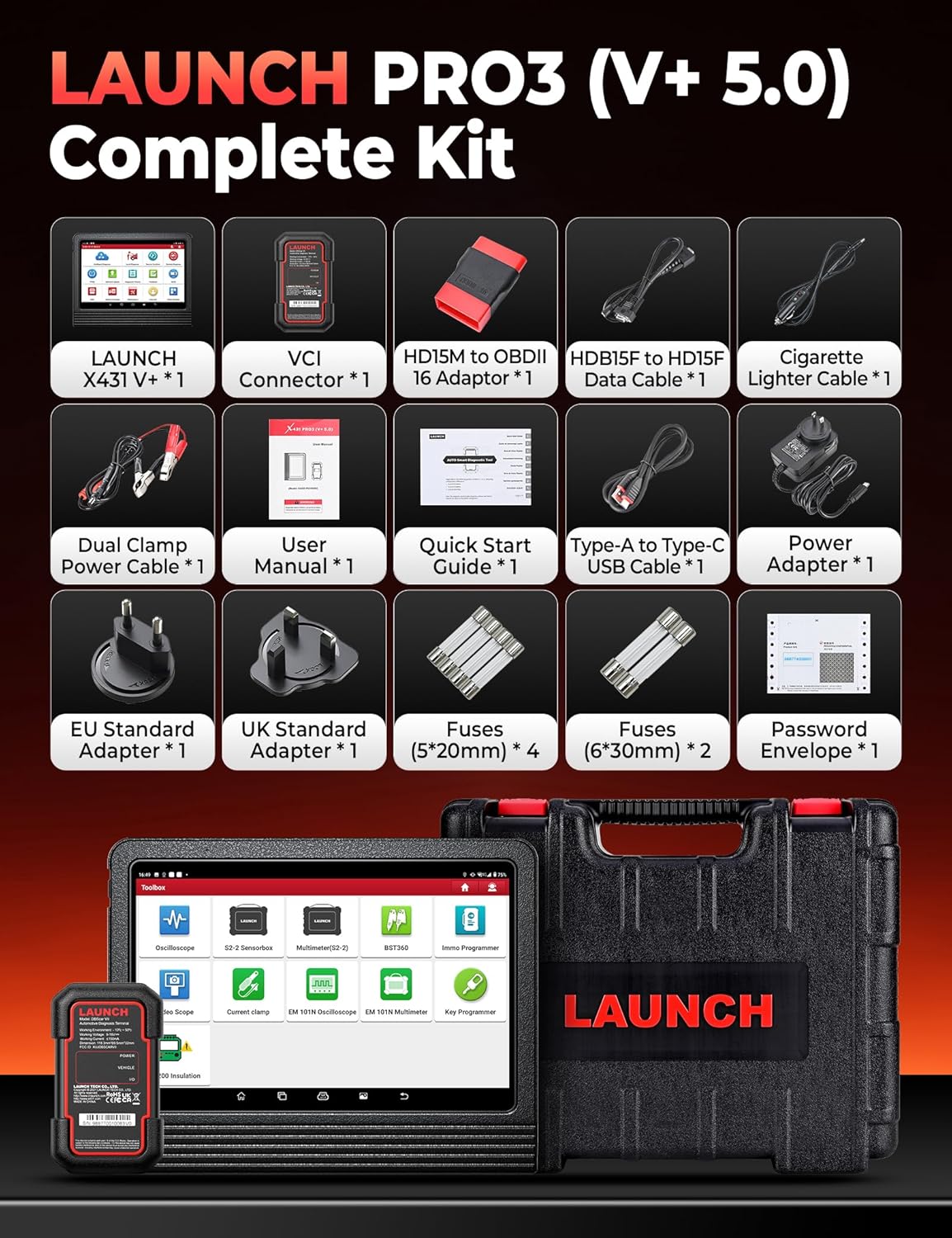
Image: The complete kit includes the LAUNCH X431 V+ unit, VCI Connector, various adapters, cables, power accessories, fuses, user manual, quick start guide, and password envelope, all housed in a protective case.
- Glavna jedinica: LAUNCH X431 V+ tablet.
- VCI Connector: DBSCar VII diagnostic connector.
- Ispravljači: Various OBDII and specific vehicle adapters.
- Kabeli: USB cable, power cables.
- Adapter napajanja: Za punjenje glavne jedinice.
- Dokumentacija: User Manual, Quick Start Guide, Password Envelope.
2. Početno uključivanje i konfiguracija
Connect the power adapter to the main unit and a power outlet. Press and hold the power button to turn on the device. Follow the on-screen prompts to complete the initial setup, including language selection, Wi-Fi connection, and account registration.

Image: This image details the hardware specifications of the device, including its 2.0GHz 4-Core CPU, Android 10.0 operating system, 10.1-inch screen, 4GB RAM + 64GB ROM, 8MP+5MP cameras, 2.4GHz/5GHz Wi-Fi, and 6300mAh battery.
3. Connecting the DBSCar VII Connector
The DBSCar VII connector supports the CAN-FD protocol, expanding vehicle compatibility. Plug the DBSCar VII connector into the vehicle's OBD-II port, typically located under the dashboard. Ensure a secure connection. The connector will establish a Bluetooth connection with the main unit automatically or can be paired manually via the device's settings.
Upute za rad
1. Dijagnostika svih sustava
The device performs OE-level diagnostics across all available vehicle systems. This includes reading and clearing diagnostic trouble codes (DTCs), viewing 12-in-1 live data streams, accessing freeze frame data, and retrieving ECU information.

Image: This image illustrates the Topology Mapping feature, which systematically displays the communication structure between vehicle modules. It also highlights All System Diagnostics capabilities, including Read/Clear Codes, 12-IN-1 Live Data, Freeze Frame Data, ECU Information, and AutoVIN & Scan for automatic VIN retrieval and system scanning.
- Mapiranje topologije: Systematically displays the communication structure between vehicle modules for a clear overview.
- AutoVIN i AutoScan: Automatically retrieves vehicle identification number (VIN) and scans all systems for quick diagnosis.
- Čitanje/Brisanje kodova: Identify and erase diagnostic trouble codes from various vehicle systems.
- Podaci uživo: View real-time data streams from sensors and components.
- Podaci zamrznutog okvira: Snimite snimku vrijednosti senzora kada se postavi DTC.
2. Kodiranje ECU-a
ECU coding allows for component replacement adaptation and vehicle customization. It supports both online and offline coding for various brands.

Image: This image differentiates between Online Coding and Offline Coding. Online Coding involves cloud server data and automatic instructions for a simpler procedure. Offline Coding allows manual steps, detailed control, and more complete customization adjustments.
- Online kodiranje: Utilizes cloud server data for automatic instructions, simplifying the coding process. Supported for brands like BMW, VW, Audi, Skoda, Seat.
- Izvanmrežno kodiranje: Provides manual control over each coding step, offering more detailed customization.
- Prilagodba: Adjust vehicle parameters such as disabling seat belt chimes or customizing mirror folding behavior.
- Vođene funkcije: Provides OE-level instructions for simplified diagnostic procedures on supported vehicles (VW, Audi, Skoda, Seat).
3. Dvosmjerno upravljanje (aktivni testovi)
Perform active tests to send commands to vehicle systems and components, verifying their operational status without using the vehicle's controls. This helps in quickly pinpointing faulty areas.
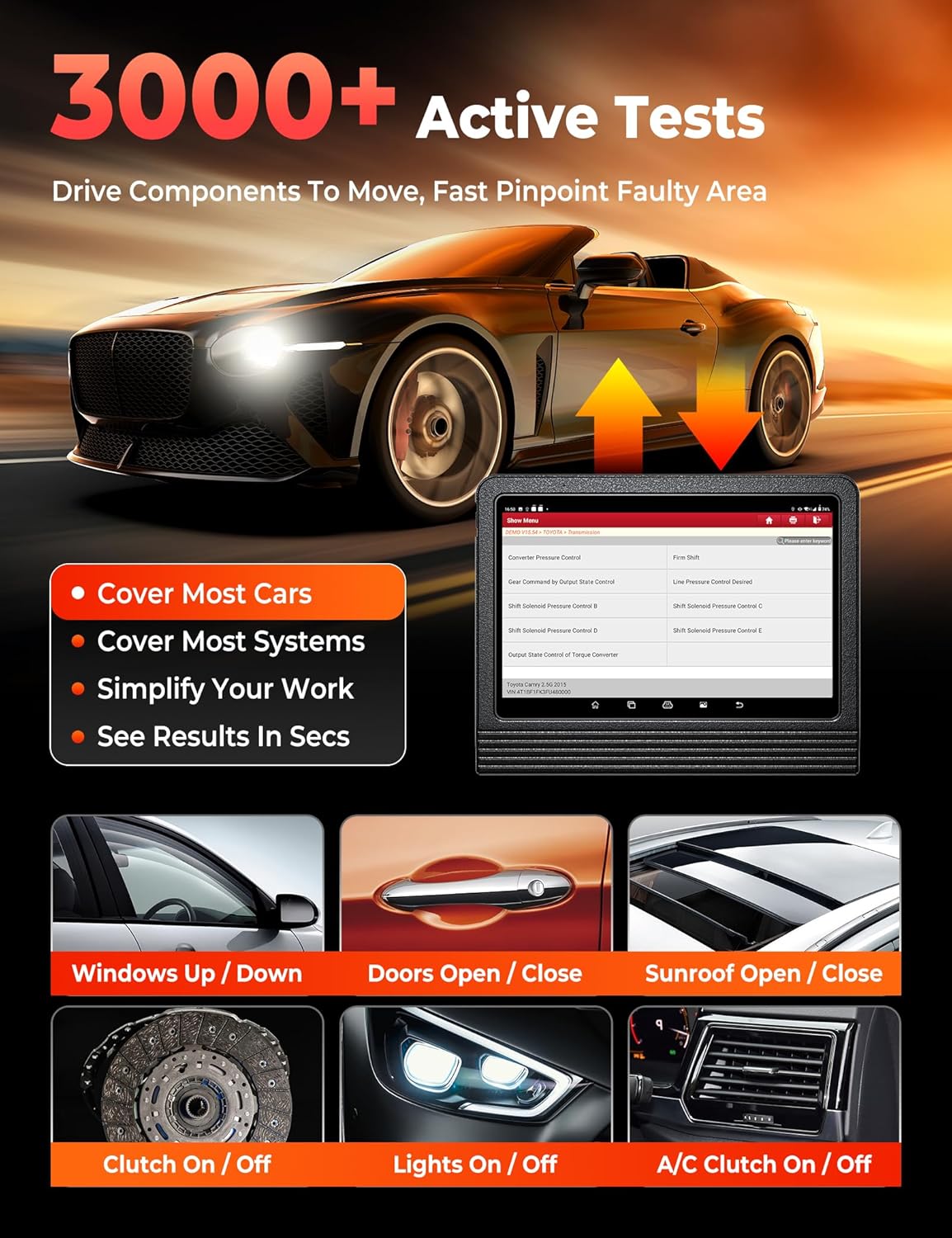
Image: This image demonstrates the 3000+ Active Tests feature, which allows the user to drive components to move and quickly pinpoint faulty areas. Examples include controlling windows, doors, sunroof, clutch, lights, and A/C.
4. Pokrivenost vozila
The tool supports over 200,000 vehicle models from 1984-2025 across American, Asian, and European markets. It includes support for FCA AutoAuth for SGW-equipped vehicles (Chrysler, Dodge, Jeep, Alfa Romeo, Fiat) and CAN-FD protocol for newer GM vehicles.

Image: This image highlights the extensive 200+ Brands Coverage of the LAUNCH X431 V+ PRO 5.0, including American (Chevrolet, Chrysler, Ford, Buick, Cadillac, Dodge, GM, Hummer, Jeep, Lincoln, Brazil-Fiat), European (BMW, Jaguar, LandRover, Volvo, Abarth, Alfa Romeo, Audi, Bentley, Bugatti, Citroen, Dacia), Asian (Toyota, Honda, Nissan, Hyundai, Kia, Acura, Daihatsu, Infiniti, Isuzu, Lexus, Mazda, Mitsubishi, Nissan GTR, Scion), and Australian (AU-Ford, Holden) vehicles. It also notes support for FCA SGW, CAN-FD & DoIP (with adapter), and no IP limitation.
Usluge održavanja
The LAUNCH X431 V+ PRO 5.0 offers over 55 maintenance and reset services, with more than 100 advanced functions available within the diagnostic software.

Image: This image showcases the 55+ Hot Maintenance Services offered by the LAUNCH X431 V+ PRO 5.0, including Oil Reset, ABS Bleed, Electronic Parking Brake (EPB), Steering Angle Sensor (SAS), Supplemental Restraint System (SRS), Injector Coding, Tire Pressure Monitoring System (TPMS), Clutch Adaptation, Coolant Bleed, Seat Calibration, Headlamp Reset, and Air/Fuel Ratio (A/F) Reset, among over 100 additional functions.
- Resetiranje ulja: Resetirajte sustav vijeka trajanja ulja nakon izmjene ulja.
- SAS resetiranje: Kalibrirajte senzor kuta upravljanja.
- Resetiranje EPB-a: Nakon zamjene, resetirajte pločice elektroničke ručne kočnice.
- TPMS resetiranje: Program new TPMS sensors or perform sensor relearn procedures.
- Resetiranje BMS-a: Registrirajte novu zamjensku bateriju.
- Resetiranje ETS-a: Perform electronic throttle position reset.
- Prilagodba mjenjača: Reset transmission adaptive learning values.
- Krvarenje iz ABS-a: Izvršite postupke odzračivanja kočnica ABS-a.
- Resetiranje AFS-a: Reset the adaptive front lighting system.
- Kodiranje injektora: Kodirajte nove brojeve injektora u ECU.
- Resetiranje AdBluea: Reset the AdBlue system after urea replacement/refill.
- Resetiranje NOx senzora: Reset the NOx sensor after fault repair/catalyst replacement.
Advanced Functions and Add-on Modules
The LAUNCH X431 V+ PRO 5.0 supports various optional add-on modules to expand its capabilities.
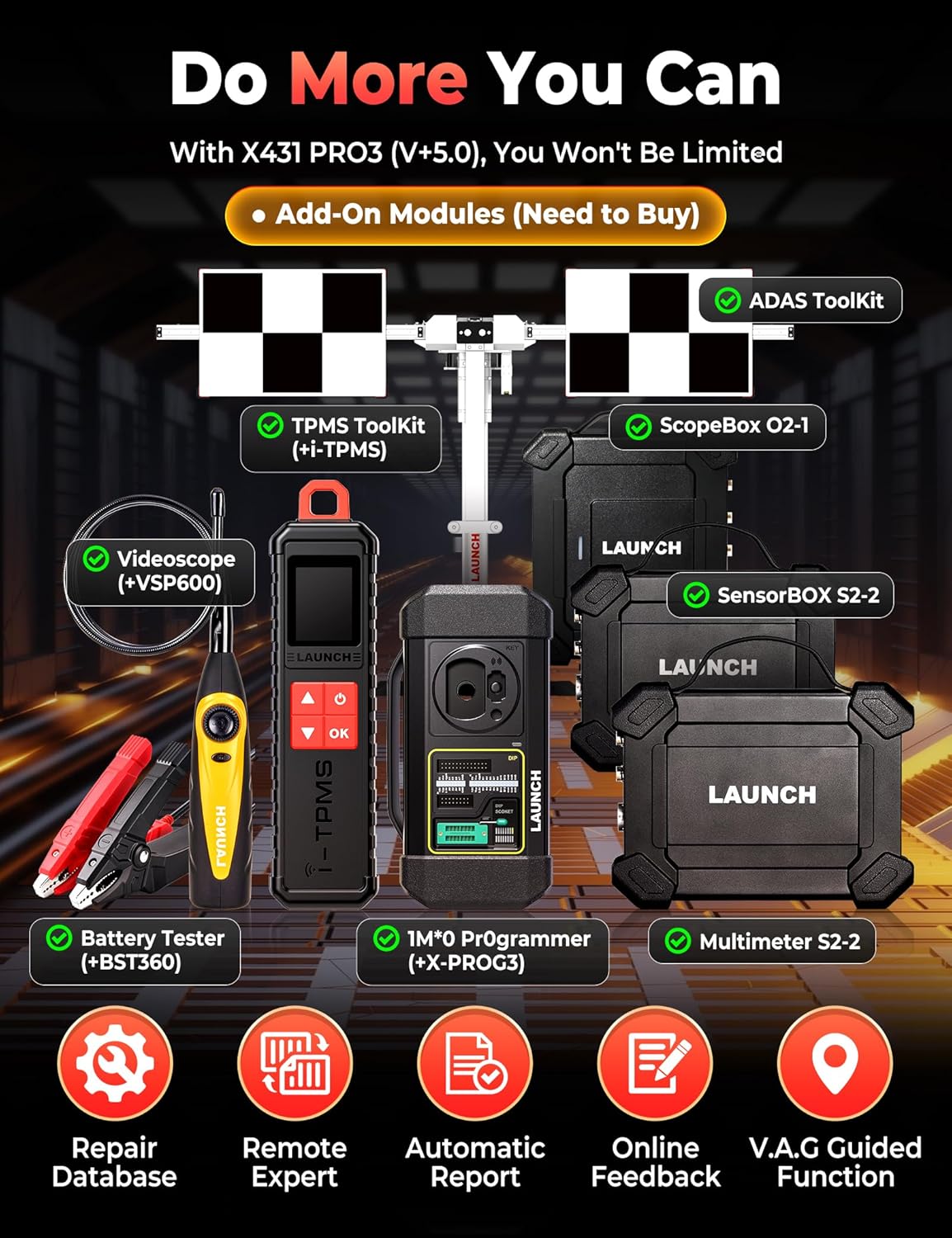
Image: This image displays various add-on modules that can be purchased separately to enhance the LAUNCH X431 V+ PRO 5.0's functionality. These include the ADAS Toolkit, TPMS Toolkit (with i-TPMS), ScopeBox O2-1, Videoscope (VSP600), Battery Tester (BST360), IMMO Programmer (X-PROG3), and Multimeter S2-2.
- ADAS Tool: For Advanced Driver-Assistance Systems calibration.
- TPMS Tool (X431 TSGUN): For comprehensive TPMS services.
- Tester baterija (BST360): For battery health analysis.
- Videoskop (VSP600): Za vizualni pregled teško dostupnih mjesta.
- IMMO Programmer (X-PROG3): For advanced immobilizer functions.
- ScopeBox: For waveform analysis.
- SensorBOX: For sensor simulation and testing.
Rješavanje problema
If you encounter issues with your LAUNCH X431 V+ PRO 5.0, refer to the following common troubleshooting steps:
- Uređaj se ne uključuje: Ensure the device is fully charged or connected to the power adapter. Check the power button for proper function.
- Nema komunikacije s vozilom: Verify the DBSCar VII connector is securely plugged into the vehicle's OBD-II port. Ensure the vehicle's ignition is on. Check the Bluetooth connection between the main unit and the VCI connector.
- Zamrzavanje/rušenje softvera: Restart the application or the device. Ensure the software is updated to the latest version. Clear cache if necessary.
- Dijagnostičke pogreške: Confirm the correct vehicle make, model, and year are selected. Ensure all cables and connectors are secure.
- Spora izvedba: Zatvorite nepotrebne aplikacije koje rade u pozadini. Osigurajte dovoljno prostora za pohranu.
For persistent issues, consult the official LAUNCH support resources or contact customer service.
Tehnički podaci
| Značajka | Detalj |
|---|---|
| Marka | POKRETANJE |
| Model | X431 V+ |
| Težina artikla | 4.94 kilogram |
| Dimenzije paketa | 42.9 x 39.7 x 17.6 cm |
| Operativni sustav | Android 10.0 |
| Veličina zaslona | 10.1 inča |
| Procesor | 2.0 GHz 4-Core |
| RAM + ROM | 4 GB + 64 GB |
| Baterija | 6300 mAh |
| Izvor napajanja | Napajanje na baterije |
| Automobilska vrsta | Specifična prilagodba za vozilo |
| UPC | 810139303558 |
Informacije o jamstvu
The LAUNCH X431 V+ PRO 5.0 diagnostic tool typically comes with a manufacturer's warranty. Please refer to the warranty card included in your product packaging or visit the official LAUNCH webZa detaljne uvjete jamstva posjetite stranicu. Sačuvajte dokaz o kupnji za slučaj zahtjeva za jamstvo.
Korisnička podrška
For technical assistance, product inquiries, or support, please contact LAUNCH customer service through their official website or the contact information provided in your product documentation. Regular software updates are available to enhance functionality and vehicle coverage; ensure your device is connected to Wi-Fi to receive these updates.