
BOMGE BM-07
BOMGE BM-07 Audio Mixer Instruction Manual
Comprehensive guide for setup, operation, and maintenance of your BOMGE BM-07 Audio Mixer.
Uvod
The BOMGE BM-07 is a versatile 7-channel audio mixer designed for recording, live streaming, and podcasting. It features digital USB and Bluetooth connectivity, echo and delay effects, and 48V phantom power. This manual provides detailed instructions to help you get the most out of your mixer.
Sadržaj paketa
Prije nego što započnete, provjerite jesu li svi artikli prisutni u paketu:
- 1x BOMGE BM-07 Audio Mixer
- 1x USB to Type-C Power Cable
- 1x Upute za uporabu (ovaj dokument)
Vodič za postavljanje
1. Powering the Mixer
The BM-07 mixer can be powered in three ways using the provided USB to Type-C cable:
- Moćna banka: Connect the USB-C end to the mixer and the USB-A end to a power bank.
- Adapter napajanja: Connect the USB-C end to the mixer and the USB-A end to a standard USB power adapter (e.g., phone charger).
- Računalo: Connect the USB-C end to the mixer and the USB-A end to a computer's USB port.

Image: The BOMGE BM-07 mixer showing its USB-C power input and three power source options: power bank, power adapter, and computer.
2. Spajanje ulaznih uređaja
The BM-07 offers various input options for microphones, instruments, and other audio sources.
- Mikrofonski/linijski ulazi (kanali 1-5): Use XLR or 6.35mm (1/4 inch) jacks for microphones or line-level instruments like guitars.
- 48V fantomsko napajanje: For condenser microphones, activate the 48V phantom power switch located near the XLR inputs for Channels 1-3.
- Stereo Line Inputs (Channels 6/7): Use the L/R 6.35mm or L/R RCA stereo inputs to connect devices such as CD players, keyboards, or computers.

Image: Detail of the mixer's input section, highlighting the XLR/6.35mm combo jacks and the 48V phantom power switches for individual channels.
3. Connecting Output Devices
Connect your monitoring or amplification systems to the mixer's outputs:
- Glavni izlaz: Use the L/R 6.35mm jacks to connect to active speakers, power amplifiers, or active sound systems.
- RCA izlaz: An additional L/R RCA output is available for connecting to other recording or playback devices.
- Monitor slušalica: Plug your headphones into the 3.5mm headphone jack for real-time audio monitoring.

Image: The mixer's headphone output, showing a 6.35mm cable connected for real-time monitoring.
4. Computer/Mobile Device Connection for Recording
The BM-07 features a built-in sound card for direct connection to computers, mobile phones, or tablets for recording.
- USB-B veza: Connect the mixer's USB-B port to your computer using a compatible cable. Ensure the "PC" switch on the mixer is engaged for computer audio.
- Veza mobilnog uređaja: For mobile phones or tablets, a USB to Phone OTG Adapter is required for data transfer.

Image: Visual guide for connecting the mixer to a computer or mobile device, illustrating the USB-B port and the PC/USB switch.
5. Bluetooth uparivanje
To wirelessly stream music from a Bluetooth-enabled device:
- Ensure Bluetooth is enabled on your device (e.g., phone, tablet, computer).
- On the mixer, select the Bluetooth input mode. The display will show a Bluetooth icon.
- Tražiti "BM-07" in your device's Bluetooth settings and pair.
- Once connected, you can stream audio to the mixer. Bluetooth range is approximately 1.5 feet.

Image: The mixer's display indicating Bluetooth mode and a smartphone successfully paired with the BM-07.
Upute za rad
Familiarize yourself with the mixer's controls for optimal audio mixing.

Image: A comprehensive labeled diagram of the BOMGE BM-07 mixer's control panel, indicating the function of each knob and button.
Kontrole kanala (kanali 1-5)
- Gumb GAIN: Adjusts the input sensitivity for each channel. Use this to set the initial signal level.
- 2-Band EQ (HIGH/LOW): Controls the high and low frequencies for tone shaping. Turn clockwise to boost, counter-clockwise to cut.
- FX gumb: Šalje dio signala kanala unutarnjem procesoru efekata.
- Gumb za glasnoću: Adjusts the output volume for each individual channel.
Master and Effect Controls
- DELAY/REPEAT Knob: Adjusts the parameters for the built-in delay and echo effects.
- EFF gumb: Controls the overall level of the effects sent to the main mix.
- MONITOR VOL Knob: Podešava glasnoću izlaza za slušalice.
- MAIN VOL Knob: Kontrolira ukupnu izlaznu glasnoću miksera.
- LED Peak Level Indicator: Provides visual feedback on the audio signal levels, helping to prevent clipping.
USB-A Interface for Playback/Recording
The USB-A port allows for direct playback of MP3 music from a USB stick or recording of the mixer's output to a USB stick.
- Reprodukcija: Umetnite USB stick s MP3 datotekom files. Use the built-in controls (Play/Pause/Next/Previous) to manage playback.
- Snimanje: Insert a USB stick. Press the "REC" button to start recording the main mix to the USB stick.
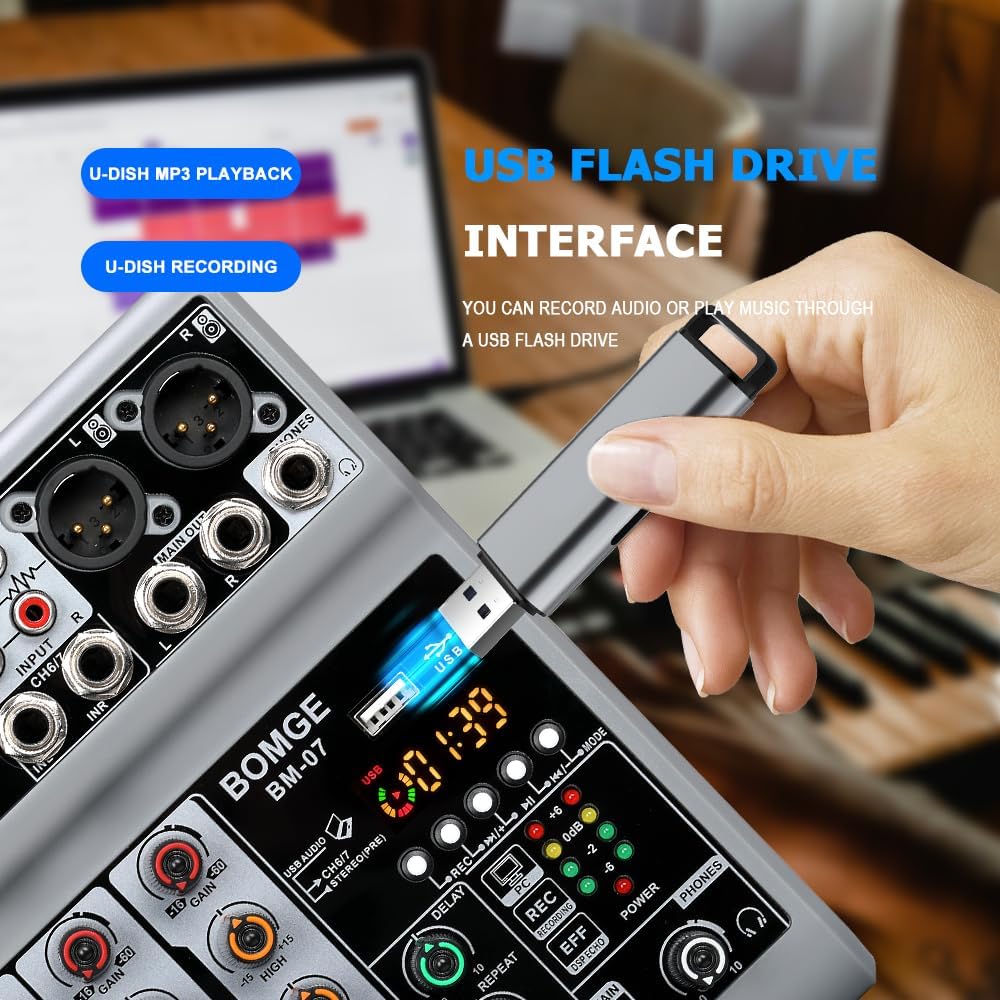
Image: The mixer's USB-A port with a flash drive connected, illustrating its function for both music playback and audio recording.
Important Note on Input Modes
The Bluetooth, USB (for computer/mobile), and 4/5 channel functions (referring to the stereo line inputs) are available as one of three options and cannot be used simultaneously. Select the desired input mode using the appropriate switch or button.
Službeni video proizvoda
Video: An official product video demonstrating the features and operation of the BOMGE BM-07 Audio Mixer. This video is 23 seconds long and provides a visual overview of the mixer's capabilities.
Održavanje
- Čišćenje: Za čišćenje površine miksera koristite meku, suhu krpu. Izbjegavajte korištenje tekućih sredstava za čišćenje ili otapala jer mogu oštetiti završnu obradu ili unutarnje komponente.
- Skladištenje: Mješalicu čuvajte na hladnom i suhom mjestu, zaštićeno od izravne sunčeve svjetlosti i ekstremnih temperatura.
- Rukovanje: Avoid dropping the mixer or subjecting it to strong impacts.
Rješavanje problema
- Nema izlaza zvuka:
- Provjerite sve kabelske spojeve (ulaze, izlaze, napajanje).
- Ensure the MAIN VOL knob is turned up.
- Verify individual channel VOL knobs are turned up.
- Confirm the correct input mode (USB, Bluetooth, Line) is selected.
- Ako koristite fantomsko napajanje, provjerite je li aktivirano za kondenzatorske mikrofone.
- Izobličen zvuk:
- Reduce the GAIN knob for the input channel.
- Lower the individual channel VOL knob.
- Check the LED Peak Level Indicator; if it's consistently red, the signal is clipping.
- Ensure output devices (speakers, headphones) are not overdriven.
- Problemi s Bluetooth vezom:
- Provjerite je li mikser u Bluetooth načinu rada.
- Check that Bluetooth is enabled on your device and "BM-07" is selected.
- Move your device closer to the mixer (within 1.5 feet).
- Pokušajte odvojiti i ponovno upariti uređaj.
- USB Recording/Playback Problems:
- Ensure the USB stick is properly formatted and contains compatible MP3 files za reprodukciju.
- Verify the USB stick has sufficient free space for recording.
- Confirm the correct USB mode (USB-A for stick, USB-B for computer) is selected.
- For mobile recording, ensure the OTG adapter is correctly connected and functioning.
Tehnički podaci
| Marka | BOMGE |
| Model | BM-07 |
| Broj kanala | 7 (5 Mic/Line, 2 Stereo Line/USB/Bluetooth) |
| Dimenzije proizvoda (D x Š x V) | 1.8" x 5.9" x 7.4" (4.57 cm x 14.99 cm x 18.8 cm) |
| Težina artikla | 550 gram |
| Tehnologija povezivanja | Pomoćni, Bluetooth, USB |
| Izvor napajanja | Corded Electric (5V USB-C) |
| Frekvencijski odziv | 24 KHz |
| Output Connector Types | 6.35mm (1/4 inch), RCA, USB |
| Vrste audio ulaza | Microphone, Computer, Musical Instruments, Electric Guitar, Mobile Phone |
| Fantomska snaga | +48V (on select XLR inputs) |
| Učinci | Jeka, Kašnjenje |
Informacije o jamstvu
The BOMGE BM-07 Audio Mixer comes with a Jamstvo 1 godine od datuma kupnje. Ovo jamstvo pokriva proizvodne nedostatke i kvarove pri normalnoj uporabi. Ne pokriva štetu uzrokovanu zlouporabom, nesrećama, neovlaštenim preinakama ili nepravilnom ugradnjom.
Zadržite svoj dokaz o kupnji za jamstvene zahtjeve.
Korisnička podrška
For technical assistance, troubleshooting, or warranty inquiries, please contact BOMGE customer support through the retailer's platform or the official BOMGE website. Please have your product model (BM-07) and purchase details ready when contacting support.
You can visit the official BOMGE store on Amazon for more information: BOMGE Music Studio
Ask a question about this manual
Ask about setup, troubleshooting, compatibility, parts, safety, or missing instructions. Manuals+ will review the question and use this page’s manual context to help answer it.