
1. Uvod
Thank you for choosing the FORGING MOUNT Full-Motion TV Wall Mount. This manual provides essential information for safe and correct installation, operation, and maintenance of your new TV wall mount. Please read these instructions thoroughly before installation and keep them for future reference.
2. Sigurnosne informacije
UPOZORENJE: Improper installation may result in serious personal injury and property damage. If you do not understand these instructions or have doubts about the safety of the installation, please contact a qualified installer.
- Osigurajte da površina za montažu može sigurno podnijeti ukupnu težinu opreme i sve priključene opreme i komponenti.
- Do not install on drywall alone. This mount is designed for wood stud, concrete, and brick walls.
- Always use an assistant or mechanical lifting equipment to safely lift and position the television.
- Tighten screws firmly but do not overtighten. Overtightening can damage the screws and components.
- Tijekom instalacije držite podalje djecu i kućne ljubimce.
- Regularly check the mount for any signs of wear or loosening.
3. Sadržaj paketa
Verify that all components are present and undamaged before proceeding with installation. If any parts are missing or defective, please contact customer support.

Figure 3.1: All components included in the package. This includes the main wall plate, TV attachment brackets, extension arms, a variety of mounting hardware for different TV models and wall types, a spirit level for accurate installation, and cable ties for cable management.
Paket obično uključuje:
- Sastavljanje zidne ploče
- Nosači za TV (x2)
- Extension Arms (if applicable)
- Mounting Hardware Kit (various screws, washers, spacers for TV and wall)
- Concrete Anchors (for concrete/brick installation)
- Razina duha
- Vezice za kabele
- Predložak za instalaciju
4. Specifikacije
| Značajka | Specifikacija |
|---|---|
| Broj modela | HY9370 |
| Kompatibilne TV veličine | 37 - 75 inča |
| Maksimalna nosivost | 45 kg (99 lbs) |
| VESA kompatibilnost | 100x100mm do 600x400mm |
| Vrsta montaže | Zidni nosač |
| Vrsta kretanja | Full-Motion (Swivel, Tilt, Level Adjustment) |
| Kut nagiba | +5° / -10° |
| Kut zakretanja | Up to 180° (depending on TV size) |
| Podešavanje razine | ±3° |
| Proširenje ruke | Up to 103.5 cm (1015mm) |
| Minimum Wall Distance | 82 mm |
| Materijal | Ugljični čelik za teške uvjete rada |
| Boja | Crna |
| Težina proizvoda | 7.1 kg |
5. Postavljanje i instalacija
Before installation, ensure you have the necessary tools (e.g., drill, stud finder, screwdriver, wrench). It is highly recommended to have at least two people for installation.
5.1 Kompatibilnost sa zidom
This mount is compatible with:
- Zidovi od drvenih nosača
- Čvrsti betonski zidovi
- Zidovi od opeke
DO NOT install this mount on drywall (plasterboard) alone without securing it to wood studs or concrete.

Figure 5.1: Wall type compatibility. The mount can be installed on wood stud, concrete, or brick walls. Drywall installation without proper stud support is prohibited.
5.2 Kompatibilnost s VESA standardom
Ensure your TV's VESA mounting pattern falls within the supported range of 100x100mm to 600x400mm.

Figure 5.2: VESA mounting pattern. Measure the horizontal and vertical distance between the mounting holes on the back of your TV to determine its VESA size.
5.3 Cable Exit Check
Before attaching the TV brackets, check if the cable exit points on your TV will be obstructed by the brackets. Adjust bracket placement if necessary.

Figure 5.3: Cable exit check. Ensure that the TV brackets do not block any essential cable ports on your television.
5.4 Koraci instalacije
Follow these general steps for installation. Refer to the included detailed manual and installation template for precise measurements and hardware selection.
- Pričvrstite nosače na TV: Secure the TV bracket arms to the back of your television using the appropriate screws, washers, and spacers from the hardware kit. Ensure they are centered and firmly tightened.
- Postavite zidnu ploču: Using the provided drilling template and spirit level, mark and drill pilot holes on your chosen wall location. Secure the wall plate assembly to the wall using the appropriate anchors and screws for your wall type.
- Objesite TV na zidnu ploču: Carefully lift the television with the attached brackets and hook it onto the wall plate. Ensure the TV is securely seated and engage any safety locking mechanisms.
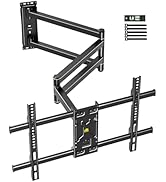
Figure 5.4: Simplified 3-step installation process. (1) Attach brackets to TV, (2) Mount wall plate to wall, (3) Hang TV onto wall plate.
6. Upute za uporabu (podešavanja)
The FORGING MOUNT HY9370 offers full-motion capabilities for optimal viewing fleksibilnost.
6.1 Arm Extension and Retraction
The mount features an ultra-long dual-folding arm that can extend up to 103.5 cm (1015mm) from the wall and retract to a minimum distance of 82mm.

Figure 6.1: Arm extension and retraction. The mount's arm can be extended to provide a maximum reach of 1015mm and folded back to a minimum distance of 82mm from the wall.
6.2 Podešavanje zakretanja
The TV can be swiveled up to 180 degrees left or right, depending on the TV size and wall position, allowing for viewing from multiple angles or rooms.

Figure 6.2: 180-degree swivel capability. The TV can be rotated horizontally to accommodate various viewing positions, ideal for open-plan living spaces or corner installations.
6.3 Podešavanje nagiba
Adjust the tilt angle from +5° (upward) to -10° (downward) to reduce glare and optimize your viewiskustvo.
Podešavanje u 6.4 stupnja
After installation, fine-tune the TV's horizontal level by adjusting it ±3° to ensure a perfectly straight display.

Figure 6.3: Tilt and level adjustments. The top image shows the TV tilting up to +5 degrees and down to -10 degrees to minimize glare. The bottom image demonstrates the ability to adjust the TV's horizontal level by +/-3 degrees for perfect alignment.
7. Održavanje
Redovito održavanje osigurava dugotrajnost i siguran rad vašeg zidnog nosača za TV.
- Čišćenje: Obrišite nosač mekom, suhom krpom. Izbjegavajte abrazivna sredstva za čišćenje ili otapala koja bi mogla oštetiti završnu obradu.
- Inspekcija: Povremeno provjeravajte sve vijke i matice kako biste bili sigurni da su čvrsto zategnuti. Po potrebi ih ponovno zategnite, ali nemojte ih previše zategnuti.
- Pokret: If the arm movement becomes stiff, apply a small amount of silicone-based lubricant to the pivot points.
8. Rješavanje problema
If you encounter issues with your TV wall mount, refer to the following common problems and solutions.
| Problem | Mogući uzrok | Otopina |
|---|---|---|
| Televizor nije ravan nakon postavljanja. | Minor misalignment during installation. | Use the built-in level adjustment feature (±3°) to correct the horizontal alignment. |
| Mount feels loose or unstable. | Mounting screws are not fully tightened or wall anchors are insufficient. | Re-check all wall mounting screws and TV attachment screws. Ensure proper anchors were used for your wall type. If unsure, consult a professional. |
| Arm movement is stiff or difficult. | Lack of lubrication or dust accumulation. | Clean the arm joints and apply a small amount of silicone-based lubricant to the pivot points. |
| TV cables are pinched or obstructed. | Cables were not routed correctly during installation. | Carefully detach the TV, re-route cables using the provided cable ties, and re-attach the TV. Ensure cables have enough slack for full motion. |
9. Jamstvo i podrška
This FORGING MOUNT product is covered by a 1-godišnje jamstvo proizvođača od datuma kupnje. Ovo jamstvo pokriva nedostatke u materijalu i izradi pri normalnoj uporabi.
Jamstvo ne pokriva:
- Oštećenja uzrokovana nepravilnom instalacijom, zlouporabom ili nemarom.
- Oštećenja uzrokovana neovlaštenim izmjenama ili popravcima.
- Normalno trošenje.
For warranty claims, technical support, or any questions regarding your product, please contact FORGING MOUNT customer service through your retailer or the official FORGING MOUNT webmjesto.