
1. Uvod
Thank you for choosing the TOPTRO TP3 4K Google TV Portable Projector. This manual provides essential information for setting up, operating, and maintaining your projector. Please read it thoroughly before use to ensure optimal performance and safety.
The TOPTRO TP3 is designed to deliver a versatile and immersive viewing experience, featuring integrated Google TV, AI-powered image adjustments, and comprehensive connectivity options. Enjoy your content at home, outdoors, or on the go.
2. Proizvod je gotovview
2.1 Ključne značajke
- Integrated Google TV: Access over 10,000 official streaming applications, including Netflix, Prime Video, and YouTube, without additional devices.
- Google Voice Control: Use the remote control's voice assistant button to search for content, adjust settings, and control playback hands-free.
- AI-Powered Image Adjustment: Features automatic focus, automatic keystone correction, obstacle avoidance, and automatic screen adjustment for a perfectly aligned and clear image within seconds.
- Native 1080P Resolution with 4K Decoding: Delivers sharp, detailed images and natural colors, supporting 4K video decoding.
- Short Throw Ratio (0.8:1): Projects a 60-inch image from just one meter distance, ideal for small spaces.
- 90-Degree Rotating Stand: Allows for flexible projection angles, including ceiling projection.
- Napredno povezivanje: Equipped with dual-band WiFi 6, Bluetooth 5.3, HDMI ARC, USB, and a 3.5mm audio jack for wide device compatibility.
- Prijenosni dizajn: Weighing only 1.2 kg (2.6 lbs) with a hidden carry handle, making it easy to transport.
2.2 Sadržaj paketa
Provjerite jesu li svi artikli prisutni u paketu:
- TOPTRO TP3 projektor
- Daljinski upravljač
- HDMI kabel
- Adapter napajanja
- korisnički priručnik
3. Postavljanje
3.1 Početno smještaj
Place the projector on a stable, flat surface. The 90-degree rotating stand allows for various projection angles, including wall, ceiling, or tabletop. For optimal image quality, ensure the projection surface is smooth and light-colored.

Image: The TOPTRO TP3 projector can be used in diverse environments, from living rooms to outdoor camping, showcasing njegovu prilagodljivost.
3.2 Priključak za napajanje
- Connect the power adapter to the projector's power input.
- Plug the power adapter into a suitable electrical outlet (220V).
- Pritisnite gumb za napajanje na projektoru ili daljinskom upravljaču da biste ga uključili.
3.3 Mrežna veza
Upon first startup, follow the on-screen prompts to connect to your Wi-Fi network. The projector supports dual-band WiFi 6 for a fast and stable connection.
3.4 Postavljanje Google TV-a
After connecting to Wi-Fi, sign in with your Google account to access Google TV and download applications from the Google Play Store. This step is crucial for utilizing the integrated streaming services.

Image: The projector's interface showing integrated Google TV with direct access to popular streaming applications.
4. Upute za rad
4.1 Osnovni rad
- Uključivanje/isključivanje: Pritisnite gumb za napajanje na daljinskom upravljaču ili projektoru.
- Navigacija: Use the directional buttons on the remote to navigate menus.
- Izbor: Pritisnite gumb 'U redu' za potvrdu odabira.
- Kontrola glasnoće: Koristite tipke za glasnoću na daljinskom upravljaču.
4.2 Podešavanje slike
The TOPTRO TP3 features AI-powered automatic image adjustments:
- Automatski fokus: The projector automatically adjusts the image clarity.
- Automatsko ispravljanje trapezoidnosti: Automatically corrects distorted images to a rectangular shape.
- Izbjegavanje prepreka: Detects and adjusts the image to avoid objects on the projection surface.
- Auto Screen Adjustment: Optimizes the image to fit the screen area.
These adjustments occur automatically within seconds of powering on or repositioning the projector. Manual digital zoom (80-100%) is also available for fine-tuning image size.

Image: Visual representation of the projector's AI-powered automatic image adjustment features, ensuring a clear and aligned picture.
4.3 Google Voice Control
Press the dedicated voice assistant button on your remote control and speak your command. For example, say "Open YouTube" or "Play music." The projector will respond to your voice commands for quick access to functions and content.
4.4 Screen Mirroring (Google Cast)
Utilize Google Cast technology to wirelessly mirror content from your smartphone or tablet to the projector. For iPhone users, download the "AirScreen" application from the Google Play Store on the projector for wireless screen mirroring.
4.5 Rotating Stand Usage
The integrated 90-degree rotating stand allows you to easily adjust the projection angle. Simply pivot the projector to direct the image onto a wall, screen, or ceiling. This feature is particularly useful for bedroom viewing or creative setups.
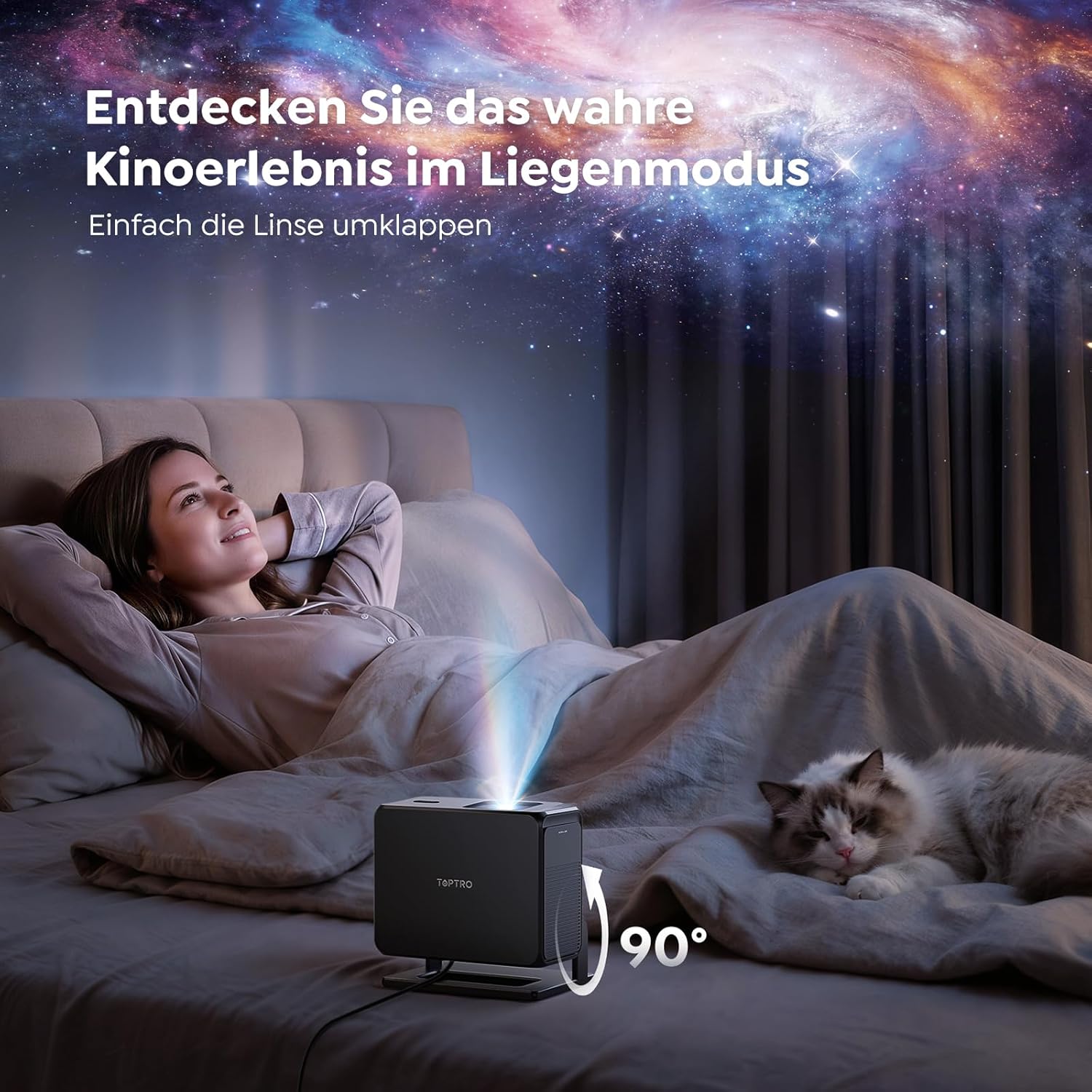
Image: The TOPTRO TP3 projector rotated 90 degrees to project content onto a bedroom ceiling, offering a unique viewiskustvo.
5. Povezivost
5.1 Žičane veze
- HDMI ARC/CEC: Connect external devices like laptops, gaming consoles (Xbox/PlayStation 5), or Blu-ray players. The ARC feature allows audio to be sent back to a compatible sound system.
- USB: Spojite USB pogone za reprodukciju medija.
- 3.5 mm audio utičnica: Connect external wired speakers or headphones.
5.2 Bežične veze
- Wi-Fi 6: Provides faster and more stable wireless connectivity for streaming and online content.
- Bluetooth 5.3: Spojite Bluetooth slušalice ili zvučnike za poboljšani audio doživljaj.
6. Održavanje
6.1 Čišćenje leće
Gently clean the projector lens with a soft, lint-free cloth designed for optical surfaces. Avoid using abrasive cleaners or excessive force, as this can scratch the lens.
6.2 Opće čišćenje
Obrišite vanjski dio projektora mekom, suhom krpom. Nemojte koristiti tekuća sredstva za čišćenje izravno na uređaju.
6.3 Skladištenje
Kada se ne koristi, projektor čuvajte na hladnom i suhom mjestu, dalje od izravne sunčeve svjetlosti i ekstremnih temperatura. Koristite originalno pakiranje ili zaštitnu kutiju kako biste spriječili nakupljanje prašine i oštećenja.
7. Rješavanje problema
7.1 Nema prikazane slike
- Provjerite je li projektor uključen i spojen na izvor napajanja.
- Check all cable connections (HDMI, USB) to external devices.
- Verify the input source selected on the projector matches the connected device.
- Confirm the lens cap is removed.
7.2 Mutna slika
- Dopustite funkciji automatskog fokusiranja da dovrši podešavanje.
- Provjerite je li površina za projekciju ravna, a projektor stabilan.
- Clean the projector lens if smudges or dust are visible.
7.3 Nema zvuka
- Provjerite razinu glasnoće i na projektoru i na spojenom izvornom uređaju.
- Ensure external speakers or headphones are properly connected (wired or Bluetooth).
- If using HDMI ARC, verify your sound system is compatible and correctly configured.
7.4 Daljinski upravljač ne radi
- Zamijenite baterije u daljinskom upravljaču.
- Provjerite da nema prepreka između daljinskog upravljača i IR prijemnika projektora.
For further assistance, refer to the detailed troubleshooting section in the full user manual or contact customer support.
8. Specifikacije
| Značajka | Specifikacija |
|---|---|
| Marka | TOPTRO |
| Naziv modela | TP3 |
| Izvorna razlučivost | 1920 x 1080 (1080P) |
| Video Decoding Support | 4K |
| Vrsta zaslona | LED |
| Posebne značajke | Auto Focus, Auto Keystone Correction, Obstacle Avoidance, Auto Screen Adjustment, Google TV, Google Voice Control |
| Tehnologija povezivanja | HDMI, USB, Bluetooth 5.3, Wi-Fi 6 |
| Hardversko sučelje | HDMI ARC/CEC, USB, 3.5mm Audio |
| Dimenzije proizvoda (DxŠxV) | 19.4 x 15.8 x 14.1 cm |
| Težina artikla | 1.2 kg |
| Form Factor | Prijenosni |
| Vrsta montaže | Ceiling Mount, Tabletop, Wall |
| Minimalna veličina slike | 40 inča |
| Maksimalna veličina slike | 120 inča |
| Maksimalna dometna udaljenost | 2.13 metara |
| Voltage | 220 volti |
| Uključene komponente | HDMI kabel |
| Boja | Crna |
| Vrsta kontrolera | Daljinski upravljač |
| Kompatibilni uređaji | Xbox/PlayStation 5, Smartphone, Tablet, Laptop, Speaker, Notebook |
| Preporučena upotreba | Gaming, Business, Home Cinema, Education |
9. Jamstvo i podrška
9.1 Informacije o jamstvu
Za specifične uvjete jamstva pogledajte jamstveni list koji ste dobili s proizvodom. Sačuvajte dokaz o kupnji za slučaj zahtjeva za jamstvo.
9.2 Korisnička podrška
If you encounter any issues or have questions regarding your TOPTRO TP3 projector, please contact our customer service team. We provide prompt, professional, and effective support to ensure a smooth user experience.
Contact details can typically be found on our official webstranici ili na jamstvenom listu.