
1. Uvod
This manual provides detailed instructions for the LAUNCH Creader Elite V3.0 OBD2 Scanner, a professional diagnostic tool designed specifically for Land Rover and Jaguar vehicles. It covers device setup, operational procedures for various diagnostic and service functions, software updates, and troubleshooting tips. Please read this manual thoroughly before operating the device to ensure correct usage and optimal performance.
2. Proizvod je gotovview
2.1. Što je u kutiji
- 1 * LAUNCH Creader Elite V3.0 OBD2 Scanner for JLR
- 1 * OBD2 Diagnostic Cable
- 1 * Vodič za brzi početak
- 1 * korisnički priručnik
2.2. Ključne značajke
The LAUNCH Creader Elite V3.0 offers a comprehensive suite of features for vehicle diagnostics and maintenance:
- Poboljšani hardver: Features Android 8.1 operating system, 32GB ROM, 3000mAh battery, and 2.4&5GHz dual-band Wi-Fi for improved performance.
- DoIP Protocol Support: Supports the new DoIP protocol for Land Rover & Jaguar models manufactured after 2017 (requires an adapter).
- Full Systems Diagnostics: Provides in-depth scanning for all available vehicle modules, including engine, transmission, ABS, SRS, and more.
- Bi-Directional Control (Active Test): Allows control of vehicle components and systems for active testing, such as windows, mirrors, wipers, and horn.
- Comprehensive Service Functions: Includes Oil Reset, Electronic Parking Brake (EPB) Reset, Battery Management System (BMS) Reset, Steering Angle Sensor (SAS) Calibration, Injector Coding, Throttle Relearn, Height Calibration, Transmission Adaptation, Crankshaft/Camshaft Relearn, Sunroof Calibration, and more.
- 4-u-1 prijenos podataka uživo: Displays real-time data from multiple sensors simultaneously in a graphical format, with recording and playback capabilities.
- Smart Diagnostic Functions: Features Auto VIN for automatic vehicle identification, DTC Lookup for code explanations, and the ability to generate and share diagnostic reports.
- Potpune OBD2 funkcije: Supports all 10 OBD2 test modes for universal vehicle compatibility (post-1996 models).
- Doživotna besplatna ažuriranja: Provides lifetime free software updates specifically for Land Rover and Jaguar vehicle brands.
2.3. Device Comparison
The Creader Elite V3.0 offers significant upgrades over previous versions:

Image: Comparison of Creader Elite V3.0, V2.0, and V1.0, highlighting V3.0's superior features like DoIP, Android 8.1, 32GB memory, and 2.4&5GHz WiFi.
2.4. Fizički opis
The device features a durable orange casing with a 4-inch touchscreen display. The back of the device includes product identification details such as the model number, FCC ID, and serial number.
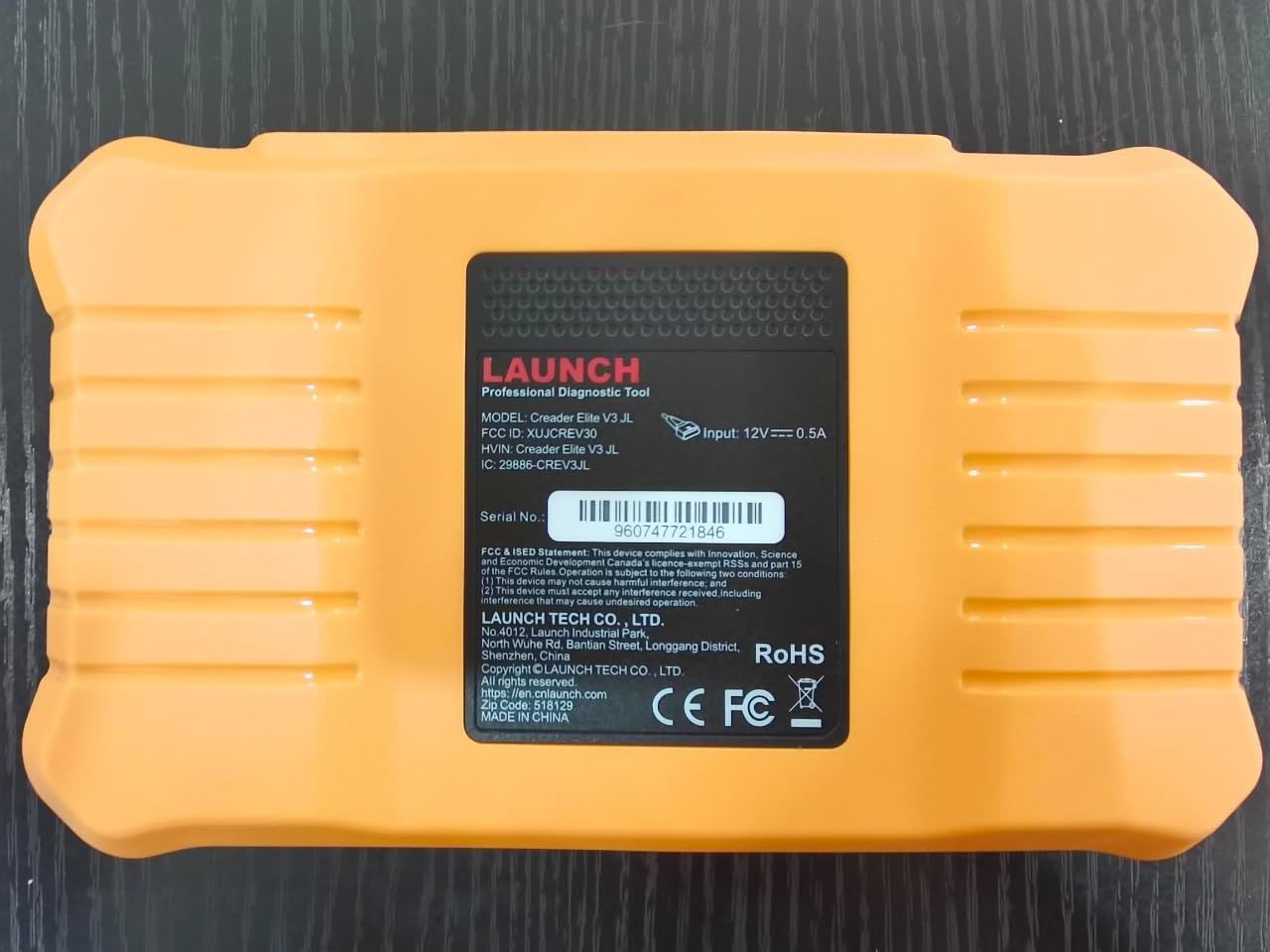
Slika: Stražnja strana view of the LAUNCH Creader Elite V3.0, displaying the model number, FCC ID, and serial number (e.g., 960747721846).
3. Postavljanje
3.1. Početno uključivanje
- Provjerite je li uređaj potpuno napunjen ili priključen na izvor napajanja.
- Pritisnite i držite gumb za napajanje dok se zaslon ne osvijetli.
- Slijedite upute na zaslonu za odabir željenog jezika i regije.
3.2. Wi-Fi veza
- Iz glavnog izbornika idite na postavke.
- Odaberite Wi-Fi i uključite ga.
- Odaberite željenu Wi-Fi mrežu s popisa i unesite lozinku ako se to od vas zatraži.
- Confirm the connection. A stable internet connection is required for software updates and online resources.
3.3. Registracija i aktivacija
Upon first use or after a factory reset, you may be prompted to register your device. Follow the on-screen instructions to create an account or log in. This step is crucial for accessing software updates and technical support.
4. Upute za rad
4.1. Spajanje s vozilom
- Locate the vehicle's OBD2 diagnostic port, typically under the dashboard on the driver's side.
- Provjerite je li paljenje vozila u položaju ON position (engine off or running, depending on the test).
- Connect the OBD2 diagnostic cable to the vehicle's OBD2 port and to the LAUNCH Creader Elite V3.0 device.
- The device will automatically power on or prompt you to do so.
4.2. Potpuna dijagnostika sustava
This function allows you to scan all available electronic control units (ECUs) in the vehicle.

Image: Display showing OE-level all system diagnostics, including Auto VIN, fault codes, 4-in-1 live data, and MIL reset.
- U glavnom izborniku odaberite Lokalna dijagnoza.
- Odaberite marku vozila (Land Rover ili Jaguar).
- Odaberite Automatsko pretraživanje or Ručni odabir. Auto Search (Auto VIN) will attempt to automatically identify the vehicle.
- Once the vehicle is identified, select Zdravstveni izvještaj or Skeniranje sustava to perform a comprehensive scan of all modules.
- Review the diagnostic trouble codes (DTCs) and ECU information. You can then choose to clear codes if necessary.
4.3. Servisne funkcije
The Creader Elite V3.0 provides numerous maintenance and reset services. Access these functions via Diagnose > Brand > System Selection > Special Function.

Slika: Prekoview of various service functions including Oil Reset, Brake Reset, SAS Calibration, Start-Stop Reset, TPMS Reset, Injector Coding, Battery Reset, ABS Bleeding, Seat Calibration, and Height Calibration.
Common services include:
- Resetiranje ulja: Resetira sustav vijeka trajanja motornog ulja.
- Resetiranje EPB-a: Resets the electronic parking brake after replacement.
- SAS kalibracija: Kalibrira senzor kuta upravljanja.
- Kodiranje injektora: Kodira nove brojeve injektora u ECU.
- Ponovno učenje gasa: Ponovno uči položaj kućišta leptira za gas.
- Kalibracija visine: Calibrates the vehicle's suspension height.
- Ponovno postavljanje baterije: Registers a new battery replacement.
- Krvarenje iz ABS-a: Izvodi postupke odzračivanja ABS kočnica.
Note: The availability of specific service functions may vary depending on the vehicle model and year. Always check compatibility before performing a service.
4.4. Dvosmjerno upravljanje (aktivni testovi)
Active tests allow you to send commands to vehicle systems and components to verify their functionality.

Image: Depicts bi-directional active tests, showing the device sending commands to vehicle actuators like wipers, windows, clutch, and injectors to check their status.
- Navigate to the desired vehicle system within the diagnostic menu.
- Odaberite Aktivni test or Dvosmjerno upravljanje.
- Choose the specific component or system you wish to test (e.g., 'Wiper Test', 'Window Test', 'Horn Test').
- Slijedite upute na zaslonu za aktivaciju i promatrajte odgovor komponente.
4.5. Potpune OBD2 funkcije
For universal vehicle diagnostics (all OBD2 compliant vehicles after 1996), use the OBD II opcija izbornika.
- Pročitajte kodove: Retrieves generic (P0, P2, P3, U0) and manufacturer specific (P1, P3, U1) codes.
- Brisanje kodova: Clears diagnostic trouble codes and turns off the Malfunction Indicator Light (MIL).
- Podaci uživo: Prikazuje podatke u stvarnom vremenu sa senzora vozila.
- I/M spremnost: Provjerava spremnost monitora povezanih s emisijama.
- Zamrzni sliku: Displays a snapshot of operating conditions at the time of an emission-related fault.
- Test O2 senzora: Dohvaća rezultate ispitivanja monitora O2 senzora.
- Ispitivanje ugrađenog monitora (način rada 6): Dohvaća rezultate za komponente i sustave pogonskog sklopa povezane s emisijama.
- Ispitivanje EVAP sustava (način rada 8): Pokreće ispitivanje sustava za kontrolu emisija isparavanjem.
- Podaci o vozilu: Dohvaća identifikacijski broj vozila (VIN), ID kalibracije (CALID) i broj za provjeru kalibracije (CVN).
4.6. Real-Time Monitoring and Data Stream
Monitor various vehicle parameters in real-time to diagnose intermittent issues or verify repairs.

Image: Real-time monitoring screen showing battery voltage, transmission oil temperature, coolant temperature, and vehicle speed, with a detailed 4-in-1 data stream graph below.
- U dijagnostičkom izborniku odaberite Podaci uživo.
- Odaberite parametre koje želite pratiti.
- The device can display up to four data streams simultaneously in a graphical format.
- Koristite Snimiti i Reprodukcija functions to capture and review data for later analysis.
4.7. Smart Diagnostic Features
The device includes features to streamline the diagnostic process:
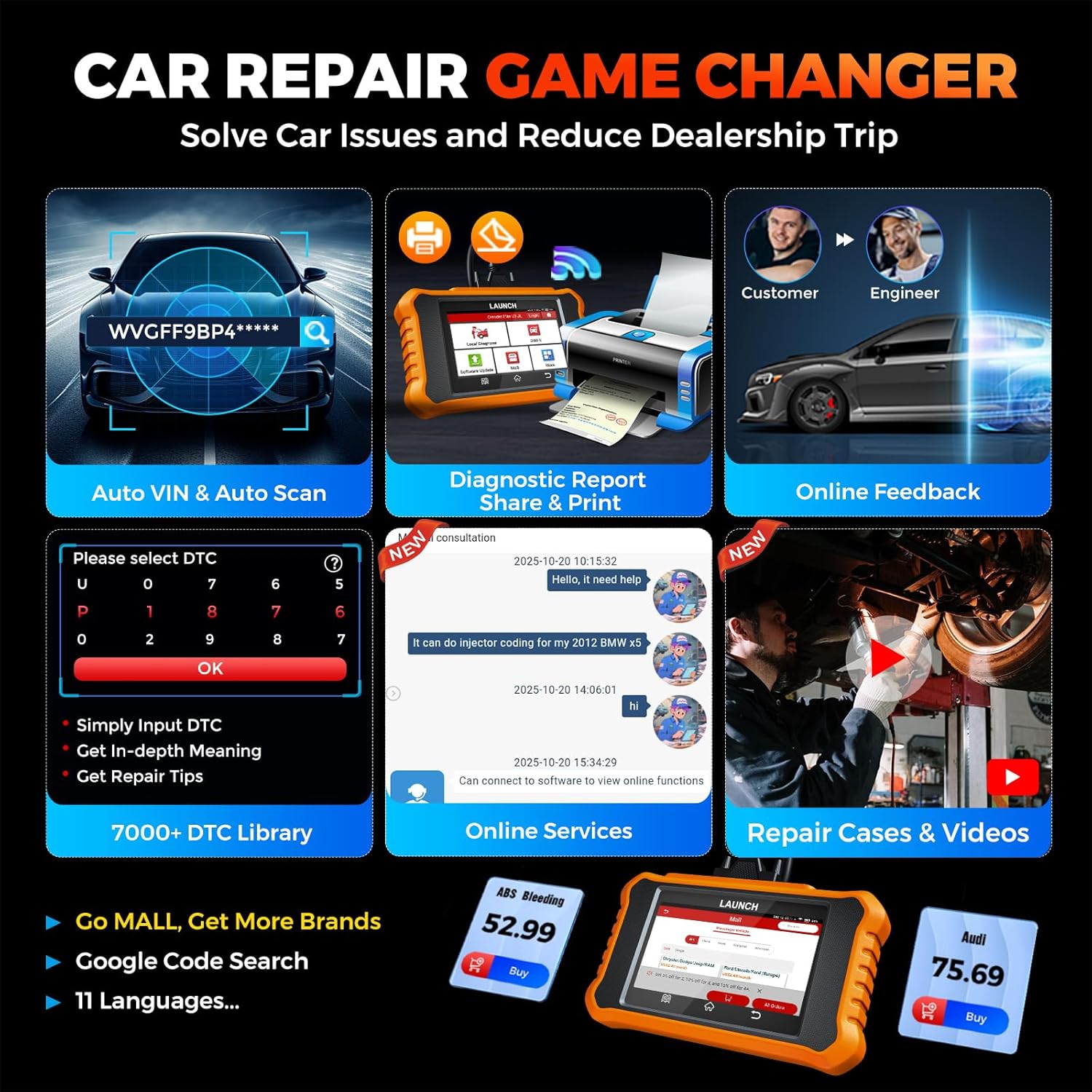
Image: Smart diagnostic features such as Auto VIN, diagnostic report generation and printing, online feedback, 7000+ DTC library, and access to online services.
- VIN automobila: Automatically identifies vehicle information (year, make, model) for quicker diagnostics.
- Traženje DTC-a: Provides detailed explanations for diagnostic trouble codes.
- Dijagnostičko izvješće: Generates a professional diagnostic report that can be shared or printed.
- Povratne informacije na mreži: Allows users to submit feedback or issues directly to technical support.
5. Maintenance & Updates
5.1. Ažuriranja softvera
The LAUNCH Creader Elite V3.0 offers lifetime free software updates for Land Rover and Jaguar brands.
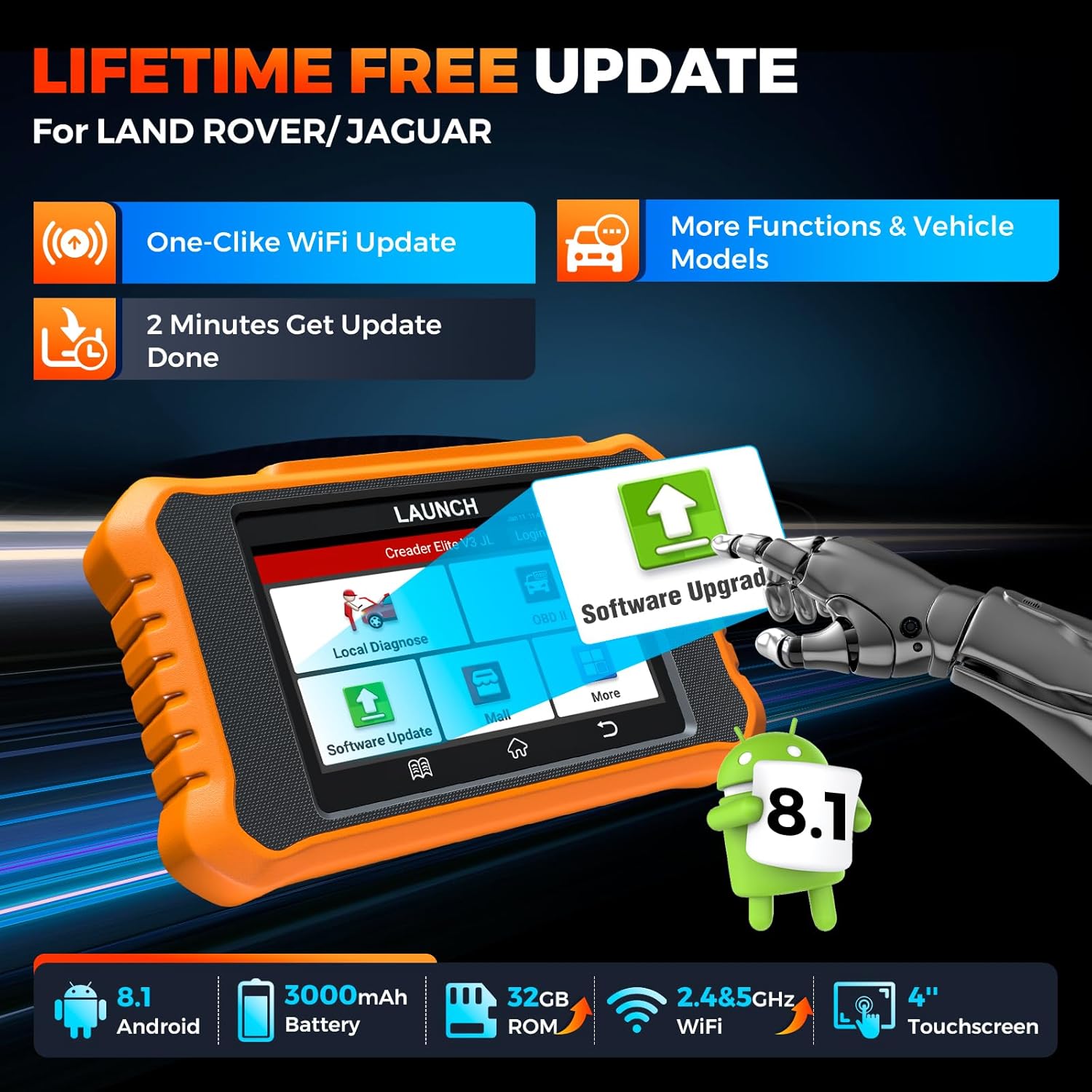
Image: Device screen illustrating the one-click Wi-Fi update process, emphasizing lifetime free updates for Land Rover/Jaguar and the ability to get more functions and vehicle models.
- Provjerite je li uređaj spojen na stabilnu Wi-Fi mrežu.
- U glavnom izborniku odaberite Ažuriranje softvera.
- Uređaj će provjeriti dostupna ažuriranja.
- Select the updates you wish to install and follow the on-screen prompts. Updates typically take a few minutes.
5.2. Expanding Vehicle Coverage (Mall)
If you require diagnostic capabilities for other vehicle brands beyond Land Rover and Jaguar, you can purchase additional software packages from the trgovački centar application on the device. Please note that software purchased from the Mall is typically valid for one year and may require re-purchase after expiry.
5.3. Briga o uređaju
- Uređaj održavajte čistim i bez prašine i vlage.
- Izbjegavajte ispuštanje uređaja ili njegovo izlaganje jakim udarcima.
- Čuvajte uređaj na hladnom i suhom mjestu kada nije u upotrebi.
- Koristite samo priloženi kabel za punjenje i pribor.
6. Kompatibilnost
The LAUNCH Creader Elite V3.0 is primarily designed for:

Image: Device interface showing diagnostic options for Land Rover (Defender, Discovery, Range Rover, Evoque) and Jaguar (E-Pace, F-Pace, F-Type, S-Type, X-Type, XE, XF, XJ, XK) models, with a note on DoIP protocol for models after 2017.
- Landrover: Compatible with models such as Defender, Discovery, Discovery Sport, Range Rover, Range Rover Evoque, etc.
- Jaguar: Compatible with models such as E-Pace, F-Pace, F-Type, S-Type, X-Type, XE, XF, XJ, XK, etc.
- DoIP protokol: Supports Land Rover & Jaguar models after 2017, requiring a separate DoIP adapter.
- Universal OBD2: Fully compatible with all OBD2 compliant vehicles manufactured after 1996 for basic OBD2 functions.
For specific vehicle compatibility, it is recommended to contact technical support via obdbox21@163.com.
7. Specifikacije
| Model | LAUNCH Creader Elite 3.0-JL |
| Operativni sustav | Android 8.1 |
| Veličina zaslona | 4 inča |
| Interna pohrana (ROM) | 32 GB |
| Kapacitet baterije | 3000 mAh |
| Wi-Fi | 2.4 i 5 GHz dvopojasni |
| Izvor napajanja | Napajanje na baterije |
| Težina artikla | 1.49 funti |
| Dimenzije paketa | 8 x 7.5 x 1.5 inča |
| Automobilska vrsta | Universal Fit (for OBD2 functions) |
8. Rješavanje problema
8.1. Uređaj se ne uključuje
- Check battery level. Connect the device to a charger and allow it to charge for at least 30 minutes.
- Provjerite je li gumb za napajanje ispravno pritisnut i držan.
- If connected to the vehicle, ensure the vehicle's ignition is on and the OBD2 cable is securely connected.
8.2. Komunikacijska greška s vozilom
- Verify the OBD2 cable is securely connected to both the device and the vehicle's port.
- Provjerite je li paljenje vozila u položaju ON položaj.
- Confirm that the vehicle is OBD2 compliant (generally 1996 and newer for US vehicles).
- Try a different OBD2 compliant vehicle to rule out a vehicle-specific issue.
- Ensure the correct vehicle brand software is installed and up to date.
8.3. Software Update Failure
- Check your Wi-Fi connection for stability and signal strength.
- Ensure the device has sufficient battery charge or is connected to power during the update process.
- Verify that there is enough free storage space on the device.
- Ponovno pokrenite uređaj i pokušajte ažurirati.
8.4. Inaccurate Readings or Functions Not Working
- Ensure the vehicle's make, model, and year are correctly identified by the device.
- Verify that the specific function is supported for your vehicle model and year. Refer to the compatibility section or contact support.
- Ensure the device software is fully updated.
9. Jamstvo i podrška
9.1. Informacije o jamstvu
The LAUNCH Creader Elite V3.0 comes with an Extended 60-Day Return & Replacement policy and a 5-Year Quality Backup. Please retain your proof of purchase for warranty claims.
9.2. Tehnička podrška
For any technical assistance, questions, or compatibility inquiries, please contact our support team:
- Email: obdbox21@163.com
- Our support team is available 24/7/365.
Note: Please direct all support inquiries to the provided email address. Do not contact LAUNCH Tech USA for support related to this specific product.


