
Uvod
Hvala na kupnjiasing the FERIETELF T29 Drone with Camera. This manual provides essential information for the safe operation, setup, and maintenance of your drone. Please read this manual thoroughly before operating the drone to ensure proper use and to prevent damage or injury.
The T29 Drone features a 1080P HD camera, WiFi FPV live video transmission, voice and gesture control, and a foldable design for portability. It comes with two batteries and a carrying case for convenience.
Sigurnosne smjernice
Uvijek dajte prioritet sigurnosti prilikom upravljanja dronom. Nepoštivanje ovih smjernica može rezultirati ozljedama, oštećenjem drona ili materijalnom štetom.
- Koristite dron na otvorenim površinama, dalje od ljudi, životinja, zgrada i prepreka.
- Do not fly near airports or restricted airspace. Check local regulations before flying.
- U svakom trenutku održavajte vizualnu liniju vidljivosti s dronom.
- Izbjegavajte letenje pri jakom vjetru ili nepovoljnim vremenskim uvjetima.
- Prije svakog leta provjerite jesu li baterije potpuno napunjene i pravilno instalirane.
- Držite prste i labavu odjeću podalje od rotirajućih propelera.
- Do not operate the drone under the influence of alcohol or drugs.
- Djeca bi trebala upravljati dronom samo pod izravnim nadzorom odrasle osobe.
Sadržaj paketa
Provjerite jesu li svi artikli prisutni u vašem paketu:
- FERIETELF T29 Drone
- Daljinski upravljač
- 1080P HD Camera (integrated)
- Rechargeable Drone Batteries (x2)
- USB kabel za punjenje
- Rezervni propeleri
- Straže propelera
- Odvijač
- Korisnički priručnik (ovaj dokument)
- Torba za nošenje
Postavljanje
1. Rasklapanje drona
Gently unfold the drone arms until they lock into position. Ensure all four arms are fully extended.
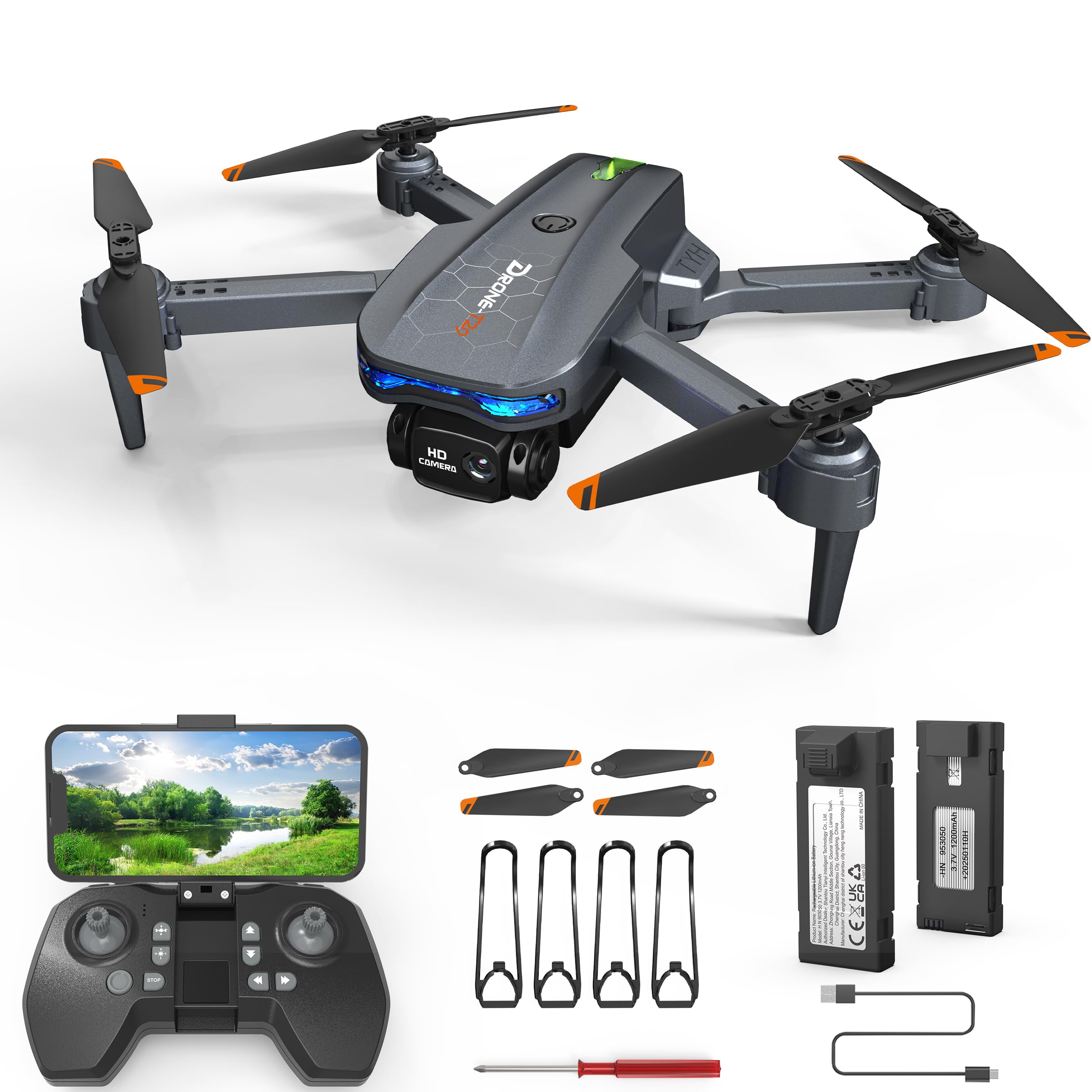
Image: The FERIETELF T29 Drone with its arms unfolded, ready for flight. The propellers are visible at the end of each arm.
2. Ugradnja štitnika propelera
For beginner pilots, it is recommended to install the propeller guards. Attach each guard to the corresponding motor arm by snapping it into place.
3. Punjenje baterije drona
Connect the drone battery to the USB charging cable. Plug the USB cable into a 5V/1A USB adapter (not included). The indicator light on the cable will show charging status. A full charge typically takes 60-90 minutes.
- Indikator punjenja: Red light ON during charging, OFF when fully charged.
Važno: Always use the provided charging cable. Do not leave batteries unattended while charging. Disconnect once fully charged.
4. Installing the Drone Battery
Insert the fully charged battery into the battery compartment on the back of the drone until it clicks securely into place.
5. Umetanje baterija u daljinski upravljač
Open the battery cover on the back of the remote controller. Insert 3 x AAA batteries (not included) according to the polarity markings. Close the battery cover.
Upute za rad
1. Uključivanje i uparivanje
- Dron postavite na ravnu, ravnu površinu.
- Pritisnite i držite gumb za napajanje na dronu dok indikatorska svjetla ne zatrepere.
- Uključite daljinski upravljač. Indikatorska lampica na daljinskom upravljaču će treptati.
- Push the left joystick (throttle) up to the maximum position, then pull it down to the minimum position. The drone and remote lights will become solid, indicating successful pairing.
2. Kalibriranje žiroskopa
After pairing, place the drone on a flat surface. Push both joysticks down and to the right simultaneously for 2-3 seconds. The drone lights will flash rapidly and then become solid, indicating successful calibration.
3. Connecting to WiFi FPV (First Person View)
- Download the "FERIETELF Drone" app from your smartphone's app store (iOS/Android).
- Uključite dron.
- Go to your smartphone's WiFi settings and connect to the network named "FERIETELF-T29-XXXXXX".
- Open the FERIETELF Drone app. You should see the live video feed from the drone's camera.
4. Polijetanje i slijetanje
- Polijetanje jednim ključem: Press the One-Key Take-off button on the remote controller. The drone will automatically ascend to a certain height and hover.
- Ručno polijetanje: Push both joysticks down and outwards to start the propellers. Then, gently push the left joystick (throttle) upwards to ascend.
- Slijetanje jednim ključem: Press the One-Key Landing button. The drone will slowly descend and land automatically.
- Ručno slijetanje: Gently pull the left joystick (throttle) downwards to descend. Once landed, pull both joysticks down and inwards to stop the propellers.
5. Osnovne kontrole leta
| Joystick/Button | Funkcija |
|---|---|
| Left Joystick (Up/Down) | Ascend / Descend (Throttle) |
| Left Joystick (Left/Right) | Rotate Left / Rotate Right (Yaw) |
| Right Joystick (Up/Down) | Fly Forward / Fly Backward (Pitch) |
| Right Joystick (Left/Right) | Fly Left / Fly Right (Roll) |
| Gumbi za obrezivanje | Adjust drone drift (forward/backward, left/right) |
6. Glasovno upravljanje
With the app connected, activate voice control. Speak commands such as "Take off", "Land", "Forward", "Backward", "Left", "Right". Ensure you are in a quiet environment for best results.
7. Upravljanje gestama
In the app, enable gesture control. Perform specific hand gestures in front of the drone's camera to trigger actions:
- "V" Gesture: Snimite fotografiju.
- Pokret dlanom: Start / Stop video snimanje.
Osigurajte dobro osvjetljenje i jasan view of your hand for accurate gesture recognition.
8. Način bez glave
Press the Headless Mode button on the remote. In this mode, the drone's orientation is relative to the pilot, making it easier to control regardless of which way the drone is facing. Press again to exit.
9. Podešavanje brzine
Press the Speed button to cycle through different speed modes (low, medium, high). Adjust according to your skill level and flying environment.
Održavanje
- Čišćenje: Use a soft, dry cloth to clean the drone and remote controller. Do not use water or solvents.
- Pregled propelera: Regularly check propellers for damage (cracks, bends). Replace damaged propellers immediately using the provided screwdriver and spare parts.
- Njega baterije:
- Čuvajte baterije na hladnom i suhom mjestu.
- Nemojte prekomjerno puniti ili previše prazniti baterije.
- If not used for an extended period, charge batteries to about 50% capacity.
- Skladištenje: When not in use, fold the drone and store it in its carrying case to protect it from dust and damage. Remove batteries from the remote controller if storing for long periods.
Rješavanje problema
| Problem | Mogući uzrok | Otopina |
|---|---|---|
| Dron ne reagira na daljinski upravljač. | Nije upareno; slaba baterija (dron/daljinski upravljač). | Re-pair drone and remote. Charge drone battery. Replace remote batteries. |
| Dron se zanosi tijekom leta. | Gyroscope not calibrated; uneven surface at take-off; wind interference. | Recalibrate gyroscope on a flat surface. Use trim buttons to adjust. Fly in calm conditions. |
| Propeleri se ne okreću. | Drone not powered on; propellers obstructed; motor issue. | Ensure drone is on. Check for obstructions. Contact support if motors are faulty. |
| No FPV video feed. | Not connected to drone's WiFi; app not open; weak signal. | Verify WiFi connection. Restart app. Move closer to drone. |
| Kratko vrijeme leta. | Baterija nije potpuno napunjena; stara baterija; agresivno letenje. | Ensure full charge. Consider replacing old batteries. Fly more conservatively. |
Tehnički podaci
- Model: TY29
- Marka: FERIETELF
- Dimenzije (rasklopljeno): 30.5 x 25.4 x 4.8 cm (12 x 10 x 1.9 inča)
- Težina: 185 gram
- Fotoaparat: 1080P HD
- Povezivost: Wi-Fi FPV
- Kontrolne značajke: Voice Control, Gesture Control, Headless Mode, One-Key Take-off/Landing
- baterije: 2 x Lithium Ion (P76 type, included)
- Baterije daljinskog upravljača: 3 x AAA (nije uključeno)
- Proizvođač: SHANTOU TIANYI INTELLIGENT TECHNOLOGY CO.,LTD.
Informacije o jamstvu
This product comes with a standard manufacturer's warranty. For specific details regarding warranty coverage, duration, and claims process, please refer to the warranty card included in your product packaging or contact FERIETELF customer support directly. Keep your proof of purchase for warranty validation.
Korisnička podrška
If you encounter any issues or have questions not covered in this manual, please contact FERIETELF customer support. For the most up-to-date contact information, please visit the official FERIETELF webweb-mjesto ili se obratite na kontaktne podatke navedene na pakiranju proizvoda.
Mrežni resursi: For additional tips, FAQs, and video tutorials, please visit the official FERIETELF support page.