
1. Proizvod je gotovview
The PUSOKEI 4K HD WiFi Action Camera is a versatile handheld video recorder designed for capturing high-quality footage in various environments, from sports activities to travel vlogs. It features a 180° rotating lens, a 1.31-inch display, and built-in WiFi for easy sharing and management of your recordings.
Ključne karakteristike:
- 4K HD kvaliteta videa: Records clear and vibrant moments in 4K resolution.
- Kompaktan i prijenosan dizajn: Easy to carry for various recording needs.
- 1.31 Inch Screen: Intuitivno sučelje za jednostavnu navigaciju i upravljanje.
- 180° Rotating Lens: Allows for unique angles and creative compositions.
- WiFi povezivost: Enables quick sharing, storage, and editing of footage via a mobile app.
- Snimanje petlje: Neprekidno snima, prepisujući najstarije files kada je memorijska kartica puna.
- LED svjetlo za punjenje: Suitable for both day and night use, enhancing image quality in low light.
Sadržaj paketa:
- 1 x PUSOKEI Handheld Camera
- 2 x USB kabeli
- 1 x priručnik s uputama
Note: A Small Memory Card (up to 256GB) is required for recording and is not included in the package.

Image: PUSOKEI 4K HD WiFi Action Camera showcasing its main features like 4K HD resolution, 180° rotating lens, one-click recording, loop recording, business back clamp, ultra-low power consumption, and small memory card support.
2. Postavljanje
2.1 Punjenje baterije
The camera is equipped with a built-in high-capacity battery. Before first use, fully charge the camera using the provided USB Type-C cable.
- Connect one end of the USB Type-C cable to the camera's charging port.
- Connect the other end to a standard USB power adapter (not included) or a computer's USB port.
- Indikator punjenja će svijetliti. Isključit će se ili promijeniti boju nakon što je punjenje završeno.

Image: The PUSOKEI Action Camera highlighting its Type-C charging port and indicating extended battery life.
2.2 Umetanje memorijske kartice
A small memory card (MicroSD card) is required to store recordings. The camera supports cards up to 256GB.
- Pronađite utor za memorijsku karticu na bočnoj strani fotoaparata.
- Gently insert the MicroSD card with the gold contacts facing down until it clicks into place.
- Za vađenje, lagano gurnite karticu dok ne izađe.

Image: The PUSOKEI Action Camera illustrating the insertion of a small memory card, emphasizing support for up to 256GB for secure data transmission and storage.
2.3 Uključivanje/isključivanje
- Za uključivanje: Press and hold the Power button (usually marked with a power symbol) for a few seconds until the screen illuminates.
- Za isključivanje: Ponovno pritisnite i držite gumb za uključivanje/isključivanje dok se zaslon ne isključi.
3. Upute za rad
3.1 Basic Controls and Screen Navigation
The camera features a 1.31-inch screen for live view and menu navigation. Use the physical buttons on the device to navigate through menus and select options.

Image: The PUSOKEI Action Camera displaying its 1.3-inch HD screen, illustrating its adjustable recording angle for wider viewing i jednostavnost korištenja.
3.2 Snimanje videa
- Ensure a formatted memory card is inserted.
- Press the Record button (often marked with a red dot or camera icon) to start recording.
- Ponovno pritisnite tipku za snimanje da biste zaustavili snimanje.
- The camera records in 4K HD resolution by default, providing high-quality footage.

Image: Comparison showing the difference between standard quality and 4K quality footage captured by the PUSOKEI Action Camera, highlighting its 4K Ultra HD display capabilities.
3.3 Using the 180° Rotating Lens
The camera's lens can be manually rotated 180 degrees to capture footage from various angles, including forward-facing, backward-facing, or any angle in between.
- Gently rotate the lens module to your desired angle.
- The screen display will adjust automatically to the lens orientation.
- This feature is ideal for vlogging, self-recording, or capturing unique perspectives.
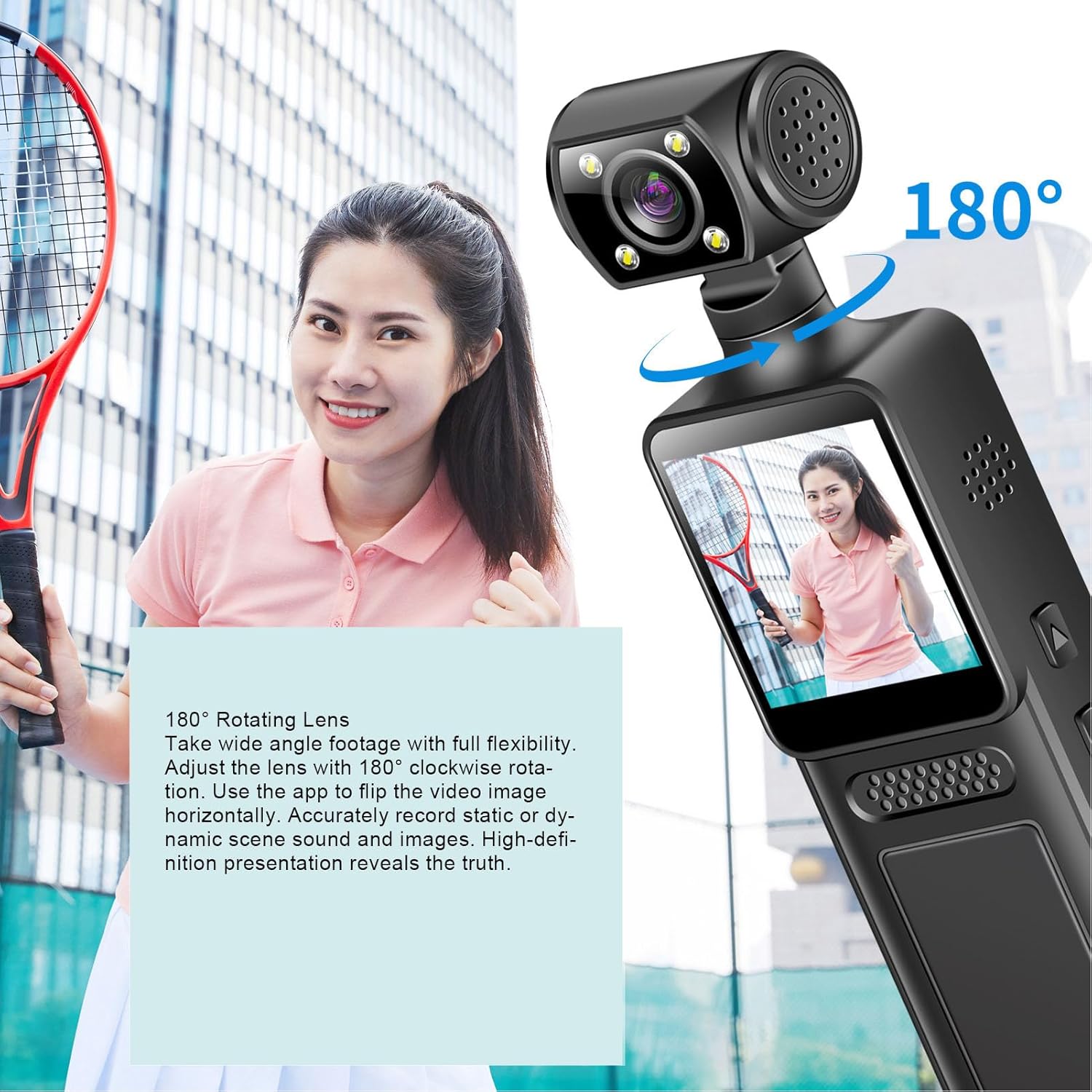
Image: The PUSOKEI Action Camera demonstrating its 180° rotating lens, allowing for wide-angle footage with full flexibility and the ability to flip video images horizontally via the app.
3.4 WiFi Connectivity and App Usage
The camera features built-in WiFi for wireless connection to your smartphone or tablet. This allows for real-time viewing, downloading, and sharing of your footage.
- Download the official PUSOKEI camera app from your device's app store (iOS/Android).
- Turn on WiFi on your camera via the settings menu.
- On your smartphone, connect to the camera's WiFi network (SSID and password usually displayed on the camera screen).
- Open the app to automatically connect and view foo u stvarnom vremenutage, or download recordings to your phone.

Image: The PUSOKEI Action Camera demonstrating mobile wireless connectivity, showing how to connect to a smartphone app to view foo u stvarnom vremenutage or download recordings.
3.5 Snimanje u petlji
The loop recording feature allows the camera to continuously record. When the memory card is full, the oldest files will be automatically overwritten by new recordings.
- Access the camera's settings menu.
- Locate the "Loop Recording" option and enable or disable it as desired.
- Set the desired loop recording duration (e.g., 1, 3, 5 minutes) if available.
3.6 Using the LED Fill Light
The integrated LED fill light provides additional illumination for recording in low-light conditions, ensuring clear image quality.
- Locate the button or menu option to activate the LED fill light.
- Toggle the light on or off as needed for your recording environment.

Image: The PUSOKEI Action Camera demonstrating its LED fill light, suitable for both day and night use, ensuring clear video in dark environments and vivid color during daylight.
3.7 Body-Worn Camera Usage
The compact design and included back clamp allow the camera to be worn on clothing, making it suitable for sports, travel, or security applications.
- Attach the camera securely to your clothing using the integrated back clamp.
- Ensure the lens is oriented correctly for the desired recording angle.
- Verify the camera is recording before engaging in activities.
4. Održavanje
Proper maintenance ensures the longevity and optimal performance of your PUSOKEI Action Camera.
4.1 Čišćenje fotoaparata
- Objektiv: Koristite meku krpu bez dlačica, posebno namijenjenu za objektive fotoaparata. Izbjegavajte jake kemikalije.
- Zaslon: Wipe gently with a microfiber cloth. Do not press hard.
- Tijelo: Use a soft, dry cloth to wipe the camera body. If necessary, slightly dampkrpu navlažite vodom, a zatim odmah obrišite suhom krpom.
- Provjerite jesu li svi priključci bez prašine i ostataka.
4.2 Njega baterija
- Izbjegavajte često potpuno pražnjenje baterije.
- Store the camera with a partially charged battery (around 50%) if not used for extended periods.
- Ne izlažite kameru ekstremnim temperaturama.
4.3 Skladištenje
- Kameru čuvajte na hladnom i suhom mjestu, dalje od izravne sunčeve svjetlosti i vlage.
- Koristite zaštitnu futrolu kako biste spriječili ogrebotine i udarce.
5. Rješavanje problema
If you encounter issues with your camera, refer to the following common troubleshooting steps.
| Problem | Mogući uzrok | Otopina |
|---|---|---|
| Kamera se ne uključuje. | Slaba baterija; neispravna baterija; problem s gumbom za uključivanje/isključivanje. | Charge the battery fully. Try a different charging cable/adapter. If problem persists, contact support. |
| Nije moguće snimati videozapis. | No memory card; memory card full; memory card error; incorrect settings. | Insert a memory card. Format the memory card (this will erase all data). Check available storage. Verify recording settings. |
| Loša kvaliteta videa. | Prljav objektiv; uvjeti slabog osvjetljenja; neispravne postavke rezolucije. | Clean the lens. Activate the LED fill light in low light. Ensure 4K resolution is selected in settings. |
| Problemi s WiFi vezom. | WiFi not enabled; incorrect password; app issues; interference. | Ensure camera WiFi is on. Re-enter WiFi password. Restart camera and phone. Try connecting in a different location. |
| Kamera se zamrzava ili prestaje reagirati. | Softverski problem; problem s memorijskom karticom. | Perform a soft reset by holding the power button until it turns off. If unresponsive, use a pin to press the reset button (if available). Remove and reinsert the memory card. |
6. Specifikacije
| Značajka | Detalj |
|---|---|
| Broj modela | PUSOKEIpqi950c8n7 |
| Video rezolucija | 4K HD |
| Veličina zaslona | 1.31 inča |
| Rotacija leće | 180 stupnjeva |
| Povezivost | WiFi, USB Type-C |
| Vrsta baterije | Ugrađena Li baterija |
| Kapacitet baterije | 1000 mAh |
| Podrška za memorijsku karticu | Up to 256GB (MicroSD, not included) |
| Težina artikla | 6.1 unci |
| Dimenzije paketa | 6.3 x 3.15 x 1.97 inča |
| Proizvođač | PUSOKEI |
7. Jamstvo i podrška
Za informacije o jamstvu i korisničkoj podršci, molimo pogledajte dokumentaciju koju ste dobili uz kupnju ili se izravno obratite prodavaču/proizvođaču.
- Proizvođač: PUSOKEI
- Kontakt: Please refer to the official PUSOKEI website or your purchase platform for specific support contact details.