
Uvod
This manual provides detailed instructions for the operation and maintenance of your LAUNCH X431 PROS Elite diagnostic scanner and LAUNCH CR319 OBD2 check engine code reader. These devices are designed to assist in vehicle diagnostics, maintenance, and repair tasks, offering comprehensive system analysis and code reading capabilities.
Proizvod gotovview
The LAUNCH X431 PROS Elite is an advanced diagnostic tablet offering extensive vehicle coverage and functions, while the LAUNCH CR319 is a compact, user-friendly OBD2 code reader for basic engine diagnostics.
LAUNCH X431 PROS Elite Diagnostic Scanner

Slika: The LAUNCH X431 PROS Elite main interface, displaying options such as Intelligent Diagnose, Local Diagnose, Service Function, Remote Diagnose, Software Update, and Diagnostic History.
The X431 PROS Elite features a robust tablet design with a user-friendly interface. It provides access to advanced diagnostic functions including online coding, personalization, V.A.G guided functions, and comprehensive all-system diagnosis. It supports modern vehicle protocols like CANFD and DoIP.
LAUNCH CR319 Check Engine Code Reader
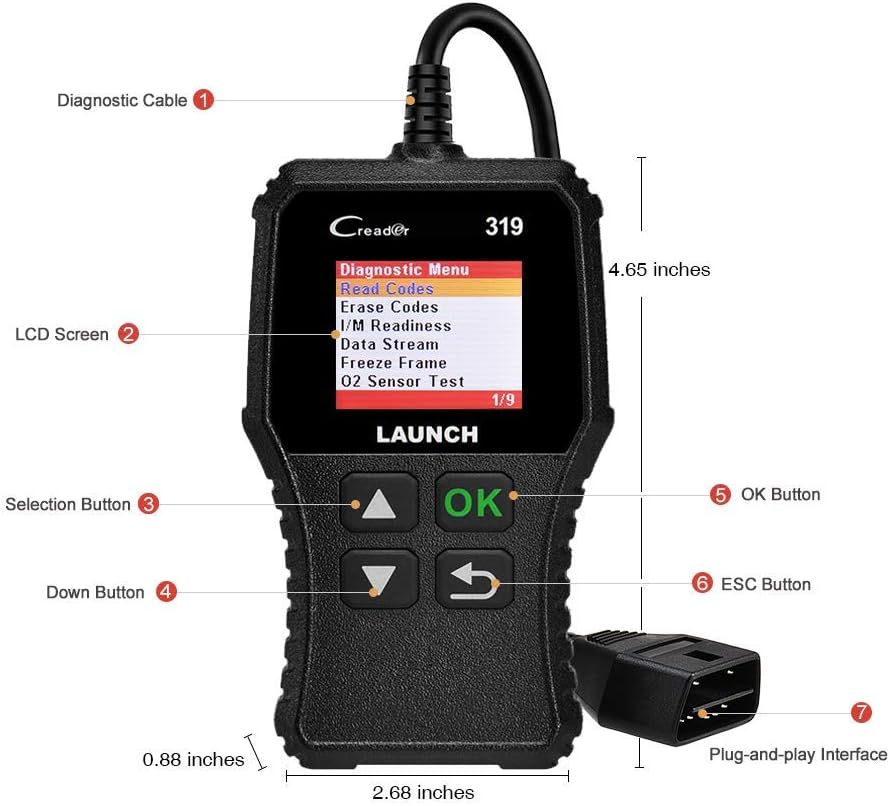
Slika: The LAUNCH CR319 device, highlighting its diagnostic cable, LCD screen, selection buttons (Up, Down, OK, ESC), and plug-and-play interface. Dimensions are also indicated.
The CR319 is a compact, handheld device designed for quick and easy reading and clearing of OBD2 trouble codes. It features a clear LCD screen and intuitive buttons for navigation, making it suitable for basic engine diagnostics and checking emission readiness.
Postavljanje
LAUNCH X431 PROS Elite
- Napunite uređaj: Before first use, ensure the X431 PROS Elite tablet is fully charged using the provided power adapter.
- Uključivanje: Pritisnite i držite tipku za uključivanje kako biste uključili uređaj.
- Početno postavljanje: Follow the on-screen prompts to select language, connect to Wi-Fi, and register your device. This is crucial for software updates and online functions.
- Povežite se s vozilom: Locate the vehicle's OBD2 port (usually under the dashboard). Connect the diagnostic cable from the X431 PROS Elite to the vehicle's OBD2 port. Turn the vehicle's ignition to the ON position (engine off).
LAUNCH CR319
- Pronađite OBD2 priključak: Find the vehicle's 16-pin OBD2 Data Link Connector (DLC), typically located under the dashboard on the driver's side.
- Povežite uređaj: Plug the CR319's diagnostic cable directly into the vehicle's OBD2 port. The device will power on automatically.
- Paljenje uključeno: Uključite paljenje vozila (motor je isključen).
Operating the LAUNCH X431 PROS Elite
The X431 PROS Elite offers a wide range of diagnostic and service functions. Ensure the device is properly connected to the vehicle and powered on before proceeding.
Dijagnostika cijelog sustava

Slika: The X431 PROS Elite displaying various service functions like Brake Reset, Oil Reset, SAS Reset, and ABS Bleeding, alongside indicators for Auto VIN, Read ECU Information, Read/Clear DTCs, and View Live Data across systems like ABS, TPMS, Engine, AT, and SRS.
This function allows you to scan all available electronic control units (ECUs) in the vehicle, including Engine, Transmission, ABS, SRS, TPMS, and more. It can read and clear Diagnostic Trouble Codes (DTCs), view live data streams, and retrieve ECU information. Select "Intelligent Diagnose" or "Local Diagnose" from the main menu to begin.
Napredno ECU kodiranje

Slika: An illustration of the X431 PROS Elite performing ECU coding, with text indicating functions such as ECU Replacement, Component Matching, Personalization, Modification & Retrofit, and Programmable Module Installation. It also lists compatible brands for ECU Online Coding.
The X431 PROS Elite supports online and offline ECU coding. This allows for replacing or recoding new modules, performing component matching, personalization (e.g., flashing auto start-stop, folding mirrors), modifications, retrofits, and programmable module installations. This function is typically found under specific vehicle brand menus or advanced functions.
38+ servisnih funkcija
Access common maintenance and reset functions directly from the "Service Functions" menu. These include, but are not limited to:
- Resetiranje ulja
- Brake Reset (EPB)
- Resetiranje senzora kuta upravljanja (SAS)
- TPMS Reset
- Usklađivanje baterije
- Resetiranje gume
- ABS krvarenje
- Resetiranje NOX senzora
- Resetiranje krovnog otvora
- Promjena jezika
- And many more, accessible through specific vehicle brands and systems.
Bi-directional Control (Active Tests)

Slika: An illustration showing the X431 PROS Elite sending commands to a vehicle and receiving feedback, with examples of controlled components like doors, windows, lights, and wipers. The image also highlights Diagnostic Feedback, Repair Information, 2-Year Free Updates, and 25+ Languages.
This function allows the diagnostic tool to send commands to vehicle systems and components to test their functionality. Examples include activating solenoids, relays, lights, wipers, or performing injector tests. This helps in pinpointing faulty components quickly.
Vehicle Coverage and Protocols

Slika: A graphic detailing the wide vehicle coverage of the X431 PROS Elite, including 150+ main brands and 100,000+ models. It also specifies compatibility with CAN FD (GM models), DOIP (BMW E/F/G Chassis, Jaguar, Land Rover), FCA SGW Vehicle Access (Fiat, Chrysler, Dodge, Alfa Romeo), and VAG Guided Functions (VW, Audi, Skoda, Seat).
The X431 PROS Elite supports over 150 vehicle brands and 100,000 models from 1996 to 2026. It includes support for advanced protocols such as CANFD (compatible with GM models) and DoIP (compatible with BMW E/F/G Chassis, Jaguar, Land Rover). It also offers FCA SGW access for Fiat, Chrysler, Dodge, and Alfa Romeo vehicles, and V.A.G guided functions for VW, Audi, Skoda, and Seat.
Operating the LAUNCH CR319 Check Engine Code Reader
The CR319 is designed for quick and efficient OBD2 diagnostics. Once connected to the vehicle's OBD2 port and the ignition is on, the device will power up and display the main menu.
Potpune OBD2 funkcije

Slika: A grid of nine images illustrating the CR319's full OBD2 functions: Read Codes, Erase Codes, Live Data, I/M Readiness, Freeze Frame, O2 Sensor Test, On-board Monitor Test, Vehicle Information, and EVAP System (Mode 8).
Navigate through the menu using the UP/DOWN buttons and confirm selections with the OK button. The CR319 supports all 10 OBD2 test modes:
- Pročitajte kodove: Prikazuje trenutne, neriješene i trajne dijagnostičke kodove grešaka (DTC).
- Brisanje kodova: Briše DTC-ove iz računala vozila i gasi lampicu za provjeru motora (MIL).
- I/M spremnost: Provjerava spremnost sustava za praćenje emisija.
- Podaci uživo: Prikazuje podatke u stvarnom vremenu sa senzora vozila.
- Zamrzni sliku: Shows a snapshot of vehicle operating conditions at the time a DTC was set.
- Test O2 senzora: Dohvaća rezultate ispitivanja nadzora O2 senzora.
- Ispitivanje ugrađenog monitora (način rada 6): Dohvaća rezultate za komponente i sustave pogonskog sklopa povezane s emisijama koji se ne prate kontinuirano.
- Ispitivanje EVAP sustava (način rada 8): Pokreće ispitivanje sustava za kontrolu emisija isparavanjem.
- Vehicle Information (Mode 9): Dohvaća informacije o vozilu kao što su VIN, Cal ID i CVN.
Turning Off the Check Engine Light
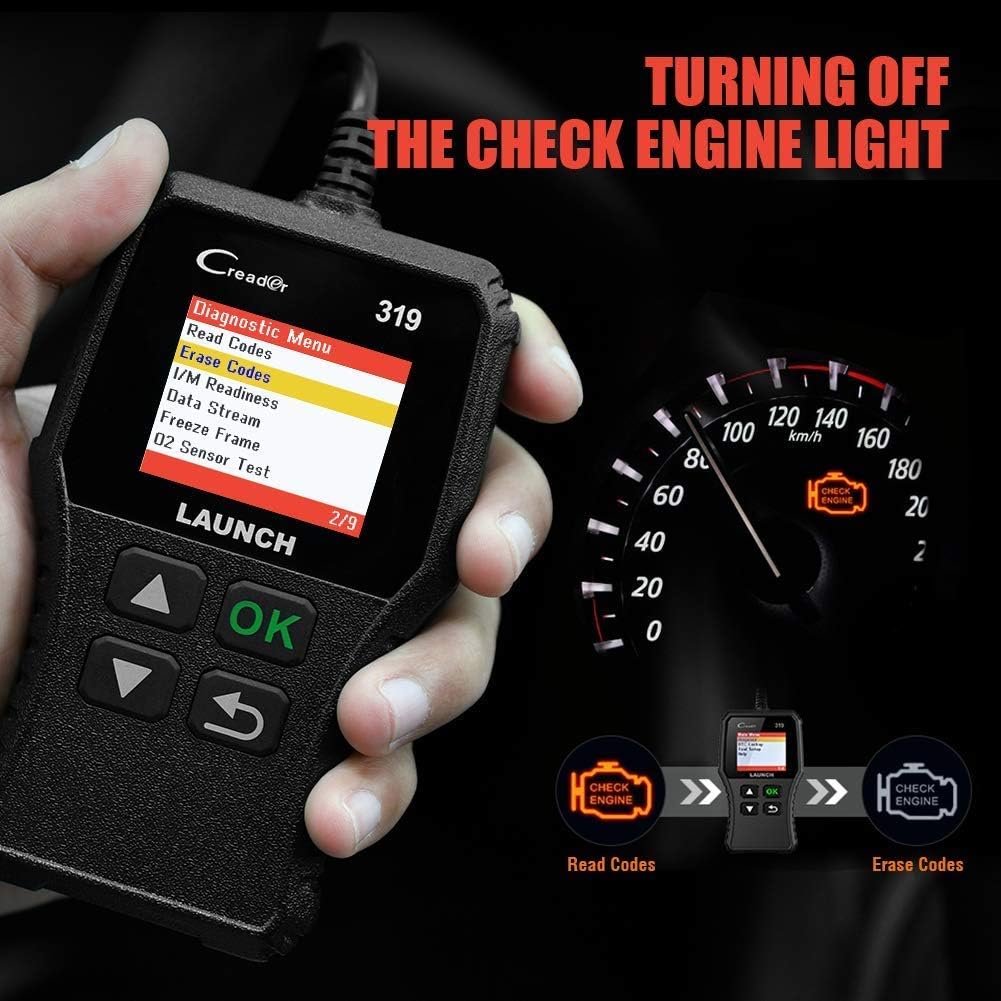
Slika: The CR319 displaying "Erase Codes" on its screen, with an illustration showing the process of reading codes, then erasing them to turn off the Check Engine Light on the vehicle's dashboard.
After reading and understanding the trouble codes, you can use the "Erase Codes" function to clear the DTCs and turn off the Malfunction Indicator Lamp (MIL). Ensure the underlying issue has been resolved before clearing codes, as they may reappear if the problem persists.
Održavanje
- Čišćenje: Use a soft, dry cloth to clean the device screens and bodies. Avoid abrasive cleaners or solvents.
- Skladištenje: Store the devices in a cool, dry place, away from direct sunlight and extreme temperatures. Keep them in their protective cases when not in use.
- Software Updates (X431 PROS Elite): Regularly check for and install software updates to ensure optimal performance, expanded vehicle coverage, and new features. Connect the device to Wi-Fi and use the "Software Update" function.
- Održavanje kabela: Inspect diagnostic cables regularly for any signs of damage. Do not bend or crimp cables excessively.
Rješavanje problema
- Uređaj se ne uključuje:
- For X431 PROS Elite, ensure the battery is charged.
- For CR319, ensure it is securely plugged into the vehicle's OBD2 port and the vehicle ignition is ON.
- Check the vehicle's fuse for the OBD2 port.
- Komunikacijska pogreška:
- Verify the diagnostic cable is securely connected to both the device and the vehicle.
- Provjerite je li paljenje vozila UKLJUČENO.
- Confirm the vehicle is OBD2 compliant (most vehicles 1996 and newer).
- Isprobajte drugo vozilo kako biste isključili problem specifičan za vozilo.
- Software Freezes/Slow Performance (X431 PROS Elite):
- Ponovno pokrenite uređaj.
- Ensure sufficient storage space.
- Izvršite ažuriranje softvera.
- Kodovi se ne brišu:
- Ensure the underlying fault has been repaired. Some codes cannot be cleared if the fault is still present.
- Follow the specific clearing procedure for your vehicle model if applicable.
Tehnički podaci
LAUNCH X431 PROS Elite
- Pokrivanje vozila: 1996-2026 models, 150+ brands
- Podržani protokoli: OBD2, CANFD, DoIP, and more
- Funkcije: All-System Diagnostics, ECU Coding (Online/Offline), 38+ Service Functions, Bi-directional Control, V.A.G Guided Functions, FCA SGW Access
- Ažuriranja: 2-Year NO-fee software updates
- Jamstvo: 5-godišnje jamstvo
LAUNCH CR319
- Kompatibilnost: OBD2 compliant vehicles (1996 and newer)
- Funkcije: Čitanje/brisanje DTC-ova, spremnost I/M-a, podaci uživo, zamrznuti okvir, test O2 senzora, test ugrađenog monitora, test EVAP sustava, informacije o vozilu
- sučelje: 16-pin OBD2 connector
- Vlast: Vehicle battery via OBD2 port
Jamstvo i podrška
Your LAUNCH X431 PROS Elite comes with a 5-godišnje jamstvo a uključuje 2-Year NO-fee software updates. For the LAUNCH CR319, standard manufacturer warranty applies.
Za tehničku podršku, reklamacije ili dodatnu pomoć, obratite se korisničkoj službi LAUNCH putem njihove službene website or the contact information provided with your product packaging. Ensure you have your product model and serial number ready when contacting support.
Mrežni resursi: Posjetite službeno PREDSTAVLJANJE website for FAQs, software downloads, and additional product information. LAUNCH Store on Amazon


