
1. Uvod
The Valeton GP-180 is a versatile digital multi-effects processor designed for guitarists. It offers advanced modeling capabilities and flexible software, making it suitable for various musical applications, whether as a standalone unit or integrated into an existing pedalboard. This manual provides essential information for setting up, operating, and maintaining your GP-180, ensuring you can fully utilize its potential as a reliable core for your signal chain.
2. Proizvod je gotovview
The Valeton GP-180 features a robust design with intuitive controls, including footswitches, rotary knobs, and a clear display for easy navigation and parameter adjustment. The rear panel provides comprehensive connectivity options for various setups.
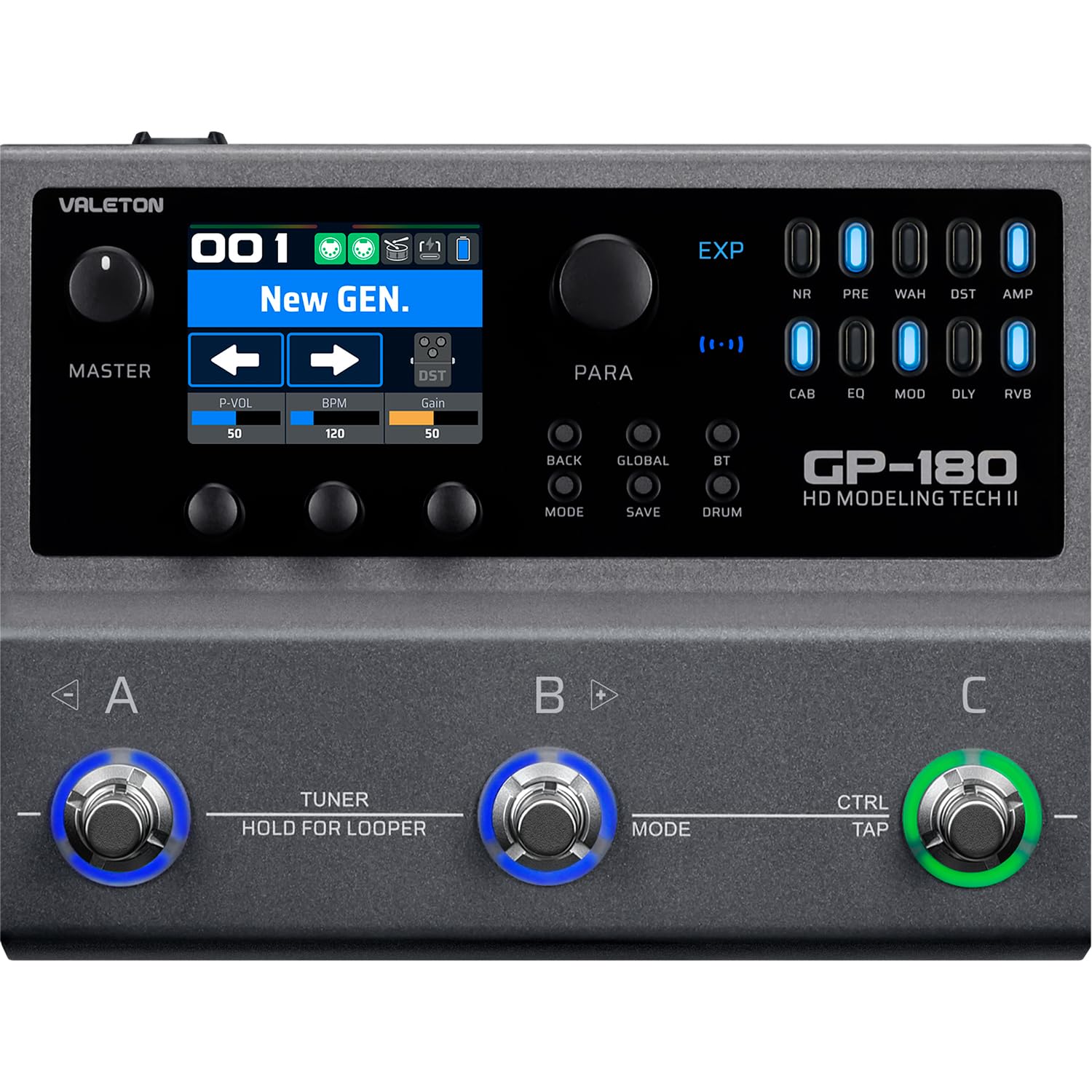
Slika 2.1: Vrh view of the Valeton GP-180, highlighting the main interface with its display, rotary knobs, and three footswitches for control.

Figure 2.2: Rear panel connectivity of the GP-180, detailing the various input, output, and control ports.

Figure 2.3: The GP-180 integrated into a home studio environment, connected to headphones and a guitar.

Figure 2.4: Close-up of a user interacting with the GP-180's control knobs.

Figure 2.5: A user operating the footswitches of the GP-180 during performance.
3. Postavljanje
3.1 Priključak za napajanje
Connect the included 9V DC power adapter to the POWER input on the rear panel. Ensure the adapter provides at least 1500mA of current. Use only the specified power supply to prevent damage.
3.2 Instrument and Audio Connections
- Ulaz za gitaru: Connect your guitar to the 'IN' jack on the rear panel.
- Audio izlaz: Connect the 'OUT' jacks (L/R Balanced) to your ampuređaj za reprodukciju zvuka, audio sučelje ili mikser.
- Slušalice: Za tihu vježbu, spojite slušalice na priključak 'PHONES'.
- Mikrofon: Connect a microphone to the 'MIC' input for vocal processing or recording.
- Vanjska ekspresivna pedala/nožni prekidač: Use the 'EXP/FS' jacks to connect an external expression pedal or footswitch for additional control.
3.3 USB veza
Connect the GP-180 to your computer using a USB cable via the 'PD USB' port. This allows for firmware updates, software editing, and direct audio recording.
4. Upute za rad
4.1 Osnovna navigacija
The GP-180 features a central display and several rotary knobs for navigating menus and adjusting parameters. The three footswitches (A, B, C) allow for preset changes, effect toggling, and other performance-oriented functions.
4.2 Footswitch Functions
- Nožni prekidači A, B, C: These can be assigned to switch presets, toggle individual effects, or control other parameters depending on the selected mode.
- HOLD FOR LOOPER (Footswitch B): Press and hold footswitch B to activate the looper function. A short press typically engages the tuner.
- CTRL/TAP (Footswitch C): This footswitch can be used for tap tempo or as an assignable control switch.
4.3 gumba za upravljanje
- NAČIN: Switches between different operational modes (e.g., Patch Mode, Stompbox Mode).
- UŠTEDJETI: Saves your current settings as a preset.
- GLOBALNO: Accesses global settings for the unit.
- BT (Bluetooth): Activates Bluetooth for audio streaming or app control.
- BUBANJ: Engages the built-in drum machine for practice.
4.4 Effect Modules
The GP-180 includes a wide array of effect modules, indicated by LEDs on the right side of the display. These include:
- NR: Smanjenje buke
- PRIJE: prijeamp
- WAH: Wah pedala
- DST: Izobličenje
- AMP: AmpModeliranje života
- TAKSI: Cabinet Simulation
- EQ: Ekvilajzer
- MOD: Učinci modulacije
- DLY: Efekti odgode
- RVB: Reverb efekti
Use the corresponding buttons and rotary knobs to activate and adjust these effects within your signal chain.
5. Održavanje
5.1 Čišćenje
To clean the unit, use a soft, dry cloth. Do not use abrasive cleaners, waxes, or solvents. Avoid spraying liquid directly onto the unit.
5.2 Skladištenje
When not in use for extended periods, store the GP-180 in a dry, cool place away from direct sunlight and extreme temperatures. Disconnect the power adapter.
5.3 Ažuriranja softvera
Povremeno provjeravajte službeni Valeton website for firmware updates. Keeping your GP-180's software up-to-date ensures optimal performance and access to new features.
6. Rješavanje problema
- Bez napajanja: Ensure the power adapter is correctly connected and provides the specified 9V DC, 1500mA. Check the power outlet.
- Nema zvuka: Verify all audio cables are securely connected. Check the volume levels on the GP-180, your instrument, and your amplifier/mixer. Ensure the correct input/output settings are selected on the unit.
- Izobličen zvuk: Check input gain levels to avoid clipping. Ensure all cables are in good condition.
- Problemi s USB vezom: Try a different USB port or cable. Ensure the necessary drivers (if any) are installed on your computer. Restart both the GP-180 and your computer.
- Neočekivano ponašanje: Perform a factory reset (refer to the full manual for instructions on how to do this, as it may vary). If issues persist, contact Valeton support.
7. Specifikacije
| Značajka | Specifikacija |
|---|---|
| Marka | VALETON |
| Broj modela | GP180 |
| Težina proizvoda | 843 grama |
| Voltage | 9 volti |
| Trenutni | 1500 mA |
| Hardversko sučelje | USB, Bluetooth |
| Dimenzije proizvoda | 18.1 x 13.9 x 5.2 cm |
| Zemlja podrijetla | Kina |
| UPC | 888506830174 |
| ASIN | B0GV23QTY7 |
8. Jamstvo i podrška
8.1 Informacije o jamstvu
The Valeton GP-180 comes with a 1-year manufacturer's warranty. Please retain your proof of purchase for warranty claims. The warranty covers defects in materials and workmanship under normal use.
8.2 Korisnička podrška
For technical assistance, troubleshooting beyond this manual, or warranty inquiries, please contact Valeton customer support through their official website or your local distributor. Provide your product model and serial number when contacting support.