
1. Gotovoview
The Philips TAZ2200 is a versatile portable sound machine designed for enjoying various audio formats. It features a top-loading CD player, a front-loading cassette player, FM radio, Bluetooth 6.0 connectivity, USB playback, and a 3.5mm audio input. Equipped with dynamic bass boost and 6W stereo speakers, it delivers rich sound. The unit can be powered by AC mains or batteries and includes a carrying handle for portability.
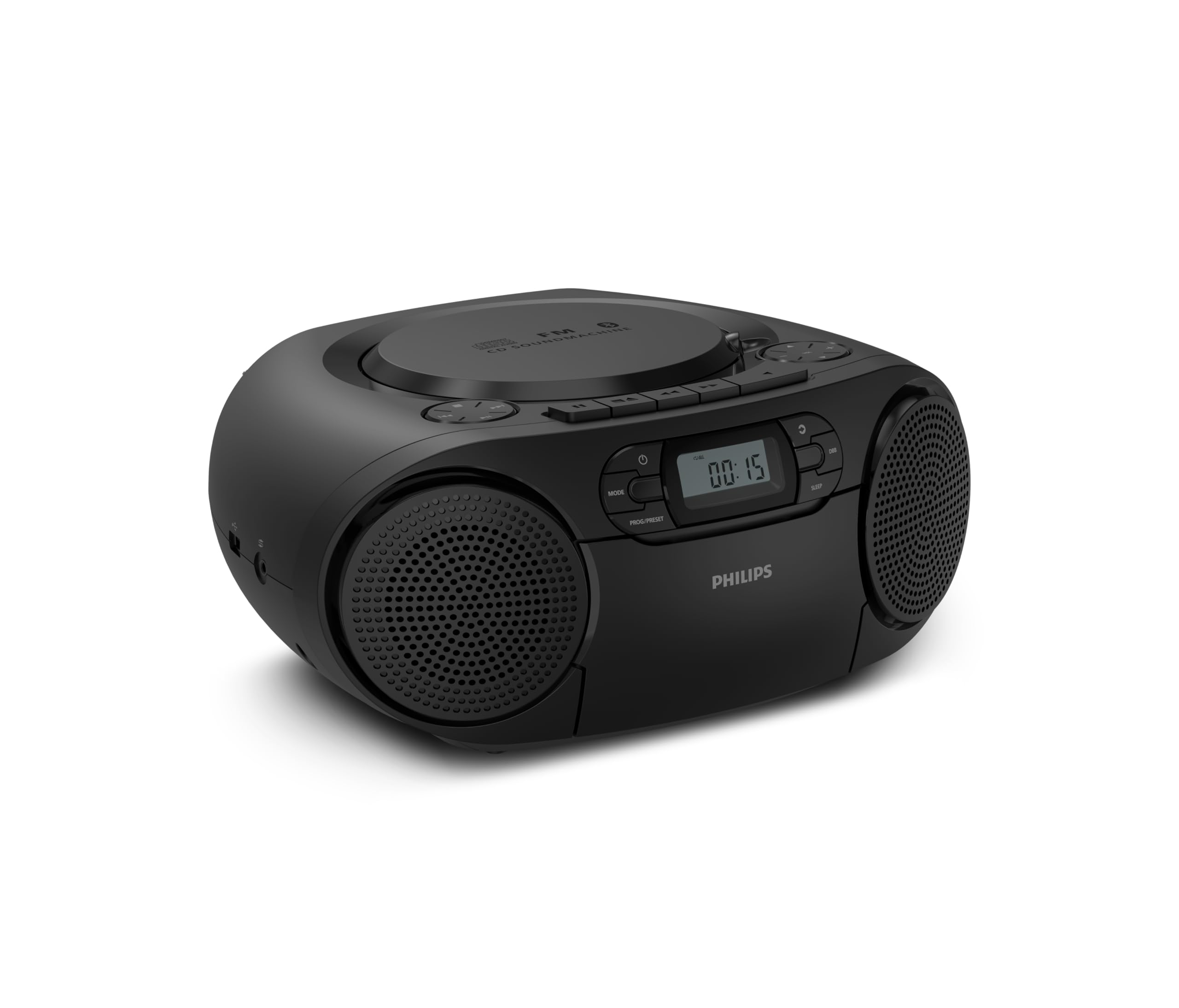
Ispred view of the Philips TAZ2200 CD Soundmachine, showing the main display and control buttons.
2. Sigurnosne informacije
Please read these safety instructions carefully before using your device and keep them for future reference. Incorrect use may result in hazards.
- Izvor napajanja: Use only the specified power adapter or batteries. Ensure the voltage odgovara zahtjevima jedinice.
- Voda i vlaga: Ne izlažite uređaj kiši, vlazi, kapanju ili prskanju. Ne stavljajte na uređaj predmete napunjene tekućinom, poput vaza.
- Ventilacija: Ensure adequate ventilation. Do not block any ventilation openings. Maintain a minimum distance around the unit for sufficient ventilation.
- toplina: Ne postavljajte uređaj u blizinu izvora topline kao što su radijatori, grijalice, peći ili drugi uređaji (uključujući amplifiers) koji proizvode toplinu.
- baterije: Follow correct polarity when inserting batteries. Do not mix old and new batteries, or different types of batteries. Remove batteries if the unit is not used for a long period.
- Čišćenje: Prije čišćenja isključite uređaj iz električne utičnice. Koristite meku, suhu krpu. Nemojte koristiti tekuća sredstva za čišćenje ili aerosolna sredstva za čišćenje.
- Servisiranje: Ne pokušavajte sami servisirati ovaj proizvod. Sve servise prepustite kvalificiranom servisnom osoblju.
3. Što je u kutiji
Prilikom raspakiranja, molimo provjerite jesu li prisutni svi dolje navedeni predmeti:
- Philips TAZ2200 CD Soundmachine
- Kabel za napajanje
- Vodič za brzi početak
- Jamstvena knjižica
- Sigurnosni list
4. Kontrole i veze
Kontrole na prednjoj ploči
The front panel features the main display, power button, mode selection, program/preset buttons, and dynamic bass boost (DBB) control. Playback controls for CD and USB are also located here.

Detaljan prednji dio view showing the display, power, mode, program/preset, and DBB buttons.
Side and Rear Connections
The side of the unit provides a USB port for digital audio playback and a 3.5mm audio input jack for connecting external devices.

Strana view illustrating the USB port and Audio Input jack.
The top of the unit houses the CD compartment and additional playback controls, while the rear features the AC power input and the FM antenna.

Vrh view showing the CD compartment and associated controls.

Stražnji view displaying the AC power input and the telescopic FM antenna.
5. Postavljanje
5.1 Napajanje
AC napajanje
- Provjerite je li jedinica isključena.
- Connect the supplied power cable to the AC IN socket on the rear of the sound machine.
- Plug the other end of the power cable into a wall power outlet.
Napajanje baterije
For portable use, the unit can operate on 6 x C-type batteries (not included).
- Otvorite poklopac odjeljka za baterije koji se nalazi na dnu jedinice.
- Insert 6 C-type batteries, ensuring correct polarity (+/-) as indicated inside the compartment.
- Čvrsto zatvorite poklopac odjeljka za baterije.
5.2 Podešavanje antene
For optimal FM radio reception, fully extend the telescopic antenna located at the rear of the unit. Adjust its position and angle to achieve the clearest signal.
6. Upute za rad
6.1 Opći rad
- Uključivanje/isključivanje: Pritisnite tipku VLAST gumb za uključivanje ili isključivanje jedinice.
- Kontrola glasnoće: Koristite GLASNOST + or VOL - tipke za podešavanje glasnoće.
- Dinamičko pojačanje basa (DBB): Pritisnite tipku DBB button to activate or deactivate the dynamic bass boost feature for enhanced bass sound.
- Odabir načina rada: Pritisnite tipku NAČIN RADA button repeatedly to switch between CD, Cassette, FM Radio, Bluetooth, USB, and Audio Input modes.
6.2 Reprodukcija CD-a
- Otvorite poklopac pretinca za CD na vrhu uređaja.
- Place a CD (CD, CD-R, or CD-RW) with the label side facing up onto the spindle.
- Zatvorite poklopac pretinca za CD.
- Pritisnite tipku NAČIN RADA gumb za odabir CD načina rada.
- Pritisnite tipku REPRODUCIRAJ/PAUZIRAJ gumb za početak reprodukcije.
- Koristite PRESKOČITI tipke (|< or >> |) za preskakanje pjesama.
- Pritisnite i držite |< or >> | to search within a track.
- Pritisnite tipku STOP tipka za zaustavljanje reprodukcije.
6.3 Reprodukcija kasete
- Open the cassette compartment door on the front of the unit.
- Umetnite kasetu s otvorenim rubom okrenutim prema gore.
- Zatvorite vrata pretinca za kasetu.
- Pritisnite tipku NAČIN RADA gumb za odabir načina rada kasete.
- Pritisnite tipku IGRATI gumb za početak reprodukcije.
- Koristite BRZO PREMOĆI or PREMOTATI tipke za brzo premotavanje vrpce naprijed ili natrag.
- Pritisnite tipku STOP tipka za zaustavljanje reprodukcije.
6.4 FM radio
- Pritisnite tipku NAČIN RADA gumb za odabir načina rada FM radija.
- Automatsko skeniranje: Pritisnite i držite PROG/PRESET gumb za automatsko skeniranje i pohranjivanje dostupnih FM postaja.
- Ručno podešavanje: Pritisnite tipku UGLAŠAVANJE tipke (|< or >> |) to manually tune to a desired frequency.
- Spremanje unaprijed postavljenih postavki: After tuning to a station, press PROG/PRESET once, then use |< or >> | za odabir unaprijed postavljenog broja i pritisnite PROG/PRESET ponovo za potvrdu.
- Prisjećanje na unaprijed zadane postavke: U FM načinu rada pritisnite PROG/PRESET repeatedly to cycle through saved preset stations.
6.5 Reprodukcija putem Bluetootha
- Pritisnite tipku NAČIN RADA button to select Bluetooth mode. The display will show 'BT' and flash, indicating it's in pairing mode.
- Na uređaju s omogućenim Bluetoothom (pametni telefon, tablet) omogućite Bluetooth i potražite dostupne uređaje.
- Select "Philips TAZ2200" from the list of devices.
- Once paired, the unit will emit a confirmation sound, and 'BT' will stop flashing.
- Start playing audio on your connected device. The sound will be streamed to the sound machine.
6.6 Reprodukcija s USB-a
- Insert a USB flash drive into the USB port on the side of the unit.
- Pritisnite tipku NAČIN RADA gumb za odabir USB načina.
- Uređaj će automatski prepoznati i početi reproducirati kompatibilni audio files (MP3, WAV, WMA).
- Koristite kontrole za reprodukciju (REPRODUCIRAJ/PAUZIRAJ, PRESKOČITI, STOP) as you would for CD playback.
6.7 Audio Input (AUX)
- Connect one end of a 3.5mm audio cable (not included) to the AUDIO IN jack on the side of the sound machine.
- Connect the other end of the audio cable to the headphone jack or audio output of your external device (e.g., MP3 player, turntable).
- Pritisnite tipku NAČIN RADA button to select Audio Input mode.
- Start playing audio on your external device. The sound will be played through the sound machine.
7. Održavanje
- Čišćenje jedinice: Obrišite vanjski dio uređaja mekom, laganoamp tkanina. Nemojte koristiti abrazivna sredstva za čišćenje ili otapala.
- Održavanje CD playera: Keep the CD compartment clean. If the lens is dirty, use a specialized CD lens cleaner. Avoid touching the lens.
- Održavanje kasetofona: Povremeno čistite glave trake i valjke lagano obrađenim vatom.amps izopropilnim alkoholom.
- Zamjena baterije: If using batteries, replace all 6 C-type batteries when the unit's performance diminishes or if the unit will not be used for an extended period.
- Skladištenje: Kada se ne koristi, uređaj čuvajte na čistom i suhom mjestu, dalje od izravne sunčeve svjetlosti i ekstremnih temperatura.
8. Rješavanje problema
If you encounter any issues with your Philips TAZ2200, please refer to the table below for common problems and solutions.
| Problem | Mogući uzrok | Otopina |
|---|---|---|
| Nema struje | Power cable not connected; Batteries depleted or incorrectly inserted. | Check AC power connection; Replace batteries or ensure correct polarity. |
| Nema zvuka | Glasnoća je preniska; odabran je pogrešan način rada; priključene su slušalice. | Increase volume; Select the correct source mode (CD, FM, BT, etc.); Disconnect headphones. |
| CD se ne reproducira | CD nije ispravno umetnut; CD je prljav ili ogreban; format CD-a nije podržan. | Insert CD with label side up; Clean or replace CD; Ensure CD is CD-R/RW compatible. |
| Cassette not playing | Cassette inserted incorrectly; Tape is damaged. | Insert cassette correctly; Try a different cassette. |
| Loš FM prijem | Antena nije ispružena ili pravilno postavljena; Slab signal. | Potpuno izvucite i podesite teleskopsku antenu; Pokušajte premjestiti uređaj na drugo mjesto. |
| Bluetooth se ne povezuje | Unit not in pairing mode; Bluetooth device too far; Device already paired with another unit. | Ensure unit is in Bluetooth mode and flashing; Move device closer; Disconnect from other devices. |
| Problemi s reprodukcijom s USB-a | USB pogon nije ispravno umetnut; Nekompatibilan file format; USB pogon oštećen. | Ponovno umetnite USB pogon; provjerite files are MP3, WAV, or WMA; Try a different USB drive. |
9. Specifikacije
| Značajka | Specifikacija |
|---|---|
| Marka | PHILIPS |
| Broj modela | TAZ2200/10 |
| Tehnologija povezivanja | Bluetooth 6.0, USB, Audio Input (3.5mm) |
| Vrsta zvučnika | Stereo (2 speakers) |
| Izlazna snaga | 6 W (max) |
| Podržani mediji | CD, CD-R, CD-RW, Cassette, USB (MP3, WAV, WMA) |
| Radio tuner | Digital FM with 20 presets |
| Izvor napajanja | AC (wired), 6 x C-type batteries (not included) |
| Dimenzije (DxŠxV) | 24.5 x 28.5 x 12.5 cm |
| Težina | 1.35 kilogram |
| Boja | Srebro |
10. Jamstvo i podrška
10.1 Jamstvo za proizvod
This Philips TAZ2200 CD Soundmachine comes with a Jamstvo 2 godine od datuma kupnje. Molimo sačuvajte dokaz o kupnji za reklamacije. Jamstvo pokriva proizvodne nedostatke i kvarove u normalnim uvjetima upotrebe.
10.2 Korisnička podrška
For technical assistance, troubleshooting beyond this manual, or warranty service, please refer to the contact information provided in the warranty booklet included with your product. You can also visit the official Philips support website for your region for further assistance and FAQs.