1. Proizvod je gotovview
The Aluratek AUV200F USB 2.0 to VGA Adapter is designed to extend your desktop by adding an additional display via a USB port. This adapter enables dual monitor support, enhancing multitasking capabilities for various applications.
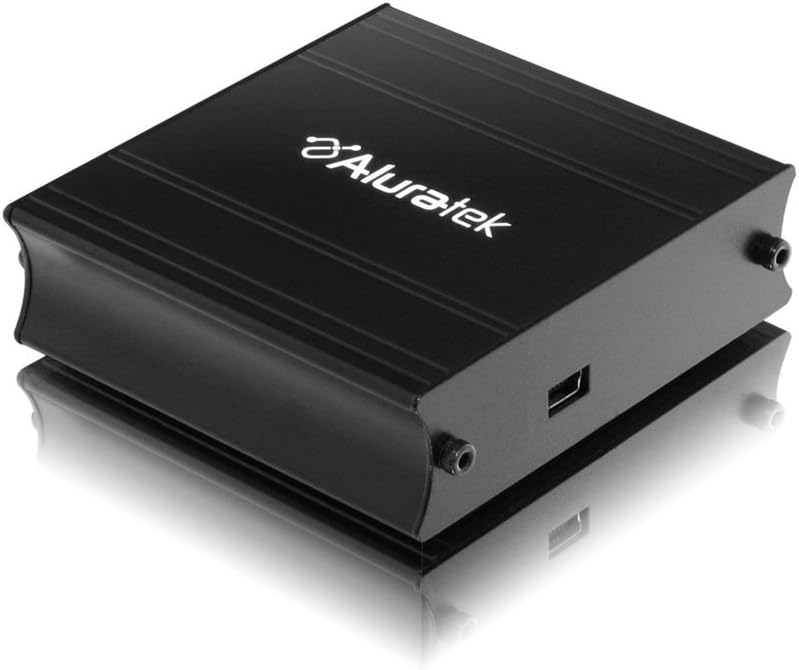
This image shows the Aluratek AUV200F USB to VGA Adapter. It is a compact, black rectangular device designed to connect a computer's USB port to a VGA monitor. The top surface displays the Aluratek logo, and one side features a USB input port, while the opposite side has screw holes for securing a VGA cable.
Ključne karakteristike:
- Supports Primary, Extended, and Mirror display modes.
- Supports widescreen monitor resolutions up to 1680 x 1050.
- Supports standard monitor resolutions up to 1600 x 1200.
- Omogućuje viewing data across multiple screens or with display continuity.
- Facilitates more effective multitasking by reducing overlapping windows.
2. Sadržaj paketa
Before proceeding with the installation, please verify that your package contains the following items:
- Aluratek AUV200F USB to VGA Adapter
- Driver Installation CD (or download instructions)
- Kratki vodič za početak
3. Zahtjevi sustava
To ensure proper functionality, your computer system must meet the following minimum requirements:
- Operativni sustav: Windows XP-SP2/3, Vista, Windows 7, or Mac OS 10.4.11 or later (Intel-based only).
- Dostupni priključci: One available USB port and one available VGA port on the monitor.
- Procesor: Recommended 1.2 GHz or higher.
- OVAN: Recommended 512 MB or higher.
4. Postavljanje i instalacija
4.1 Instalacija upravljačkog programa
- Umetnite CD s upravljačkim programom: Place the provided driver installation CD into your computer's optical drive. If your computer does not have an optical drive, download the latest drivers from the official Aluratek webmjesto.
- Pokreni instalacijski program: Follow the on-screen instructions to install the necessary drivers. It is recommended to restart your computer after the driver installation is complete.
4.2 Hardverska veza
- Connect VGA Cable: Connect one end of a VGA cable (not included) to the VGA port on your external monitor and the other end to the VGA port on the Aluratek AUV200F adapter. Secure the screws on the VGA connector for a stable connection.
- Spojite USB kabel: Plug the USB connector of the Aluratek AUV200F adapter into an available USB 2.0 port on your computer.
- Uključivanje: Ensure your external monitor is powered on.
5. Upute za rad
Once the adapter is connected and drivers are installed, your operating system should detect the new display. You can configure the display settings through your computer's display control panel.
5.1 Configuring Display Modes (Windows)
- Access Display Settings: Right-click on an empty area of your desktop and select "Screen resolution" (Windows 7/Vista) or "Display settings" (Windows 10).
- Identify Displays: Click "Identify" to see which number corresponds to each monitor.
- Choose Display Mode: In the "Multiple displays" dropdown menu, select one of the following options:
- Proširite ove zaslone: This creates an extended desktop, allowing you to drag windows between monitors.
- Duplicirajte ove zaslone: This mirrors your primary display onto the second monitor.
- Show desktop only on 1/2: This disables one of the displays.
- Adjust Resolution: Select the desired resolution for each monitor. The Aluratek AUV200F supports up to 1680x1050 for widescreen and 1600x1200 for standard monitors.
- Primijeni postavke: Click "Apply" and then "OK" to save your changes.
5.2 Configuring Display Modes (Mac OS)
- Access Display Preferences: Go to "System Preferences" > "Displays".
- Arrangement Tab: In the "Arrangement" tab, you can drag the monitor icons to arrange them as desired for an extended desktop. To mirror displays, check the "Mirror Displays" box.
- Resolution Tab: In the "Display" tab for each monitor, select the desired resolution.
6. Rješavanje problema
If you encounter issues with your Aluratek AUV200F adapter, please refer to the following common solutions:
- No Display on Second Monitor:
- Ensure all cables (USB and VGA) are securely connected.
- Verify that the external monitor is powered on and set to the correct input source (VGA).
- Check your computer's display settings to ensure the second monitor is detected and configured for "Extend" or "Duplicate" mode.
- Reinstall the device drivers from the Aluratek webmjesto.
- Poor Display Quality or Lag:
- Provjerite ispunjava li vaše računalo preporučene sistemske zahtjeve.
- Adjust the display resolution to a lower setting to see if performance improves.
- Note that USB-to-VGA adapters are generally not recommended for high-motion video playback or demanding graphic applications like gaming due to potential latency.
- Problemi s instalacijom upravljačkih programa:
- Download the latest drivers directly from the official Aluratek support webmjesto.
- Privremeno onemogućite antivirusni softver tijekom instalacije ako vam smeta.
- Try installing the drivers in Safe Mode if standard installation fails.
- Adapter nije prepoznat:
- Try connecting the adapter to a different USB port on your computer.
- Ensure the USB port is functional by testing it with another USB device.
7. Specifikacije
| Model | AUV200F |
| Marka | Aluratek |
| Vrsta konektora | USB 2.0 na VGA |
| Supported Resolutions (Widescreen) | Do 1680 x 1050 |
| Supported Resolutions (Standard) | Do 1600 x 1200 |
| Kompatibilni operativni sustavi | Windows XP-SP2/3, Vista, Windows 7, Mac OS 10.4.11 or later (Intel-based) |
| Kompatibilni uređaji | Prijenosna računala, stolna računala |
| Dimenzije proizvoda | 23.62 x 14.73 x 6.35 cm |
| Težina artikla | 181.44 g |
8. Održavanje
To ensure the longevity and optimal performance of your Aluratek AUV200F adapter, follow these maintenance guidelines:
- Čišćenje: Use a soft, dry cloth to clean the adapter. Avoid using liquid cleaners or solvents.
- Skladištenje: Adapter čuvajte na hladnom i suhom mjestu, dalje od izravne sunčeve svjetlosti i ekstremnih temperatura.
- Rukovanje: Handle the adapter with care. Avoid dropping it or subjecting it to strong impacts. Do not force connectors.
9. Jamstvo i podrška
The Aluratek AUV200F USB to VGA Adapter comes with a 1-godišnje ograničeno jamstvo od datuma kupnje. Ovo jamstvo pokriva nedostatke u materijalu i izradi pri normalnoj uporabi.
For technical support, warranty claims, or further assistance, please visit the official Aluratek webweb-mjesto ili se obratite njihovoj službi za korisnike. Sačuvajte dokaz o kupnji radi potvrde jamstva.
Službenik Alurateka Webstranica: www.aluratek.com


