1. Uvod
This manual provides essential instructions for the safe and effective operation of your Nikon Coolpix S8100 digital camera. Please read this manual thoroughly before using your camera and keep it in a safe place for future reference.
2. Komponente kamere
Familiarize yourself with the main components of your Nikon Coolpix S8100 camera.
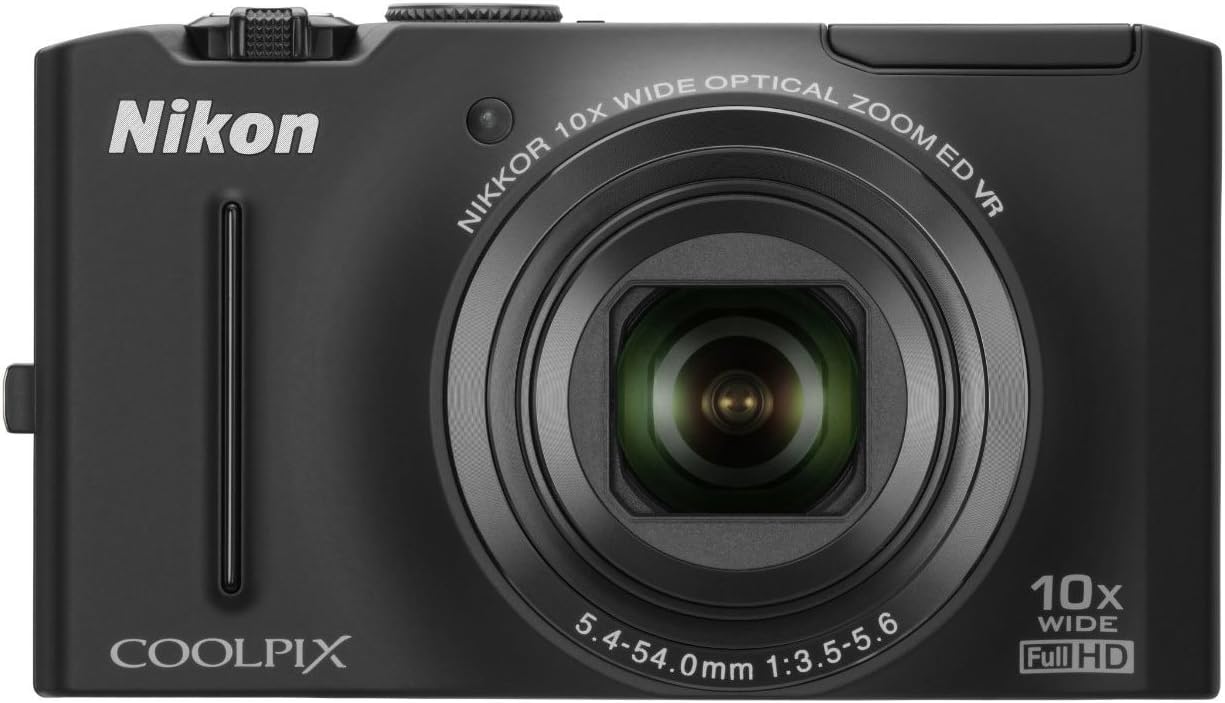
Slika 2.1: Prednja strana view of the Nikon Coolpix S8100 camera, showing the lens, flash, and brand logo.

Slika 2.2: Kutno view of the Nikon Coolpix S8100 camera, highlighting the top controls and LCD screen.
2.1. Prednja ploča
- Objektiv: 10x Optical Zoom-Nikkor ED Glass Lens.
- Bljesak: Ugrađena bljeskalica za uvjete slabog osvjetljenja.
- Self-Timer Lamp: Označava rad samookidača.
2.2. Stražnja ploča
- LCD monitor: 3-inch Ultra-High Resolution (921,000-dot) Clear Color Display.
- Kontrolni gumbi: Navigation, menu, playback, and delete functions.
2.3. Gornja ploča
- Gumb za napajanje: Uključuje/isključuje kameru.
- Gumb okidača: Snima fotografije.
- Kontrola zumiranja: Adjusts optical zoom.
3. Početno postavljanje
3.1. Umetanje baterije
The camera uses an EN-EL12 Li-ion rechargeable battery. Ensure the battery is fully charged before first use.
- Open the battery chamber cover located on the bottom of the camera.
- Insert the EN-EL12 battery with the correct orientation, matching the polarity indicators.
- Close the battery chamber cover securely.
3.2. Umetanje memorijske kartice
The Nikon Coolpix S8100 supports SD/SDHC memory cards (not included).
- Open the memory card slot cover, usually located next to the battery chamber.
- Insert the SD/SDHC card into the slot until it clicks into place. Ensure the card is oriented correctly.
- Zatvorite poklopac utora za memorijsku karticu.
3.3. Punjenje baterije
Use the supplied EH-68P Charging AC Adapter and UC-E6 USB Cable to charge the battery while it is in the camera.
- Connect the UC-E6 USB Cable to the camera's USB port.
- Connect the other end of the USB cable to the EH-68P Charging AC Adapter.
- Plug the AC adapter into a power outlet. The charging indicator will light up.
- Charging is complete when the indicator turns off.
4. Osnovni rad
4.1. Uključivanje/isključivanje kamere
Pritisnite tipku Gumb za napajanje on the top panel to turn the camera on or off.
4.2. Snimanje fotografija
- Uključi kameru.
- Kadrirajte snimku pomoću LCD monitora.
- Pritisnite tipku Okidač halfway down to focus. The focus indicator will light up.
- Pritisnite tipku Okidač all the way down to capture the image.
4.3. Recording Full HD Movies
The Coolpix S8100 supports Full HD (1080p) movie recording with stereo sound.
- Uključi kameru.
- Pritisnite namjenski Movie Record button (usually marked with a red dot) to start recording.
- Pritisnite tipku Movie Record button ponovno za zaustavljanje snimanja.
- During recording, you can use the zoom control to adjust the optical zoom.
Video 4.1: Official product video demonstrating the Nikon Coolpix S8100's features, including its fast operation and Full HD movie recording capabilities.
4.4. Reprodukcija
Do view captured images and videos:
- Pritisnite tipku Gumb za reprodukciju (usually marked with a play icon).
- Pomoću navigacijskih gumba možete se pomicati kroz fotografije i videozapise.
- Pritisnite tipku OK/SET button za reprodukciju videozapisa.
5. Napredne značajke
5.1. Scene Modes
The camera offers 17 scene modes, including Scene Auto Selector, which automatically recognizes the scene and selects the most appropriate mode.
- Access scene modes via the Biranje načina or tipka MODE.
- Select a scene mode that matches your shooting environment for optimized results.
5.2. Image Stabilization (VR)
The 4-way VR Image Stabilization System minimizes camera shake for sharper images and smoother videos.
- Optical VR: Lens shift technology.
- Detekcija pokreta: Adjusts shutter speed and ISO for moving subjects.
5.3. Smart Portrait System
Enhance your portraits with features like:
- Smile Timer: Automatically releases the shutter when a smile is detected.
- In-Camera Red-Eye Fix: Corrects red-eye automatically.
- Face-Priority AF: Detects up to 12 faces for optimal focus.
- Skin Softening: Smoothes skin tones.
- Blink Warning: Alerts if a subject has blinked.
6. Održavanje i njega
6.1. Čišćenje fotoaparata
- Za čišćenje kućišta fotoaparata koristite meku krpu koja ne ostavlja dlačice.
- For the lens and LCD screen, use a specialized lens cleaning cloth and solution.
- Izbjegavajte korištenje jakih kemikalija ili abrazivnih materijala.
6.2. Briga o bateriji
- Čuvajte baterije na hladnom i suhom mjestu kada ih ne koristite.
- Ne izlažite baterije ekstremnim temperaturama.
- Prije duljeg skladištenja potpuno napunite baterije.
7. Rješavanje problema
| Problem | Mogući uzrok | Otopina |
|---|---|---|
| Kamera se ne uključuje. | Baterija je prazna ili nepravilno umetnuta. | Napunite bateriju ili je ponovno ispravno umetnite. |
| Slike su mutne. | Podrhtavanje fotoaparata, kretanje objekta ili nepravilan fokus. | Hold the camera steady, use a faster shutter speed, or ensure proper focus. |
| Nije moguće snimati videozapis. | Memory card is full or too slow. | Izbrišite nepotrebno files or use a faster SDHC card (Class 6 or higher recommended). |
8. Specifikacije
- Senzor slike: CMOS senzor od 12.1 megapiksela
- Objektiv: 10x Optical Zoom-Nikkor ED Glass Lens (30-300mm equivalent)
- Prikaz: 3-inch Ultra-High Resolution (921,000-dot) Clear Color LCD
- Stabilizacija slike: 4-way Optical VR Image Stabilization
- Video snimanje: Full HD (1080p) with Stereo Sound
- ISO osjetljivost: ISO 160 - 3200
- Mediji za pohranu: SD/SDHC memorijske kartice
- Povezivost: HDMI, USB
- Izvor napajanja: EN-EL12 Li-ion rechargeable battery
- Dimenzije: Approximately 103.7 x 59.2 x 27.2 mm (4.1 x 2.3 x 1.1 in.)
- Težina: Approximately 150 g (5.3 oz) including battery and SD memory card
9. Jamstvo i podrška
9.1. Ograničeno jamstvo
This product is covered by a limited warranty. Please refer to the warranty card included in the product packaging for full details regarding coverage, duration, and conditions. The warranty typically covers defects in materials or workmanship under normal use.
Note: Warranty may be voided by misuse, abuse, negligence, sand, liquids, impact, current fluctuations, or failure to follow operating instructions.
9.2. Korisnička podrška
For technical assistance, product inquiries, or service requests, please visit the official Nikon support website or contact their customer service. Contact information can typically be found on the warranty card or the Nikon webmjesto.


