Uvod
This manual provides essential information for the safe and effective use of your Olympus PEN E-PL6 Mirrorless SLR Camera. Please read it thoroughly before operating the camera and keep it for future reference. The Olympus PEN E-PL6 is designed to deliver superior image quality and performance, featuring a 16 MP Live MOS Sensor and TruePic VI image processing engine.
Proizvod gotovview
The Olympus PEN E-PL6 offers advanced photographic capabilities in a compact mirrorless body. Key features include:
- 16 Megapixel Live MOS Sensor: For high-resolution images with rich detail.
- TruePic VI Image Processing Engine: Ensures vibrant colors and fast performance.
- 3-osna stabilizacija slike u tijelu: Reduces blur from camera shake, especially in low light.
- ISO Range from 100 to 25,600: Izvrsne performanse pri slabom osvjetljenju.
- 8 fps Sequential Shooting: Capture fast-moving subjects with ease.
- Full HD Video 1080i: Snimajte videozapise visoke razlučivosti.
- 12 Art Filters and Effects: Enhance creativity directly in-camera.
- Customizable Settings (My Set) and Self-Timer: Personalize your shooting experience.
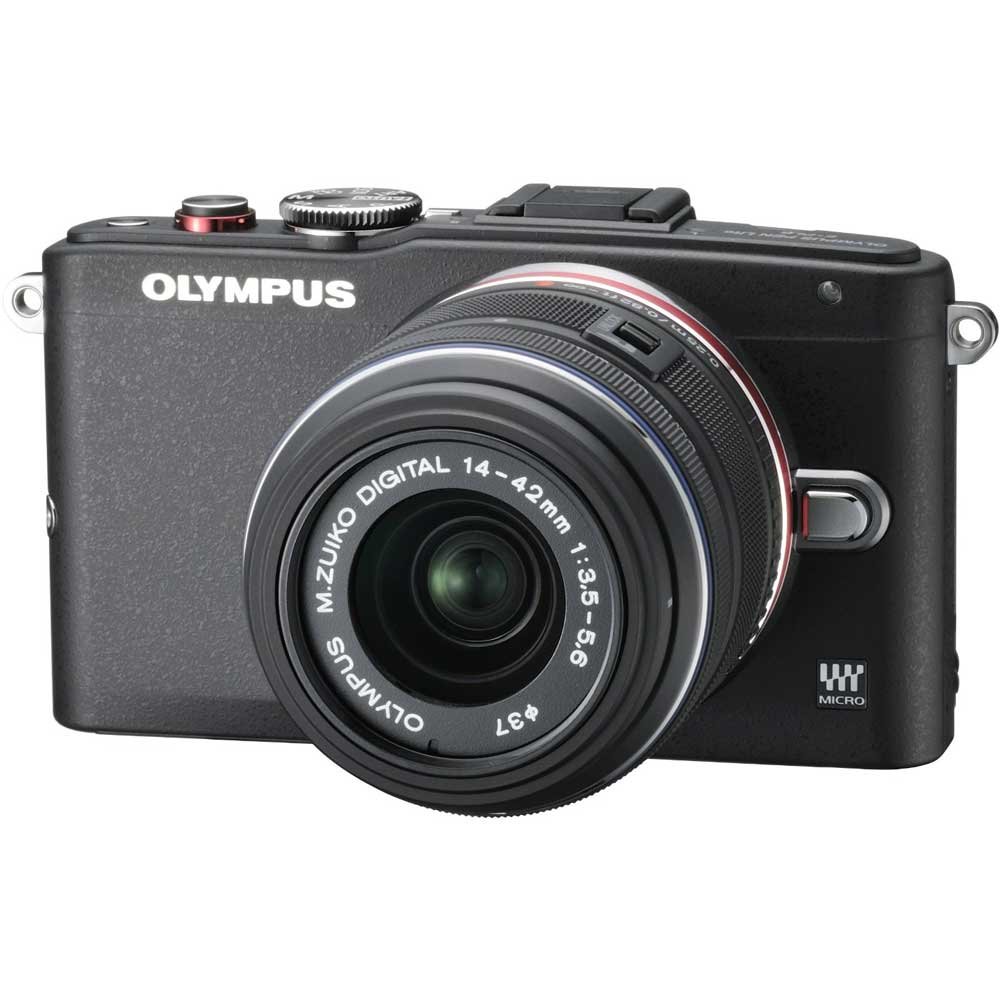
Figure 1: Olympus PEN E-PL6 Mirrorless SLR Camera with M.Zuiko Digital 14-42mm Lens attached.
Postavljanje
1. Ugradnja baterije
- Otvorite poklopac odjeljka za baterije koji se nalazi na dnu fotoaparata.
- Umetnite isporučenu litij-ionsku bateriju, pazeći na ispravnu orijentaciju.
- Čvrsto zatvorite poklopac odjeljka za baterije.
- Prije prve upotrebe napunite bateriju pomoću priloženog punjača.
2. Pričvršćivanje objektiva
- Remove the body cap from the camera and the rear lens cap from the M.Zuiko Digital 14-42mm lens.
- Poravnajte bijelu indeksnu oznaku na objektivu s bijelom indeksnom oznakom na kućištu fotoaparata.
- Montirajte objektiv okretanjem u smjeru kazaljke na satu dok ne klikne na svoje mjesto.
3. Umetanje memorijske kartice
- Otvorite poklopac utora za memorijsku karticu.
- Insert an SD/SDHC/SDXC memory card with the label facing the front of the camera until it clicks.
- Zatvorite poklopac utora za memorijsku karticu.
Rukovanje kamerom
Osnovni načini fotografiranja
Turn the mode dial to select your desired shooting mode (e.g., Program Auto, Aperture Priority, Shutter Priority, Manual, Art Filter, Scene Mode).
Fokusiranje
- Automatsko fokusiranje (AF): Fotoaparat automatski fokusira kada se okidač pritisne do pola.
- Ručno fokusiranje (MF): Rotate the focus ring on the lens to adjust focus manually. Use the magnified view or focus peaking for precision.
Postavke ekspozicije
- ISO: Adjust sensitivity to light (ISO 100-25600). Higher ISO allows shooting in darker conditions but may introduce noise.
- Otvor: Controls the amount of light entering the lens and the depth of field.
- Brzina zatvarača: Controls the duration the sensor is exposed to light. Faster speeds freeze motion, slower speeds allow for motion blur.
Stabilizacija slike
The 3-axis in-body image stabilization system helps reduce blur. Activate or deactivate it via the camera's menu settings.
Art Filters and Effects
Explore the 12 built-in Art Filters to add creative effects to your photos and videos. Select 'ART' on the mode dial to access these options.
Video snimanje
To record Full HD 1080i video, switch the mode dial to the video recording setting and press the dedicated video record button.
Prilagodljive postavke
Utilize the 'My Set' feature to save your preferred camera settings for quick recall. The customizable self-timer allows for delayed shooting.
Održavanje
Čišćenje fotoaparata i objektiva
- Za čišćenje kućišta fotoaparata koristite meku krpu koja ne ostavlja dlačice.
- For the lens and sensor, use a blower brush to remove dust, followed by a lens cleaning solution and cloth if necessary. Avoid touching the lens surface directly.
Briga o bateriji
- Čuvajte baterije na hladnom i suhom mjestu kada ih ne koristite.
- Izbjegavajte redovito potpuno pražnjenje baterija kako biste produžili njihov vijek trajanja.
Skladištenje
When storing the camera for extended periods, remove the battery and memory card. Store the camera in a dry, dust-free environment, preferably with a desiccant to prevent mold.
Rješavanje problema
Kamera se ne uključuje
- Provjerite je li baterija potpuno napunjena i ispravno umetnuta.
- Provjerite jesu li kontakti baterije čisti.
Slike su mutne
- Verify that the lens is properly focused.
- Check shutter speed; use a faster speed or tripod in low light.
- Provjerite je li stabilizacija slike aktivna ako je potrebno.
Greška memorijske kartice
- Ponovno umetnite memorijsku karticu.
- Try a different memory card to rule out card malfunction.
- Formatirajte memorijsku karticu (napomena: time će se izbrisati svi podaci).
Tehnički podaci
| Značajka | Specifikacija |
|---|---|
| Broj modela | PEN E-PL6 |
| Senzor | 16 Megapixel Live MOS |
| Procesor slike | TruePic VI |
| Stabilizacija slike | 3-Axis In-Body, Sensor-shift |
| ISO raspon | 100 to 25,600 (Expanded Minimum 100) |
| Video snimanje | Full HD 1080i |
| Podržano File Formati | RAW (Olympus ARW), JPEG, MPO (3D still) |
| Kompatibilni nosači | Micro Four Thirds |
| Optical Zoom (with 14-42mm lens) | 3x |
| Maximum Focal Length (with 14-42mm lens) | 42 milimetara |
| Opis mjerenja | Višestruko, središnje ponderirano, točkasto |
| Dimenzije proizvoda | 4.37 x 1.5 x 2.52 inča |
| Težina artikla | 9.8 unci |
| Baterije | 1 litij-ionska baterija (uključena) |
| Proizvođač | Olimp |
Jamstvo i podrška
Your Olympus PEN E-PL6 camera is covered by a manufacturer's warranty. For specific details regarding warranty coverage, duration, and terms, please refer to the warranty card included with your product or visit the official Olympus support website. For technical assistance, troubleshooting, or service inquiries, please contact Olympus customer support.