1. Uvod
The Intel NUC DE3815TYKHE is a compact, fanless mini PC designed for various applications, including thin clients, digital signage, and embedded solutions. This kit provides a flexible platform with support for a 2.5-inch storage drive, offering a customizable computing experience in a small form factor.
2. Sadržaj paketa
Provjerite jesu li svi artikli prisutni u vašem paketu:
- Intel NUC DE3815TYKHE Unit
- AC adapter za napajanje
- VESA Mounting Bracket (with screws)
- Kratki vodič (ako je uključen)
3. Fizički overview
3.1 Prednja ploča
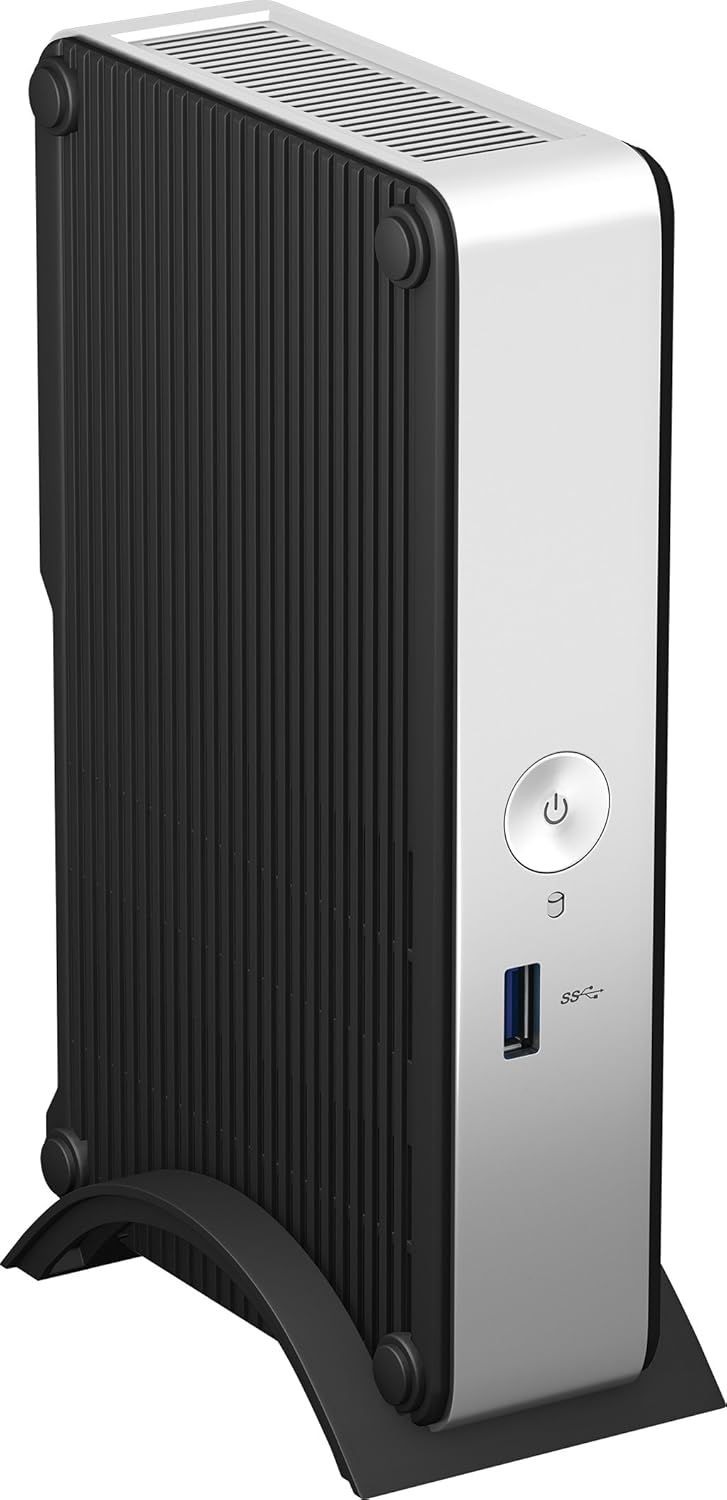
The front panel provides essential connectivity and controls.

Slika 1: Ispred view of the Intel NUC DE3815TYKHE. This image displays the compact, fanless design of the unit, highlighting the power button and a single blue USB 3.0 port on the front for easy access.
- Gumb za napajanje: Koristi se za uključivanje ili isključivanje jedinice.
- USB 3.0 priključak: Za spajanje USB uređaja velike brzine.
3.2 Stražnja ploča
The rear panel houses various ports for display, network, and peripherals.

Slika 2: Stražnji view of the Intel NUC DE3815TYKHE. This image details the available rear ports, including VGA, HDMI, two USB ports, an Ethernet port, and a headphone/microphone jack, along with the power input.
- VGA priključak: Za spajanje na starije monitore ili projektore.
- HDMI priključak: For connecting to modern displays with audio support.
- USB 2.0 priključci (x2): Za spajanje standardnih USB uređaja.
- Ethernet priključak (RJ-45): Za žičanu mrežnu povezivost.
- Priključak za slušalice/mikrofon: Za audio ulaz i izlaz.
- DC ulazna snaga: Za spajanje AC adaptera za napajanje.
3.3 Unutarnje komponente
Accessing the internal components is necessary for memory and storage installation.
Slika 3: Intel NUC DE3815TYKHE unit displayed alongside its internal motherboard. This view illustrates the compact size of the main unit and the layout of the internal components, including the processor, memory slot, and connectors for storage.
- DDR3L SODIMM Slot: For installing system memory.
- 2.5-inch Drive Bay: For installing a SATA HDD or SSD.
- Bežične antene: Built-in for wireless connectivity.
- eMMC pohrana: 4GB embedded storage for operating system or data.
4. Postavljanje
Follow these steps to prepare your Intel NUC for operation.
4.1 Instaliranje memorije (RAM)
- Unscrew and remove the bottom cover of the NUC unit.
- Locate the DDR3L SODIMM slot on the motherboard.
- Align the notch on the SODIMM module with the notch in the slot.
- Insert the module at a 45-degree angle and press down until the retaining clips snap into place.
4.2 Installing a 2.5-inch Storage Drive
- With the bottom cover removed, locate the 2.5-inch drive bay.
- Connect the SATA data and power cables from the NUC to your 2.5-inch HDD or SSD.
- Secure the drive within the bay using the provided screws (if applicable).
- Replace the bottom cover and secure it with screws.
4.3 Spajanje perifernih uređaja
- Prikaz: Connect your monitor to the HDMI or VGA port.
- Tipkovnica i miš: Connect USB keyboard and mouse to any available USB ports.
- Mreža: For wired internet, connect an Ethernet cable to the RJ-45 port. For wireless, ensure antennas are clear.
- Audio: Connect headphones or speakers to the audio jack if needed.
4.4 Uključivanje
- Connect the AC power adapter to the DC power input on the rear panel.
- Uključite strujni adapter u zidnu utičnicu.
- Press the power button on the front panel to turn on the NUC.
5. Instalacija operativnog sustava
The Intel NUC DE3815TYKHE supports multiple operating systems. You will need to install your preferred OS onto the internal eMMC storage or the 2.5-inch drive you installed.
- Prepare a bootable USB drive with your chosen operating system (e.g., Windows, Linux).
- Connect the USB drive to a USB port on the NUC.
- Power on the NUC and enter the BIOS/UEFI setup (usually by pressing F2 during boot) to configure the boot order.
- Slijedite upute na zaslonu za instalaciju operativnog sustava.
6. Održavanje
The fanless design of the Intel NUC DE3815TYKHE minimizes maintenance requirements.
- Čišćenje: Periodically wipe the exterior with a soft, dry cloth. Avoid using liquid cleaners directly on the unit.
- Ventilacija: Ensure the ventilation slots are not obstructed to allow for proper passive cooling.
- Ažuriranja softvera: Redovito ažurirajte operativni sustav i upravljačke programe za optimalne performanse i sigurnost.
7. Rješavanje problema
Ako naiđete na probleme, pogledajte sljedeće uobičajene korake za rješavanje problema.
- Bez napajanja: Provjerite je li adapter za napajanje sigurno spojen i na NUC i na ispravnu utičnicu. Testirajte utičnicu s drugim uređajem.
- Nema zaslona: Verify that the monitor is powered on and correctly connected to the NUC's HDMI or VGA port. Try a different cable or monitor if possible.
- Operativni sustav se ne pokreće: Check the boot order in the BIOS/UEFI settings. Ensure the installed storage drive is detected and contains a valid operating system.
- Periferni uređaj nije otkriven: Ensure USB devices are properly seated in the ports. Try a different USB port or device.
- Nema mrežne povezivosti: For wired connections, check the Ethernet cable and router. For wireless, ensure Wi-Fi is enabled in the OS and the NUC is within range of a network.
8. Specifikacije
| Značajka | Detalj |
|---|---|
| Naziv modela | DE3815TYKHE |
| Procesor | Intel Atom Processor (e.g., E3815) |
| OVAN | 4 GB DDR3L 1333 (SODIMM slot for expansion) |
| Unutarnja pohrana | 4GB eMMC (embedded MultiMediaCard) |
| Proširenje pohrane | Internal 2.5-inch SATA HDD/SSD bay |
| Grafika | Integrirana Intel Graphics |
| Video izlaz | hdmi, vga |
| USB priključci | 1x USB 3.0 (prednji), 2x USB 2.0 (stražnji) |
| Audio | Kombinirani priključak za slušalice/mikrofon |
| Mreža | Ethernet (RJ-45), Built-in Wireless Antennas |
| Dizajn | Bez ventilatora |
| Podrška za operativni sustav | Multiple OS options (e.g., Windows, Linux) |
| Boja | Metallic gray plastic ring with black sides |
9. Jamstvo i podrška
Za informacije o jamstvu i tehničku podršku obratite se službenoj tvrtki Intel webstranicu ili se obratite mjestu kupnje. Sačuvajte dokaz o kupnji za slučaj zahtjeva za jamstvo.
- Mrežna podrška: Posjetiti Intel Support for DE3815TYKHE for drivers, downloads, and troubleshooting resources.
- Kontakt: Refer to the Intel support page for contact options.


