Uvod
This manual provides essential instructions for the installation, operation, and maintenance of your Yale YMG40 Digital Door Lock. Please read this manual thoroughly before installation and use to ensure proper function and security.
Sadržaj paketa
Prije početka instalacije provjerite jesu li sve komponente prisutne:
- Yale YMG40 Digital Door Lock (Front and Back Body)
- Mortise Lock Assembly
- 2 mehanička ključa
- Installation Hardware (screws, strike plate, etc.)
- Korisnički priručnik (ovaj dokument)
Ključne značajke
- Push-Pull Ručka: Designed for convenient operation; push to enter, pull to exit.
- Višestruki načini pristupa: Biometric fingerprint recognition, PIN code entry, and mechanical key override.
- Optional Connectivity: Compatible with Z-Wave and Bluetooth modules for smart home integration (modules sold separately).
- Glasovni vodič: Provides audio prompts for setup and operation.
- Safe Handle Mechanism: Enhances security by preventing unauthorized entry.
- Automatsko zaključavanje: Configurable to automatically lock the door after closing.
- Pristup u hitnim slučajevima: Low battery warning and external power terminal for emergency situations.
Postavljanje i instalacija
Professional installation is recommended for optimal performance and security. Ensure your door meets the following specifications:
- Debljina vrata: 40-75mm (wooden doors).
- Vrsta vrata: Suitable for both inswing and outswing doors.
Početni koraci:
- Pripremite vrata: Ensure the door is properly prepped according to the provided template (if applicable) for the mortise lock and lock body.
- Ugradnja utorne brave: Insert the mortise lock into the door edge and secure it.
- Install Lock Bodies: Mount the front and back lock bodies, ensuring cables are correctly routed and connected.
- Umetnite baterije: Install the required batteries into the back body.
- Početno programiranje: Follow the voice guide prompts to set up the master PIN code.
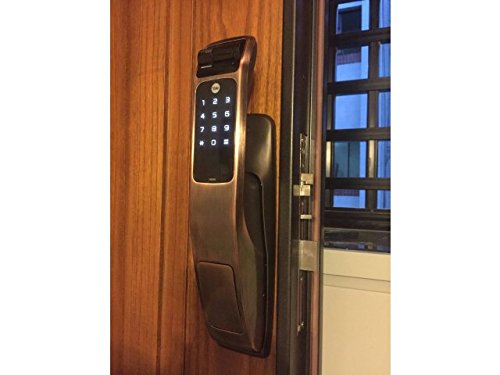
Image: Yale YMG40 Digital Door Lock installed on a wooden door, showing the sleek design and integration.
Upute za rad
1. Accessing the Door
a. Fingerprint Access
The lock supports up to 20 different fingerprints. To unlock using a fingerprint:
- Place your registered finger on the fingerprint scanner.
- The lock will verify the fingerprint and unlock.
- Use the push-pull handle to open the door.
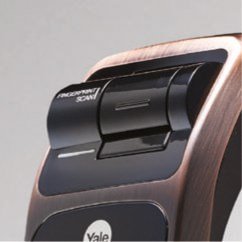
Slika: Detaljna view of the fingerprint scan area on the Yale YMG40 lock.
b. PIN Code Access
The lock supports up to 30 different user codes. To unlock using a PIN code:
- Dodirnite tipkovnicu da biste je aktivirali.
- Enter your registered PIN code followed by the '*' or '#' button (refer to specific model instructions for exact key).
- The lock will verify the code and unlock.
- Use the push-pull handle to open the door.

Slika: prednja strana view of the Yale YMG40 Digital Door Lock, showcasing the illuminated keypad and push-pull handle.
c. Mechanical Key Override
In case of emergency or battery failure, the lock can be opened using the provided mechanical keys.
- Locate the mechanical key slot, typically hidden under a cover on the front body.
- Insert one of the 2 mehanički ključ and turn to unlock.
- Use the push-pull handle to open the door.

Slika: Krupni plan view of the mechanical key override cylinder on the Yale YMG40 lock.
d. Push-Pull Handle Operation
The ergonomic push-pull handle simplifies door opening:
- Izvana: After successful authentication (fingerprint, PIN, or key), simply gurnuti the handle down to open the door.
- Iznutra: Jednostavno Vuci the handle down to open the door.
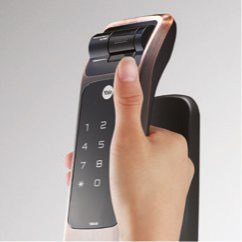
Image: A hand demonstrating the push-pull action of the Yale YMG40 door handle.
2. Automatsko zaključavanje
The YMG40 can be configured to automatically lock the door after it closes. Refer to the full programming guide for instructions on enabling or disabling this feature.
3. Optional Accessories (Z-Wave & Bluetooth)
The Yale YMG40 is compatible with optional Z-Wave and Bluetooth modules, allowing integration with smart home systems and remote control capabilities. These modules are sold separately. Consult the specific module's instructions for pairing and setup.
A remote control accessory is also available, utilizing wireless floating ID technology with a range of up to 50 meters.
Održavanje
- Zamjena baterije: The lock will provide a low battery warning. Replace all batteries promptly when this warning appears to ensure continuous operation.
- Čišćenje: Vanjski dio brave čistite mekom, suhom krpom. Izbjegavajte abrazivna sredstva za čišćenje ili otapala koja bi mogla oštetiti završnu obradu ili elektroničke komponente.
- Senzor otiska prsta: Keep the fingerprint sensor clean and free of debris for accurate readings.
- Mehanički ključ: Store the mechanical keys in a safe, accessible location outside the property for emergency use.
Rješavanje problema
- Brava ne reagira: Check battery levels. If batteries are depleted, use the mechanical key or connect a 9V battery to the emergency power terminal (if available on your model) to provide temporary power.
- Otisak prsta nije prepoznat: Ensure your finger is clean and dry. Try re-registering your fingerprint if issues persist.
- PIN kod ne radi: Verify the correct PIN is being entered. Ensure the keypad is active before entering the code.
- Door Not Locking/Unlocking Properly: Provjerite ima li prepreka u okviru vrata ili mehanizmu zasuna. Osigurajte da je brava pravilno poravnata s bravom.
- Voice Guide Issues: Ensure the volume is set appropriately.
For persistent issues, consult the full product manual or contact Yale customer support.
Tehnički podaci
| Značajka | Detalj |
|---|---|
| Model | YMG40 |
| Vrsta brave | Mortise Lock, Biometric |
| Metode pristupa | Fingerprint, PIN Code, Mechanical Key |
| Kapacitet otiska prsta | Up to 20 different fingerprints |
| User Code Capacity | Up to 30 different user codes |
| Mehanički ključevi | 2 Keys included |
| Front Body Dimensions (D x W x H) | 67.6 mm x 76 mm x 359.1 mm |
| Back Body Dimensions (D x W x H) | 65.2 mm x 76 mm x 359.1 mm |
| Debljina vrata | 40-75mm (Wooden Doors) |
| Materijal | Nehrđajući čelik |
| Connectivity (Optional) | Z-Wave, Bluetooth |
| Težina artikla | 1 kg |
Podrška i jamstvo
For technical assistance, warranty information, or service requests, please contact Yale customer support. Refer to your product packaging or the official Yale webmjesto za kontakt podatke specifične za vašu regiju.
Note: Installation charges may be extra and are typically not covered under product warranty.


